The Coordination Tax Is the Real Bottleneck in Creator Ops — and BAND Is a Bet That Agents Should Talk to Each Other
Every social media operator I know has quietly become a middleman. Not between brands and audiences — between tools. The scheduler says a post failed; the analytics tool says it published; the design tool has a different version of the asset; the approval thread lives in Slack while the caption lives in a Notion doc. You copy context from one session into the next, tell the community manager what the copywriter just changed, and find out an hour later that two people made opposite assumptions about whether the TikTok hook was final. More tools were supposed to mean more work shipped. Instead, a lot of it turns into more coordination for you. That’s the exact problem BAND, a multi-agent coordination product from the team at BAND, is attacking — just pointed at developers first. The launch is worth your attention not because you’ll buy it tomorrow, but because it names the failure mode that will define creator tooling for the next two years.
What BAND Actually Does (and What It Doesn’t)
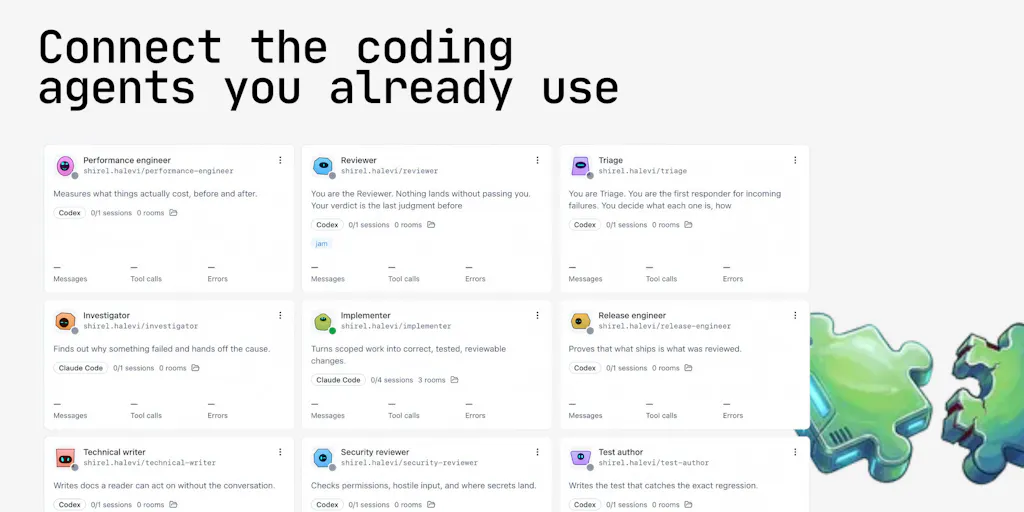
Let me be precise about the source material, because the Product Hunt page is a developer launch and it would be easy to overclaim its relevance to social teams. Per maker Arick Goomanovsky, BAND for Developers lets you connect coding agents you already run — Claude Code, Codex, GitHub Copilot, and OpenCode — into shared rooms across machines. The agents message each other, delegate, review each other’s work, and unblock one another. Plans, decisions, and work state live in the room rather than inside a single session, so they survive when a session ends. You stay in your IDE and terminal; BAND desktop shows what’s moving, what’s blocked, and which agent is waiting on you.
The team claims the difference from existing multi-agent dev tools is that those tools “give you a better dispatch board” — assign tasks, run agents in parallel, review output — while every handoff still routes through a human. BAND’s pitch is that the handoffs happen agent-to-agent. BAND desktop is free to download at band.ai/use-cases/band-desktop. Pricing beyond the free desktop tier is not disclosed. The launch page shows 176 reviews and a comment thread, not user counts or revenue figures.
Here’s what it is not: it is not a social media scheduler, not a content repurposing engine, and not an analytics layer. If you’re looking for a Buffer or Later replacement, this isn’t that. What it is, in my reading, is a coordination primitive — a shared room where autonomous workers negotiate state — and that primitive is exactly what’s missing from the creator stack.
Why the “room” is the interesting part, not the agents
I’ve tested enough AI content tooling to be numb to agent demos. What caught my attention in the launch thread is the detail from maker Joanna Braunold: when agents hand work to each other, BAND desktop keeps the trail visible — who owns what, what got handed off, where something’s blocked, which questions got escalated to you — and you can toggle those details on and off inside the chat. That’s an audit trail for machine work. In my experience running multi-platform publishing, the single most expensive failure isn’t a bad post; it’s not knowing why a post went out wrong. If you’ve ever debugged a failed Instagram Reel publish across three dashboards at 11pm before a launch, you know the value of a visible handoff trail is not abstract.
How It Differs From the Incumbents You Already Pay For
The honest comparison set for BAND isn’t Hootsuite or Metricool — those are publishing and analytics layers. The closer analogues are the automation middlewares creators are already stitching together: Zapier and Make for glue, n8n for the tinkerers, and the native AI features inside Canva and CapCut for asset generation. Every one of those tools moves data between steps. None of them let two autonomous workers argue about the output before a human sees it.
That’s the real distinction. A Zapier workflow is a conveyor belt: trigger, action, done, and if step four produces garbage, step five ships the garbage. BAND’s model is closer to a newsroom — agents review each other’s work and can block on a question. My take: this is the correct architecture for content ops, because content work is iterative and judgment-heavy in a way that invoicing automation is not. A caption that’s 20% too salesy doesn’t throw an error code. It just underperforms, silently, and you find out from the analytics a week later.
Where the math breaks for social teams
I’d bet BAND’s model works best when the work has a checkable definition of done. Code compiles or it doesn’t; tests pass or they don’t. Content doesn’t have that property. When I scheduled 30 posts across five platforms last month, the failure modes were things like “the hook is technically accurate but tonally wrong for Threads” — a judgment call no reviewer agent can adjudicate without your brand voice encoded somewhere it can read. The launch thread actually surfaces this: commenter Ariel asks directly how context is managed between agents and whether one agent might incorrectly invalidate another’s output because it lacks full context. That’s the right question, and the maker responses describe visibility and escalation, not a solved context-sharing model. Treat context fidelity as an open question until you’ve tested it against your own brand guidelines.
What Creators and Social Teams Should Borrow From This
Even if you never install BAND, the launch is a useful blueprint. Three things I’m stealing for my own workflow:
1. Put state in a shared place, not in a session. The most operationally useful idea on that page is that plans and decisions live in the room so they survive when a session ends. Most creator teams do the opposite: the strategy lives in someone’s head, the approval lives in a DM, the asset lives in a drive folder with three versions. If you run a repurposing pipeline — one YouTube long-form into Shorts, Reels, a LinkedIn carousel, and an X thread — write the decisions down where every downstream step can read them. A simple shared doc per campaign with “locked” and “open” fields beats most paid tooling.
2. Design for escalation, not just automation. BAND’s pitch is that you step in “when it matters” and the rest keeps moving. That’s the right ratio for social. In my experience, fully autonomous publishing is a trap — platform algorithm shifts punish stale formats fast, and an agent that doesn’t know your audience’s current mood will confidently ship the wrong thing. The operator’s job becomes exception handling: review what’s blocked, answer the question, step back out. If you’re building any AI-assisted content workflow this quarter, instrument it so the only things that reach you are decisions, not drafts.
3. Don’t standardize on one vendor’s agents. The maker explicitly frames BAND as letting you avoid moving your whole team onto one vendor’s agents. For social teams this matters more than it does for developers, because your toolchain is already heterogeneous — Meta Business Suite for Facebook and Instagram, TikTok Studio, YouTube Studio, Pinterest Business, LinkedIn natively, plus a scheduler on top. Any coordination layer that requires you to consolidate first will fail procurement. Interoperability is the feature.
Why TikTok and YouTube operators should care more than LinkedIn ones
The platform where this pattern pays off first is short-form video. A single TikTok post involves a hook decision, a caption, a cover frame, a sound choice, a posting-time call, and a comment-moderation posture — six judgment points, each with a different failure mode, and watch time rewards getting all six right. That’s a workflow with enough parallel branches that agent-to-agent review could plausibly help. LinkedIn text posts are one decision. If you’re evaluating anything in this category, start where the branching is worst.
Where My Judgment Says It Falls Short
Balance time. First, the launch is developer-first, and the social-media use case is my extrapolation, not the team’s claim. The maker does mention broader applicability — “B2B workflows, coding and QA automation, support triage, research pipelines, scheduled ops tasks” — but every concrete example on the page is software development. If you’re a solo creator, the setup cost of wiring agents into rooms almost certainly exceeds the coordination you’re actually doing. This is a team-and-agency tool, or a tool for operators running genuinely complex multi-step pipelines.
Second, the free-desktop model raises the usual questions. Pricing above desktop is not disclosed, and “free” coordination layers historically monetize through seat counts or execution volume — which for a content team means your bill scales with how much you publish. I’d want that math before standardizing.
Third, and most important: nothing on the page addresses the platform-API realities that dominate social ops. Rate limits, token expiry, review-queue delays, and the fact that Instagram’s Graph API and TikTok’s content posting API have materially different capabilities and constraints than a human posting manually. A coordination layer that doesn’t speak those APIs is coordinating the thinking about content, not the shipping of it. Those are different problems, and the second one is where most of your time actually dies.
Who this is not for
Solo creators publishing to two platforms. Anyone whose bottleneck is asset production rather than coordination — you don’t need agent rooms, you need CapCut templates and a batching day. And any team without written brand guidelines: agents reviewing each other’s work against an unwritten voice will converge on generic, and generic is the one thing the algorithms reliably punish.
What I’d Watch / Test Next
This week, before touching any new tooling: audit where your coordination actually happens. List every handoff in your publishing pipeline — brief to draft, draft to approval, approval to design, design to schedule, schedule to analytics — and mark which ones currently route through you personally. If more than half do, you have a coordination tax problem, and BAND’s launch is at minimum a vocabulary for fixing it.
Then run a cheap experiment. Pick one recurring workflow — say, repurposing a weekly long-form video into three short-form cuts — and write the decisions into a shared room-style doc that every step reads from, with explicit “blocked on” flags. See whether the handoffs shrink. If they do, download BAND desktop and test whether agent-to-agent review survives contact with your brand voice, and report back on the context-fidelity question the launch thread left open. If they don’t, you’ve learned the bottleneck was never tooling — and that’s worth knowing before you pay for a coordination layer to coordinate work that didn’t need it.