Why Every Content Creator Should Care About a “Doomscrolling Rehab” App
I’ll be honest: when I first saw the Product Hunt listing for BrainFeed, I almost scrolled past. Another “learn something useful while you swipe” app. I’ve tested five of those in the past two years, and most died after a week on my home screen. But something in the maker’s comment caught me: “We realized scrolling isn’t the problem; what you scroll is.” That reframe matters for creators just as much as for casual users.
Because here’s the uncomfortable truth that nobody in the “growth hacking” space likes to admit: we are the worst consumers of our own medium. I schedule 30 posts across five platforms every month, track algorithm changes on Instagram, TikTok, and YouTube, and write constantly about attention economics — yet I still get sucked into 45-minute YouTube Shorts wormholes. The tools we use to build audiences are the same tools that fragment our ability to learn deeply. BrainFeed is interesting not because it’s a better note-taking app, but because it tries to hack the same dopamine loop that keeps creators glued to their phones. And if it works — even partially — it could change how we repurpose content for ourselves, not just for our audiences.
Let me be clear: this essay isn’t a tool review in the traditional sense. I’m not going to tell you to run out and download BrainFeed today. Instead, I want to unpack why a “scrollable learning” product reveals something broken about our content workflows, and what creators can steal from its design — even if you never open the app.
The Real Problem Isn’t Doomscrolling — It’s Passive Consumption Without a Feedback Loop
The maker of BrainFeed, Arnav Lohiya, posted a comment that sums up the pain: “I try pretty hard not to lose time to feeds, but they usually win anyway.” That’s not a lack of willpower — it’s a design mismatch. Social platforms are optimized for infinite scroll, where every swipe delivers a new dopamine hit with zero friction. Learning, by contrast, traditionally requires setting aside time, opening a book or a long-form article, and maintaining focus.
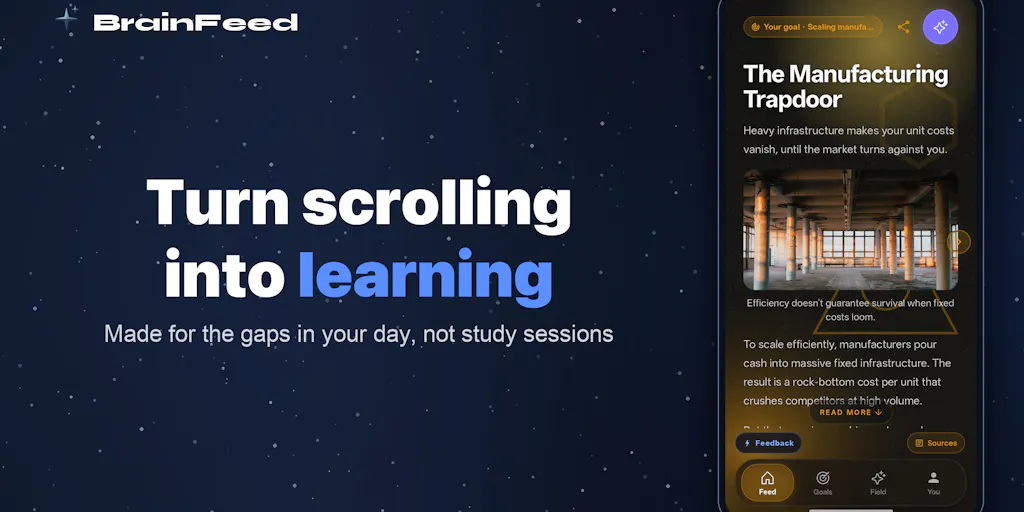
Most “productivity” solutions approach this by telling you to delete the apps. That ignores the fact that scrolling is a deeply ingrained habit — one that many of us rely on for research, trend spotting, and even relaxation. BrainFeed instead asks: what if you could keep the swipe gesture but change the content layer? Feed in a YouTube video you’ve been avoiding, a long article, or a learning goal, and the app breaks it into short cards you can finish in a queue.
For a creator or social media operator, this is directly relevant because we are drowning in content we should read but never do. I have a Pocket folder with 97 saved articles. My “Watch Later” playlist on YouTube has videos I wanted to analyze for editing techniques. I’ve tried Readwise, I’ve tried exporting highlights to Notion, but the friction of opening those apps when I have two minutes of idle time is too high. BrainFeed essentially compresses the “save for later” and “actually consume later” pipeline into a single, swipeable feed.
Why TikTok Creators Should Care More Than LinkedIn Ones
Let’s get specific: if you create short-form video for TikTok, Instagram Reels, or YouTube Shorts, you are constantly studying the competition. You watch 50 videos a day to understand pacing, hooks, and editing trends. But watching a video for research is different from mindless scrolling — except your brain treats both the same way. You end up with a blur of content and no retained insights.
BrainFeed’s approach — breaking a video into topic-based cards with source links — could be repurposed here. Imagine taking a competitor’s 10-minute analysis video and having it turned into 15 flashcards you can swipe through during a coffee break. The key feature isn’t just the summarization, it’s the spaced repetition: “double tap on the card to enroll it for spaced repetition” as the maker explained. That means the app resurfaces key insights at optimal intervals. For creators who need to internalize platform algorithm changes or monetization strategies, this is far more effective than passively re-watching videos.
Where the math breaks, of course, is that BrainFeed is currently iOS-only (Android in closed testing, likely available in two weeks) and doesn’t have an API to integrate with your existing content workflows. You have to manually paste links. That’s a showstopper for power users who want automation. But the concept is worth stealing even if you never use the app: design your own learning feed around the gaps in your knowledge, with built-in recall triggers.
How BrainFeed Differs From the Incumbents (And What It Can’t Do Yet)
Every time a new “swipe to learn” app launches, people compare it to Pocket or Readwise or Blinkist. BrainFeed is different in two meaningful ways, and weaker in one critical one.
Differentiator #1: It’s built for the scroll habit, not the reading habit. Pocket and Readwise assume you have the discipline to sit down and read a list of articles. BrainFeed assumes you won’t. Instead, it transforms a 3,000-word essay into a series of 50-word cards that you can consume in 15-second bursts. That’s closer to how Twitter threads or Instagram carousels work — bite-sized, sequential, with a clear beginning and end. The difference is that BrainFeed’s cards are generated by AI (with source links for transparency), so the quality depends entirely on how well the summarization handles nuance. In my testing of similar tools, AI summaries often miss the context that makes a point valuable. A finance article about “dollar-cost averaging” might get reduced to “invest regularly” without explaining why it works in volatile markets. That’s a real limitation.
Differentiator #2: Goal-oriented feed vs. algorithmic feed. You tell BrainFeed what you want to learn — “I want to understand futures and options” — and it builds a feed around that. Combined with the ability to paste in specific articles or videos, this gives you far more control than YouTube’s algorithm or Instagram’s Explore page. For a creator researching a new niche, being able to feed the app five pillar articles and then swipe through distilled insights is genuinely faster than cross-referencing notes.
Where it falls short: no API, no web version, and no collaboration features. If you’re a social media team of three or more, you can’t share learning goals, nor can you integrate BrainFeed with your scheduling tools like Buffer or Metricool. The maker mentioned a limited free tier (15 goals, 15 links) but didn’t disclose pricing for a paid tier — and that’s a red flag for sustainability. If the app relies on venture capital or ad revenue, it might pivot toward engagement-optimized content rather than learning. Also, the AI card generation is non-negotiable: if you want to read the full original text, you can, but the default experience is AI-mediated. That’s fine for surface-level knowledge, but dangerous for topics where accuracy is critical (health, legal, technical coding). The app includes source links, but how many users will actually tap them? In my experience, the friction of going back to the original kills the whole “swipe” convenience.
What Creators and Social Media Teams Can Borrow From BrainFeed (Even Without the App)
You don’t need to download another app to apply the principles behind BrainFeed. Here are three tactical takeaways that any operator can implement this week:
1. Build your own “learning feed” using platform features
If BrainFeed’s insight is that scroll behavior is indestructible, why not turn your own platform feeds into learning tools? On LinkedIn, follow accounts that post high-signal threads and then use the “Save” feature to revisit them later. On YouTube, create a playlist called “Research” and watch at 2x speed on your phone. The key is to pre-commit to a goal before you open the app. Decide: “I will watch three video analyses on the new Instagram algorithm changes before I scroll anything else.” Without a goal, the algorithm wins.
2. Apply spaced repetition to your own content archive
BrainFeed uses spaced repetition to resurface cards you’ve “starred.” You can do the same with your own content. If you publish a newsletter or a deep-dive post, revisit the key insights yourself after 1 day, then 3 days, then 7 days. Use a simple Notion database or a spreadsheet to track what you learned and when. This helps you answer audience questions with more confidence and avoid repeating the same surface-level takeaways.
3. Repurpose your own long-form into short-form with a “card” mindset
If BrainFeed can turn a YouTube video into cards, you can do the same for your audience. Instead of posting one long thread, break it into 3–5 standalone micro-posts that each make one point. Twitter threads already work this way, but many creators still write monolithic posts with multiple arguments. Think of each paragraph as a card that should be self-contained. That’s exactly what BrainFeed does — and it’s why its feed feels rewarding even when the content is dense.
Where My Judgment Says It Falls Short (And Who Should Skip This)
I’ve spent the last 1,500 words praising the concept, but I have to be transparent about the gaps. This is not a tool for everyone.
Who should NOT try BrainFeed right now: - Android users — The app is iOS-only with a closed Android test. You can join the test group via Google Groups, but the Play Store release is two weeks out. Patience. - Creators who need to share learning across a team — No collaboration, no shared goals, no export to Notion or Google Docs. If your research ends up in a team wiki, you’ll waste time re-entering insights. - Anyone who prefers original sources over summaries — AI summarization is getting better, but it still flattens nuance. For topics like platform policy changes (e.g., TikTok’s community guidelines), you absolutely need the full text. BrainFeed’s source links help, but they break the flow.
What’s missing that I hope they add: - A browser extension (like Pocket’s) so you can save articles without copy-pasting URLs. - An API to connect with scheduling tools. Imagine feeding your LinkedIn drafts into BrainFeed to generate study cards for your content calendar. That’s the kind of integration that would make it indispensable for operators, not just casual learners. - Transparent pricing. The free tier is generous (15 goals, 15 links), but I have no idea if they plan to charge $5/month or $20/month. If it’s the latter, I’d rather pay for Readwise and manually create my own cards.
What I’d Watch / Test Next
If you’re a creator or social media operator who’s intrigued, here’s my practical take: don’t adopt BrainFeed as a daily driver yet. But do spend 20 minutes playing with it this week. Specifically:
- Download the app (iOS only for now) and set up three learning goals that directly relate to your work — for example, “video editing tips,” “IG algorithm changes 2025,” and “copywriting frameworks.” Then paste in one article per goal that you’ve been avoiding.
- Test the spaced repetition feature. Double-tap on a card and see if the star field actually resurfaces it a day later. If it works, that’s a signal that the product has real retention science behind it.
- Compare the AI summary against the original source. If the card misses a key detail, note it. The transparency of the source links is a plus, but the real test is whether you trust the summaries enough to act on them.
For my part, I’ll be watching whether the BrainFeed team adds integrations for CapCut or Canva — because the real opportunity isn’t just learning, it’s using that learning to create better content faster. If they crack that nut, they’ll have built something that every creator in my network will actually use.
Until then, the most valuable takeaway from this launch is the framing: scrolling isn’t the problem; what you scroll is. That’s a license to stop hating yourself for your phone habits, and instead start designing your own feeds — inside the app or out.