The Creator Stack Is Getting Crowded — and That’s Exactly Why Tool Design Now Matters More Than Tool Count
Every social media operator I know is running a stack that has quietly doubled in the last eighteen months. A scheduler, a repurposing tool, an AI caption writer, a clip generator, a link shortener, an analytics dashboard, a DM automator. The pitch for each is always the same: save time, post more, grow faster. The reality is that coordination — not creation — is now the bottleneck. When I scheduled 30 posts across five platforms last month, the actual scheduling took under an hour. What ate the week was keeping six tools, three client folders, and two AI assistants from stepping on each other. That’s why a Product Hunt launch like buddylist — an MSN-Messenger-style desktop app for orchestrating multiple coding agents — is worth a creator’s attention even though it isn’t a social media tool at all. It’s a preview of the interface pattern our own tooling is about to inherit, and it’s a clean case study in why “one shared workspace” beats “five best-in-class tabs.”
What buddylist Actually Is, and the Problem It’s Really Solving
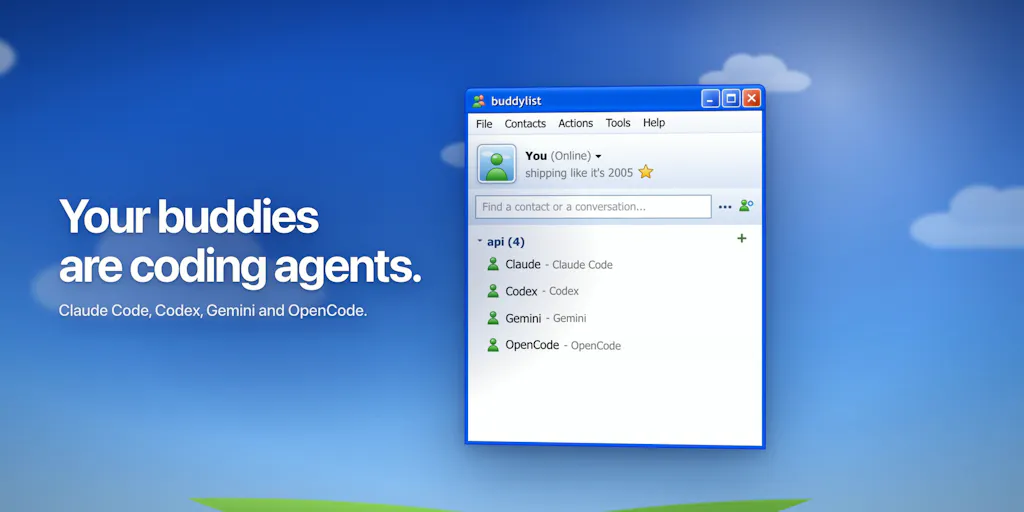
Let me be precise about the product before I editorialize. buddylist is a free desktop app for macOS (Apple Silicon), Windows, and Linux, built by maker Safa Elmali. It lets you add AI coding agents — Claude Code, Codex, Gemini, and OpenCode — as “buddies” in a contact list, pull them into group chats, and point them at a shared project folder. The team’s own framing is nostalgic: bring back the MSN Messenger feeling, but for working with coding agents. You can ask Claude to build a feature, then have Codex review it in the same conversation. You can hand an unfinished checklist to a different agent. Separate contacts can work in their own Git worktrees, while chat tabs and forked chats share the existing folder. Review diffs, run a terminal, preview the app, and manage PRs beside the conversation. There are retro themes, nudges, and winks. It’s free, with optional Buy Me a Coffee support, and you bring your own agent accounts — provider access and usage are billed separately, which the maker states plainly.
Now, the honest question a social media manager should be asking: why am I reading about a developer tool? Because the underlying problem is identical to yours. The maker’s own explanation of why he built it — echoed in the comments by Oleksii Sekundant, who noted that “switching agents mid-task is a lot less appealing if you have to explain the whole job again” — is the same pain you feel when you write a caption in one tool, generate a clip in another, schedule it in a third, and then can’t remember which version went to which platform. Context loss between tools is the tax on every multi-tool workflow, and it compounds as you add more AI into the mix. buddylist’s answer is to collapse the agents into one shared room with one shared folder. Your answer, increasingly, will need to be the same.
Why this is a social-media story, not just a dev story
Here’s my take, flagged clearly as opinion: the interface conventions that win in developer tooling tend to arrive in creator tooling about twelve to eighteen months later. Slack-style channels, Notion-style blocks, Figma-style multiplayer cursors — all of it migrated. The “contact list + group chat + shared folder” pattern buddylist is testing is the next one. If you’ve ever wished your AI caption assistant, your clip generator, and your scheduler could all see the same campaign brief without you re-pasting it four times, you’re already asking for what buddylist built for code. When Buffer, Later, or Metricool ship their next major interface revision, I’d bet the group-chat-with-shared-context metaphor shows up somewhere in the product tour.
How It Differs From the Tools You Already Pay For
The comparison that matters is not buddylist versus a social scheduler — they solve different jobs. The comparison that matters is buddylist versus the way you currently orchestrate anything across multiple AI tools, which for most creators is “a bunch of browser tabs and a prayer.” Let me draw the contrast against incumbents you actually know.
Against Hootsuite and Buffer: those are publishing pipes. They hold your queue, your calendar, your approvals, and your basic analytics. What they do not do is hold a conversation between multiple AI workers about a single piece of content. If you use Buffer’s AI assistant to draft a caption, that draft lives in Buffer. If you then use a separate tool to generate a thumbnail, that lives elsewhere. The context splits. buddylist’s shared project folder is the architectural answer to that split, and it’s the detail that commenters on the launch page kept circling back to.
Against Canva and CapCut: these are creation surfaces with increasingly strong AI features baked in. They’re excellent at what they do, but they’re walled gardens. Your CapCut project doesn’t hand off cleanly to your scheduler with full context intact. buddylist’s model — bring your own agent accounts, share the folder — is the opposite philosophy: the app is a coordination layer, not a content silo.
Against the “just use ChatGPT” default: this is where I think buddylist is genuinely instructive. Most creators I know use one general assistant for everything — captions, scripts, hashtag research, email replies. The buddylist thesis is that different agents have different strengths, and the value comes from routing tasks to the right one while keeping them in the same conversation. Ask Claude to build, have Codex review. For a creator, the translation is: ask one model to write the hook, have another stress-test it for platform fit, then have a third adapt it for LinkedIn’s longer-form norms versus TikTok’s three-second rule. That’s a real workflow, and almost nobody is running it deliberately.
Where the “bring your own accounts” model actually helps creators
The maker is explicit that buddylist is free but you bring your own agent accounts, and provider access and usage are separate. For a solo creator watching subscription costs, that’s a feature, not a bug. You’re not paying a markup on tokens you barely use, and you’re not locked into one vendor’s model roadmap. It also means you can swap agents as pricing and capability shift — which, given how fast the model landscape moves, is a hedge worth having. The trade-off is that onboarding is on you: you need accounts with each provider, and you need to understand roughly what each one is good at. That’s a real friction point, and I’ll come back to it in the limitations section.
What Creators and Social Teams Should Steal From This
Strip away the MSN skins and the winks, and buddylist is making four design arguments that any social media operator should be stealing for their own workflow — even if they never install the app.
One: shared context beats parallel tabs. The single most expensive thing in a multi-tool content workflow is re-explaining the job. Every time you paste a brand brief into a new AI tool, you’re paying a context tax. The fix, whether you use buddylist or not, is to maintain one canonical brief per campaign — a single doc that every tool and every collaborator reads from — and to stop letting drafts live in five different inboxes. In my own tests of similar “AI workspace” tools, the teams that centralized the brief cut revision cycles dramatically; the teams that didn’t kept regenerating the same caption six ways.
Two: role specialization is underrated. The “Claude builds, Codex reviews” pattern maps directly onto content. One model drafts, a second critiques against platform norms, a third adapts format. Most creators use one model for everything and wonder why the output feels generic. Deliberate role assignment — even just “this model writes hooks, that one edits for tone” — is a cheap upgrade.
Three: handoff should be a first-class action. buddylist lets you hand an unfinished checklist to another agent. In content terms, that’s the handoff from strategist to editor to scheduler, and most teams do it over Slack with a link and a hope. Making handoff explicit — a checklist, a status, a named owner — is the difference between a content pipeline and a content pile.
Four: the interface is part of the product. The nostalgia isn’t decoration; it’s a bet that a familiar, low-friction surface makes people actually use the tool. For social teams, the lesson is that your internal tooling’s UX determines adoption. A beautiful analytics dashboard nobody opens is worth less than an ugly spreadsheet everyone updates.
Why TikTok creators should care more than LinkedIn ones
This is a slightly contrarian sidebar, so take it as opinion. TikTok’s distribution is the most volatile of the major platforms — a single video’s reach can swing wildly based on early watch time and completion rate, and the algorithm rewards volume and iteration in a way LinkedIn simply doesn’t. That means TikTok creators run more experiments per week, which means more AI-assisted drafting and more rapid review cycles. The “multiple agents, shared context, fast handoff” model buddylist is testing is disproportionately valuable when your output cadence is high and your feedback loop is measured in hours. LinkedIn rewards fewer, more considered posts; the coordination overhead is lower, so the payoff from an orchestration layer is smaller. If you’re a TikTok-first operator, watch this pattern closely. If you’re LinkedIn-first, you can afford to wait.
Where My Judgment Says It Falls Short
I like the concept. I’m not going to pretend it’s a finished product for a creator audience, because it isn’t — and the maker doesn’t claim it is.
It’s a developer tool, full stop. There is no social scheduling, no platform API integration, no analytics, no UTM tracking, no content calendar. If you’re looking for a Buffer or Later replacement, this is not it and was never meant to be. The value for a creator is conceptual and workflow-level, not feature-level. Anyone who installs it expecting to manage Instagram posts will be disappointed, and that’s a positioning risk the launch page doesn’t fully neutralize.
The “bring your own accounts” friction is real. Four providers, four sets of credentials, four billing relationships, and provider usage billed separately. For a technical user, that’s fine. For a social media manager who just wants captions drafted, it’s a lot of setup for an app that doesn’t touch their actual publishing workflow. The browser demo with scripted replies is a smart low-commitment entry point — the maker links it at buddylist.dev — but a demo isn’t a daily driver.
Platform coverage is limited and expanding. The maker confirms it’s the four built-in agents for now, and when asked about adding Hermes, says he’d love to add support. That’s an honest answer, but it means the “group chat” value is capped by how many agents you actually use. A creator who only pays for one model gets much less out of this than a developer running three.
Nostalgia is a double-edged sword. The MSN aesthetic is charming and clearly resonating — Chris Messina called it “strong nostalgia vibes,” and commenter Samantha Wobst asked for AIM and ICQ skins, which the maker says are on the list. But nostalgia skews the early-adopter base toward people who remember MSN fondly, which is not the same as the people who most need multi-agent coordination. My take: the retro skins will drive downloads; the shared-folder architecture will drive retention. The launch leans harder on the former than the latter.
What’s not disclosed: user counts, retention, roadmap timing for new agent support, and whether a paid tier is planned beyond the optional Buy Me a Coffee support. I’m not going to invent those numbers. Treat the free-forever framing as the current state, not a guarantee.
Where the math breaks
If you’re a solo creator, the coordination overhead buddylist removes is small — you’re one person with one context, and a shared folder is just… your folder. The value scales with the number of agents and collaborators you’re juggling. A two-person content team running three AI tools each is the sweet spot. A solo TikTok creator using one model is over-tooled. Be honest about which one you are before you install anything.
What I’d Watch / Test Next
Here’s what I’d actually do this week, whether or not you touch buddylist.
Test the pattern, not the product. Pick one campaign and run it through a deliberate multi-agent workflow: one model drafts the hook, a second critiques it against the target platform’s norms, a third adapts it for a second platform. Keep everything in one shared doc. Measure whether the output is meaningfully better than your single-model default. If it is, you’ve validated the thesis without installing anything.
Audit your context tax. For one week, log every time you re-paste a brief, re-explain a brand voice, or re-upload an asset into a new tool. That log is your coordination overhead, and it’s the number buddylist is trying to shrink. If it’s high, start centralizing.
Watch the incumbents. Keep an eye on whether Buffer, Later, or Metricool ship any group-chat-or-shared-context interface patterns in their next release. That’s the signal that the buddylist pattern has crossed into creator tooling.
Try the browser demo. The scripted-reply demo at buddylist.dev costs nothing and shows you the interaction model in five minutes. If the group-chat-with-agents feel clicks for you, download the desktop app and run one real project through it. If it doesn’t, you’ve learned something about how you like to work — and that’s worth the five minutes either way.
The bigger takeaway: the next wave of creator tooling won’t be won by the tool with the most features. It’ll be won by the tool that makes the coordination between features feel effortless. buddylist is a small, nostalgic, developer-focused bet on that future. I’d bet the pattern outlives the product.


