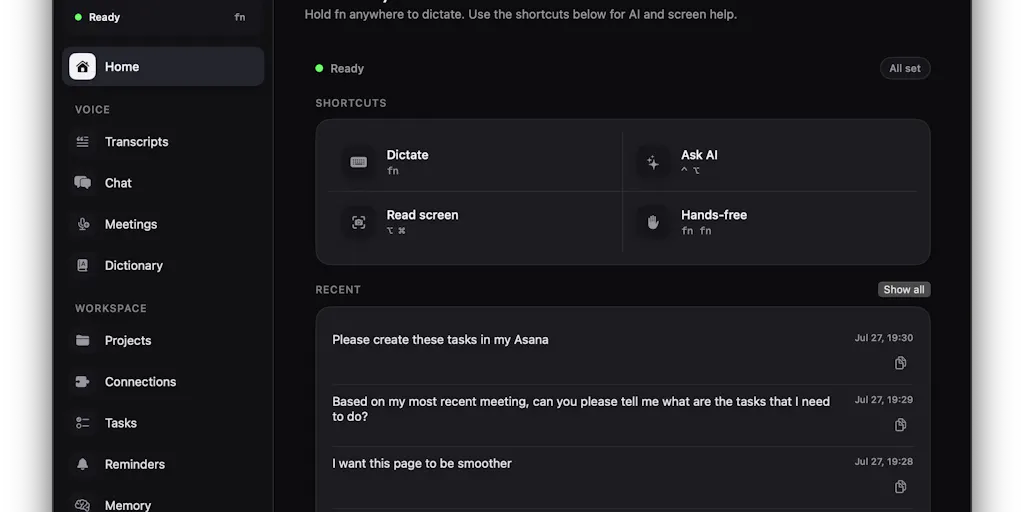
For years, the social-media industry has optimized the visible parts of content work—editing, captioning, scheduling—while ignoring the invisible tax that eats creator teams alive: context switching. A thought born in a client call has to travel through a voice memo, a notes app, a search tab, and a scheduler before it becomes a post. That journey is where the hours go. Crodo AI is a macOS voice-first assistant that wants to collapse that journey into one voice layer: dictate in any app, ask questions about what’s on your screen, capture meetings, and act on Gmail, Calendar, and Slack without switching tools. That matters to creators because the bottleneck isn’t ideas—it’s the distance between speaking and shipping.
The tax is the enemy, not the tool
I have run social accounts for client brands and early-stage startups, and the most expensive moment of my week is never the publishing. It’s the ninety seconds before publishing, when I’m copying a YouTube script into a caption, rewording it for LinkedIn, and trying to remember what the client actually said in the meeting. Last month, when I scheduled 30 posts across 5 platforms, the slowest part wasn’t the scheduler. It was translating one thought into five different voices and formats.
This is why I’ve never been impressed by suite-only tools. Buffer solved the mechanical cost of posting years ago. It did not solve the creative cost of capture, conversion, and context. The product I’m looking at here, Crodo, is not another social scheduler. It’s a response to a different problem: the copy-paste-switch loop that happens before you ever open a scheduling dashboard.
The maker, Yash Rai, put the diagnosis in his launch note: “using AI on a Mac still involves too much typing, copying, pasting, and switching between apps.” In my experience, that’s true for every AI-assisted creator workflow. I’ve tried tools that help with individual pieces—transcription, captions, AI writing—but the actual friction is the handoff between them. You dictate a thought into a voice memo, transcribe it, paste it into an AI chat, then copy the result into a design tool or video editor. Crodo is trying to remove those handoffs by making voice the input and the screen the context.
That framing matters to social media operators because the gap between “an idea in your head” and “a platform-native asset” is where most content operations lose time. The tools we currently use are optimized for the end of that pipeline—posting, analyzing, iterating. They are not optimized for the beginning. The beginning is usually you, alone, staring at a screen, trying to think out loud in a way that a machine can turn into pixels. If a voice-first assistant can make that beginning faster, it changes the economics of content production more than an algorithm update ever will.
Why TikTok creators should care more than LinkedIn ones
My take: the most obvious early adopter is a TikTok creator or a short-form video editor, not a LinkedIn ghostwriter. TikTok’s product is audio-forward: voiceovers, sounds, reactions, dialogue. A voice-first assistant maps onto that creative flow because you are already talking through ideas out loud. LinkedIn’s product is text-forward; its best content is read, not heard. A voice assistant can help you draft there too, but the transcription and editing overhead is more visible when the final artifact is polished prose. In my experience, voice dictation pays off most when the output is a script, a hook, or a caption—not a 1,000-word essay.
What Crodo actually is, and how it differs from the incumbents
Crodo’s launch page calls it a “voice-first AI assistant for macOS.” The feature set is broader than dictation: dictate text into any app, ask questions with your voice, get answers based on what’s on your screen, capture and summarize meetings, and work with Gmail, Google Calendar, and Slack. It’s currently free, per the maker, “while I figure out what’s worth charging for.” It requires Apple Silicon and macOS 14.2+, with a Windows version in progress. Those are facts from the launch page, not my endorsement. The question is whether the combination is more useful than the individual tools it competes with.
The Product Hunt page lists five similar products, and they map neatly onto the categories Crodo is trying to fuse.
- Wispr Flow is dictation-first: “Speak naturally, write perfectly & 4x faster in every app.” If your only pain point is typing speed, Wispr Flow is the obvious incumbent.
- Granola is meeting-first: “The AI notepad for people in back-to-back meetings.” It has become the default AI notetaker for many operator teams.
- TalkTastic is a voice keyboard that claims to understand personal context. That’s closer to Crodo, but it stays in the keyboard layer.
- Shadow is the ambitious version: “The interface AI needs. One that sees, hears, and runs.” It’s aiming for more autonomy, not just voice input.
- Littlebird is the context-heavy assistant: “The AI assistant that already knows your work.”
My read: Crodo is trying to sit in the middle. It takes Wispr Flow’s dictation, Granola’s meeting notes, TalkTastic’s personal context, and Shadow’s screen-awareness, then wraps them in a lightweight macOS interface with email, calendar, and chat integrations. That’s a compelling thesis—if it works. The risk is that fusion products often do many things acceptably and nothing brilliantly. I’d bet the single-category incumbents are each more polished in their core use case. Wispr Flow has had years to refine dictation accuracy; Granola has a loyal following because its notes read like a human wrote them. Crodo’s advantage is not raw power in any one dimension. It’s that the handoffs between those dimensions are exactly where my workflow dies.
What the screen-context feature really unlocks
The detail I keep coming back to is “get answers based on what’s on your screen.” This is underrated in creator tools. Most AI assistants live in a browser tab or a chat window, away from the thing you’re actually working on. When I’m preparing a client report, I don’t want to summarize a dashboard by copying numbers into a prompt. I want to look at the dashboard and ask, “What changed this month?” The screen is the context. Crodo’s approach is the same logic that powers “computer use” agents, but aimed at a much more practical layer: not doing your work for you, but answering questions about the work in front of you. That is genuinely different from a dictation app. It’s also a privacy boundary worth watching.
What creators and social teams can borrow from it
Even if you never open Crodo, the product is a useful mirror for how a modern social media operation should be arranged. I see four transferable principles.
1. Capture with voice, not just with text
The best ideas in social media show up at inconvenient moments: on a walk, in the shower, in the middle of another brand’s campaign review. Most creators still reach for a text note, which forces you to slow down and type, and in that slowdown the idea gets flatter. Voice-first capture keeps the energy. The workflow I want to test with Crodo is simple: record a planning monologue, have the assistant transcribe it, then turn the transcript into a set of hooks, captions, and scheduling notes. Even a mediocre voice assistant is faster than opening a text editor and “writing” your idea before you’ve fully had it. My take: the content calendar should start as a voice memo, not a spreadsheet.
2. Treat the screen as a source of truth
Every social operator has a tab open with analytics, a brief, or a competitor’s content. Instead of copying that context into an AI prompt, ask the assistant to look at the screen. This is the “browser is the API” idea, applied to your own workflow. If Crodo can reliably answer “what’s the top post this month?” or “what does this client brief actually ask for?” from the screen, it turns every window into a searchable source. I would test this first with low-stakes tasks—a public dashboard, your own content calendar—before pointing it at client data.
3. Meetings are content, not just coordination
I’ve used Granola on client calls, and the single biggest unlock for a social team is realizing that a good meeting summary is a content brief. Every brand sync, collab negotiation, and design review contains hooks, concerns, and language you can reuse. A voice-first assistant with meeting notes and screen context could turn a one-hour call into a week’s worth of content fragments: a quote for a graphic, a question for an Instagram Story, a selling point for a caption. In my experience, this is where AI meeting tools earn their keep—not in the notes themselves, but in the content ideas they surface.
4. Integrations are the moat, not the model
The launch page emphasizes Gmail, Calendar, and Slack, with “many other apps coming soon.” Those three are where social teams actually live. Slack is where the brief lives. Calendar is where the deadlines live. Gmail is where the approvals live. If Crodo can read a Slack brief, pull the due date from Calendar, and draft an email reply without you switching tabs, that’s more valuable than another AI writing panel inside Buffer. The scheduling tool handles distribution; the voice assistant handles coordination. Neither replaces the other, but the integration layer is where the time savings hide.
Where I’d pump the brakes
I don’t want to write a launch-hype post. The maker is honest about the state of the product, and the limitations are real. I’m evaluating this from the launch page and my experience with similar tools, not a long Crodo-only trial. Here’s where I’d be cautious, and who I’d point away from Crodo today.
Who this is not for
- Windows-first teams. The current build requires Apple Silicon and macOS 14.2+. The maker says a Windows version is in progress, but not shipped. If your social team runs on Windows, this product is not for you yet.
- Privacy-sensitive operations. Screen context means the assistant needs to see what’s on your screen. That’s a security decision, not just a feature toggle. If you manage accounts with unreleased campaigns, client data, or NDAs, I would not connect a new, still-free, indie tool to your working screen until you’ve vetted its data handling. The launch page does not disclose data retention or security policies.
- Keyboard-first writers. Voice-first is not universally faster. If you write precise, long-form essays for LinkedIn or a blog, dictation can actually slow you down because you spend time correcting punctuation, jargon, and sentence boundaries. In my experience, voice dictation still stumbles on brand names, hashtags, handles, and acronyms. Crodo does not publish accuracy benchmarks, so I’d test it with your own vocabulary before trusting it for client-facing copy.
Where the math breaks
The bigger concern is economic. Every voice command in a tool like Crodo is a small pile of API calls: speech-to-text, large language model inference, screen capture, vision analysis, and then the integration calls to email, calendar, or chat apps. That’s not free for the maker. The launch page says the product is free “while I figure out what’s worth charging for”—which is a transparent and fair position for a first public launch, but it means you are building a workflow on top of a pricing model that does not exist yet. If the maker decides the economics require a high subscription or a usage cap, your workflow changes with it. That’s fine for an experiment. It’s risky for a client services operation.
The second math problem is time-per-query. Voice AI products only win if the whole loop—speak, process, return, correct—is faster than just doing the task. I’ve tested dictation tools that take longer to correct than to type. A “4x faster” claim from Wispr Flow only holds once you’ve accounted for the correction loop. Crodo’s screen-context feature is even more fragile: if the screen capture is blurry, the vision model misreads a chart, or the integration silently fails because of an API rate limit, the efficiency story collapses. I’d want to see Crodo handle a messy, real-world screen—not a clean product demo—before I built my week around it.
What the launch page doesn’t tell you
The source doesn’t mention anything about pricing tiers beyond free, data retention, security audits, model providers, or latency benchmarks. It doesn’t say how many users it has or what the roadmap beyond “coming soon” looks like. Those are not attacks; they’re just gaps. For a first public launch, the maker’s request for feedback is the right move. But “free” and “coming soon” are the two most expensive words in SaaS when you are relying on the tool for client work.
What I’d watch / test next
If you’re on an Apple Silicon Mac, the test is easy. Install Crodo, connect your email, calendar, and Slack, and run one real task end-to-end—not a demo. Dictate a week’s worth of captions. Ask it to summarize the brief in the active tab. Capture a client call and see if the notes turn into a usable content brief. Measure two things: correction rate and time saved. My hunch is that voice dictation will win on casual, first-draft content and lose on precise client-facing copy. The screen-context feature is the one I’d stress-test hardest, because that’s the part that could become a daily habit if it works.
For social teams, the bigger experiment is to build a voice-first pipeline regardless of which tool you use: record a planning voice memo, have AI transcribe and break it into platform-specific drafts, then schedule those drafts in Buffer or Metricool. If that pipeline survives a week of real client work, you have a workflow worth paying for. Watch how Crodo evolves from there—whether Windows ships, whether pricing stays sane, and whether incumbents like Wispr Flow and Granola add screen context and integrations. If they do, Crodo’s differentiation shrinks. If Crodo gets the integrations right first, it could become the default voice layer for Mac-based creators. Either way, the winner is the operator who stops treating voice AI as a toy and starts treating it as a production input.


