The real bottleneck in AI-assisted coding isn’t the model — it’s the babysitting
If you run social accounts for a living, you already know the feeling this product is built around. You kick off a long task — a batch render, a scheduled export, a queue of posts — walk away to do something else, and come back an hour later to find it stalled on a single confirmation dialog. The tool was ready to keep working; it was waiting for you. That’s the exact frustration Cursor Remote Lite is trying to solve for developers, and it’s worth twenty minutes of your attention even though you’ll probably never install it. Here’s why: the underlying pattern — a capable agent that can’t run unattended because it keeps asking a human for permission — is the same pattern that’s quietly throttling every AI content workflow I’ve tested this year. The launch itself is small. The lesson is not.
What Cursor Remote Lite actually is, and the problem it names
Let me describe it plainly, because the product is niche and the maker’s pitch is dense.
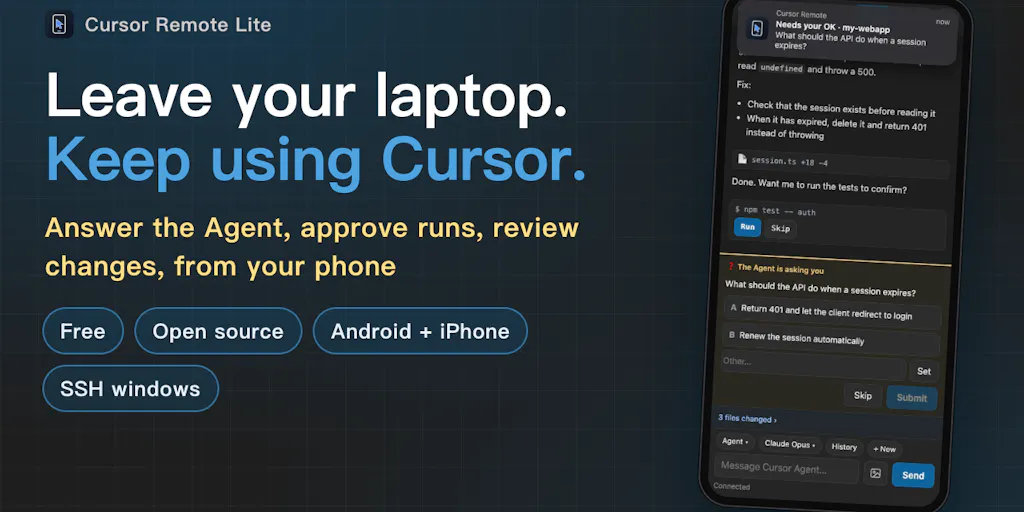
Cursor is an AI-native code editor. Its “Agent” mode can execute multi-step tasks — editing files, running commands, reading errors, iterating. The catch, as the maker Yuzhuo Chen explains in the launch post, is that the Agent frequently pauses: it needs you to approve a command, or it’s asking a clarifying question, and it will sit there indefinitely until you click. If you’ve started a task and walked away, you come back to a stalled process and a wasted block of time.
Cursor Remote Lite is a small relay that runs on your own computer and drives the real Cursor instance over the Chrome DevTools Protocol. It then exposes a phone-friendly UI so you can, from your phone: answer the Agent’s questions, approve commands, queue the next task while the current one is still running, and keep or undo changed files. It works across local, SSH, and Agents windows. Your code never leaves your machine — the phone connects in through a Cloudflare tunnel. It’s free, MIT-licensed, and self-hosted.
The maker’s stated motivation is specific and, I think, telling: their project lives on a GPU server they reach through Cursor’s SSH window, so “moving the task to a cloud agent wasn’t an option,” and their laptop doesn’t travel with them everywhere. That’s not a hypothetical pain point. That’s someone who got tired of losing hours to a dialog box.
Why this is a social-media story, not just a dev-tools story
I’ve spent the last year watching social teams adopt AI tooling in roughly the same sequence. First they use it to draft captions. Then to generate variations. Then to repurpose one long video into a dozen short clips. And at every stage, the same wall appears: the AI produces something, and then a human has to sit there and shepherd it through the next step. Approve this. Confirm that. Paste the output into the scheduler. Check the aspect ratio. Re-upload because the thumbnail rendered wrong.
That’s the babysitting tax, and it’s the single biggest reason AI hasn’t compressed social production timelines as much as the vendor decks promised. The models got good. The workflow didn’t get unattended. Cursor Remote Lite is a narrow, developer-shaped answer to that problem — but the shape of the answer is the interesting part.
How it differs from the tools you’re already paying for
The obvious comparison set here is not other Cursor plugins. It’s the remote-control and scheduling layer you already use.
If you’re a social operator, you probably run something like Buffer, Later, or Metricool to queue posts. Those tools solve scheduling — they hold your content and fire it at the right time. What they don’t do is let you remotely approve a step inside a running process. If your AI clip generator needs you to pick between three hooks before it renders the final export, your scheduler can’t help. You have to be at the machine.
The other comparison is the cloud-agent route. Tools like Devin or the various “autonomous agent” platforms want you to hand the whole task to a remote environment. That’s a real option for some workflows, but it fails the moment your work depends on a local asset — a licensed music library on an external drive, a GPU render box, a proprietary dataset, a client’s private footage. The maker hit exactly this wall: “moving the task to a cloud agent wasn’t an option.”
What Cursor Remote Lite does differently is keep the work where it lives and move only the control surface. The relay runs locally. The phone is just a remote. Nothing gets uploaded to a third party’s inference stack. For anyone handling client footage or unreleased campaign assets, that distinction isn’t paranoia — it’s often a contractual requirement.
The self-hosted angle matters more than the maker lets on
The launch post buries the most interesting detail: it’s free, MIT, and self-hosted, and the connection runs through a Cloudflare tunnel. In a market where every adjacent tool is a $20–$40/month subscription, a self-hosted relay is a genuinely different posture. You’re not buying a service; you’re running a small piece of software on hardware you already own.
My take: this is the right architecture for the problem, and it’s also why the product will stay small. Self-hosting means no support desk, no onboarding funnel, no growth loop. It means the maker can ship something honest and useful without pretending it’s a business. I’d rather see more of that than another freemium dashboard.
What creators and social teams can borrow from this
Strip away the Cursor specifics and there are three transferable ideas here that I think social operators should steal outright.
1. Separate the control surface from the work surface
The core insight is that you don’t need to move the work to get remote control of it. You need a thin layer that lets you intervene from wherever you are. Most social teams do the opposite: they move everything into a browser-based dashboard so they can access it from anywhere, and in the process they lose local file handling, native rendering, and half their plugins.
In my own testing of content pipelines, the teams that move fastest are the ones that keep heavy processing local — CapCut or DaVinci Resolve on a real machine — and use a thin remote layer only for approvals and queueing. Cursor Remote Lite is a working proof that this pattern is buildable in a weekend-sized project. You don’t need enterprise tooling to get it.
2. Queue the next task while the current one runs
This is a small feature with outsized effect. The relay lets you send the next task while the Agent is still busy. Applied to social: while your clip generator is exporting batch one, you should already be queuing batch two’s brief. Most creator workflows are strictly serial — you wait, then you start the next thing. Anything that lets you pipeline instead of serialize is worth more than it looks.
3. Design the approval step, don’t just tolerate it
The reason the Agent stalls is that approval is a blocking, synchronous, human-required event. Cursor Remote Lite doesn’t eliminate approval — it makes approval asynchronous and mobile. That reframe is the whole product. If your content pipeline has a mandatory human review step (and for anything client-facing, it should), ask yourself whether that step requires a desk, or just a decision. If it’s just a decision, it can happen from a phone, and your pipeline stops being desk-bound.
Why TikTok and Reels creators should care more than LinkedIn ones
Volume is the variable. A LinkedIn operator posting three times a week can afford to babysit every step. A short-form creator pushing multiple posts a day across TikTok, Instagram Reels, and YouTube Shorts cannot. The more your output depends on batch processing — clip generation, caption variants, thumbnail tests — the more the babysitting tax compounds. The pattern Cursor Remote Lite demonstrates is worth roughly nothing to a low-volume poster and potentially hours per week to a high-volume one. Match the tool to your cadence before you get excited.
Where my judgment says this falls short
I want to be clear-eyed here, because the launch post is honest and I’d rather match that honesty than inflate it.
The computer must stay awake. The maker states this limit plainly. If your machine sleeps, the relay dies. That’s a real constraint, and it means the product doesn’t actually free you from the desk — it frees you from being at the desk while the desk stays powered on. For a laptop that travels, that’s a problem. For a desktop or a home server that stays on, it’s a non-issue. Know which one you are.
The startup scripts are macOS-only for now. Also stated directly. Windows and Linux users are, at launch, out of luck unless they’re comfortable adapting the scripts themselves. Given it’s MIT-licensed, someone probably will — but “someone probably will” is not the same as “it works today.”
It’s a relay driving a real app over the Chrome DevTools Protocol. I’d bet this is brittle across Cursor updates. Any UI change in the editor can break the automation, and the maker has no control over Cursor’s release cadence. That’s an inherent fragility in the approach, not a flaw in the execution — but it’s the kind of thing that determines whether a tool survives six months or gets abandoned. Not disclosed: how frequently it’s been tested against new Cursor versions, or what the maintenance plan is.
It’s a single-maker, free, MIT project. That’s not a criticism — it’s a description. There’s no SLA, no support, and no roadmap obligation. If you depend on it for a client deliverable and it breaks, you’re on your own. For personal workflows, fine. For agency production pipelines, I’d want a fallback.
And it’s not for you if you don’t use Cursor. This is obvious but worth saying. The product solves a Cursor-specific problem. If you’re on GitHub Copilot, Windsurf, or a plain editor, there’s nothing here for you except the architectural idea, which you can’t install.
Where the math breaks
The value proposition is entirely a function of how often your Agent stalls and how much your time is worth. If you run short tasks that finish in two minutes, the relay saves you nothing — you’d never have left your seat. If you run long tasks that stall repeatedly, it saves you the difference between being chained to a desk and being reachable by phone. That’s a real but conditional win. I’d resist the urge to frame it as a universal productivity unlock, because it isn’t one.
What I’d watch / test next
If you’re a social operator reading this and wondering what to actually do with it, here’s my concrete list for the week.
First, audit your own babysitting tax. For three days, note every time an AI tool in your content pipeline stops and waits for you. You’ll probably find two or three recurring choke points. That list is more valuable than any tool recommendation, because it tells you where a remote-approval layer would actually pay off.
Second, if you use Cursor and your machine stays on, try the relay. It’s free and MIT, so the cost of finding out is an evening. Test it on a throwaway task before you trust it with anything client-facing.
Third, steal the pattern even if you skip the tool. Look at your content stack and ask which steps are decisions versus work. Decisions can be moved to a phone. Work usually can’t. Restructure accordingly.
Fourth, watch the maintenance signal. Check back in a month. If the maker is shipping fixes as Cursor updates, it’s a keeper. If the repo goes quiet, you’ve learned something about free single-maker tools without paying tuition.
The bigger thing I’m watching is whether this pattern — thin local relay, remote control surface, self-hosted — shows up in the social tooling market proper. I’d bet it does. The cloud-dashboard era solved access. It didn’t solve unattended operation. Whoever builds the Cursor Remote Lite equivalent for content pipelines — a way to approve, queue, and course-correct a running batch from your phone without uploading your footage anywhere — will have a much bigger market than they realize. Until then, this launch is a good blueprint and a useful reminder: the hard part of AI-assisted work was never the AI. It was the waiting.


