The Creator Workflow Is a Mess of Files — and Nobody’s Fixing the Right Layer
Every social media operator I know lives in a state of quiet, constant file chaos. The TikTok draft that got approved at 11pm lives in a Google Drive folder with three different naming conventions. The sponsor’s logo is buried in an email attachment from six weeks ago. The raw 4K interview footage is on an external SSD, the proxies are on the NAS, and the final export — the one that actually went live — is somehow only in the “Old Projects” folder that you’re terrified to touch because you’re not sure what’s still referenced by what.
We spend thousands on scheduling tools, analytics dashboards, and AI repurposing pipelines. We obsess over the perfect posting cadence and the ideal hook-to-payload ratio. And yet the foundational layer — the actual files, the raw materials of the entire creator economy — is still managed by a file manager that feels like it was designed in 2001 and hasn’t had a meaningful update since. Finder doesn’t understand what a “content pipeline” is. It doesn’t know that a .mov file is part of a series, that a .psd is the master file for a thumbnail, that a .csv of engagement data belongs to a specific campaign.
That’s the gap that DockDuck is trying to fill, and it’s why I’m paying attention even though it’s not a social tool. The creator economy runs on files, and the people who get the file layer right are the ones who ship consistently.
What DockDuck Actually Is (and What It Isn’t)
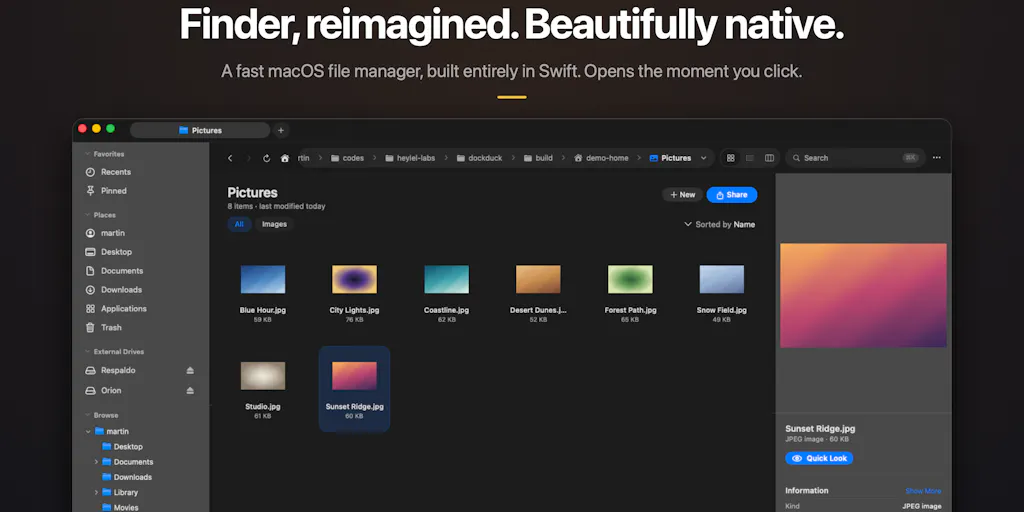
Let me get the product recap out of the way, because the details matter here. DockDuck is a native macOS file manager built by Martin, a solo developer who got tired of Finder’s stagnation and equally tired of the “modern” alternatives that turned out to be Electron apps burning RAM and battery just to list files. The pitch is straightforward: 100% Swift and AppKit, zero Electron, opens instantly, and includes the power features that power users actually reach for — dual-pane browsing, server connections (SFTP/SMB), batch rename, tags, and a pinned dashboard for frequently accessed items.
It’s a pay-once or yearly license — no subscription — with a free 14-day Pro trial and a launch discount code (PRODUCTHUNT21 for 10% off until September 30). The “your files never leave your Mac” framing is deliberate, and the maker is building in public, actively soliciting feedback on the Product Hunt launch page.
Now, here’s the thing that makes this interesting to me as someone who runs social accounts and manages content workflows: this is not a social media tool. There’s no UTM tracking, no scheduling calendar, no analytics dashboard. But the problems it solves are the problems that sit underneath every content operation. When I’m managing content across Instagram, TikTok, YouTube, and LinkedIn, the bottleneck is rarely the posting — it’s the asset management. It’s finding the right version of the right file at the right moment, and knowing that you’re not about to post a stale edit to 50,000 followers.
The dual-pane layout alone is worth talking about. If you’ve ever tried to move assets between a “raw footage” folder and a “final exports” folder while simultaneously checking a reference image from the “client feedback” folder, you know that single-pane Finder is actively working against you. Dual-pane isn’t a luxury — it’s a workflow necessity for anyone who moves files between directories as part of a daily routine. I’ve been using ForkLift and Commander One for years specifically for this reason, and I’ve watched both of them struggle with the same identity crisis: are they a power tool for sysadmins or a daily driver for normal humans? DockDuck’s bet is that you can be both, and that the “feels like Apple made it” aesthetic isn’t a nice-to-have — it’s the thing that makes the power features approachable.
The Problem It Actually Solves: The “Finder Tax” on Creative Work
Let me get specific about the operational pain. Last month, I was running a content sprint for a client who needed 30 posts scheduled across 5 platforms. The workflow was: pull raw footage from the camera SD card, drop it into a project folder, edit in CapCut, export versions for vertical (9:16), square (1:1), and horizontal (16:9), then upload each to the respective platform’s scheduling tool.
The Finder tax was everywhere. I spent twenty minutes hunting for a specific clip because the file name was “IMG_4821.MOV” and I’d forgotten which folder it was in. I accidentally uploaded the wrong aspect ratio to Buffer because two files had nearly identical names and I grabbed the wrong one. I had three versions of the same thumbnail because I kept exporting new iterations without cleaning up the old ones.
DockDuck’s pinned dashboard — the “stuff I open every day” view — is a direct answer to this. Instead of navigating a deep folder hierarchy every single time, you pin the project folders that are active this week. The batch rename feature means you can standardize your file naming convention across a whole project in one pass, which is the single highest-leverage habit for avoiding the “which version is this” problem. And the dual-pane view means you can see your source folder and your destination folder simultaneously, which eliminates the drag-and-drop-across-windows dance that causes so many of those “did I actually move that file or just copy it” moments.
The tags feature is where this gets interesting for content teams. Finder has tags, but they’re clunky and most people don’t use them. DockDuck’s implementation is designed to be a daily habit, not a metadata chore. You tag a folder as “Client: Acme” and another as “Status: Final” and suddenly you have a lightweight content management system without the overhead of an actual DAM tool. For a solo creator or a small team, that’s genuinely useful. You’re not going to invest in Bynder or Cloudinary for a two-person operation, but you also can’t afford to lose files in a chaotic folder structure.
What’s Different Here: The Native-First Bet
The “zero Electron” framing is doing more work than it might appear. When Gal Dayan commented on the launch page about quitting “modern Finder alternatives” because they lagged scrolling a folder with a few thousand files, he was naming a real problem. I’ve tested Marta, QSpace, and a handful of other “modern” file managers, and the Electron tax is real. These apps are built on web technologies wrapped in a native shell, and while they’re often feature-rich, they carry a performance penalty that becomes obvious when you’re dealing with large media files — which is exactly what creators deal with every day.
A single 4K video file can be several gigabytes. A folder with a few hundred such files is a nightmare for an Electron app that has to render each file’s icon, metadata, and preview through a Chromium rendering engine. Native apps using Swift and AppKit can leverage the operating system’s file system APIs directly, which means instant scrolling, instant previews, and no jank. This isn’t a niche concern — it’s the difference between a tool that feels like part of your workflow and a tool that feels like an obstacle.
The security angle is worth highlighting too. When I’m connecting to a client’s server via SFTP to pull down approved assets, I’m trusting the file manager with credentials that, if compromised, would expose a lot more than just files. Martin’s response to the Keychain question on the launch page is the right answer: saved server credentials go into the macOS Keychain, not custom storage. The connection metadata (host, user, port) lives in app preferences, but the password is split off and stored securely. This is the kind of detail that separates a tool built by someone who understands the platform from a tool built by someone who’s just trying to ship features. Rolling your own credential storage would have been a red flag; leaning on the platform’s security primitives is exactly what a native app should do.
There’s also a broader trend here that’s worth naming: the pendulum swinging back toward native apps after a decade of Electron dominance. Tools like Notion, Slack, and Figma are all Electron-based, and they’ve normalized the trade-off of “web tech convenience for native performance.” But for file management — the most performance-sensitive app category on any computer — that trade-off is unacceptable. DockDuck is betting that creators and power users are tired of the compromise, and I think that bet is right.
What Creators and Social Media Teams Can Borrow From This
Even if you never touch DockDuck, the thinking behind it is worth stealing. Here’s what I’m taking from this launch and applying to my own content operations:
The Pinned Dashboard as a “Current Projects” View
The idea of a pinned dashboard for files you open every day maps directly to how I should be organizing my content workflow. Instead of a deep folder hierarchy, I should have a “current projects” view that surfaces exactly the assets I’m actively working on. This is the difference between “where did I put that file” and “oh right, it’s in my active projects.” The concept is simple, but it requires discipline to maintain. You pin the five folders that matter this week, you work exclusively from them, and you archive them when the project ships.
Batch Rename as a Content Hygiene Habit
The batch rename feature isn’t just a convenience — it’s a content hygiene tool. If you’re not standardizing your file names at the project level, you’re setting yourself up for version confusion. My current convention is [client]-[platform]-[content-type]-[version]-[date] — e.g., acme-tiktok-hook-v3-20240915.mp4. It’s verbose, but it eliminates the “which one is the final version” problem. Batch rename makes it possible to retrofit this convention onto a folder of files that were exported with default names, which is the realistic scenario for most creators.
The “Native First” Principle for Tool Selection
The zero-Electron stance is a reminder that tool selection matters beyond features. When I’m choosing between Metricool and Hootsuite for scheduling, or between Canva and Figma for design, I should be asking about the underlying technology and how it affects performance and reliability. A tool that janks, lags, or crashes at a critical moment is worse than a tool with fewer features that runs smoothly. This is especially true for live-streaming and real-time content creation, where a laggy tool can mean a missed moment.
The Keychain Lesson: Trust the Platform’s Security Primitives
The way DockDuck handles credentials is a model for how any tool should handle sensitive data. When I’m logging into social media management tools or connecting to client servers, I want to know that the tool is leaning on the platform’s security infrastructure rather than rolling its own. This is a trust signal that should factor into my tool selection process. If a tool asks me to store credentials in its own database, that’s a red flag. If it uses the OS keychain or a well-established auth protocol, that’s a green flag.
Where My Judgment Says It Falls Short
I want to be balanced here, because there’s a difference between “this is a promising early launch” and “this is the tool you should switch to today.” DockDuck is the former, not the latter, and here’s why.
It’s a One-Person Project
Martin is a solo developer. That’s commendable — the indie hacker spirit is exactly what the creator economy needs more of — but it’s also a risk. When I’m building my content operation around a tool, I need to know it’s going to be maintained, updated, and supported for years. A solo developer can disappear, get burned out, or pivot to a different project. The Product Hunt launch page is an early launch, which means there are likely rough edges, missing features, and bugs that haven’t been discovered yet. The maker’s willingness to build in public is a positive signal, but it’s not a guarantee of longevity.
The Feature Set Is Still Sparse Compared to Incumbents
When I compare DockDuck to ForkLift or Commander One, the feature gap is significant. Those tools have been around for years and have accumulated features like folder synchronization, archive management, remote editing, and extensive customization options. DockDuck’s feature set — dual-pane, server connections, batch rename, tags, pinned dashboard — covers the 80% use case, but the last 20% is where power users get stuck. If you need advanced file comparison, folder syncing, or extensive automation scripting, DockDuck isn’t there yet.
The “Who Is This NOT For” Question
This is where I need to be honest about the limits. DockDuck is not for you if:
- You’re on Windows or Linux. This is macOS-only, and there’s no indication of cross-platform plans. If your team is mixed-OS, this tool doesn’t help.
- You need a full digital asset management system. DockDuck is a file manager, not a DAM. If you need version history, asset metadata, approvals workflows, or team collaboration features, you need something like Cloudinary or Bynder, not a desktop file manager.
- You’re deeply invested in Finder’s ecosystem. If you use Finder tags extensively, have a complex folder structure that’s already working, or rely on Finder’s built-in integration with other macOS apps, switching to a third-party file manager means rethinking your workflow. The cost of switching is real, and it’s not clear that DockDuck offers enough of an advantage to justify the disruption.
- You need cloud-native file management. DockDuck is local-first. Your files live on your Mac, and while it supports SFTP/SMB connections, it’s not a cloud file manager. If you’re working with a distributed team that needs shared access to the same files, this isn’t the tool for that.
The Pricing Model Question
The pay-once (or yearly) model is a point in DockDuck’s favor — subscriptions are a plague on the software industry — but it also raises a question about sustainability. A solo developer with a pay-once model needs a steady stream of new customers to keep the lights on. The yearly option provides some recurring revenue, but it’s a harder business model than a subscription. I’d bet the maker has thought about this, but it’s worth watching whether the project stays actively developed or goes into maintenance mode.
Why TikTok Creators Should Care More Than LinkedIn Ones
Here’s a hot take: the file management problem is more acute for TikTok creators than for LinkedIn thought leaders, and it’s worth unpacking why.
TikTok is a volume game. You’re posting multiple times a day, often with raw footage shot on your phone, edited quickly in CapCut or similar tools, and uploaded with minimal metadata. The sheer volume of files generated in a week of TikTok creation is staggering — dozens of raw clips, multiple edits, several versions of each, plus the final uploads. Without a file management system, you’re drowning in a sea of IMG_4821.MOV files with no way to distinguish between the clip that got 100k views and the one that flopped.
LinkedIn, on the other hand, is a lower-volume, higher-polish platform. You’re posting a few times a week, often with text-based content or carefully produced video. The file management problem exists, but it’s less acute because there are fewer files to manage. A LinkedIn creator can get away with a simple folder structure and a good naming convention. A TikTok creator needs a system that can handle hundreds of files per week without losing track of what matters.
DockDuck’s batch rename and pinned dashboard are particularly valuable for the TikTok workflow. Batch rename lets you standardize your file names across a day’s worth of raw footage in one pass, and the pinned dashboard gives you immediate access to the clips you’re actively working on. This isn’t a luxury — it’s a survival mechanism for anyone creating at TikTok volume.
Where the Math Breaks
Let me talk about the economics for a minute, because there’s a calculation that creators need to make when choosing tools like this.
The cost of DockDuck is not disclosed on the launch page, which is a small transparency gap. The maker mentions a “pay-once (or yearly)” model and a 10% discount code, but the actual price isn’t listed. That’s a common Product Hunt launch strategy — get people into the conversation first, then hit them with pricing — but it makes it harder to evaluate the tool against alternatives.
For comparison, ForkLift is a one-time purchase of around $30, and Commander One has a free version with a Pro tier around $30. If DockDuck is priced in that range, it’s competitive. If it’s priced higher, the value proposition needs to be stronger.
The real math, though, isn’t about the price of the tool — it’s about the cost of the time it saves. If DockDuck saves you 15 minutes a day in file management, that’s 5,475 minutes a year — over 91 hours. At even a modest hourly rate for a creator’s time, that’s worth a few hundred dollars. The question isn’t “is DockDuck worth it?” but “does it actually save that time?” And that’s a question only you can answer by testing it.
What I’d Watch / Test Next
If you’re a creator or social media operator who’s intrigued by DockDuck, here’s what I’d do this week:
Download the 14-day trial. The launch page offers a free Pro trial with no card needed, which is the right way to evaluate a tool. Spend a week using it as your primary file manager and see if the dual-pane workflow and pinned dashboard actually change how you work. Pay attention to whether you’re spending less time hunting for files and more time creating.
Set up a batch rename convention for your next content sprint. Whether you use DockDuck or not, the habit of standardizing file names at the project level is worth adopting. Pick a convention —
[client]-[platform]-[content-type]-[version]-[date]— and apply it to your next batch of exports. See if it reduces version confusion and makes it easier to find the right file at the right moment.Audit your current file management pain points. Before you commit to any tool, make a list of the specific file management tasks that waste your time. Is it finding files? Moving files between folders? Renaming batches? Connecting to servers? Once you know your pain points, you can evaluate whether DockDuck (or any tool) actually addresses them.
Watch how the maker responds to feedback. Martin is building in public and actively soliciting feedback on the Product Hunt page. The way he responds to feature requests and bug reports over the next few months will tell you a lot about whether this is a tool worth betting on. A responsive solo developer who ships updates regularly is a better bet than a team that ignores its users.
Compare against the incumbents. Don’t switch tools without a side-by-side comparison. Run DockDuck alongside ForkLift or Commander One for a week and see which one actually fits your workflow. The best tool isn’t the one with the most features — it’s the one you actually use.
The creator economy runs on files, and the people who get the file layer right are the ones who ship consistently. DockDuck is an early bet on that principle, built by someone who understands the platform and the problem. It’s not a finished product, and it’s not for everyone. But it’s a direction worth watching — and a reminder that the tools we use every day deserve better than the default options we’ve settled for.