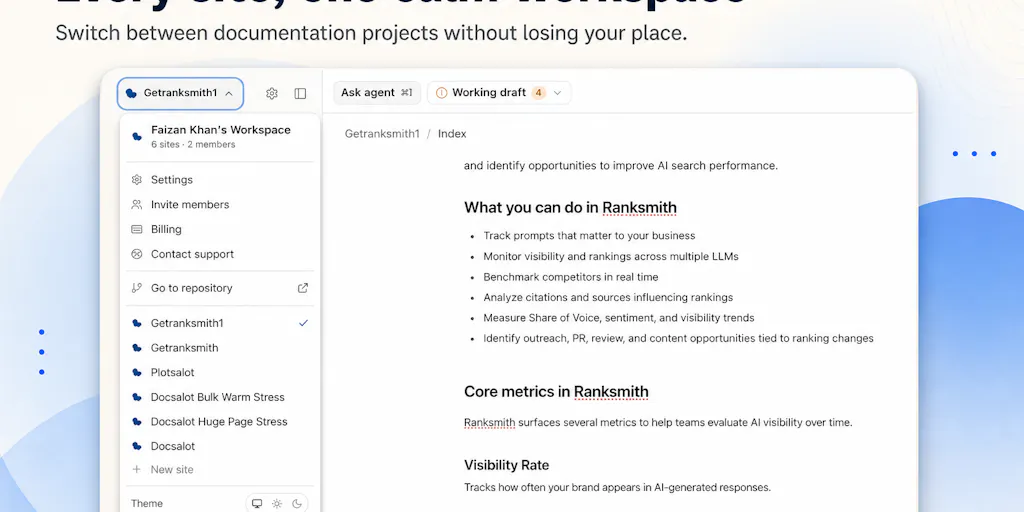
Every creator business is a documentation business. The posts you publish are just output; the thing that lets you scale is the repeatable process behind them — hooks file, caption templates, sponsor briefs, alt-text rules, review cadence. AI has made generation cheap, but generation was never the real bottleneck. The bottleneck is organizing AI output into something coherent, previewing it, approving it, and keeping it current when your product or platform changes. That’s why I clicked on the DocsAlot launch. It’s a documentation CLI for AI agents. It is not a social media tool. But the workflow it encodes — agent drafts, human previews, approved output publishes — is exactly what the creator economy needs next.
AI can write. It can’t maintain.
In the launch post, founder Faizan Khan makes a point that sounds obvious until you’ve lived it: Claude and Codex can already write documentation. The problem is what comes next: organizing it into a polished site that doesn’t look vibe-coded, previewing changes, publishing safely, and keeping everything current when the product changes.
Every social media manager who has asked an AI for a 30-day content calendar knows the second half of that sentence. The calendar looks plausible. The hooks are familiar. The captions are grammatically fine. But the offer changed last week, the new sponsor needs different compliance language, and the platform just changed how it ranks search results. The AI didn’t know, because the context it generated from was stale. Generation is no longer the hard part. Maintenance is.
The “polished site that doesn’t look vibe-coded” line is what pulled me in. “Vibe-coded” is the developer community’s version of what social media managers call “AI slop”: output that has the surface texture of work but no underlying system of record. DocsAlot’s bet is that the answer is a workflow, not another generator. You tell your coding agent to read the CLI instructions and create a new set of docs, run a preview, and then publish only what you approve. There is a real CLI underneath for developers and CI pipelines, but you don’t need to memorize commands. You describe the outcome; your agent handles the steps.
That is the single most important idea in this launch for creators: the AI is the assistant, not the publisher. The human stays in the approval loop. Most AI content tooling currently optimizes for volume — more captions, more hooks, more repurposed clips. DocsAlot optimizes for control. In my experience running content operations, control is the scarce resource, not output.
Why DocsAlot is not another docs-site generator
There are already plenty of ways to publish docs. The quick and dirty path is a hosted wiki. The developer path is a static site generator or an API docs platform. The social-media equivalent is a scheduling dashboard: Buffer and its peers solve the “when does this go live” problem, but they don’t solve the “is this still true and on-brand” problem.
DocsAlot’s differentiator is that it is agent-native. The first-class user is a coding agent; the human is the safety gate. That flips the typical setup. In a traditional docs tool, you write, then you fight the tool to preview and deploy. With DocsAlot, the agent does the scaffolding: create new docs, pull existing docs, make updates, run a local preview, publish the approved result. You stay in control — preview first, approve the result, then publish — but the mechanical work is delegated.
In my own tests of similar agent workflows, that division of labor is a meaningful shift. When I schedule posts through a social media management tool, I still have to open the draft in the platform context, check the visual, verify the caption against a brand doc, and then approve. The tool makes publishing easier, but it doesn’t make the approval decision easier. DocsAlot automates the scaffolding around the approval: pull the existing content, update it, preview it, and wait. The human still owns the final yes.
Imagine a social tool that worked the same way. An AI drafts a TikTok script, a LinkedIn post, and an Instagram carousel from a single master brief. You preview each version in platform context, approve what works, and the tool publishes. That’s the product I want to see next. DocsAlot is not that product — it’s for documentation, not social — but it has the right skeleton.
That’s also why the tagline on the DocsAlot product page matters. Documentation that works for both humans and AI systems is not a vanity phrase. Docs are increasingly the interface that AI agents use to understand a product. If your docs are stale, the agent fails. The same is becoming true for creator content: AI systems are reading posts, summarizing them, and citing them. Your content is not just for your audience anymore. It’s also a signal layer for AI distribution.
Why TikTok creators should care more than LinkedIn ones
The preview-approve-publish loop is more valuable on TikTok than on LinkedIn, and it’s not because LinkedIn is dead. It’s because TikTok’s algorithm punishes stale context faster. Ranking rewards watch time and completion, and those signals turn over quickly. A hook formula that was winning in March can be dead by May. If your content docs still describe last quarter’s approach, every AI-generated video starts from the wrong base.
LinkedIn is slower. Written thought leadership has a longer shelf life, and your archive is part of your credibility. Stable docs matter there too, but the cost of staleness is lower. For TikTok creators, the cost is immediate: low completion, low distribution, and a feedback loop that makes the next post even weaker. The workflow discipline DocsAlot is selling — keep the source true, preview before publish, review the output — is the discipline high-velocity creators need most.
Steal this workflow: preview, approve, publish
The best thing about DocsAlot for creators is not the tool itself. It’s the pattern. You can borrow it this week without ever touching a CLI.
First, write a content bible for your AI assistant. The launch page’s most revealing comment is from Abdullah Javaid, who says he hand-edits CLAUDE.md whenever an API changes and forgets more often than he would like to admit. For creators, CLAUDE.md is your content bible: platform-specific tone, banned words, hashtag sets, sponsor compliance, visual style, approving editor. If you don’t have one, every AI prompt you write is starting from zero. The AI doesn’t know your brand voice, your previous failures, or the compliance rules that changed last month.
Second, add a human approval gate. The source phrase that matters most is from the founder: “preview first, approve the result, then publish.” In practice, that means asking AI to draft three hooks, not “post these for me.” It means reviewing the draft in the actual tool you’re going to publish in, not in the chat window. It means checking the caption against the content bible, verifying the UTM parameters, and then scheduling. That is not slower; it is faster than fixing a wrong post after it goes live.
Third, treat repurposing as a docs pipeline. The reason repurposing workflows collapse is that a long-form video and a set of short clips are treated as separate projects. They should be generated from one master doc per content pillar. The master doc carries the source facts, the call to action, the offer, and the platform-specific notes. The AI then produces variants for short-form, text posts, and carousels. Each variant gets reviewed against the master doc before scheduling. Now repurposing is a documentation exercise, not a hero act of editing.
Fourth, keep a review log. The stale context problem is real. Every evergreen post should have a last-reviewed date, just like docs have a last-updated timestamp. When your offer changes or a platform changes its rules, ask your AI to sweep for anything referencing the old version. That sweep works only if your content is documented in the first place. Most creators skip this because it feels like overhead, but it is the exact overhead DocsAlot was built to remove.
If you are an indie founder shipping a product, the direct test is even simpler. Point your coding agent at the DocsAlot CLI instructions, ask it to create docs for your project, and run a preview. If the loop works as described, you have a docs site that updates when your product changes — without you becoming a full-time technical writer.
Where DocsAlot falls short (and who should skip it)
I haven’t run DocsAlot through a real project yet, so let me be clear about what this essay is: an interested first read, not a product recommendation. The launch page is dated July 5, 2026, and as of this writing it has no reviews — only a comment thread. Pricing is not disclosed. Those are early-stage caveats, and they matter.
The biggest open question is drift detection. Abdullah’s comment asks whether DocsAlot detects drift between the docs and the real code on its own, or whether it still depends on the agent being told to re-pull when something changes. As of this writing, the founder had not answered that in the thread. In my experience, most agent workflows only re-pull when you tell them to. If DocsAlot does not solve drift detection, it is a nicer publishing layer, not a true maintenance layer. The automation still depends on someone noticing that the underlying product changed — which is exactly the failure mode every creator knows from forgetting to update an evergreen post.
Who should skip DocsAlot? Solo creators who don’t code. If you have never used Claude, Codex, or a command line, this is not your tool. You will get more value from Canva templates and a simple scheduler. Social media managers who need collaborative approval flows across a team should also look at enterprise social suites first. DocsAlot is not a scheduler and does not claim to be. The product solves a documentation problem, not a content calendar problem.
Finally, the “works for both humans and AI systems” claim is a statement of intent, not a benchmark. It is the right ambition. But until I see the drift question answered, I’d treat the maintenance promise with caution.
Where the math breaks: stale context
The math of AI content tooling is simple: generation cost goes down, context cost goes up. Every AI tool that produces output faster without a mechanism to verify the source of truth accumulates stale content. DocsAlot shifts the work to the agent, which is good — but if the agent doesn’t know the code changed, the docs still rot.
Creators face the same math. AI can generate 30 posts in a minute. If your underlying offer, brand voice, or platform rules changed, you have just generated 30 pieces of wrong. The only fix is a review gate and a docs file that gets updated first. The tool is not the hard part. The discipline is.
What I’d watch / test next
This week, I’d do three things. First, create one brand-voice doc for your content operation and call it content.md or brand.md. Put your platform-specific rules in it, then ask your AI to draft from that file only. Second, if you ship a product, spend thirty minutes pointing your coding agent at the DocsAlot CLI instructions and running a preview. You don’t need to migrate your entire docs site to test whether the loop feels safe. Third, watch whether DocsAlot adds automated drift detection. If it does, that is the signal for wider adoption. If it doesn’t, borrow the pattern anyway and add your own review cadence.
For social media teams, the bigger lesson is not the tool. It’s to stop treating AI as a publisher and start treating it as an assistant that drafts while you remain the editor. Preview first, approve the result, then publish. That is the entire thesis of DocsAlot, and it’s the only way to keep your content honest as the volume scales.