The LinkedIn Inbound Signal Is the Most Underused Asset in Social — And Bearconnect V2 Is Betting On It
Most social media managers I know treat LinkedIn as a distribution checkbox: you publish the post, you log the impressions, you move on to the next platform in the rotation. That framing is wrong, and it has been wrong for a while. The real value of LinkedIn for a creator or an operator isn’t the reach of the post — it’s the intent trail it leaves behind. Every comment, every reaction, every profile view from a decision-maker is a warm signal that most teams never harvest because their scheduling tool and their outreach tool don’t talk to each other. Bearconnect.io is the latest tool trying to close that gap, and its V2 launch is worth unpacking — not because the product is flawless, but because the workflow it’s selling is the workflow more creators should be running.
What Bearconnect Actually Solves (And What It Isn’t)
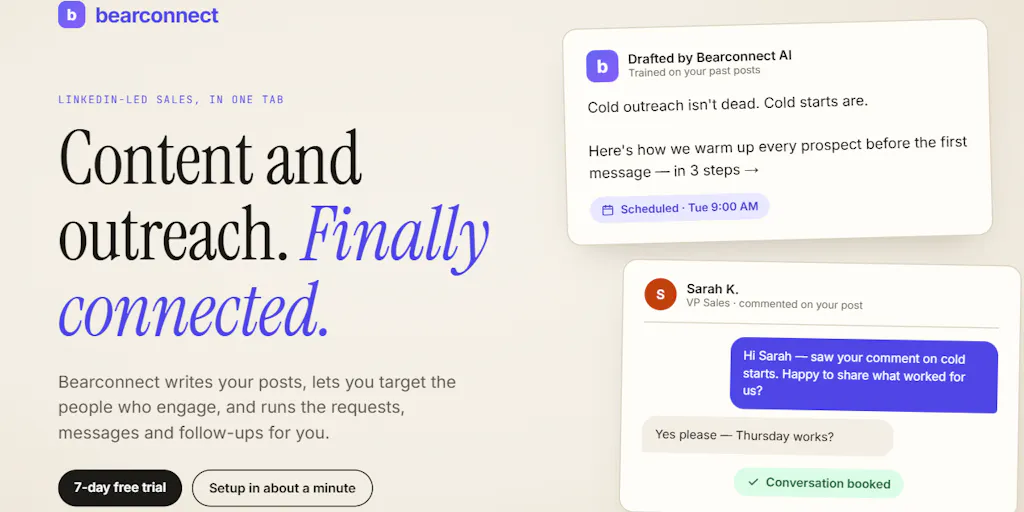
The maker, Mona Juneja, frames the V2 pivot plainly: a year ago Bearconnect launched as a LinkedIn outreach tool, and customer feedback pushed the team toward a wider thesis — that LinkedIn isn’t only about outbound. People are already showing intent through the content they create, engage with, and respond to, and the product now tries to capture that intent and convert it into conversations. That’s the launch post in one sentence, and I think it’s the right diagnosis.
Concretely, V2 bundles four things that used to live in separate tools:
- Content creation and scheduling on LinkedIn itself
- Prospect discovery from LinkedIn activity (i.e., finding people based on what they engage with)
- Outbound sequences — connection requests, messages, follow-ups
- Team workspaces with role-based access, aimed at sales teams and agencies managing multiple LinkedIn accounts without password sharing
It also adds AI for post creation and inbox reply drafting “in your own Brand Voice,” plus integrations with HubSpot, Pipedrive, Make, and webhooks. Pricing is not disclosed on the launch page.
Here’s the honest framing: this is not a social media management tool in the Buffer or Hootsuite sense. It’s a LinkedIn-native revenue workflow with a scheduler bolted on. If you’re a creator running six platforms and you need a single calendar view, this is not your tool. If you’re an operator whose LinkedIn presence is supposed to generate pipeline — whether for your own consulting practice or a B2B client — this is the category you should be watching.
Why the inbound/outbound merge matters more than the AI features
The AI post-drafting and reply-drafting features will get the marketing attention, but they’re the least interesting part of this launch. The structural move is stitching the publishing side to the prospecting side. In my own experience running B2B content programs, the highest-converting outreach I’ve ever sent was to people who had already engaged with a post I published — and the reason most teams don’t do this systematically is purely operational. The engagement data lives in LinkedIn’s native notifications, the outreach lives in a separate sequencer, and nobody has time to manually reconcile the two every morning. A tool that closes that loop is solving a workflow problem, not a content problem.
How It Stacks Up Against the Incumbents
The LinkedIn automation space is crowded and has been for years. Dripify, Expandi, Waalaxy, and Lemlist all play in the outbound sequencing lane. Taplio and AuthoredUp own the content-creation-and-analytics lane. Shield and Metricool approach it from the analytics side. What Bearconnect is attempting — and what makes V2 notable — is being the first tool in this list I’ve seen that credibly claims to own both lanes under one roof, with team access controls on top.
That’s a real differentiator on paper. It’s also the hardest product shape to execute well, because you’re competing against specialists on two fronts simultaneously. A creator who only needs scheduling will find Taplio more focused. An agency that only needs sequencing will find Dripify more mature. The bet Bearconnect is making is that the overlap is where the money is — that the operator who wants to publish, identify engagers, and sequence them without exporting CSVs will pay a premium for the consolidation.
My take: that bet is correct in the long run, but the winner of this category won’t necessarily be the first mover. It’ll be whoever nails the data handoff between the publishing layer and the outreach layer without making the UX feel like two products stapled together.
Where the math breaks
The integration story is where I’d want to see receipts. “Integrations with HubSpot, Pipedrive, Make and webhooks” is a sentence that can mean anything from a native two-way sync to a Zapier-style trigger that fires once. Without documentation, I can’t tell you which. If you’re evaluating this for a client account, the first thing I’d test is whether a LinkedIn engagement can flow into HubSpot as a contact property — not just as a new lead — because that’s the difference between a prospecting tool and a CRM-aware workflow.
The Safety Question Every LinkedIn Operator Should Ask First
The most useful exchange on the entire launch page is buried in the comments. Muhammad Ahmed asks the question every experienced LinkedIn operator asks: LinkedIn is stringent on automation, so what safety measures exist, and is there a limit to avoid getting into trouble? Juneja’s reply is specific: Bearconnect limits activity to 25 connection requests and 50 messages per day, and when it detects you approaching your LinkedIn weekly limit, it automatically pauses campaigns and resumes them when it’s safe to continue.
That’s a meaningful disclosure, and I’d treat it as the single most important fact in this launch. Here’s why: LinkedIn’s own published limits are fuzzy and change without notice, but the community consensus for years has hovered around 100–200 connection requests per week for accounts in good standing, with messages capped lower and heavily dependent on account age and acceptance rate. A daily ceiling of 25 requests and 50 messages sits inside that envelope, which is the right posture. The auto-pause on weekly-limit detection is the feature that actually matters, because the failure mode that gets accounts restricted isn’t a single aggressive day — it’s a steady drip that trips a threshold nobody warned you about.
Why TikTok creators should care more than LinkedIn ones
If you’re a pure short-form creator living on TikTok and Instagram Reels, this launch is mostly not for you — and I want to be direct about that rather than pretend every tool matters to every reader. The mechanics that make Bearconnect useful (connection request ceilings, weekly limit detection, inbox reply drafting) are LinkedIn-specific. The transferable lesson is the workflow pattern: publish content, identify who engaged, route them into a sequenced follow-up, log the outcome in your CRM. You can run that pattern manually on TikTok by watching your comment section and DMing high-intent commenters, and honestly, most creators under 50k followers should do exactly that before paying for any tool. The tool is a scaling layer, not a starting layer.
Where the AI brand-voice claim needs scrutiny
“AI can help create posts and draft inbox replies in your own Brand Voice” is the kind of claim I’ve tested dozens of times across tools like Jasper, Copy.ai, and the native AI features inside Canva and CapCut. Brand voice replication is genuinely hard, and the quality ceiling is usually determined by how much of your existing writing the model has ingested. The launch page doesn’t say whether Bearconnect trains on your historical posts, your sent messages, or just a prompt you fill in — and that distinction is the difference between output that sounds like you and output that sounds like LinkedIn-flavored ChatGPT. I’d test with three real posts you’ve written and see how close the drafts land before trusting it on a client account.
What Creators and Social Teams Can Steal From This Playbook
Even if you never sign up for Bearconnect, the operating model behind it is worth copying. Here’s what I’d extract:
Treat engagement as a lead source, not a vanity metric. The launch thesis — that intent shows up in content engagement before it shows up in a DM — is correct and underused. Build a weekly ritual where you scan your post engagers on LinkedIn and tag anyone who fits your ICP. That’s a manual version of what Bearconnect automates.
Set hard daily ceilings on outbound and honor them. The 25⁄50 number is a reasonable default. Whatever tool you use, configure the ceiling before you configure the sequence. The sequence is worthless if the account gets restricted.
Separate the publishing calendar from the outreach calendar. Most teams I’ve worked with blur these, and the result is that outreach gets deprioritized whenever content deadlines hit. Two calendars, two owners if you can afford it.
Build the CRM handoff before you scale the sequence. If a reply doesn’t create a trackable record in HubSpot or Pipedrive, you’re running outreach blind. Configure the integration first, then ramp volume.
Use team workspaces as an access-control boundary, not a convenience feature. The comment from Oleksii Sekundant about agencies wanting clear per-account permissions is the right instinct. Password sharing across client LinkedIn accounts is a liability and, depending on your jurisdiction and contract, potentially a compliance problem.
The repurposing angle nobody mentioned
One thing conspicuously absent from the launch is any mention of cross-platform repurposing. If you’re publishing on LinkedIn, you’re presumably also publishing some version of that content on X, Threads, Facebook, and maybe a newsletter. A tool that owns your LinkedIn publishing layer is a natural place to add “syndicate this post to X and Threads” — but the launch page doesn’t claim it, so I won’t assume it exists. If Bearconnect adds that, it becomes meaningfully more interesting to the solo creator segment. Until then, you’re still running a separate repurposing workflow through something like Repurpose.io or manual copy-paste.
Where I Think It Falls Short
Three honest concerns, in order of how much they’d affect my buying decision:
1. LinkedIn platform risk is structural, not solvable. Any tool in this category is one algorithm or policy change away from a bad quarter. LinkedIn has been tightening automation detection for years, and no amount of “weekly limit protection” makes that risk zero. If your entire pipeline depends on a third-party automation tool, you have concentration risk. Diversify your inbound channels.
2. The all-in-one positioning is a double-edged sword. When a tool does publishing, prospecting, sequencing, AI drafting, and team management, the odds that any one of those is best-in-class drop. My guess is Bearconnect will be strongest at the sequencing layer (its original DNA) and weakest at the content analytics layer, where specialists like Metricool and Taplio have years of head start.
3. Pricing opacity is a friction point. Not disclosed on the launch page. For agencies evaluating this across multiple client accounts, seat-based pricing versus account-based pricing is the entire budget conversation. I’d want that answered before a demo.
Who it’s NOT for: solo creators under ~10k followers who aren’t running any outbound motion, social media managers who need multi-platform scheduling as their primary job, and anyone in a regulated industry where automated LinkedIn outreach creates compliance exposure.
What I’d Watch / Test Next
If you’re a social media operator evaluating Bearconnect this week, here’s the concrete sequence I’d run:
- Sign up for the trial and connect a non-critical LinkedIn account first — never your primary client account on day one.
- Test the engagement-to-prospect flow end to end. Publish a post, wait 48 hours, and see whether Bearconnect surfaces the engagers as prospects and whether they flow into HubSpot or Pipedrive as usable records. That single test tells you whether the core thesis holds.
- Run the AI brand-voice drafter against three real posts you’ve written and score the output honestly. If it needs heavy editing, treat it as a first-draft tool, not an autopilot.
- Set the daily ceilings yourself — don’t assume the defaults — and watch the weekly-limit auto-pause behavior for the first two weeks.
- Ask the team directly about pricing, seat model, and what happens to your data if you churn. Those answers will tell you more about the company than any feature list.
The bigger thing I’m watching is whether the inbound/outbound merge becomes the standard shape for LinkedIn tooling, or whether the market keeps rewarding specialists. My bet is on the merge — but it’ll take two or three more launches like this one before we know which team executes it cleanly.


