The quiet product lesson hiding in a fitness tracker launch
Most social media operators I know are drowning in a specific kind of irony: we build content for platforms that own the distribution, the audience, and increasingly the monetization, and we do it with tools that keep our actual work product locked in someone else’s cloud. So when a small maker ships something built around the opposite premise — your data lives in your browser, the server can’t read it, export everything to CSV — I pay attention, even when the product has nothing to do with social media on its face. That’s the case with Eat Train Feel, a free web app from maker Aleš Sušnik that combines workout building, coaching, and Garmin watch sync. It’s a fitness tool. But the architecture decisions inside it are the same ones creators and social teams are going to have to make about their own content pipelines over the next 18 months, and the debate in its comment thread is more useful than most “creator economy” panels I’ve sat through.
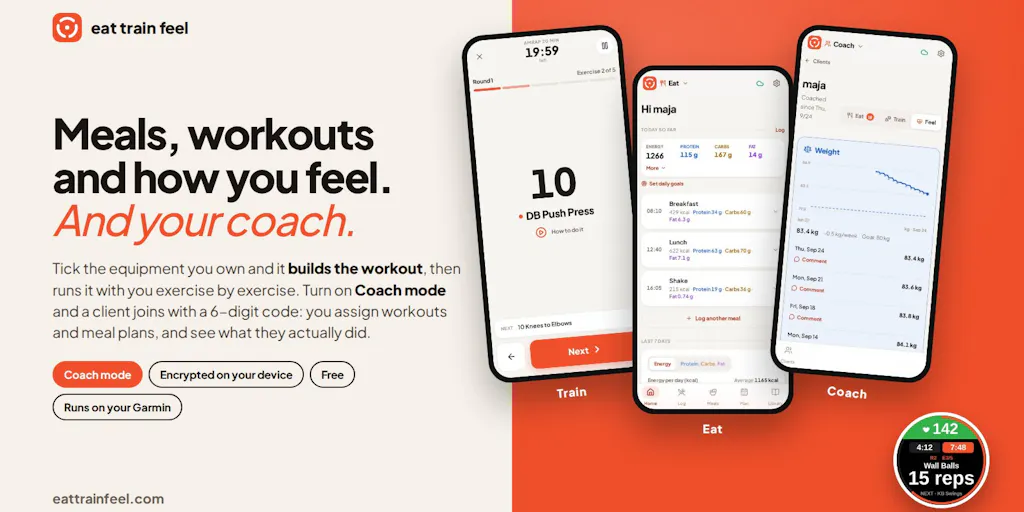
What Eat Train Feel actually is, and what problem it solves
Strip away the launch-page framing and here’s the real story: a maker got tired of copy-pasting workouts into DMs and watching clients screenshot them. As he puts it in his own launch post, “By number five I was copy-pasting from my notes and she was screenshotting my messages. Not sustainable.” That’s a workflow problem every creator recognizes — the moment your output outgrows your delivery mechanism, you either build a system or you start losing clients.
The product has two halves. The Coach part lets a trainer send a workout for a specific day, see whether the client actually did it, and see what they ate — all in one place. The watch part solves a narrower but sharper frustration: getting an AMRAP onto a Garmin so that LAP moves to the next exercise and the watch produces a proper activity with one lap per exercise. The maker trains at home with a Garmin fenix 8 and describes the old experience as a perpetual “did it sync?” game.
Other stated design choices from the launch thread:
- Workouts are built from equipment the user actually has.
- Data is encrypted in the browser; the server can’t read it.
- No app store — it’s a web app that works on any device and syncs.
- Free, no ads, full CSV export.
Pricing, user counts, funding, and team size are not disclosed. This reads like a solo side project, not a venture-backed company, and I’d treat the roadmap accordingly.
Why social media operators should care about a fitness app
Because the interesting part isn’t the fitness. It’s the data ownership posture and the coach-client permission model, both of which map directly onto how creators handle client work, brand deals, and audience data. If you run social for three clients, you already have a version of the “coach sees the client’s data” problem — you need access to their accounts, their analytics, their creative assets, and their approval workflows, but you don’t want to be the single point of failure holding everyone’s credentials. The comment thread on this launch is essentially a public design review of that exact tradeoff.
The encryption-vs-collaboration tension nobody has cleanly solved
The most substantive exchange in the thread comes from Gal Dayan, who’s building a product called Dial. He flags what he calls an “interesting tension”: if client-side encryption means the server can’t read the data, how does a coach see what the client ate or how the workout went? His framing is honest and worth quoting because it’s the same wall every privacy-first collaboration tool hits — he says he wants that model for Dial’s call transcripts but “haven’t found a clean way to do both without the server holding a key somewhere anyway.”
The maker’s reply is refreshingly non-defensive. He confirms that what you share with the coach gets decrypted so the coach can see it, and that this is stated in the policy. He says he has an idea for solving it properly — something along the lines of how the watch and app exchange data via a token — but hasn’t had time to implement it. Then he makes an argument I think is genuinely correct and rarely stated this plainly: “if I decide to share something with you, why would I want it to be encrypted. You’ll have to see it anyhow.” He draws the line at photos, which is why he built per-picture sharing controls that can be revoked.
Where the math breaks
The maker’s logic is sound for one-to-one sharing but breaks down at scale, and this is where creators should pay attention. The moment you’re sharing with a brand, a client’s legal team, or a platform, “you’ll have to see it anyhow” stops being a comfort and starts being a liability. The decryption event becomes the audit trail. If you can’t answer “who decrypted what, when, and under whose grant,” you don’t have a privacy story — you have a privacy claim. My take: the token-exchange idea he’s gesturing at is the right direction, but the harder problem is revocation. Per-picture share-and-stop-sharing is a good start; the enterprise version of that is per-recipient, time-boxed, revocable access grants, and almost nobody in the creator tooling space has built it well.
What creators and social teams can steal from this launch
Three transferable lessons, in order of how quickly you can apply them.
1. Build from the equipment you actually have
The maker’s first stated design principle is that workouts are built from the equipment you actually have. Apply that to your content stack. Most creators I know are running a Canva subscription they use 10% of, a CapCut workflow that’s really just trimming, and a scheduling tool they log into twice a month. The right question isn’t “what’s the best tool” — it’s “what does my actual weekly output require.” If you publish four Reels a week and one newsletter, you don’t need an enterprise content calendar. You need a capture habit, a trim pass, and a scheduler that doesn’t fight you.
2. Treat export as a feature, not a footnote
“Export everything to CSV” is listed almost as an afterthought on the launch page. It shouldn’t be. For social teams, export is the difference between owning your performance history and renting it from whichever analytics dashboard you happen to be paying this quarter. Metricool, Buffer, and Hootsuite all offer some form of data export, but the granularity varies wildly, and platform API changes have a habit of quietly removing fields you’d built reports around. If your historical engagement data only exists inside a vendor’s UI, you don’t have historical engagement data. You have a screenshot habit.
3. The web-app-over-app-store choice is a real strategic call
No app store means no 15–30% platform tax, no review queue, no forced feature deprecation when Apple changes its mind. It also means no push notification infrastructure you don’t build yourself and no discovery from store search. For a solo maker, that tradeoff is easy to defend. For a creator building a paid community or course platform, it’s a genuine strategic fork. My take: web-first is correct for anything where the core value is the data or the workflow, and native-first is correct for anything where the core value is the habit — and notifications are how you build a habit.
Why TikTok creators should care more than LinkedIn ones
This is a general principle, not a comment on this specific product. TikTok’s distribution is volatile by design — a video can spike weeks after posting, and the algorithm rewards watch time and completion over follower count in ways that make historical data less predictive. That means the export question matters less to you than the capture question. If a video spikes in week three, you need to be able to pull the asset, the caption, the sound, and the comment sentiment fast enough to ride the wave with a follow-up. LinkedIn is the opposite: distribution is slow, compounding, and heavily tied to your network graph, which means your historical engagement data is genuinely predictive and worth archiving carefully. Same tool category, opposite operational priorities.
Where I think this falls short
I want to be fair here, because the maker is clearly building in public and asking for exactly this kind of feedback.
The privacy story is a claim, not yet a mechanism. The maker admits the proper solution isn’t implemented. Until it is, “encrypted in the browser, server can’t read it” is true for data you don’t share and effectively false for data you do share with a coach. That’s not dishonesty — he states it plainly — but it’s the kind of nuance that gets lost in a launch headline, and creators should read privacy marketing with the same skepticism they’d apply to a “10x your reach” claim.
Free with no ads is not a business model. Not disclosed is how this sustains itself. Free, no ads, and full export is a wonderful combination for users and a precarious one for the builder. If it disappears, your data goes with it — which is precisely why the CSV export matters. Use it.
The Garmin integration is a moat and a cage. Deep watch integration is genuinely hard to replicate and clearly the product’s sharpest edge. It also means anyone not on Garmin gets much less value. If you’re on an Apple Watch or a Whoop, this isn’t for you yet.
Who this is NOT for: social media managers looking for a scheduling or analytics tool. This does none of that. I’m using it as a case study in architecture and permission design, not recommending it as part of your content stack.
What I’d watch / test next
Concrete things an operator can actually do this week:
- Audit your export paths. Pick your top three tools — likely your scheduler, your analytics, and your design tool — and actually run an export. If you can’t get your last 12 months of post-level performance data out in a usable format, that’s a gap worth closing before you need it.
- Write down your client-access model. For every client account you manage, note who holds the credentials, who can revoke access, and what happens the day you part ways. Most social teams have never written this down, and it’s the same problem the coach-mode encryption debate is circling.
- Watch how this thread resolves. The token-exchange idea the maker floated is the kind of thing that, if it works, gets copied across every privacy-first collaboration tool within a year. That’s worth tracking.
- Read privacy claims as architecture, not marketing. When a tool says “we can’t see your data,” ask the follow-up question the commenter asked: then how does collaboration work? The answer tells you whether the claim is a design principle or a landing page.
The launch itself is small. The design conversation underneath it is the one I’d bookmark.


