The tooling layer behind AI content is quietly becoming the story
If you run social for a living, your job has quietly become less about posting and more about shipping working things: a caption generator that actually sounds like your brand, a UGC image pipeline, a lead-magnet app behind a link-in-bio, a product demo that doesn’t require a developer. The bottleneck is no longer ideas — it’s the gap between “I built a workflow that works on my laptop” and “here’s a shareable link my audience can use.” That gap is exactly what the latest Gradio launch is poking at, and it’s worth ten minutes of your attention even if you’ve never written a line of Python.
What actually shipped here
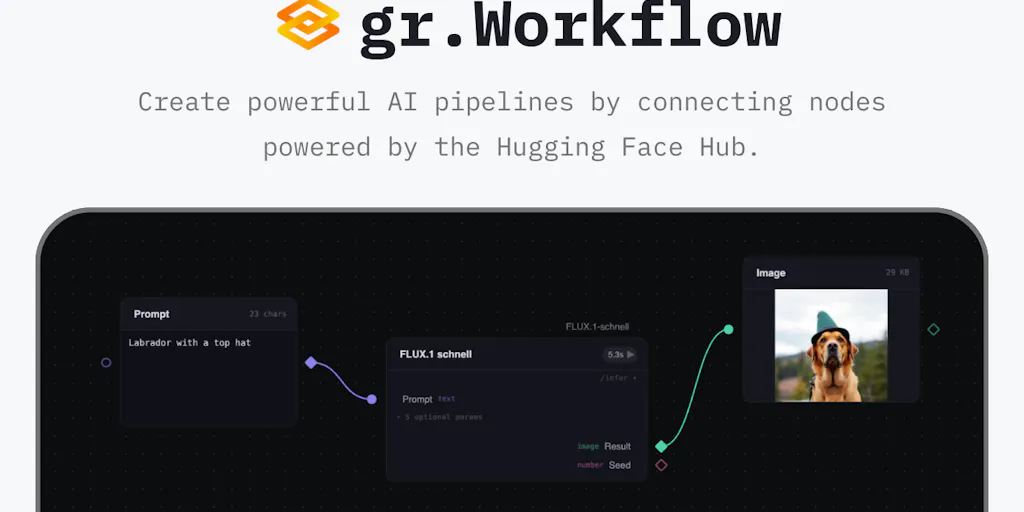
The maker, hannah, frames the problem bluntly: “every multi-step ai thing i’ve built ends up as something that works on my machine and nowhere else.” The pitch is that you build an AI pipeline as a graph — inputs, steps, outputs — and the graph itself is the thing you share. There’s no separate UI to write afterward. It taps into the Hugging Face Hub so that any model served by inference providers, anyone’s public Space, and datasets all drop onto the canvas as nodes. Nothing to download, nothing to wrap. Your own Python functions sit next to them, and it’s built on Gradio, so anyone who’s shipped a Gradio app already knows most of the interface. The maker explicitly says it’s still in beta and asks for issues via GitHub or Discord.
That’s the whole pitch. No pricing, no user counts, no benchmarks — all not disclosed. Which is fine, because the interesting part for us isn’t the launch itself. It’s what this class of tool says about where creator ops is heading.
The real problem isn’t “AI content,” it’s glue work
Let me reframe this for the social-media operator who skimmed the above and thought “that’s a developer tool, not my problem.”
The single biggest time sink in a modern content operation isn’t writing captions or editing video. It’s glue work: moving an asset from the place it was generated to the place it gets scheduled; re-encoding a vertical cut for TikTok versus Reels versus Shorts; pulling a UTM-tagged link out of one dashboard and pasting it into another; regenerating a thumbnail because the first one underperformed. Every one of those steps is a tiny integration, and most teams solve them with a human being acting as middleware.
The graph-based approach Gradio is betting on is a direct answer to that. Instead of “generate image → download → upload to Canva → export → upload to scheduler,” you describe the pipeline once and share the pipeline. When I’ve tested similar node-based builders in the past — think n8n or Make wired into an image model — the friction wasn’t the building. It was the sharing. Sending a colleague a workflow they can’t run without your API keys is not a handoff, it’s a hostage situation.
Why this matters more to TikTok and Shorts creators than to LinkedIn ones
Here’s my take, and I’ll flag it as opinion: the creators who should care most about pipeline-sharing tools are the ones whose platforms reward volume with variation. TikTok’s distribution model keeps re-testing your content against fresh audience pools, which means the marginal value of your 40th video variant is higher than on a platform where a single post can carry your week. Same logic for YouTube Shorts, where watch time and swipe-away rate dominate. If you’re producing 5–15 short-form variants a day, automating the variation step — different hooks, different thumbnails, different caption framings — is where the leverage is.
LinkedIn and X are different beasts. Their algorithms lean harder on engagement rate and dwell time on a small number of posts, and the format is mostly text. You don’t need a graph pipeline to draft ten LinkedIn posts; you need a good prompt and a strong point of view. So if you’re a LinkedIn-first creator, this launch is intellectually interesting but operationally low-priority. If you’re a short-form operator, it’s closer to a missing piece.
How it stacks up against what you’re already using
The honest comparison set here isn’t other AI app builders. It’s the tools you already pay for and the duct tape holding them together.
Against Buffer, Hootsuite, Later, and Metricool: these are distribution and analytics layers. They schedule, they report, they suggest best times. None of them are trying to be the place where you build the content asset. Gradio’s graph approach lives upstream of all of them. In a mature stack, you’d build the pipeline in something like this, output the asset, then hand it to your scheduler. No overlap, no competition — but also no integration promised in the source, which is a gap worth noting.
Against Zapier and Make: these are the incumbents for “connect two SaaS tools.” They’re excellent at triggers and actions across APIs. What they’re not great at is AI-native pipelines where the middle step is “run this model on this input.” You can bolt an OpenAI call into a Zap, but the mental model is still trigger → action, not graph of interconnected model nodes. Gradio’s pitch is closer to a visual DAG for AI steps, which is a meaningfully different abstraction.
Against ComfyUI and Langflow: these are the node-graph tools most AI tinkerers already know. ComfyUI owns the image-generation graph niche; Langflow owns LLM orchestration. Gradio’s differentiation, per the maker, is the direct Hugging Face Hub integration — “any model served by inference providers, anyone’s public space, datasets, all of them drop onto the canvas as nodes.” That’s a real convenience if your work lives in the HF ecosystem. If it doesn’t, the value proposition shrinks fast.
Where the math breaks
Two things I’d want to verify before recommending this to a team.
First, inference cost. The maker says models are served by inference providers, which almost always means metered API calls. If you’re running a pipeline that generates 50 image variants a day for a TikTok testing cadence, your per-post cost could quietly exceed what you’d pay for a flat-rate tool like CapCut or Canva Pro. The source doesn’t disclose pricing, so I can’t do the math — but you should, before you build a workflow that becomes expensive to run at scale.
Second, sharing semantics. “The graph is the thing you share” is a beautiful sentence. What it doesn’t tell me is whether the recipient needs their own API keys, their own HF account, or their own compute. If sharing a graph means sharing a dependency tree of credentials, the collaboration story is weaker than it sounds. In my experience with node-based tools, this is where 80% of the friction hides. I’d bet the beta has rough edges here.
What creators and social teams can actually borrow from this
Even if you never open the tool, there are three transferable ideas worth stealing for your own operation this quarter.
1. Treat your content workflow as a graph, not a checklist. Most social teams run a linear checklist: ideate → script → shoot → edit → caption → schedule → analyze. That’s fine for one-off posts. It falls apart when you’re producing at volume, because steps that should run in parallel (thumbnail generation and caption drafting, for example) get serialized by habit. Sketch your workflow as a graph on a whiteboard. You’ll find at least two steps you can run concurrently, and at least one step you’re doing manually that a tool could do.
2. Prefer tools where the artifact is the workflow. This is the deeper lesson from Gradio’s pitch. When you build a Notion template, the template is the artifact. When you build a spreadsheet, the spreadsheet is the artifact. When you build a node graph, the graph is the artifact. Every time you choose a tool where the thing you built can be handed to someone else and run, you reduce your own bus factor and multiply your team’s throughput.
3. Watch the Hugging Face ecosystem even if you’re not technical. Hugging Face has quietly become the App Store for open models. Public Spaces are live demos anyone can use. Datasets are the raw material for fine-tunes. If you’re a creator who commissions custom models — a brand-voice fine-tune, a product-photo generator, a face-swap for UGC — your freelancer is probably already working in this ecosystem. Understanding its shape makes you a better client and a better buyer.
A sidebar for indie founders specifically
If you’re a solo founder using content as your distribution channel, the appeal here is different. You don’t have a content team; you are the content team. Your constraint isn’t throughput, it’s attention residue — the cognitive cost of context-switching between “build the thing” and “market the thing.”
A tool that lets you build a small interactive demo (a “try it yourself” widget, a lead-magnet calculator, a personalized recommendation engine) and share it as a single link is genuinely valuable, because it collapses the build-and-market loop. You build the pipeline, you drop the link in your bio, you move on. That’s the indie-founder use case, and it’s the one I’d bet this launch actually serves best — better than the enterprise content-team use case the maker’s framing gestures at.
Where I think this falls short
I’ll be direct, because hype doesn’t help anyone.
It’s a developer tool wearing creator-tool clothing. The maker’s language — “Python functions,” “Gradio app,” “GitHub repo,” “Discord” — is unambiguous. This is for people comfortable in code. The creator who lives in CapCut and Canva is not the target user, and pretending otherwise does them a disservice. If you’re not technical, bookmark this and wait for the no-code layer someone will inevitably build on top.
The beta caveat is real. “It is still in beta, so feel free to report any issues” is a trust signal, not marketing. Betas break. If your content calendar depends on a pipeline, don’t put a beta tool in the critical path. Prototype with it, sure. Don’t stake a launch on it.
No pricing, no user counts, no benchmarks. The source is silent on all three. The team claims the Hugging Face integration is seamless; I have no way to verify that from a launch page. Treat the claims as claims.
The comparison to schedulers is a category error the launch invites. Some readers will look at this and think “another content tool.” It isn’t. It’s an app-building tool. If you go in expecting a Buffer replacement, you’ll be disappointed. Go in expecting a way to ship small AI-powered experiences, and the value is clearer.
Who it’s NOT for: LinkedIn-first thought leaders, newsletter writers, community managers who mostly reply and moderate, and anyone whose content strategy is “one great post a week.” Your bottleneck is judgment, not pipelines. Skip this.
What I’d watch / test next
Three concrete things I’d do this week if I were running a short-form-heavy account or an indie product with a content-led growth motion.
First, audit your glue work. For one week, log every manual step between “idea” and “published post.” You’ll almost certainly find two or three steps that are pure mechanical transfer — moving files, renaming assets, pasting links. Those are your automation candidates, whether you solve them with this tool, with Make, or with a $20 Fiverr script.
Second, prototype one shareable widget. Not a full pipeline — one small thing. A “which product is right for you” quiz that runs on a model. A caption rewriter your audience can paste into. A thumbnail A/B tester. Ship it as a link, put it in your bio for a week, and watch whether it moves any of your UTM-tagged traffic. The point isn’t the widget; it’s learning whether interactive assets belong in your content mix.
Third, watch the pricing page. When this tool (or its inevitable competitor) publishes pricing, the calculus changes. If it lands under $30/month for individual creators, it becomes an easy experiment. If it’s usage-metered at inference-provider rates, run the math on your actual volume before committing. And if you’re already deep in the Hugging Face ecosystem, spin up a beta account and build one throwaway graph — just to feel whether the “graph is the artifact” promise holds up when you actually try to hand it to someone else. That’s the test that matters.