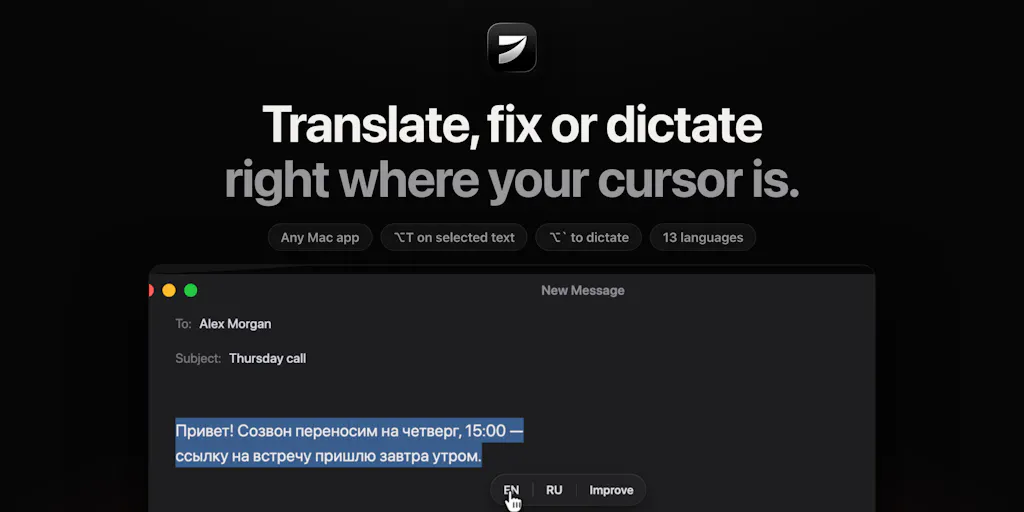
The hotkey is the product: what Jarq gets right about AI text workflows
Most AI writing tools fail for a boring reason: they live somewhere other than where you write. You draft an email in Gmail, a caption in Buffer, a cold DM in LinkedIn — and the “AI assistant” is in another tab, waiting for you to paste text in, prompt it, and paste the result back. That copy-paste loop is not a workflow. It’s a tax. So when I saw Jarq, a macOS utility from solo indie developer Birzhan Abishev, I paid attention — not because translation is a novel category, but because the interaction model is the whole pitch: select text, hit a hotkey, move on. For anyone who runs social accounts across multiple languages or juggles five platforms in a day, that’s the kind of friction removal that actually compounds.
What Jarq actually is, minus the launch-page gloss
Jarq is a macOS text-action tool. You highlight text in any Mac app, press a hotkey, and it translates, shortens, fixes, or rewrites that text in place. There’s also a dictation mode bound to ⌥` that lets you speak in one language and get clean, punctuated text in another. Translation covers 13 languages, per the maker’s launch post. The name comes from the Kazakh word «жарқ», meaning a flash of light — the maker’s framing for “select, hotkey, done.”
The pricing is unusually creator-friendly for this category: free for five actions a day, forever, with Pro at $4.99/month, $39/year, or a $200 one-time lifetime payment. Everyone gets a 14-day Pro trial with no card and no account required. It requires macOS 13+ on Apple Silicon — so Intel Mac users are out, at least for now.
On privacy, the maker is refreshingly direct rather than vague: Jarq uses cloud AI models (he names GPT and Whisper) to process text and voice, Jarq itself doesn’t retain your text on its servers, and your history stays local on your Mac. That’s a meaningful distinction — processing in the cloud but not storing it — and it’s the kind of claim I’d want to see spelled out in a privacy policy before I fed it client work. My take: “we don’t keep it” is better than “we train on it,” but it’s still cloud processing, and that matters if you’re under an NDA or handling unreleased campaign copy.
Why the hotkey model matters more than the feature list
I’ve spent years watching “AI writing assistants” get bolted onto everything — Notion, Google Docs, Grammarly, a dozen Chrome extensions — and the pattern is consistent: the tool is powerful but the context switch kills adoption. You’re in flow, you hit a wall on a sentence, and now you have to leave the document, open a chat, re-explain what you want, and paste back. By the time you’ve done that three times, you’ve lost the thread.
A select-and-hotkey tool collapses that to a single gesture. This is the same reason Raycast and Alfred built devoted followings on Mac — they meet you where your hands already are. It’s also why Wispr Flow and Superwhisper have gained traction for dictation specifically. The maker explicitly positions Jarq against those two, and his differentiation claim is worth quoting precisely: Wispr Flow and Superwhisper “are great at dictation,” but Jarq “is built around the text actions — and translation is the core, not an add-on.”
That’s a real strategic choice, and I think it’s the right one for a solo developer. Dictation is a crowded, well-funded race. Text actions — especially translation — are a narrower lane with a specific, underserved user: people who write professionally in a language that isn’t their first. If that’s you, the value proposition is obvious. If it isn’t, Jarq is competing on convenience alone, and convenience is a harder sell.
Why TikTok and Instagram creators should care more than LinkedIn ones
Here’s where I’ll get opinionated. If your content is English-only and you post to LinkedIn, Jarq is a nice-to-have. If you run TikTok, Instagram Reels, or YouTube Shorts and you’re trying to reach non-English audiences — or you’re a non-native English speaker producing in English — this is closer to a must-test.
Why? Because short-form video is the one format where translation actually changes your distribution math. Captions, on-screen text, and hook copy are cheap to localize and expensive to ignore. A creator who can turn one English script into Spanish, Portuguese, and Hindi caption variants in a few hotkeys is effectively multiplying their addressable audience without re-shooting anything. That’s not a “10x your reach” claim — reach depends on the algorithm, not your tool — but it is a real reduction in the cost of testing a new market. The team’s framing is that Jarq is for people who write in a language that isn’t their first; I’d extend that to anyone running a multi-market content calendar.
LinkedIn, by contrast, is a platform where a slightly awkward sentence costs you less, because the feed rewards substance and dwell time over polish. The marginal value of a rewrite hotkey is lower there. Not zero — just lower.
The dictation question that the launch thread got right
The most useful comment on the launch page came from Gal Dayan, who asked exactly the right technical question: when you speak in one language and get output in another, does the tool wait for a pause to commit the translation, or does it stream and self-correct as you talk? His reasoning was sharp — “that’s usually where these tools either feel magic or feel laggy.”
This is the kind of question that separates a demo from a daily driver. Real-time speech translation has a latency-vs-accuracy tradeoff baked into its architecture. Commit-on-pause gives you cleaner output but breaks your rhythm. Streaming correction feels responsive but can produce jittery text that you then have to fix — which defeats the purpose. I don’t know which approach Jarq uses, because the source doesn’t say, and I won’t guess. But I’d bet this single design decision determines whether dictation becomes a habit or a novelty. If you’re testing Jarq, test the dictation specifically on a long, meandering sentence — the kind you’d actually speak — and watch whether it waits or guesses.
Where I think Jarq falls short — and who shouldn’t bother
Let me be balanced, because launch pages rarely are.
Platform lock-in is severe. macOS 13+ on Apple Silicon only. No Windows, no Intel Macs, no web, no mobile. For a solo dev that’s a sensible scope decision. For a social team where half the people are on Windows laptops, it’s a non-starter. If your workflow lives in a browser on a Chromebook, this tool does not exist for you.
Cloud processing is a real constraint. The maker is transparent that text and voice go to cloud models. If you’re handling embargoed product copy, unreleased campaign creative, or anything under client confidentiality, “we don’t store it” may not be enough for your legal or compliance team. I’d want a written DPA before I used it on client work.
The free tier is a taste, not a tool. Five actions a day is enough to build the habit and not enough to run a content operation. That’s fine — it’s a trial by another name — but don’t expect to localize a week of captions on the free plan.
Translation quality is unverified here. The source claims 13 languages and names GPT and Whisper as the underlying models, but says nothing about accuracy benchmarks, tone control, or how it handles idioms. My experience with general-purpose translation models is that they’re strong on Spanish, French, and German, and noticeably shakier on languages with heavy register variation or non-Latin scripts. I wouldn’t ship client-facing copy in Japanese or Arabic without a native review pass, regardless of which tool produced it.
The $200 lifetime price is a bet. It’s a good deal if the product survives, and a sunk cost if the solo developer moves on. That’s not a knock on Birzhan — it’s the structural risk of buying lifetime access to a one-person product. Factor it in.
Where the math breaks
Run the numbers on your own usage before you upgrade. If you translate or rewrite fewer than five things a day, the free tier covers you forever. If you’re a heavy user doing 30+ actions a day, the $39/year works out to roughly eleven cents a day — trivially worth it if it saves you even a few minutes. The lifetime option only makes sense if you’re confident you’ll still be using it in three-plus years, which is roughly the break-even against the annual plan. I’d start annual and upgrade later if it sticks.
What creators and social teams can borrow from this
Even if you never install Jarq, there are three operational lessons in this launch worth stealing.
One: audit your copy-paste loops. Every time you leave your writing surface to use an AI tool, you’re paying a context-switch tax. Count how many times a day you do it. If it’s more than a handful, you have a workflow problem that no amount of better prompting will fix. The solution is usually a hotkey, a snippet, or a browser extension — not a smarter model.
Two: treat localization as a distribution lever, not an afterthought. The creators winning on TikTok and YouTube right now are the ones who ship the same idea in three languages instead of one. Caption translation is the cheapest version of that. You don’t need Jarq for it — you could use DeepL or Google Translate — but you do need to build the step into your publishing checklist.
Three: prefer tools that live inside your existing stack. This is the same principle behind why Buffer, Later, and Metricool beat juggling native apps — fewer tabs, fewer logins, fewer places for a post to fall through the cracks. Jarq applies that logic to text actions. If you’re evaluating any new AI tool this quarter, ask where it lives relative to where you actually work. If the answer is “in a separate tab,” it’s probably not going to stick.
What I’d watch / test next
Here’s what I’d actually do this week if I were evaluating Jarq for a real content operation.
First, install the free tier and stress-test the translation on your hardest language pair — not the easy one. Feed it a paragraph of your own published copy, not a clean sample, and see how it handles your voice. Second, test the dictation on a genuinely long, unstructured sentence to answer Gal Dayan’s pause-vs-stream question for yourself, because that’s the feature most likely to delight or disappoint. Third, check whether your team’s machines even qualify — macOS 13+ on Apple Silicon rules out a lot of hardware. Fourth, read the privacy documentation before you put client work through it, and get sign-off if you’re under contract. And fifth, watch the maker’s engagement. Birzhan said he’d be “here all day answering every comment,” and for a solo product, how the developer responds to hard questions in the first month tells you more about the roadmap than any feature list.
My overall take: Jarq isn’t trying to be a platform. It’s trying to be a gesture. That’s a smaller ambition and a smarter one. If you write in a second language for a living, it’s worth an afternoon. If you don’t, bookmark it and move on — the hotkey insight is still worth stealing.


