The vlog bottleneck isn’t editing — it’s the gap between shooting and assembling
If you publish video across Instagram Reels, TikTok, YouTube Shorts, or even long-form YouTube, you already know the dirty secret of the creator workflow: filming is the fun part, and assembling is where momentum dies. The average social operator I talk to shoots three to five times more footage than they ever post, not because the clips are bad, but because the edit is a tax. You open CapCut or Premiere, you scrub through 40 minutes of raw phone video, you try to remember which clip came after which, and by the time you’ve built a rough cut, the trend you were chasing has cooled. That’s the gap JOGAK is trying to close, and it’s why the launch caught my eye even though it’s a small indie app with no funding announcement and no user numbers attached. The pitch, per the maker’s own post, is that your vlog “can come together while you’re filming” — record the moments you want to keep, and the app joins them in shooting order on one timeline. That’s a workflow claim, not a feature claim, and workflow claims are the ones worth stress-testing.
What JOGAK actually is, per the source
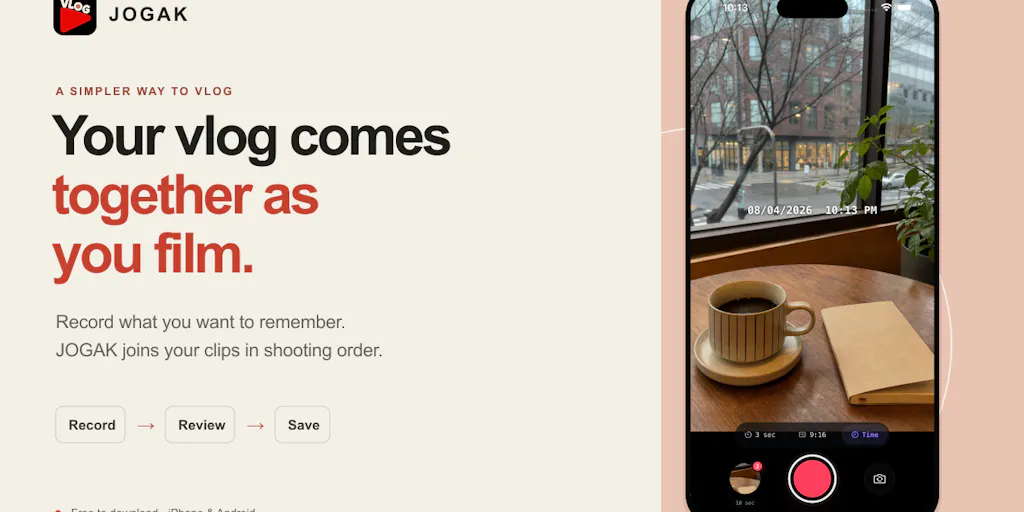
The maker, who goes by Coolpisoo on Product Hunt, describes JOGAK as an app for “everyday video diaries, walks, trips, and moments with family or pets.” The core loop: record clips, let the app stitch them in shooting order on a single timeline, then review the sequence, rearrange or trim clips, add text or music, and save the finished video to your phone. It’s free to download. Exports carry the JOGAK logo by default, and you can remove it by watching an ad. No sign-up is required. The maker explicitly asks for feedback on the “recording-to-export experience,” especially from people new to making vlogs, and wants to know which part feels easy and where users get stuck.
That’s the entire factual surface of the launch page. No pricing tiers beyond the free download, no disclosed user counts, no stated platform integrations, no export resolution specs, no mention of cloud sync or team features. If you’re looking for a Hootsuite-style scheduling layer or a Metricool-style analytics dashboard, this isn’t that. I’d categorize it as a capture-and-assemble tool, closer in spirit to the “record now, arrange later” philosophy behind Apple’s Clips or the auto-stitch behavior in some GoPro companion apps than to a full nonlinear editor.
The real problem JOGAK solves — and why it’s a social-media problem, not just a hobbyist one
Here’s where I’ll put on my operator hat. The single biggest predictor of whether a creator posts consistently isn’t talent or gear — it’s friction between capture and publish. Every additional step between “I filmed this” and “this is live on Instagram” is a place where a post goes to die. This is why the repurposing-industrial-complex exists: tools like Repurpose.io and Opus Clip exist specifically to shrink that gap for people who already have finished assets. But there’s an earlier gap that almost nobody addresses: the gap between raw footage and a first assembly. That’s the gap JOGAK is aiming at, and I think it’s a genuinely underserved slot in the creator stack.
Why TikTok creators should care more than LinkedIn ones
The value of “shooting order = edit order” scales with how much you shoot and how fast you need to publish. A TikTok or Reels creator filming a day-in-the-life, a travel diary, or a “come with me” vlog is capturing 20–60 short clips in a session and needs a rough sequence fast so they can add a hook, a caption, and a trending sound. A LinkedIn creator posting a talking-head thought-leadership clip shoots one take and needs almost no assembly. So the math favors short-form video natives, travel and lifestyle creators, and anyone doing daily or near-daily diary content. If your content is scripted, storyboarded, and shot in one controlled session, the “shooting order” premise buys you very little — you already know your edit order because you planned it.
Where the math breaks
The shooting-order premise assumes your best edit is chronological. That’s true for diaries, walks, and trips. It’s false for almost everything else. Comedy sketches, tutorials, listicles, before/after transformations, and hook-first short-form all depend on reordering — putting the payoff first, the setup second. If you’re a growth marketer building a UGC-style ad, you’re deliberately breaking chronology to front-load the hook in the first 1.5 seconds. In those formats, an auto-assembled shooting-order timeline is just a starting point you’ll immediately dismantle, which means the tool saves you the import step but not the edit step. That’s still something, but it’s not the “vlog comes together while you film” promise in its strongest form.
What creators and social teams can borrow from the JOGAK approach
Even if you never download JOGAK, the workflow philosophy is worth stealing. I’ve been running a version of it manually for years, and it’s the single biggest unlock I’ve found for posting volume without burning out.
The principle: decide your sequence at capture time, not at edit time. When I scheduled 30 posts across five platforms last month for a client’s travel account, the posts that shipped fastest were the ones where the creator filmed in deliberate order and narrated a mental “this goes first, this goes second” as they shot. The posts that stalled were the ones where they dumped 200 clips into a folder and hoped the edit would reveal itself. It never does. The edit is where indecision compounds.
Three borrowable practices:
- Shoot in publish order. If you know the story beats, film them in the order you’ll cut them. This sounds obvious and almost nobody does it. It turns your editor from a puzzle into a trim pass.
- Trim on the timeline, not in the camera roll. Deleting bad takes in your phone’s gallery is a trap — you lose the context of what came before and after. Reviewing on a timeline (which is exactly what JOGAK does, per the maker’s description) preserves sequence and makes cuts faster.
- Treat the logo-or-ad export as a pricing signal. The “watch an ad to remove the logo” model is a classic freemium lever, and it’s worth understanding as a creator because it tells you what the maker values: reach over revenue, at least at launch. For a free tool with no sign-up, that’s a reasonable trade. My take: if you’re publishing brand work, a logo bug in the corner is a non-starter, so the ad-watch is effectively mandatory for professional use. That’s not a criticism, it’s just the real cost of the free tier.
The question every creator should ask a free tool
Amanda Ornellas Gutierres asked the sharpest question on the launch page: “For the free export with the logo, where does it show up, and how big is it? Wondering if it covers part of the video.” That question is unanswered in the source as of this writing. It matters enormously. A small corner watermark is ignorable; a centered or bottom-third bug that overlaps captions or a subject’s face ruins the export. Until the maker answers, treat the free tier as “free with unknown visual cost.” If you’re testing it this week, export one clip and inspect the logo placement before you commit a real post to it. I’d bet the answer is a corner watermark, because that’s the industry norm, but that’s my inference, not a sourced fact.
How JOGAK stacks up against the tools you already pay for
Let’s be honest about the competitive set, because “free vlog app” is a crowded shelf.
CapCut is the default for most short-form creators. It’s free, it’s powerful, and its auto-caption and template features are genuinely best-in-class. But CapCut is an editor you open after shooting. It doesn’t change the capture-to-assembly gap; it just gives you better tools once you’re already in the edit. JOGAK’s differentiation is upstream of that — it wants the assembly to start during capture.
Canva plays in the same “easy content” lane but skews toward graphics, carousels, and templated video. It’s a design tool with video bolted on, not a capture tool. Different job.
Apple Clips is the closest philosophical cousin: record, arrange, add captions and music, export. But Clips is iOS-only and Apple-ecosystem-locked, and its momentum has faded. JOGAK’s maker doesn’t disclose platform support in the launch post, which is a real gap — if it’s iOS-only, it inherits Clips’ ceiling.
GoPro Quik and similar action-cam companions auto-stitch footage, but they’re tied to hardware ecosystems and lean on music-driven montages rather than chronological diaries.
InShot and Splice are the mobile-editor incumbents that most vloggers actually use. They’re mature, they have huge template libraries, and they’ve been optimized for years. A new indie app has to be meaningfully faster or simpler to pull users off them.
Where JOGAK could win: radical simplicity and zero onboarding friction. No sign-up, free download, one clear loop. For a first-time vlogger — the exact audience the maker is asking for feedback from — that’s a lower barrier than any of the incumbents. Where it likely struggles: no disclosed templates, no disclosed platform-specific export presets (9:16 vs 16:9 vs 1:1), no disclosed analytics or scheduling, and no disclosed team features. For a solo hobbyist, none of that matters. For a social media manager running a brand account, most of it does.
Why the “no sign-up” detail is bigger than it looks
In an era where every app wants your email, your Google account, and a seven-day trial before you see a single feature, “no sign-up required” is a genuine differentiator. From a growth standpoint, it removes the single biggest drop-off point in mobile onboarding. From a creator standpoint, it means you can test the app in the time it takes to record three clips. From a trust standpoint, it means the maker isn’t harvesting your data as the price of admission — at least not visibly. I’d flag that as a positive signal, with the caveat that “no sign-up” doesn’t automatically mean “no data collection,” and the source doesn’t address privacy practices at all.
Where my judgment says JOGAK falls short (or at least stays silent)
I want to be balanced here, because the launch page is thin and I’m not going to invent details to fill it.
Platform support is undisclosed. iOS, Android, or both? This is the first thing I’d want to know and the source doesn’t say. If it’s iOS-only, the addressable audience shrinks dramatically — Android dominates global smartphone share, and a huge chunk of TikTok and Reels creators shoot on Android.
Export specs are undisclosed. Resolution, frame rate, aspect ratio options, file size limits. For social publishing, aspect ratio flexibility is non-negotiable — you need 9:16 for Reels and TikTok, 1:1 or 4:5 for feed posts, 16:9 for YouTube. If JOGAK only exports one ratio, it’s a diary app, not a social publishing tool.
No scheduling, no analytics, no cross-posting. This isn’t a knock — it’s not what the app is for. But if you’re a social media manager evaluating it against Buffer, Later, or Hootsuite, understand that JOGAK sits entirely upstream of those tools. It produces an asset; it doesn’t distribute or measure one. Your workflow would be: shoot and assemble in JOGAK, export to camera roll, then upload to your scheduler. That’s an extra hop, and extra hops are exactly what the app claims to eliminate. There’s a tension there worth naming.
The maker’s own framing is a tell. The launch post asks for feedback “especially if you’re new to making vlogs.” That’s not a growth-marketer pitch — it’s a hobbyist pitch. Which is fine, and arguably more honest than most launches. But if you’re running a brand account with UTM-tagged links, a content calendar, and approval workflows, you are not the target user, and you shouldn’t evaluate it as if you were.
No monetization path is disclosed beyond the ad-removal export. No subscription tier, no pro features, no pricing page mentioned. For a free indie app, that raises the obvious sustainability question: what happens when the maker’s time or hosting costs outrun ad revenue? I’ve watched a dozen promising free creator tools get acqui-hired and shut down. If you build a workflow around JOGAK, keep your raw footage in a place you control.
Who JOGAK is NOT for
- Brand social teams needing approval workflows, asset libraries, or role-based access.
- Creators who need multi-aspect-ratio exports for cross-platform publishing.
- Anyone whose content depends on non-chronological editing (comedy, tutorials, ads).
- Android users, if the app turns out to be iOS-only (unconfirmed).
- Agencies managing multiple client accounts — there’s no disclosed multi-account support.
What I’d watch / test next
If you’re a creator or social operator reading this, here’s what I’d actually do this week — concrete, low-effort, and reversible.
First, if you shoot diary-style or travel content, download JOGAK and run one real session: film five to seven clips in the order you’d want them to appear, then export and inspect two things — the logo placement Amanda asked about, and the export aspect ratio. Those two facts determine whether it’s usable for social publishing or just personal archiving. Second, regardless of whether you keep the app, adopt the “shoot in publish order” habit for one week and measure how much faster your edits go. That’s free and it’s the real lesson here. Third, if you’re evaluating it for a brand account, don’t — not yet. Wait for disclosed platform support, export specs, and some signal on sustainability. Fourth, watch the maker’s replies on the launch thread; indie devs who answer hard questions publicly tend to ship faster and more transparently than the ones who go quiet after launch day.
The bigger trend I’m tracking: the creator stack is bifurcating into capture-side tools that reduce friction before the edit and distribution-side tools that automate after it, with the traditional editor getting squeezed from both ends. JOGAK is a small, early bet on the capture side. Whether it survives depends less on the idea — which is sound — and more on the unglamorous details the launch page hasn’t told us yet.


