The Proactive Assistant Is Coming for Your Calendar — Here’s Why Social Operators Should Pay Attention
Every social media manager I know has the same secret: the tool stack is not the hard part. The hard part is the initiation problem. Nobody tells you when to post the thing, follow up on the collab, or notice that a scheduled TikTok got rejected by the API at 2 a.m. You find out because you checked — not because something told you. So when a product launches on the premise that the assistant should text you first, when something needs doing, my ears prick up. That’s Kiwi, a proactive assistant from maker Aneesh Modi, and while it’s pitched at personal life admin — flights, parcels, Saturday plans — the operating model it’s testing is exactly the model I think social tooling is about to adopt. Let me explain why this launch matters to anyone running accounts for a living, and where I think it falls short.
The problem Kiwi is actually solving (and why it’s a social-media problem in disguise)
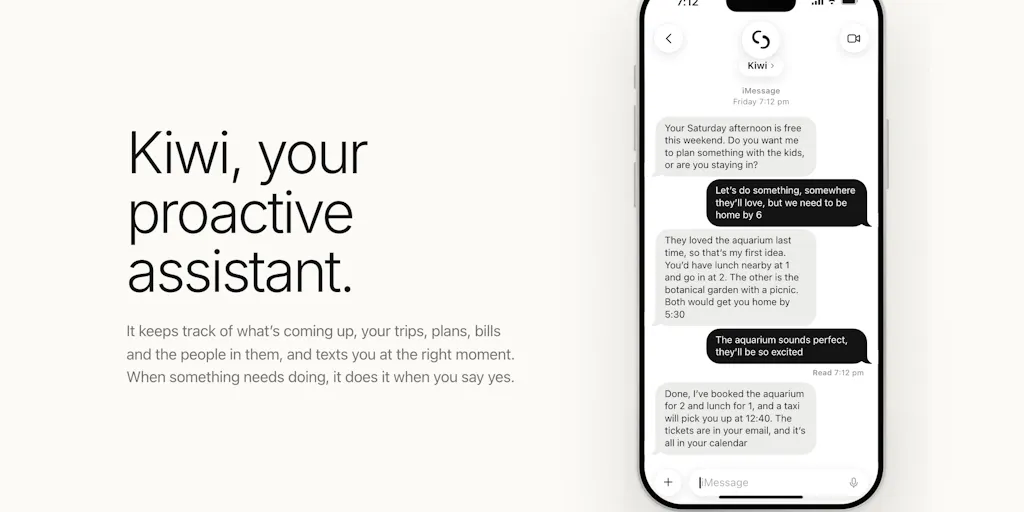
Read the launch copy closely and you’ll notice Kiwi isn’t framed as a chatbot. The maker’s core claim is that most assistants wait for you to ask, and Kiwi flips that: it texts you first when something needs doing. The examples are deliberately mundane — a delayed flight that triggers a taxi offer, a parcel that needs a signature, a free Saturday afternoon it offers to fill with plans for the kids. You reply “yes,” and it does the checking, the apps, the websites, and only confirms once the company confirms. That’s the whole interaction loop: the maker describes saying yes as “the whole job”.
Now map that onto a creator’s week. The reason social operators drown isn’t that scheduling is hard — Buffer, Later, and Hootsuite have made queueing posts a solved-ish problem. The drowning comes from the unasked work: the comment thread that’s about to turn hostile, the brand deal deliverable due Friday that nobody put on the calendar, the Instagram Reel that underperformed because the hook was buried at second four, the UTM link that got truncated in the bio. None of those announce themselves. A proactive layer that watches your connected accounts and pings you before the fire — that’s the actual product gap in this category, and Kiwi is a clean proof of concept for the interaction pattern.
Why the “texts you first” model is the interesting part
I’ve tested enough “AI assistant” tools to be cynical about chat interfaces. The dirty secret of most of them is that they’re a search box wearing a personality. You still have to know what to ask. The genuinely hard engineering problem — and the one Kiwi is staking its identity on — is deciding what’s worth interrupting a human for. In the comments, a user named Neeraj Nathany asks exactly this: does a delayed flight always ping, but a free Saturday only sometimes? The maker’s answer is the most useful thing on the page: a delayed flight always gets a text because it changes your plans, while a Saturday suggestion only fires when it really fits — for example, when you haven’t made plans yet. That’s a relevance threshold, and every social tool that wants to be proactive will have to build one. If your scheduling tool pinged you every time engagement dipped 2%, you’d mute it in a week. The craft is in the calibration.
How it differs from the incumbents you’re already paying for
Here’s where I’d draw the comparison lines, because “AI assistant” is a crowded shelf and most of it is noise.
Versus scheduling suites. Metricool, Buffer, and Later are pull tools — you go to the dashboard, you read the analytics, you decide. Kiwi is a push tool. The philosophical difference matters more than the feature list: pull tools assume you have the discipline to check; push tools assume you don’t, and route the signal to where you already are — your messages. For a solo founder juggling Instagram, TikTok, and LinkedIn between other work, push is often the difference between catching a trend and reading about it three days late.
Versus general AI chat. ChatGPT and Claude will happily draft your captions and repurpose a YouTube script into a Threads thread — but they don’t know your flight is delayed, your parcel needs a signature, or your Saturday is empty, because they’re not wired into your calendar and inbox the way Kiwi claims to be. The maker confirms it has your email and calendar and handles both work and personal admin: briefing you before meetings, flagging emails that need a reply. That ambient context is the moat, and it’s also the risk — more on that below.
Versus the “agentic browser” wave. The genuinely novel claim here is that Kiwi does the checking, the apps, and the websites and only tells you something is booked once the company confirms. That’s an execution layer, not a suggestion layer — closer to what the agentic-browsing crowd is chasing than to a notification app. The maker is upfront that it isn’t perfect yet: some sites ask you to prove you’re human. That single sentence tells you more about the maturity of the category than any landing-page claim.
The Kiwi Band and the screen-time angle
There’s a hardware footnote worth flagging: the team is building the Kiwi Band, a screenless wrist band that buzzes when Kiwi needs you and takes a tap or voice reply, so your phone can stay pocketed. It’s free during the pilot according to the maker. My take: the band is a tell. It reveals that the team’s real thesis isn’t “assistant” at all — it’s ambient computing for people who want less screen time. That’s a much bigger and more interesting bet than another chat app, and it’s also the part I’d watch most skeptically, because hardware pilots have a way of staying pilots.
What creators and social teams can borrow from this launch
Even if you never install Kiwi, the launch is a masterclass in product thinking you can steal for your own content ops. Three things stood out to me.
1. Build your own proactive layer with what you already have
You don’t need a wristband to stop being the bottleneck. In my own workflow, the highest-leverage change I’ve made is turning pull checks into push alerts: a Slack or Telegram bot that pings me when a scheduled post fails, when a comment hits a sentiment threshold, or when a brand-deal deliverable is 48 hours out. Most scheduling APIs and analytics tools expose webhooks for exactly this. The Kiwi lesson isn’t “buy Kiwi” — it’s “stop waiting to be asked.” If you’re on YouTube and Pinterest especially, where a single asset can drive traffic for months, a proactive reminder to refresh the pin description or update the end screen pays for itself.
2. Relevance thresholds beat notification volume
The delayed-flight-versus-free-Saturday distinction is the most transferable idea on the page. When you set up alerts for your own accounts, apply the same logic: always ping for things that change plans (a post failed, a payment cleared, a client replied), sometimes ping for nice-to-haves (engagement is up, a trend is rising). If you can’t articulate which bucket a notification belongs to, don’t build it. Your future self will thank you.
3. The “only confirm once it’s confirmed” principle
The maker’s promise that Kiwi only tells you something is booked once the company confirms it sounds boring. It’s actually the trust architecture of the entire product. Social teams should steal it wholesale: your client-facing status updates, your “the collab is live” messages, your reporting dashboards — all of them should distinguish scheduled from published from confirmed live. I’ve seen more agency trust destroyed by a “posted!” Slack message that turned out to be a failed API call than by almost anything else.
Where my judgment says it falls short
Time for the balance section, because this is a launch page and launch pages are, by design, the best possible version of a product.
The privacy surface is large and under-specified. Kiwi has your email, your calendar, and — if you opt in — your WhatsApp. The maker addresses the obvious fears: it always shows the price before booking, never types your card number, and never shows your passwords to an AI. On messages, the answer to a user asking whether Kiwi reads texts is that it only reads your messages if you want it to, and that iMessages stay private because it only sees messages you send to Kiwi itself. Those are the right reassurances, but “never shows your passwords to an AI” is a promise, not an architecture, and the launch doesn’t disclose how credentials are stored or what the data-retention policy is. Not disclosed is the honest answer to most of my security questions, and for a tool with inbox access, that’s the thing I’d want answered before connecting a work account.
Enterprise email is hit-or-miss. The maker is refreshingly candid that connecting enterprise email “sometimes works, sometimes doesn’t” depending on company IT settings — some let you connect yourself, some need IT approval. For a solo creator on Gmail, fine. For a social team inside a brand, that’s a blocker until IT signs off, and IT rarely moves fast for a pilot-stage tool.
The proactivity is only as good as the integrations. Smart-home devices aren’t connected yet — the maker asks users which ones they use and how they’d want Kiwi to work with them. That’s a good sign of roadmap humility, but it also means the “ambient” promise is currently narrower than the pitch. And the human-verification problem on some booking sites is a real ceiling on the execution layer; agentic tools hit CAPTCHAs and stop, and that’s a category-wide wall, not a Kiwi-specific flaw.
Who this is not for
If you live inside a single platform and your workflow is already dialed — one Canva template, one CapCut edit, one scheduled batch a week — Kiwi adds a layer you don’t need. If you’re a large social team with a dedicated ops person and a project-management tool, the proactive-ping model is already covered by your stack, and adding a personal assistant with inbox access raises more compliance questions than it answers. And if you’re the kind of operator who genuinely enjoys the dashboard ritual, the push model may feel like losing control. Kiwi is for the person who is the bottleneck and knows it.
What I’d watch / test next
Here’s what I’d actually do this week if I were evaluating this space, whether or not I install Kiwi.
Test the relevance threshold on your own alerts. Pick one account you run and audit every notification it sends you for a week. Bucket each one as “changes plans” or “nice-to-have.” Kill or downgrade the nice-to-haves. That exercise alone will make you a better judge of whether any proactive assistant — Kiwi included — is calibrated to your tolerance.
Ask the security questions before you connect anything. If you’re tempted by Kiwi, email the maker the questions the launch page doesn’t answer: where credentials live, what the retention policy is, and what happens to calendar and email data if you disconnect. The maker’s comment-reply style suggests he’ll answer. Treat the answers as the real product spec.
Watch the Band pilot as a signal, not a product. The screenless band is free during the pilot, which means the team is buying data, not revenue. If the pilot converts to a paid hardware line, that tells you the ambient thesis has legs; if it quietly fades, the software is the business. Either way, don’t plan your workflow around hardware that may not ship.
Steal the confirmation principle for your client reporting. This one costs nothing and improves trust immediately. Separate “scheduled,” “published,” and “confirmed live” in every status update you send. It’s the least glamorous lesson from this launch and probably the most valuable.
My overall take: Kiwi is a sharper bet than most Product Hunt assistant launches because it’s solving the initiation problem rather than the answering problem, and because the maker is unusually honest about where it breaks. Whether the specific product wins is an open question — but the interaction model it’s testing is one every social tool will be copying within a year. Watch this space, and while you’re at it, go audit your own notifications.


