The video you keep putting off is now a distribution problem, not an editing problem
Every social media operator I know has a graveyard of half-finished video projects. Not because they can’t edit — because the edit loop is brutal. Cut, export, send, wait for notes, fix one timestamp, break the audio sync, re-render, repeat. For solo founders and one-person content teams, that loop is where launch momentum goes to die. So when I saw LaunchReel on Product Hunt — a Claude Code plugin from maker Gajanan Rathod that generates launch videos and talking-head reels from a prompt — my first thought wasn’t “cool AI tool.” It was: this is aimed squarely at the bottleneck that stops most creators from shipping video at all. That’s worth examining closely.
What LaunchReel actually is, and the problem it’s really solving
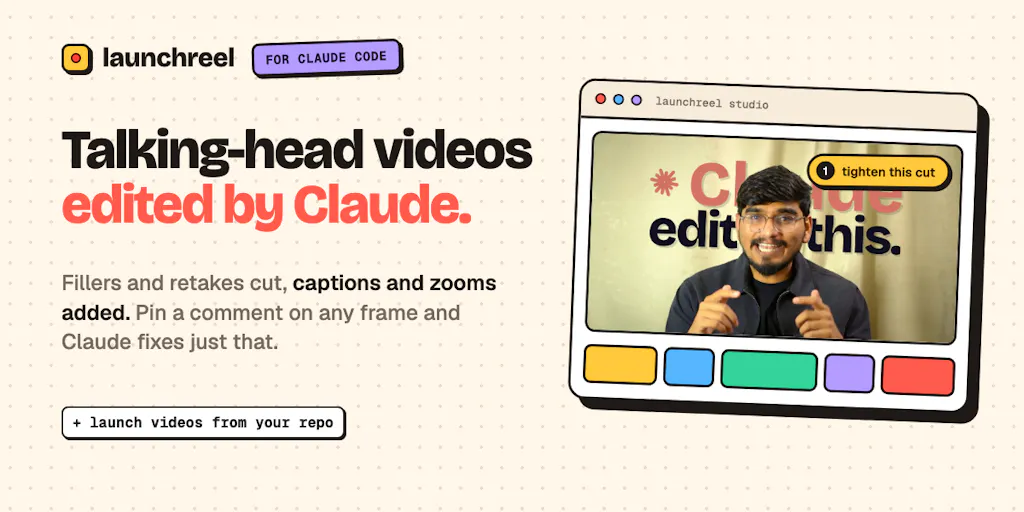
Strip away the launch-page framing and here’s the mechanic: LaunchReel is a plugin for Claude Code, which means the video is generated as code rather than rendered through a traditional timeline. You prompt it, and it produces either a talking-head reel from existing recordings — cutting fillers, pauses, and retakes, adding captions, zooms, and supporting visuals — or a launch video built from your actual product repo, where Claude writes each scene against your real product.
The maker’s own framing is refreshingly honest: he describes himself as a video editor turned maker who spent years in the edit loop, and explicitly says Claude won’t nail a video in one go. That admission matters, because it shapes the whole product. Instead of pretending the AI output is final, LaunchReel ships with a “Studio” layer:
- Frame-pinned comments. You pin a comment on any specific frame, Claude fixes that spot and replies. The maker’s claim is that nothing else re-renders and nothing else breaks — a direct answer to the classic AI-editing fear that fixing one thing silently corrupts another.
- Direct manipulation for small fixes. Click any text to change font, size, or color; drag the timeline. The maker frames these as costing “no prompt” — you’re not burning a generation to nudge a caption.
- Output specs. Original music, voiceover, 16:9 or 9:16, up to 4K. Footage stays on your machine.
Pricing is straightforward as described: your first video is free, and the first 10 founders get 50% off for three months with code FOUNDING50. Anything beyond that — seat limits, render caps, ongoing subscription tiers — is not disclosed on the page.
Why the frame-pinning detail is the actual product
I’ve tested enough AI video tools to know the failure mode isn’t bad first drafts. It’s bad second drafts. You get something 70% right, ask for one fix, and the model regenerates the whole thing with a different voice cadence, different B-roll, different caption timing. Now you’ve traded an editing problem for a slot-machine problem.
One commenter, Justin Rockmore, zeroed in on exactly this, noting that clients sign off on a version, not a render — so the second pass is where you lose them. The maker’s reply is the load-bearing claim of the entire product: “whatever you pin and ask to fix gets fixed, rest stays as it is. nothing changes without being asked for.” If that holds up in practice, it’s a meaningfully different interaction model from prompt-and-pray generation. My take: that single behavior is more valuable to a client-services operator than any of the music or resolution specs.
How it stacks up against the tools already on your stack
Let’s be concrete about the competitive set, because “AI video tool” is now a crowded, mushy category.
Against CapCut and Descript: These are editing environments where you do the work, with AI as an accelerant. Descript’s text-based editing and CapCut’s auto-captions are genuinely good, but you’re still the one assembling the narrative. LaunchReel inverts the labor — you describe the outcome and review the result. That’s a different job, not a better version of the same job.
Against Canva and template-driven video: Canva wins on polish and brand consistency for social assets, but it can’t read your repo and it doesn’t know what your product actually does. The “launch video from your repo” angle is the genuinely novel bit here — the claim is that Claude writes every scene as code for your real product, not a stock approximation of it.
Against Synthesia and avatar-based generators: Those solve for “I don’t want to be on camera.” LaunchReel solves for “I have footage and a product and no time.” Different buyer.
There’s also a workflow question worth naming: this lives inside Claude Code, which means it’s a developer-adjacent tool. If you’re already comfortable in a terminal and prompting Claude, the friction is near zero. If your entire workflow is Buffer, Later, and a Google Drive folder of raw clips, this is a new environment to learn before you get a single frame out.
Why TikTok and Reels creators should care more than LinkedIn ones
The 9:16 output and the “cut fillers, pauses, and retakes” feature are aimed at the retention economy. On TikTok and Instagram Reels, watch time and completion rate are the distribution levers that actually move reach — a dead three-second pause at the top of a talking-head clip is a scroll trigger. If a tool reliably strips those and adds captions and zooms without a manual pass, that’s a direct hit on the metric that determines whether the algorithm shows your video to anyone past the first 200 viewers.
LinkedIn video is more forgiving of a slower open and less punishing of imperfect pacing, because the feed rewards dwell time and comment velocity more than raw completion. So the ROI math favors short-form-first creators. My read: if your primary channel is LinkedIn thought-leadership video, the auto-cut feature is a nice-to-have. If you’re grinding TikTok and Reels for reach, it’s closer to a core workflow tool.
What social media teams can borrow from this, regardless of whether you adopt it
Here’s the part I’d underline for operators who aren’t going to install a Claude Code plugin this week. The interesting ideas in LaunchReel are portable.
1. Treat revision as a first-class feature, not an afterthought. The frame-pinned comment model is essentially “review mode” for video. Even in a manual workflow, you can steal this: timestamp your notes, pin them to specific moments, and resolve them one at a time instead of doing a full re-edit pass. When I’ve managed review cycles across a client and a freelance editor, the single biggest time sink was vague feedback (“make it punchier”) triggering a full rebuild. Frame-level specificity is the fix, tool or no tool.
2. Build launch video from the source of truth. The repo-as-script idea generalizes. Your product changelog, your feature docs, your release notes — these are the raw material for a demo video, and most teams never touch them when scripting. If you’re a social media manager supporting a product team, ask for the repo or the changelog before you ask for a creative brief.
3. Separate “generate” from “polish.” LaunchReel’s split between AI generation and a manual Studio is a smart architecture that mirrors how good content ops should work: let the machine produce the 70% draft, then give humans cheap, fast, precise controls for the last 30%. If you’re evaluating any AI content tool — video, copy, or design — ask which of those two jobs it’s actually solving. Tools that blur them tend to be bad at both.
4. Local footage handling is a trust feature. The maker states your footage stays on your machine. For agencies working under client NDAs or creators with unreleased product footage, that’s not a footnote — it’s a procurement question. I’d want that confirmed in writing before uploading anything sensitive, but the posture is the right one.
Where the math breaks
Let me be the skeptic, because the launch page invites it.
The “launch video from your repo” claim is the most exciting and the least verifiable. What does Claude actually see? Does it parse your README, your component library, your live UI, or all three? How does it handle a product with no clean visual surface — an API, a backend service, a B2B tool with an ugly admin panel? The maker doesn’t say, and “not disclosed” is the honest answer. My bet is it works beautifully for visually legible products and struggles with anything abstract.
Second: the maker himself flags that you’ll review it, and review it again. That’s a real cost, and it’s the same cost that made the original edit loop painful — just shifted from rendering to prompting. If a 90-second video takes six review cycles, you may not have saved the hours you hoped. The counterargument is that each cycle is cheap and non-destructive, which is genuinely different from a render-and-pray loop. But “cheap iterations” only wins if the iterations converge.
Third: one commenter, Srinivasa Reddy, asked whether LaunchReel could cut down an existing four-minute recording that had gone stale after new features shipped, and the maker recommended starting fresh rather than trimming. That’s an important limitation to internalize — this is optimized for generation, not surgical editing of existing long-form footage. If your problem is “I have a great 20-minute interview and need three clips,” this is not obviously the tool.
Who this is not for
I want to be direct here, because the launch-page energy can create mismatched expectations.
LaunchReel is probably not for you if: you already have a video editor you love and a fast review loop; you need frame-accurate color grading or motion design; your product has no visual surface to show; or your entire stack is GUI-based and you have no interest in a terminal-adjacent workflow. It’s also not for teams that need multi-seat collaboration and approval chains — nothing on the page suggests that exists, and I wouldn’t assume it.
It is plausibly for: solo founders shipping a launch without a video budget, one-person social teams who need talking-head reels at volume, and developers already living in Claude Code who’d rather prompt than open a timeline.
What I’d watch / test next
If you’re curious, here’s what I’d actually do this week — not just read the page.
First, run the free first video. Pick the single video you’ve been putting off — the one the maker asked about in his closing question — and see whether the first draft lands closer to 40% or 80%. That number tells you everything about whether the review cycles will converge.
Second, stress-test the frame-pinning claim specifically. Generate something, pin one fix, and verify that nothing else moved — caption timing, music, B-roll. That’s the trust claim the whole product rests on, and it’s the one worth verifying before you commit.
Third, test it against a non-visual product if you have one. That’s where I’d expect the repo-to-video magic to break, and knowing the edges is more useful than another success story.
Fourth, check the 9:16 export end-to-end — captions legible at small sizes, safe zones respected, audio levels broadcast-appropriate for TikTok and Reels. Auto-generated vertical video frequently nails the concept and fumbles the platform spec.
And finally, if you’re one of the first 10 founders, the FOUNDING50 code is a low-stakes way to find out whether this fits your workflow before you build a process around it. Just go in knowing the pricing beyond the launch window isn’t public, and that the real test isn’t whether the AI can make a video — it’s whether the second draft is cheaper than the first.


