The real lesson from Lecta isn’t the product — it’s the distribution model
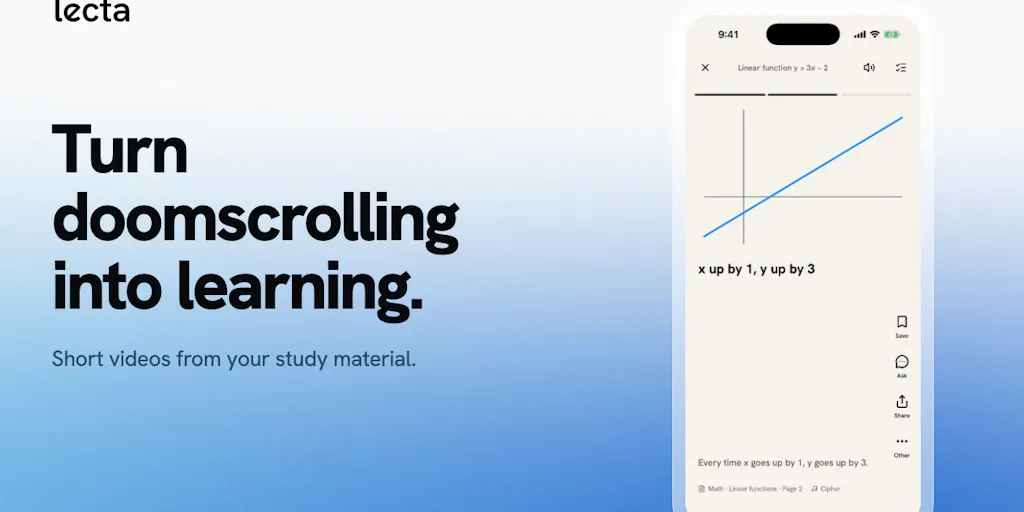
Every few months a tool launches that makes social media operators quietly nervous, because it treats the feed itself as the delivery mechanism rather than the destination. Lecta, a new iPhone app from developer TOMO, is one of those. The pitch is blunt: “Turn doomscrolling into learning.” Upload a PDF, a photo of a handout, or a lecture recording, and Lecta converts it into short learning videos you scroll through, then layers quizzes, flashcards, games, and an AI tutor on top of the same source material. It’s available on iPhone in English and Japanese with a free plan, and web is “coming soon,” per the maker’s launch post.
Why should a creator or social media manager care about a study app? Because the product’s core assumption — that vertical, swipeable video is now the default interface for any kind of information transfer, not just entertainment — is the same assumption you’re already betting your content calendar on. If a study tool can compete for the same thumb-scroll attention your brand is fighting for, that tells you something about how saturated the feed has become, and how high the bar for “worth stopping for” now sits. I’ve spent the last few years watching creators try to bolt education onto short-form as an afterthought; Lecta is a reminder that the format itself is the product.
What problem Lecta actually solves (and what it doesn’t)
Strip away the launch-page polish and Lecta is a repurposing pipeline with a game layer. The input is unstructured study material — a PDF, a photo, a recording. The output is a sequence of short videos, each presumably anchored to a diagram, graph, or concept, punctuated by quick comprehension questions drawn from the user’s own source. From there, the app offers notes, quizzes, flashcards, an AI tutor, and a set of named games: Formula Race, Hyperlane, Quiz Rush, and Jeoparty. You can save cards for later review, and the maker explicitly frames the goal as making “boring exam prep a bit more fun with friends.”
If you’ve ever built a content repurposing workflow, that input-to-output shape should look familiar. It’s the same logic behind turning a webinar into a dozen CapCut edits, or slicing a podcast into Opus Clip shorts. The difference is the intent: most repurposing tools optimize for reach and watch time, while Lecta optimizes for retention of information. That’s a meaningfully different objective function, and it changes what “good” looks like. A creator chasing watch time wants a hook in the first 1.5 seconds and a loop at the end. A study tool wants the viewer to actually remember the Krebs cycle next Tuesday. Those goals pull the edit in opposite directions, and I’d bet that tension is the hardest design problem Lecta has to solve.
Why the “scroll to learn” framing is the interesting part
The maker’s phrase “scroll to learn” is doing more work than it looks like. It’s an admission that the swipe gesture is now a learned behavior so deeply ingrained that you can hijack it for non-entertainment purposes. In my own testing of short-form educational content across TikTok and Instagram Reels, the creators who actually retain viewers past the three-second mark are the ones who don’t fight the format — they lean into the same pacing, caption density, and visual rhythm as entertainment, then smuggle the substance in underneath. Lecta appears to be productizing exactly that instinct. Whether an AI-generated video sequence can match a human editor’s sense of rhythm is an open question, and not disclosed anywhere in the launch material.
How it stacks up against the incumbents you already pay for
Here’s where I’d push back on treating Lecta as a category of one. The study-tool space is crowded, and the repurposing space is even more crowded. On the study side, Quizlet owns flashcards, Anki owns spaced repetition, and Khan Academy owns structured curriculum. On the AI-tutor side, Khanmigo and a dozen ChatGPT-wrapper startups are all chasing the same “explain this to me” use case. What Lecta adds is the format — video-first, scroll-native, game-inflected — which none of those incumbents have meaningfully adopted. That’s a real differentiator, but it’s also a thin moat. Flashcard apps can add video. Video tools can add flashcards. The question is whether Lecta’s specific combination of input flexibility (photo, PDF, recording) and output variety (videos, games, tutor) is enough to keep users from just… using three other apps.
For social media operators, the more useful comparison is to scheduling and repurposing SaaS. Tools like Buffer, Later, and Metricool handle the “get this content onto these platforms at these times” problem. Canva handles the “make it look decent” problem. Lecta is solving a different problem entirely — but the workflow shape is instructive. It takes one messy input and fans it out into many consumable units. That’s the same mental model you should be applying to your own content operations, whether or not you ever touch a study app.
Where the math breaks
I want to be careful here, because the launch page makes no performance claims I can verify. There are no disclosed user counts, no retention figures, no pricing beyond “free plan,” no revenue numbers. The maker claims the app turns study material into short learning videos; whether those videos are actually good — coherent, well-paced, factually faithful to the source — is not something a Product Hunt listing can tell you. In my experience testing AI-generated video from documents, the failure mode is almost always the same: the tool produces something that looks like a lesson but glosses the parts that require genuine explanation. If Lecta falls into that trap, the game layer becomes a distraction from the fact that nothing was learned. I’d want to see a real user run a dense technical PDF through it and report back before I’d call it a study tool rather than a study-adjacent toy.
What creators and social teams can steal from this
Even if you never open Lecta, three operational lessons transfer directly to your content workflow.
One source, many formats. Lecta’s whole premise is that a single input — a PDF, a photo, a recording — can become videos, quizzes, flashcards, and games. That’s the repurposing thesis you should already be running, just applied to study material instead of marketing content. If you’re still treating each platform as a separate content creation task, you’re leaving hours on the table. Record one long-form video, then slice it for YouTube Shorts, Reels, and TikTok. Pull the transcript for an X thread and a LinkedIn post. Turn the key stat into a Pinterest infographic. The format changes; the source doesn’t.
Games as engagement mechanics. The named games — Formula Race, Hyperlane, Quiz Rush, Jeoparty — are a reminder that interactivity drives completion rates in a way passive video doesn’t. You see this on every platform now: polls on Instagram Stories, quizzes in Threads, interactive stickers everywhere. If your content strategy is purely broadcast, you’re competing with a feed that increasingly rewards participation. I’m not saying turn your brand account into a game show. I am saying that a single well-placed question in a caption or a poll in a Story can meaningfully change how the algorithm reads your engagement rate.
Language as a first-class decision. The maker notes the app launched in English and Japanese, and a commenter specifically called out that bilingual support as a nice touch. That’s a small detail with big implications for creators with international audiences. If you’re publishing only in English, you’re cutting off a meaningful share of potential reach on platforms where translated captions and subtitles are now table stakes. YouTube’s multi-language audio tracks and auto-translated captions exist for a reason. The creators I’ve watched grow fastest in the last two years are the ones who treat localization as a default, not a later-phase project.
Why TikTok creators should care more than LinkedIn ones
Lecta’s format is vertical, swipeable, and short. That maps almost perfectly onto TikTok and Reels behavior, and almost not at all onto LinkedIn, where the dominant format is still text-plus-image or a native video that people watch with the sound off in an office. If you’re a TikTok creator, the Lecta model — hook, visual anchor, quick check-for-understanding, next — is basically a template for educational short-form that performs. If you’re a LinkedIn creator, the transferable lesson is narrower: the repurposing logic still applies, but the format doesn’t. Don’t try to make a swipeable quiz carousel on LinkedIn and expect it to land the way it would on TikTok. Read the room.
Where my judgment says Lecta falls short
Three things give me pause, and I want to flag them as opinion rather than fact.
First, the platform constraint. Lecta is iPhone-only at launch, with web “coming soon.” For a study tool, that’s a real limitation — most serious studying happens on a laptop, with a PDF open in one window and notes in another. A phone-native experience is great for the doomscroll-to-learn pitch, but it’s a worse fit for the actual workflow of exam prep. I’d bet the web version matters more than the launch page implies, and I’d want to see how the experience translates to a larger screen before judging the product on its merits.
Second, the AI tutor problem. Every study app now has an AI tutor, and the quality gap between them is enormous. Some hallucinate confidently. Some refuse to engage with the actual source material. Some are just a chat window bolted onto a flashcard app. The launch page says Lecta has “an AI tutor with the same material,” which is the right design — grounding the tutor in the user’s own documents is the only way to reduce hallucination risk — but “grounded” is a claim, not a guarantee. Not disclosed: which model it uses, how it handles conflicting information in the source, or what happens when the source material is wrong.
Third, the monetization question. A free plan with no disclosed pricing for a paid tier is a common launch strategy, but it leaves the business model opaque. If Lecta is free forever, fine — but AI video generation and AI tutoring are expensive to run, and I’d want to know what the ceiling on the free plan actually is before recommending it to anyone. Not disclosed in the source, and I’m not going to guess.
Who this is NOT for
If you’re a professional social media manager running brand accounts, Lecta is not a tool you’ll use directly. It’s a consumer study app. The value for you is conceptual, not operational — it’s a signal about where attention is going and what format expectations your audience is internalizing. If you’re a creator who makes educational content, the value is slightly more direct: Lecta is a competitor for the same “I have five minutes and I want to feel like I learned something” moment your content occupies. And if you’re a student, the honest answer is that Lecta might be great, might be a novelty, and the only way to know is to run your own material through it and see whether the output actually teaches you anything. The launch page can’t answer that. Only your own test can.
What I’d watch / test next
If you want to extract value from this launch without waiting for Lecta to prove itself, here’s what I’d do this week. First, run your own repurposing audit: take your single best-performing long-form asset from the last quarter and map every possible derivative — short video, carousel, text post, infographic, quote card. Count how many you’ve actually made. Most creators I know are sitting on 5–10x more content than they’ve published, and the bottleneck is workflow, not ideas. Second, test one interactive element in your next post — a poll, a quiz question, a “which one would you pick” prompt — and watch whether completion rate or comment rate moves. Third, if you publish in more than one language or have a meaningful international audience, check whether your captions and subtitles are actually localized or just auto-generated and unedited. That’s a 20-minute fix with outsized reach implications.
As for Lecta itself: I’d watch whether the web version ships, whether the free plan stays generous, and whether anyone publishes an honest, unsponsored test of its output quality on dense technical material. Until then, treat it as a useful signal about format and attention, not a tool you need in your stack. The lesson isn’t “download this app.” The lesson is that the swipe is now the universal interface, and anyone building for creators — or building a content operation — needs to design for that reality first.


