The Most Underrated Skill in the Creator Economy Isn’t Content—It’s Motion
Here’s a truth that every social media operator learns eventually, usually after the third all-nighter before a big product launch: the difference between a post that gets scrolled past and one that gets watched often isn’t the idea—it’s the motion. Static images are the baseline of the feed, but motion is what stops the thumb. For years, the only way to add that polish was to live inside After Effects or pay a freelancer for something you’d want to tweak five times anyway. That’s the problem that caught my eye when I saw Loopcase launch on Product Hunt. It’s not another AI video generator promising to replace your brain. It’s a focused tool for a specific, painful, and deeply familiar workflow: turning a finished case study or a static portfolio piece into a looping motion graphic without touching a timeline. For creators and social teams who are drowning in repurposing work, this is a signal worth reading closely—not because it’s a category killer, but because it points to where the creator economy’s tooling is heading: away from bloated suites and toward single, opinionated jobs done exceptionally well.
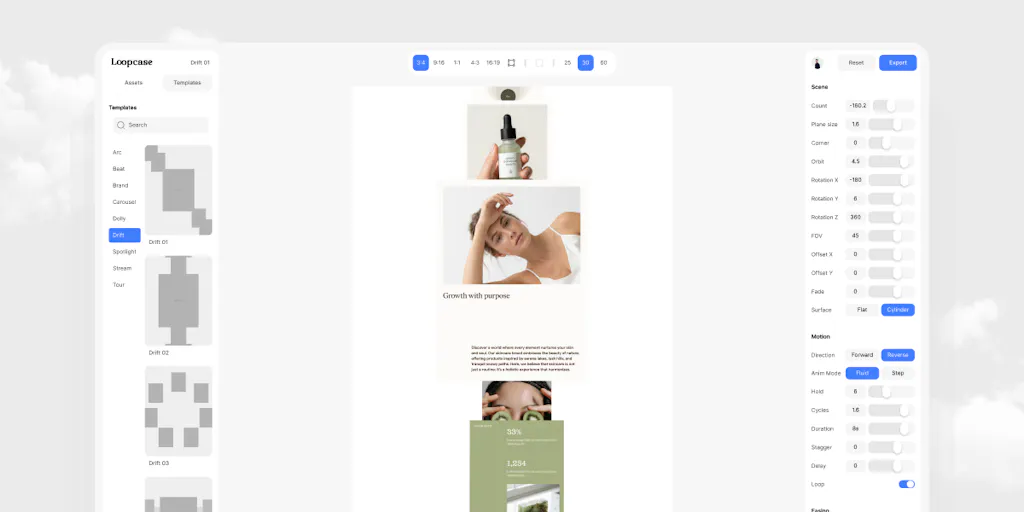
The pitch from maker Kim is refreshingly unpretentious: pick a template, drop in your images, adjust motion with live sliders, export. No keyframes, no render queue. The magic, as Kim describes it, is invisible—every export loops seamlessly because the animations are constructed to loop, not trimmed to fit. That’s a technical detail that matters more than most people realize, because a hard cut on a loop is the fastest way to make a portfolio look amateur. But my interest here goes beyond the product itself. Loopcase is a case study in how we should be thinking about our own content operations. It’s about the value of constraints, the power of a “deliberately short” template catalogue, and the strategic advantage of a tool that exports real files on a free plan. Let me unpack what this means for how you run your social accounts, what you can borrow from Loopcase’s philosophy, and where I think it falls short.
The Problem It Actually Solves: The 9pm Portfolio Panic
Let’s start with the operational reality. I’ve been in the trenches managing social calendars for brands and for my own projects. The grind isn’t the ideation; it’s the execution. You have a great case study or a killer product shot, but the feed demands a video. The client wants “something dynamic.” The algorithm, whether it’s Instagram or LinkedIn, is quietly rewarding native video and punishing static images with lower reach. So you’re left with a choice: open After Effects and spend four hours fighting with keyframes, or use a generic template in Canva that looks like everyone else’s generic template. Loopcase steps into that specific gap. It’s built for the moment when the work is done, the presentation is tomorrow, and the motion is the last mile. As the maker notes, the tool was born from exactly this scenario—a product designer who was tired of opening After Effects at 9pm or paying a freelancer for something they’d want to tweak five times anyway. That’s not a hypothetical pain point; that’s a Tuesday for most of us.
The core mechanic is deceptively simple. You’re not building an animation from scratch. You’re choosing from a short, curated list of motion styles, dropping in your images, and using sliders to adjust the feel. This is a fundamental shift in approach. Most tools in this space, from the heavyweight Adobe After Effects to the browser-based Canva, operate on a timeline model. You have layers, keyframes, and a render queue. That model is powerful, but it’s overkill for 80% of the content a social media manager needs to produce. Loopcase is betting that you don’t need a timeline for a portfolio loop. You need a constrained set of options that are guaranteed to look good and, crucially, guaranteed to loop. The maker’s pride in the invisible mechanics is telling: “every export loops seamlessly, frame zero equals the last frame, guaranteed by how the animations are constructed rather than by trimming.” This is a trust signal. It tells me the maker understands that the worst part of motion design isn’t the design—it’s the technical jank that breaks the illusion.
For a social media operator, this solves a specific workflow bottleneck: the “repurposing sprint.” When I’m turning a blog post into a LinkedIn carousel, a YouTube video into a Short, and a podcast clip into a TikTok, I don’t have time for bespoke animation. I need a system. Loopcase fits into that system as a final-step polish tool. It’s not for creating the narrative; it’s for making the asset feel premium. This is the same reason why tools like CapCut have exploded in popularity—they lower the barrier to motion. But CapCut is still a timeline editor. Loopcase is a step further into abstraction. It’s a “motion preset” tool, and that’s a category that has room to grow.
Why the “No Timeline” Bet is Smarter Than It Sounds
The decision to avoid a timeline is a philosophical one, and I think it’s the right call for the target user. Timelines are where time goes to die. You start with a simple title animation, and an hour later you’re easing an opacity keyframe on a layer you didn’t know existed. Loopcase removes that entire class of problem by removing the interface that causes it. This is a lesson for anyone building a content operation: constraints are a feature, not a bug. When I have to produce 30 posts across 5 platforms in a week, I don’t want a tool that offers me 200 ways to animate a logo. I want a tool that offers me 5 ways that all look professional and are fast. The maker’s statement that the template catalogue is “deliberately short” because “a case study needs one good move, not two hundred mediocre ones” is the kind of product philosophy that earns trust. It signals a deep understanding of the user’s actual job-to-be-done.
This also has implications for how we think about “engagement.” A looping video of a product shot or a case study isn’t just about aesthetics. It’s about dwell time. On platforms like Instagram and TikTok, a loop that plays seamlessly keeps the viewer on the post longer. It invites a second watch. That’s a real signal to the algorithm that your content is interesting. A hard cut on a loop is a dead giveaway that the creator didn’t care about the details. Loopcase’s guarantee here is a competitive advantage that’s hard to replicate without deep technical work. In my experience, most creators don’t think about this. They think about the hook, the caption, the hashtags. But the micro-detail of the loop is what separates a professional portfolio from a hobbyist’s.
How It Differs From the Incumbents: A Case of Focus
To understand Loopcase’s position, you have to look at the landscape of tools a creator might currently use. The first stop for most is Canva. Canva is a beast—it does everything from static graphics to full video editing. But its video features are still fundamentally a timeline editor, and its animation presets are often generic and overused. You can spot a Canva animation from a mile away. The second stop is CapCut or Adobe Premiere Rush, which are more powerful but also more complex. Then you have the social media management suites like Buffer and Hootsuite. These tools are about scheduling and analytics, not asset creation. They don’t solve the “make this static image move” problem.
Loopcase occupies a niche that is currently underserved. It’s not a full editor. It’s a motion styler. The closest comparison I can think of is Rive or LottieFiles, which are used for interactive motion and animation, but those are geared toward designers and developers building into apps, not creators making portfolio pieces. Loopcase is simpler. It’s a web-based tool that runs in the browser, which is a significant advantage. You don’t need to download software. You don’t need a powerful GPU. You just need a browser and some images. This lowers the friction to entry, which is why the free plan is such a smart move. The maker states, “The free plan exports real files. No trial wall, no locked export button.” That’s a huge trust signal. Too many tools in this space offer a free trial that watermarks your work or locks the export button until you pay. Loopcase is betting that if you can put a Loopcase video on your portfolio today without paying, you’ll come back when you have a client project that needs the premium features.
In my own tests of similar tools, the export quality is often the dealbreaker. Some web-based tools compress the video so much that it looks terrible on a high-res screen. Loopcase’s focus on seamless looping suggests a level of attention to output quality that you don’t see in every indie tool. The maker is a product designer who built this for their own workflow, which usually means the details are cared for. This is a “scratch your own itch” product, and those often have the best UX because the maker is their own harshest critic.
Where the Math Breaks: The Limits of a Short Template Catalogue
Now, let me put on my operator hat and look at the downside. The “deliberately short” template catalogue is a feature for the maker, but it’s a limitation for the user. After you’ve used Loopcase for a month, you might find that the five or six motion styles start to feel repetitive. If you’re producing content for a brand that needs a distinct visual identity, a template-based tool is going to hit a ceiling. You can’t create a custom animation from scratch. You’re stuck with the options given. This is fine for a portfolio piece, but it’s a hard stop for a full-scale social campaign that needs a unique motion language.
This is the classic trade-off between speed and uniqueness. Tools like Canva and CapCut offer more flexibility because you have a timeline and keyframes. Loopcase sacrifices that flexibility for speed and guaranteed quality. For a social media manager producing high volume, that’s a good trade. For a brand designer working on a high-stakes launch, it might be a frustration. The tool is also specifically designed for “case studies.” That’s a narrow use case. It’s not for animating a logo stinger for a YouTube channel. It’s not for creating a kinetic typography video for a podcast promo. It’s for making a static portfolio piece move. If you need those other things, you’re back to After Effects or a freelancer.
Another limitation is the lack of audio support, which is not mentioned in the source. For social media, sound is often half the battle. A looping video without a soundtrack or sound effects can feel flat, especially on platforms like TikTok where audio is the primary driver of discovery. If Loopcase doesn’t have a way to add a music track or a subtle whoosh sound, it’s only solving half the problem. I’d bet that this is a future feature, but as it stands, you’ll need to use another tool to add audio, which breaks the seamless workflow.
Why TikTok Creators Should Care More Than LinkedIn Ones
The value of a tool like Loopcase varies wildly by platform. For a LinkedIn creator, a polished, seamless loop of a case study is a fantastic way to signal professionalism. It’s the kind of content that gets shared in DMs. It says, “I pay attention to details.” For a TikTok creator, however, a portfolio loop is almost irrelevant. TikTok is about raw, in-the-moment content. It’s about authenticity, not polish. A slickly animated case study would look out of place in a feed of raw talking-head videos and trending audio. The algorithm on TikTok rewards native content that feels like it was made on a phone. Loopcase’s aesthetic is too “designed” for that environment.
This is a crucial point for social media operators. You can’t use a one-size-fits-all approach to content creation. A tool that works for your Instagram grid might be useless for your TikTok feed. Loopcase is a tool for the “professional” platforms—LinkedIn, your personal website, your portfolio, maybe a polished YouTube intro. It’s less useful for the “casual” platforms. This is a positioning challenge for the maker. They’re building a tool for designers and agencies, which is a specific B2B audience. The creator economy is broader than that, but the tool’s utility is concentrated in a niche. That’s not a bad thing; it’s a smart way to start. But it means that a social media manager for a fashion brand might not find immediate value.
What Creators Can Borrow: The Philosophy of “One Good Move”
Even if Loopcase isn’t the right tool for every creator’s workflow, the philosophy behind it is transferable. The idea of “one good move, not two hundred mediocre ones” is a powerful content strategy. Too often, we try to do everything at once. We create a 10-minute video when a 30-second loop would be more effective. We try to master every platform when we should focus on one where we can be exceptional. Loopcase is a reminder that constraints breed creativity. By limiting your options, you force yourself to be decisive. You spend less time fiddling and more time shipping.
I also love the “free plan exports real files” approach. This is a lesson in trust. The maker is saying, “I’m confident that if you use this, you’ll see the value and come back.” This is the opposite of the “trial wall” approach that many SaaS companies use. For creators, this is a reminder that the best way to build an audience is to give away your best work upfront. Don’t hold back your best tips for a paid newsletter. Put them out there for free. The trust you build will be worth more than the subscription revenue in the long run.
The browser-based nature of the tool is also a trend worth watching. We’re seeing a shift away from heavy desktop applications toward lightweight, collaborative web tools. Figma revolutionized design by moving it into the browser. Loopcase is part of that same wave for motion. This is a signal that the next generation of creative tools will be accessible anywhere, have lower system requirements, and will be easier to collaborate on. For a social media team, this is a huge win. You can have a junior designer mock up a motion graphic, share the link with a senior manager for approval, and export the final file—all without leaving the browser.
Where My Judgment Says It Falls Short
Let me be as clear as I can about the limitations. First, the source does not disclose pricing for the paid plans. The maker mentions “founding lifetime pricing” for the first 50 people, but the actual numbers are not in the source. This is a red flag for me as an operator. Pricing is a key factor in tool adoption. I need to know if it’s a $10/month tool or a $50/month tool before I integrate it into my workflow. The lack of pricing information suggests the product is still early in its go-to-market strategy. I’d bet this is something they’re still figuring out based on feedback.
Second, the tool is clearly designed for a specific use case: case studies. This is a narrow lane. It’s not a general-purpose motion tool. If you’re a social media manager who needs to animate a quote graphic for a tweet or a promotional card for a webinar, Loopcase might not be the right fit. It’s a tool for the end of a project, not the beginning. It’s the final polish, not the main event.
Third, the lack of an API or integration with other tools is a concern. In my workflow, I use a scheduling tool like Metricool or Buffer to plan my content. If Loopcase can’t export directly to these platforms or integrate with a cloud storage service like Dropbox or Google Drive, it adds an extra step to my process. I have to export the video, download it, and then upload it to my scheduling tool. That’s friction. For a tool that’s supposed to save time, this is a potential dealbreaker.
Finally, there’s the question of scalability. What happens when you need to produce 50 of these loops for a large campaign? The manual process of dropping in images and adjusting sliders for each one could become tedious. There’s no mention of batch processing or a way to apply a template to multiple projects at once. For an agency, this is a significant limitation. The tool is great for a one-off portfolio piece, but it’s not yet a production workhorse.
What I’d Watch / Test Next
This week, if you’re a creator or social media operator, I’d suggest taking Loopcase for a spin, but with a specific test in mind. Don’t just try it with one image. Try it with a series of images from a recent project. See how the motion feels across a sequence. Pay attention to the export quality. Does the loop hold up on a mobile phone screen? Does it look as good on a desktop as it does in the preview? I’d also test the speed of the workflow. Time yourself from “I have the images” to “I have the exported video.” If it’s faster than your current process, that’s a win.
I’d also watch to see if the maker adds audio support. That would be the single most impactful feature for social media use. A loop with a subtle sound effect is infinitely more engaging than a silent one. I’d also look for integrations with scheduling tools. If Loopcase can export directly to Buffer or Metricool, it becomes a much more valuable part of the stack.
Finally, I’d pay attention to the template catalogue. If the maker starts adding more styles, it signals they’re listening to feedback. If it stays short, that’s a deliberate choice. Either way, the product is worth a look. It’s a small, focused tool that solves a real problem. In a sea of bloated AI video generators, that’s a breath of fresh air. The creator economy doesn’t need more features. It needs more focus. Loopcase is a reminder of that.


