The inbox is the last platform social teams actually own — and the tooling gap just got a little smaller
Every social media manager I know has the same quiet anxiety: the algorithm giveth, and the algorithm taketh away. Reach on Instagram and Facebook is rented. TikTok can throttle a post for reasons nobody will ever explain. X’s distribution has been a moving target for two years. But email — the humble, unglamorous, technically-ancient channel — is the one place where a creator’s audience list belongs to the creator, not the platform. That’s why I pay attention when a new tool lands that treats email design as a first-class creative workflow rather than a drag-and-drop afterthought. Maildun for Mac, launched by maker Dunn, is an agentic email builder that runs natively on macOS. It’s not a social scheduling tool. But if you run a newsletter as the owned-media backbone of your creator business — and you should — the workflow decisions this product makes are worth studying, because they hint at where “AI-assisted content production” is heading for the rest of us.
What problem this actually solves (and what it doesn’t)
Let me be precise about the category. Maildun is not a Buffer, a Hootsuite, or a Later. It doesn’t schedule posts, it doesn’t pull analytics, and it doesn’t touch your social calendar. What it does is sit in the email-design layer — the space currently occupied by tools like Beehiiv, Mailchimp, ConvertKit (now Kit), and the template editors inside Substack. That’s a crowded neighborhood, and most of it is browser-based, subscription-priced, and increasingly AI-flavored.
The maker’s pitch is specific: design by hand when you want control, hand it to AI when you don’t, and let your coding agents work on the same designs. That last clause is the interesting one. Maildun ships a built-in MCP server, which means tools like Claude Code, Codex, Claude Desktop, or Cursor can list, create, and edit emails in your active workspace — with its brand and media — without needing Node.js installed. For the social-media-adjacent operator who has started wiring AI agents into their content pipeline, that’s a meaningfully different architecture than “chat with a bot inside a web editor.”
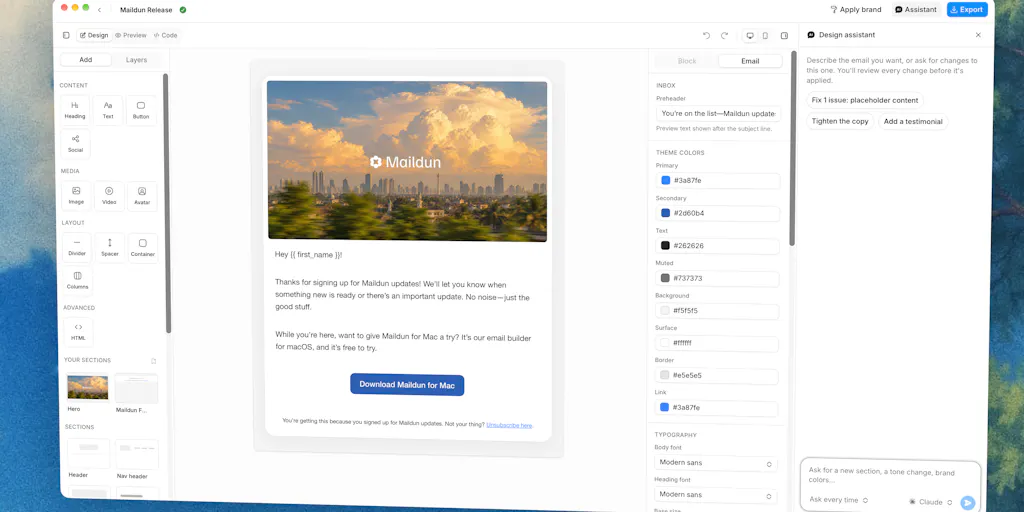
The rest of the feature set reads like a competent modern design tool: a drag-and-drop editor with blocks, sections, an inspector, and desktop/mobile preview; AI design assistance where you bring your own Claude, ChatGPT, Gemini, or Grok API key; workspaces scoped per client or product; a brand system with colors, fonts, a Markdown brand guide, and component styles that behave like shadcn/ui for email; saved sections; and media uploads to your own Cloudflare R2 or Amazon S3 bucket, with images resized and converted to WebP on your Mac before upload. It’s built with Tauri 2, React 19, and shadcn/ui, and it uses the same UI kit, theme tokens, fonts, and icons as the existing Maildun web product — so if you already use Maildun, the Mac app feels like home.
Why the “bring your own key” choice matters more than it sounds
Most AI features in creator tools are opaque. You pay a subscription, you get a black box, and you have no idea which model is running, what it costs per generation, or whether your content is being used for training. Maildun’s approach — bring your own Claude, ChatGPT, Gemini, or Grok key — flips that. You control the model, you control the spend, and you can swap providers when one gets better or cheaper. For agencies managing multiple client workspaces, that’s a real budgeting advantage. It’s also a trust signal: the maker isn’t trying to lock you into a proprietary AI layer. My take: this is the right call, and I expect more creator tools to copy it within a year.
How it differs from the incumbents you’re probably already paying for
Here’s where I’d push back on the “just another email builder” read. The differentiation isn’t the editor — plenty of tools have drag-and-drop. It’s the combination of three things: native macOS performance, agent access via MCP, and a brand system that actually propagates.
On the brand front, the maker describes it this way: new designs start on-brand, “Apply brand” restyles existing ones, and the assistant keeps to it. A commenter, Maxime Legeay, flagged exactly why that matters: “Being able to restyle old designs in one click means you dont have to rebuild every email when a client changes their colors.” If you’ve ever managed a rebrand for a client across a dozen evergreen email templates, you know the pain. In Mailchimp or Canva, that’s a manual rebuild. In Maildun’s model, it’s a button.
On the agent front, the MCP server is the feature I’d actually test first. The maker explicitly asks for feedback on “the AI and MCP workflows,” which tells me this is the part he considers unfinished or most in need of real-world validation. That’s honest, and it’s also a warning: don’t expect a polished, documented, edge-case-handled agent experience on day one. In my experience testing early MCP integrations in other tools, the happy path works and the weird paths — nested components, conditional blocks, image references — fall over. I’d bet the same is true here.
Where the math breaks for social-first teams
If your primary output is Instagram carousels, TikTok videos, and X threads, Maildun is not for you. It doesn’t generate images for social, it doesn’t resize for platform aspect ratios, and it doesn’t publish anywhere except maildun.com as a template. The “Publish to Maildun” feature shares a design as a template on the web product, public or as a draft, and publishing again updates the same template so the link keeps working. That’s a nice touch for template marketplaces, but it’s not a social distribution feature. If you’re looking for a tool that helps you repurpose a newsletter into a LinkedIn post and a TikTok script, this isn’t it. That’s a different product category — and honestly, a different essay.
What creators and social teams can borrow from this workflow
Even if you never open Maildun, there are three operational patterns here worth stealing for your social content pipeline.
First: separate the design layer from the distribution layer. Maildun is deliberately not a sending platform in the social sense — it designs, and then you export or publish. That separation is smart. Most social teams I’ve worked with have their design tool, their scheduler, and their analytics tool tangled together in one subscription, and when one breaks, everything breaks. Keeping design portable — as HTML you can send through any provider — is a resilience strategy. A commenter, Jose Paulino, asked exactly the right question: “What does the export look like: plain HTML I can send through any provider (I use Resend), or does sending go through maildun.com?” The maker didn’t answer in the scrape, so that’s an open question. But the fact that a user is asking it tells you the demand for portability is real.
Second: treat brand as code, not as a mood board. The Markdown brand guide and shadcn-style component tokens are a quietly radical idea. Instead of a PDF brand book that nobody reads, you have a machine-readable spec that both humans and agents follow. For social teams juggling multiple client brands, that’s the difference between “the intern used the wrong blue again” and “the system won’t let you use the wrong blue.”
Third: let agents do the boring edits, not the creative ones. The AI assistant in Maildun edits through the editor’s validated tools, and every change shows up live as a proposal you accept or reject. That’s the right interaction model. It’s not “generate me an email” — it’s “make this change, show me, let me decide.” For social content, the equivalent is an agent that resizes, reformats, and reschedules — not one that writes your voice. The moment you let an agent write your voice, you’ve outsourced the only thing that differentiates you.
Why TikTok creators should care more than LinkedIn ones
This is counterintuitive, so stick with me. LinkedIn creators already live in a text-first, document-friendly environment where long-form email and long-form posts are cousins. The workflow overlap is obvious. TikTok creators, by contrast, are the ones most likely to be building an email list as a hedge against platform risk — because TikTok is the platform most likely to vanish, get banned, or change its algorithm overnight. If you’re a TikTok creator with 500K followers and no email list, you are one policy change away from starting over. A tool that makes email design faster and more agent-friendly is, weirdly, more strategically valuable to you than to the LinkedIn guy who already has a newsletter habit.
Where my judgment says it falls short
Let me be balanced, because the Product Hunt page is a launch announcement, not a review, and I haven’t run this in production.
The Mac-only constraint is real. Maildun for Mac runs natively on macOS. If your team is on Windows, or if you’re a Chromebook-based creator, you’re out. That’s a deliberate choice — native performance, local image processing, Tauri — but it’s a market-limiting one. Most social media managers I know work on whatever their company issued them, and that’s often not a Mac.
The AI cost model is unclear. Bringing your own API key means you pay per token, and email design with iterative AI edits can burn through tokens fast. The maker doesn’t disclose any pricing for the app itself in the scrape, so I can’t tell you whether Maildun is free, one-time, or subscription. That’s a gap. If you’re evaluating it for a team, ask directly.
The MCP workflow is early. The maker’s own request for feedback on “the AI and MCP workflows” signals that this is the least-baked part. MCP is still a young protocol, and agent-driven design editing is a genuinely hard problem. I’d expect rough edges, and I’d expect the documentation to lag the capability.
The publishing story is narrow. “Publish to Maildun” is the only native publish target mentioned. No direct integration with Mailchimp, ConvertKit, Beehiiv, or Resend is described in the scrape. If export is plain HTML, that’s workable — but it’s a manual step, and manual steps are where social teams drop the ball.
And the biggest open question: does any of this matter if you don’t send email? Maildun is an email builder. If your creator business is 100% social and you’ve never sent a newsletter, this tool solves a problem you don’t have yet. The honest answer is: build the list first, then worry about the design tool. A beautiful email to zero subscribers is still zero.
What I’d watch / test next
If you’re a social media operator or creator who already runs a newsletter — or who’s been meaning to start one as an owned-media hedge — here’s what I’d do this week.
First, ask the maker the export question directly. Jose Paulino’s question about plain HTML and dark-mode blocks is the one that determines whether Maildun fits into an existing stack or replaces it. If it exports clean HTML you can push through Resend or your ESP of choice, it’s a design tool. If it locks you into maildun.com for sending, it’s a platform. Those are very different commitments.
Second, test the MCP server with a throwaway workspace before you trust it with a client brand. Give Claude Code or Cursor a simple task — “duplicate this header block and change the button color” — and see how it handles the validated-tools constraint. If it works, you’ve got a genuinely new workflow. If it doesn’t, you’ve lost an afternoon.
Third, watch whether the “Apply brand” feature holds up on a real rebrand. That’s the feature commenter Maxime Legeay singled out, and it’s the one with the clearest ROI for agencies. If it works as described, it’s worth paying for. If it’s a partial restyle that leaves orphaned colors in nested components, it’s a demo feature.
And finally, keep the strategic frame in mind. Maildun is a small product in a crowded category, and it may or may not win. But the patterns it’s betting on — bring-your-own-model AI, agent-accessible design via MCP, brand-as-code, portable output — are the patterns I’d bet the next generation of creator tooling gets built on. Whether you adopt this specific app or not, those are the questions to ask of every tool you’re evaluating this year. The platforms will keep changing. The workflows that survive are the ones that don’t depend on them.