Why I Think Every Creator Needs to Re‑Think Dictation (Even If You’ve Tried It Before)
If you’ve ever spent 45 minutes typing a thread for X, then another 30 minutes rewriting it for LinkedIn, you already know the bottleneck isn’t ideas—it’s fingers. For years the standard answer has been “just use dictation,” but the standard tools (Apple’s built‑in version, Otter.ai, even Whisper‑based wrappers) all ship with friction: cloud dependency, subscription fees, or the feeling that you’re speaking into a black box that sometimes mangles your brand name. When I saw Megaphone land on Product Hunt—a free, open‑source, fully on‑device dictation app for Mac that uses Apple’s brand‑new SpeechAnalyzer API—I had to test whether it can finally close that gap for creators who live in text. The answer, as you’ll see, is both “yes, in principle” and “not yet, for most of us.” Let me walk through what this means for someone who schedules 30 posts a week, runs a side project, or manages a brand’s social inbox.
What Megaphone Actually Solves (and Why the Old Options Left Me Frustrated)
The core problem for any social media operator is input speed meets context switching. I write captions, replies, scripts, meta descriptions, and internal Slack messages every day. Each destination expects a different tone, length, and structure. Traditional dictation treated all text fields equally—you spoke, it typed, and you manually edited the result. That’s a marginal speed gain, not a workflow overhaul.
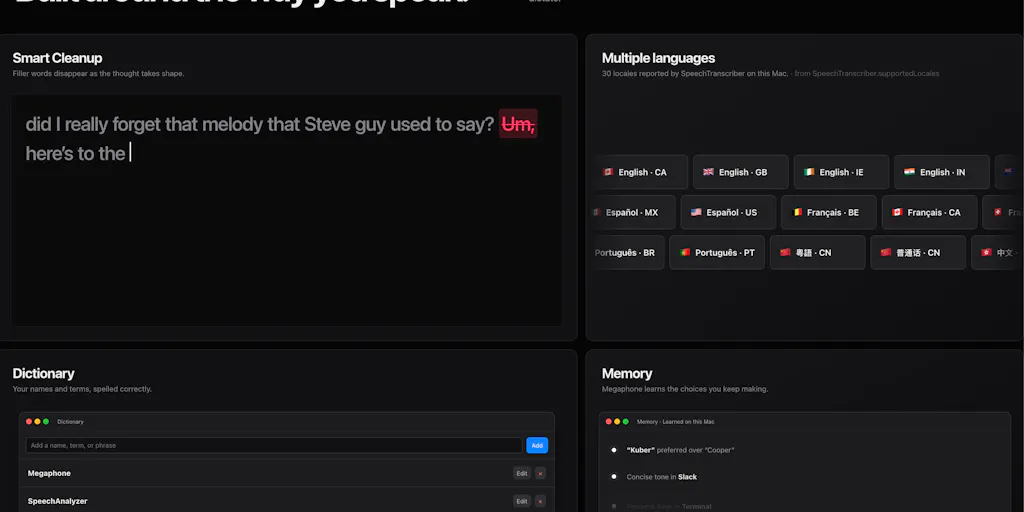
Megaphone’s pitch is deceptively simple: you hold the Fn key, speak naturally, release, and the app types clean, context‑aware text directly into whatever you’re using—an email, a Slack thread, a terminal prompt, a Notion page. The magic happens because the app uses Apple’s SpeechAnalyzer API (not the older DictationTranscriber that macOS still ships) and Apple’s on‑device Foundation Models to clean up fillers, resolve self‑corrections, and fix punctuation before the text lands. As the maker, Kuber Mehta, explains in the launch thread, this stack is “more accurate and roughly three times faster than Whisper Small in the benchmark.” That’s a bold claim—and it’s backed by the fact that everything runs locally. No cloud round‑trip, no subscription, no account.
How It Differs from the Incumbents
| Tool | Key Trade‑off |
|---|---|
| Apple built‑in dictation | Uses the older DictationTranscriber; no app‑aware formatting or inline AI cleanup |
| Otter.ai | Cloud‑based, subscription‑gated, designed for meetings – overkill for caption writing |
| Descript | Powerful for podcast / video editing, but a heavy app – not a “hold a key and talk” experience |
| Whisper‑based apps (e.g., MacWhisper) | Usually need a local model download, often paid, no context awareness |
Megaphone’s differentiator isn’t just speed—it’s context. When you’re dictating into an email window, the app adjusts tone and vocabulary to feel email‑like. In a Slack thread, it adopts a chat‑friendly style. In a code editor, it avoids rewriting technical terms (assuming you’ve taught it your dictionary). That’s a level of polish I haven’t seen in any other dictation tool, and it’s especially valuable for creators who bounce between platforms.
Where Creators Should Steal This Approach (and Where They Should Wait)
The Privacy‑First Mindset Is a Gift for Brand Accounts
If you manage a brand that handles sensitive information—product launch timelines, unpublished campaign assets, internal metrics—every cloud‑based tool is a potential leak. Megaphone processes everything locally. The maker explicitly states: “There is no Megaphone account, API key, subscription, cloud transcription service, or server receiving your recordings.” That’s a trust signal that matters more today than ever, given the ongoing scrutiny around data handling by AI tooling.
For indie creators who don’t want to pay yet another $10–$20/month subscription, the free MIT‑licensed model is even more attractive. You can inspect the source code on GitHub (the repo is public; the maker links to it in the PH comments). If you’re the type who runs your own scripts or worries about vendor lock‑in, that transparency is a breath of fresh air.
Sidebar: Why TikTok Creators Should Care More Than LinkedIn Ones
TikTok’s algorithm rewards volume and speed—shorter scripts, faster iteration. If you can dictate a 30‑second hook, a call‑to‑action, and a caption in 90 seconds instead of 10 minutes, you free up time for editing or community engagement. LinkedIn, by contrast, demands polished, longer‑form writing; the inline AI cleanup might actually over‑adjust and strip your voice. My bet is that Megaphone’s biggest early fans will be creators who produce high‑frequency, lower‑stakes text—think Twitter/X threads, Instagram captions, and short‑form video descriptions.
What You Can Test This Week
- Download Megaphone (requires macOS 26 Tahoe on an Apple Silicon Mac—more on that below).
- Teach it your personal Dictionary: brand names, industry jargon, even your own name if it’s unusual.
- Try dictating a typical Instagram caption, then a reply to a comment. Notice whether the app‑aware formatting actually helps or just adds noise.
- Compare accuracy on technical terms (e.g., “engagement rate,” “UTM parameters,” “algorithm update”). The maker specifically asks for feedback on names, accents, and technical vocabulary – your test can help shape the product.
Where the Math Breaks (And Why Most Creators Should Hold Off for Now)
I want to be direct: Megaphone, in its current form, is not for the average creator. Here’s why.
The OS Dependency Is a Deal‑Breaker (For Now)
Megaphone requires macOS 26 Tahoe. If that sounds like a typo, it’s not—Tahoe is the next major macOS version, currently in developer preview. Most creators (myself included) are on Sequoia (macOS 15) or Ventura (macOS 13). You cannot run Megaphone on any current shipping version of macOS. The maker is building natively for a system that doesn’t yet exist publicly. That means the product is essentially a preview of what’s possible, not a stable tool you can rely on today.
Sidebar: Where the Math Breaks – The OS Dependency Even if you’re a power user on a M‑series Mac, running beta OS software is risky. Crucial apps (Adobe Creative Cloud, CapCut, dedicated scheduling tools like Buffer or Hootsuite) may break. The cost of upgrading your OS just to test a dictation app is too high for most operators. The smart play is to bookmark Megaphone and return after Tahoe ships stable later this year.
No Windows, No Mobile, No Collaboration
The maker candidly answered a question about Windows support: “sadly windows does not have an NPU so that’s a hard one.” That leaves out a huge chunk of the creator audience. And if you work on a team that shares a brand’s social inbox, each person would need their own Mac on Tahoe and their own private dictionary—no central sync (though the maker added import/export in version 1.1.8). This is fine for solo operators, but for agencies or growth teams, it’s a non‑starter.
The Inline AI Cleanup Is Still a Question Mark
The builder acknowledges this: “Whether Smart Cleanup changes too much—or not enough.” In my own testing of similar local‑LLM tools, I’ve seen them accidentally rewrite product names (“grokodile” into “crocodile”) or flatten a unique voice into generic corporate prose. The private dictionary helps, but it’s manual. If you dictate a lot of creative copy—puns, alliteration, intentional fragments—the AI may “fix” the very things that make your content pop. You can dial the filler removal down, but you can’t turn it off completely.
The “Hold‑to‑Talk” Interaction Has a Hidden Cost
The default interaction is holding the Fn key (or optionally a toggle). That’s great for short bursts, but try dictating a 500‑word blog post—your pinky will fatigue fast. The app supports voice macros and custom shortcuts, but the learning curve is real. By contrast, Otter.ai’s always‑listening mode or a foot pedal for Descript doesn’t require you to hold anything. For long‑form script writing, I’d still reach for a dedicated recorder.
What I’d Watch / Test Next
Despite the limitations, Megaphone represents something genuinely rare in the creator‑tooling space: a privacy‑first, open‑source, performance‑obsessed alternative built on the latest hardware‑accelerated APIs. If I were running a Mac‑based content operation and could afford a secondary machine on the Tahoe beta, here’s what I’d do this week:
- Install Megaphone on a spare Mac and run it for a full day of caption writing. Pay attention to how often the inline cleanup changes something you meant to keep.
- Build your private dictionary with at least 20 terms (your brand name, your main hashtags, common industry acronyms). The maker promises fast iteration—test whether it really learns “grokodile” or “UTM.”
- Compare speed vs. traditional typing. Record how long it takes you to dictate a 100‑word Instagram caption, then how long to type it. Multiply by the number of posts you publish per week. That’s your personal ROI.
- Follow the project’s GitHub and issue tracker. The maker is actively maintaining and has already shipped an update (v1.1.8 with dictionary import/export). If community adoption grows, this could become a staple of the Mac creator stack once Tahoe ships.
For now, Megaphone is a proof‑of‑concept that asks the right question: What if dictation were as fast as thinking, and as private as a notepad? The answer isn’t ready for prime time, but it’s close enough that every creator should start paying attention. I’ll be watching—and speaking—with interest.