The Real Bottleneck in Your Content Stack Isn’t Ideas — It’s the Tool You’re Already Inside
Every social media operator I know has quietly become a power user of something they never planned to master. For a growing slice of the creator economy, that something is Claude Code — the terminal-and-editor agent that started life as a developer tool and is now doing grunt work for people who write captions, draft carousels, and batch out video scripts. The problem nobody talks about at conferences: the moment you build a real workflow around one AI tool, you inherit its rate limits, its account boundaries, and its model lock-in. A new Mac menu-bar app called Moxie, built by Birju Vachhani, is trying to loosen exactly that knot. Whether or not you ever touch Claude Code, the design problem it’s solving — how to keep a long-running creative session alive when your tooling wants to interrupt it — is the same problem every content team is about to hit.
What Moxie Actually Does, Stripped of the Launch-Page Gloss
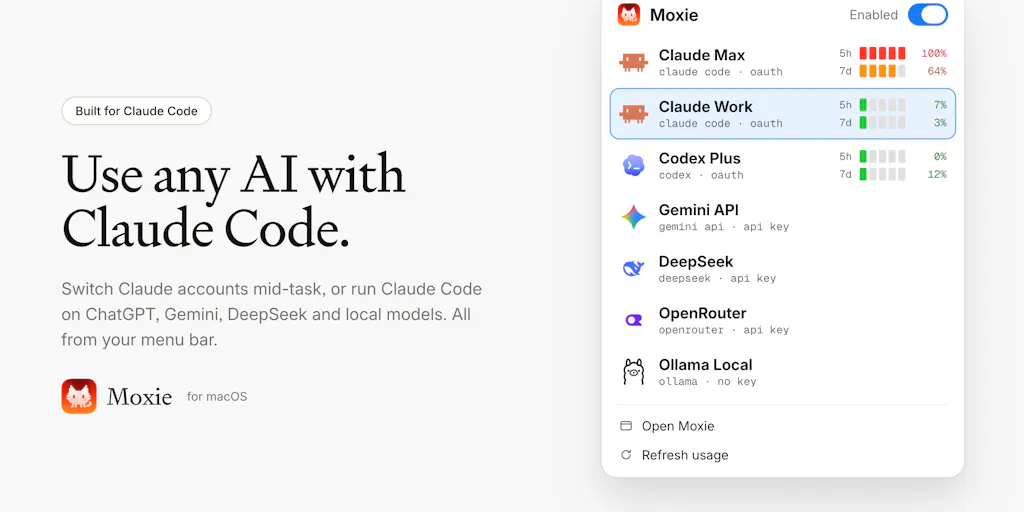
Let me translate the maker’s pitch into operator language. Moxie is a small macOS app that lives in your menu bar and sits between Claude Code and whichever AI provider you want to route requests to. The maker describes the core pain plainly: “hitting the 5-hour limit halfway through a task, and wanting to try other models without leaving the tool I already know.” His list of prior fixes — “a config file here, a router there, signing out and back in, restarting the session” — is the exact duct-tape stack I’ve watched creators assemble over the past year.
The feature set, per the Product Hunt launch page:
- Provider flexibility. You can run Claude Code against your ChatGPT plan, Gemini, DeepSeek, OpenRouter, or local models via Ollama.
- Mid-task account switching. One click swaps accounts, and according to the maker, the same session keeps going on the other account.
- Limit visibility. Moxie surfaces each account’s 5-hour and weekly limits with a heads-up before you hit the wall.
- Setup automation. It configures Claude Code for you, in both the CLI and the VS Code extension.
- Local-first privacy. Keys stay in your macOS Keychain, requests go directly to the provider, and there’s no Moxie account.
Pricing is described only as “free to try” — the full pricing model is not disclosed on the launch page. User counts, funding, and company size are likewise not disclosed. I’m flagging that upfront because launch pages love to imply traction without stating it, and this one doesn’t state it.
Why this is a social-media story and not just a dev-tools story
Here’s my take, and it’s the reason I’m writing about a menu-bar utility on a creator-economy blog. The last eighteen months of social tooling have quietly converged on the same architecture: a chat-style agent that holds context across a long working session while it drafts, edits, and reformats content. If you’ve used Jasper, Copy.ai, or the AI features baked into Buffer or Later, you’ve felt the shape of it. The moment your caption drafts, hook variations, and repurposing prompts live inside one continuous session, that session becomes production infrastructure. And production infrastructure that dies at an arbitrary usage ceiling is a scheduling problem, not a convenience problem.
Think about what a “5-hour limit” actually means to someone batching a week of content. You sit down Sunday to turn one YouTube long-form into nine TikToks, four Reels, a LinkedIn carousel, and a Threads rant. You’re ninety minutes in, the agent has absorbed your brand voice from the transcript, and then the ceiling hits. Every workaround costs you the thing that makes the session valuable: continuity.
Where Moxie Fits Against the Tools You Already Pay For
Let me be precise about the comparison, because “AI router” is a crowded category and most of it is aimed at developers, not creators.
The closest well-known analogue in the developer world is OpenRouter, which the maker explicitly names as one of the providers Moxie can route to. OpenRouter is a unified API layer — it’s plumbing, and you still need something on top of it to manage sessions and accounts. Moxie is the opposite end of that stack: a consumer-facing control surface that assumes you’re already inside Claude Code and just want to stop getting ejected.
Against creator-native tools, the comparison is murkier. Metricool, Hootsuite, and Sprout Social solve publishing, scheduling, and analytics across platforms — different job entirely. Canva and CapCut own the asset-production layer. Moxie doesn’t compete with any of them. What it competes with is the friction inside whichever AI assistant you’ve made your writing partner.
The honest framing: Moxie is not a social media tool. It’s an AI-session continuity tool that happens to matter a lot to people whose social media workflow runs through an AI session. If your stack is ChatGPT plus a spreadsheet plus the native Instagram scheduler, Moxie is irrelevant to you today. If your stack is an agentic coding-adjacent tool doing content work, it’s directly relevant.
The account-switching mechanic, explained by the maker
The most interesting exchange on the launch page is between the maker and Gal Dayan, who runs Dial. Dayan asks the question I’d have asked: when you switch accounts mid-task, does the conversation history carry over, or do you start fresh and re-explain yourself?
The maker’s answer is worth quoting because it clarifies the architecture: “Claude Code technically has no idea that the account or model changed. It’s session never got interrupted at all. It naturally transitions to the new account on next turn without realizing it. Moxie handles the handoff smoothly and carefully to not kill your ongoing requests and transition them to new account/model gracefully.”
Dayan’s read on that — that Moxie “sits below Claude Code at the transport/API layer rather than inside the session” — is, in my experience, the correct interpretation of how this class of tool has to work. You can’t inject continuity into an agent from above; you have to intercept the transport layer beneath it. That’s a meaningfully harder engineering problem than a wrapper, and it’s the reason this isn’t just a config file with a GUI.
The Tradeoff Nobody Wants to Talk About: Model Consistency
Here’s where I get skeptical, and where the launch-page comments get genuinely useful.
Chris, who lists Likely AI in his profile, raises the objection that matters most for anyone doing brand-voice work: “Ive tried model hopping before. You get inconsistent results when you jump models. i run AI with months of calibrated feedback. swap the model tomorrow and the memory transfers but the reasoning resets. different weights, different floor.”
This is not a nitpick. It’s the central risk of any multi-model workflow, and it maps directly onto content operations. If you’ve spent three months teaching one model your tone — the way you open a hook, the phrases you ban, the length you actually want — that calibration lives in the weights’ behavior, not in a portable file. Swap models mid-session and you inherit the transcript but not the judgment. For a caption draft, that’s survivable. For a 2,000-word LinkedIn essay or a scripted video, it’s the difference between on-brand and off-brand, and you won’t catch it until you’re editing line by line.
The maker’s counter is reasonable but incomplete: “Not really if you are switching to a on-par or higher model. Better yet, switch a claude account with another Claude account and get the same model handling it.” That’s the strongest use case — same model, different account, seamless continuity. It sidesteps the consistency problem entirely.
But when Dayan pushes further — does Moxie default to keeping you on the same model family, or is it indifferent? — the answer is: “You control what model picks it up when you switch the account… Moxie is facilitates the switch mechanism, you as a user control what model inherits it.” In other words, the tool is neutral; the discipline is on you.
Why this matters more for TikTok and Reels creators than for LinkedIn writers
I’ll make an operational judgment here. Short-form video creators run higher-volume, lower-stakes-per-asset workflows. If a hook draft comes out slightly off-voice because you switched from Claude to Gemini mid-batch, you reshoot the first three seconds and move on. The cost is minutes. Long-form writers — LinkedIn thought leadership, newsletter operators, YouTube scriptwriters — carry higher per-asset stakes and longer sessions, which is exactly where model inconsistency hurts most and where the 5-hour ceiling bites hardest. So the people who most need Moxie’s continuity feature are also the people who should be most cautious about its model-switching feature. That tension is real and the launch page doesn’t resolve it.
Where the math breaks
Moxie’s value proposition scales with how much you lean on a single AI session. If you touch an agent twice a week for twenty minutes, the switching overhead never accumulates and the app is dead weight. If you’re running multi-hour content sprints across accounts, the ceiling becomes a recurring tax and the app pays for itself in saved restart-and-re-explain cycles. The break-even point isn’t published, and I’d bet it’s highly individual. Test it against your own session logs rather than anyone’s benchmark.
What Creators and Social Teams Should Steal From This
Even if you never install Moxie, the launch page is a useful mirror for how content teams should think about their AI stack. Three transferable lessons, in my experience:
1. Treat your AI session as production infrastructure, not a chat window. The moment a session holds your brand voice and a week of content, it deserves the same continuity planning you’d give a CMS. Ask: what happens to this work if my access dies mid-session? If the answer is “I re-explain everything,” you have a fragility problem.
2. Separate the model layer from the interface layer. The whole reason Moxie can exist is that Claude Code’s interface is decoupled from the provider underneath. That’s a healthy architecture and you should want it in your own stack. If your content workflow is welded to one provider’s UI with no abstraction, you’re one pricing change or rate-limit policy shift away from a rebuild.
3. Track your actual ceilings. Moxie’s limit-visibility feature is the least flashy and possibly most useful. Most creators have no idea how close they run to their usage caps until they hit one mid-sprint. Whatever tool you use, know your ceiling before it interrupts you.
A note on the local-first, no-account design
The maker’s claim that “everything runs on your Mac. Keys stay in your Keychain, requests go straight to the provider you pick, and there’s no Moxie account” is a genuine differentiator in a category where most AI middleware wants your credentials and a login. For social media managers handling client accounts, that’s not a nice-to-have — it’s often a compliance requirement. I can’t independently verify the security posture from a launch page, but the architecture described is the right shape.
Where My Judgment Says This Falls Short
Balanced means naming the gaps. Here’s what the launch page doesn’t answer, and what I’d want before recommending this to a team:
- Pricing is “free to try” and nothing more. No tiers, no renewal terms, no seat model. For a solo creator that’s fine; for an agency budgeting tools across five social managers, it’s a blocker.
- macOS only. No Windows, no Linux, no web. That excludes a large share of social teams, and there’s no stated roadmap.
- No session audit trail. Dayan’s closing question is the sharpest one on the page: “does Moxie keep any local record of which model handled which stretch of a session?” The maker hadn’t answered at the time of the scrape. For anyone doing client work or needing to explain a bad draft three hours later, that’s a real gap. If you can’t reconstruct which model made which call, debugging a bad output becomes guesswork.
- The consistency problem is delegated to the user. As established, Moxie is deliberately neutral about model choice. That’s defensible, but it means the tool won’t protect you from your own worst switching decisions.
- No disclosed user numbers, funding, or team size. Not disqualifying for an early-stage indie app, but it means you’re betting on a solo maker’s roadmap. For a tool you might make load-bearing, that’s a risk to price in.
Who this is NOT for: anyone whose content workflow doesn’t run through Claude Code or a similar agentic tool; Windows-based teams; agencies that need multi-seat management and audit logs; and creators who prefer a single, stable model they’ve calibrated over months and don’t want the temptation to hop.
What I’d Watch / Test Next
If you’re a social media operator curious whether this class of tool belongs in your stack, here’s what I’d do this week — concrete, no purchase required:
- Audit your last five AI-assisted content sessions. Note how many times you restarted, re-explained context, or hit a usage ceiling. That number is your baseline. If it’s near zero, skip this category entirely.
- Test the same-model, different-account switch first. Per the maker’s own guidance, that’s the cleanest continuity path. See whether a long session survives an account swap without losing voice.
- Run a deliberate cross-model test and read the output cold. Draft the same hook on two providers mid-session, then have a colleague pick which one sounds on-brand without knowing which model wrote it. That’s the only honest consistency check.
- Ask the maker the audit-trail question directly. Whether Moxie logs which model handled which stretch of a session determines whether it’s usable for client work. If that’s a dealbreaker for you, get the answer before you build a habit around it.
- Decide your abstraction layer now. Even if Moxie isn’t the answer, the underlying lesson holds: keep your content workflow portable across providers. The creators who get blindsided by the next rate-limit or pricing change will be the ones who welded their process to a single UI.
The bigger story here isn’t one menu-bar app. It’s that AI-assisted content work has grown up enough to develop infrastructure problems — ceilings, handoffs, consistency debt — and the tooling to manage those problems is arriving. Watch this category. The creators who treat their AI session like production infrastructure will out-ship the ones who treat it like a chat window, and the gap will widen fast.


