The Notch as a Distribution Surface: What a Tiny Mac Radio App Teaches Social Media Operators About Attention
Every few months a small utility launch reminds me that the most interesting product lessons for social media people rarely come from social media tools. Notch Radio, a one-time-purchase Mac app from Unicrow that lives in the MacBook notch and plays internet radio, is one of those launches. On its face it has nothing to do with Instagram Reels, TikTok watch time, or LinkedIn carousels. But the design decisions the maker describes — a persistent, always-available surface, a zero-account model, a one-time price, no analytics — are the same decisions social media operators are quietly being forced to make about their own tooling stacks right now. If you manage accounts across five platforms, the interesting question isn’t “should I install a radio app.” It’s “why does this thing’s product philosophy feel so alien next to the SaaS I pay for every month.”
Why a radio app is worth a social media operator’s attention
I’ve spent the last several years watching creator tooling consolidate into subscription bundles. Buffer, Hootsuite, Later, Metricool, Sprout Social — every one of them has moved toward tiered monthly pricing, seat-based expansion, and “AI credits” that meter your usage. Meanwhile the platforms themselves keep changing the rules: X gutted third-party API access years ago, Instagram and Threads have tightened Graph API permissions repeatedly, and TikTok’s Content Posting API still gates certain features behind audit approvals. The result is that the average operator now pays $80–$300 a month for a stack that still can’t reliably cross-post a Reel to TikTok without a watermark workaround.
So when a maker shows up on Product Hunt and says “you pay once, there’s no account, no server, no analytics, nothing about what you listen to is ever sent to us,” that’s not just a pricing gimmick. It’s a deliberate stance about what software owes its user. And it’s a stance I think social media operators should be paying attention to, because the tools we depend on are drifting in the opposite direction.
What Notch Radio actually is, and the problem it’s solving
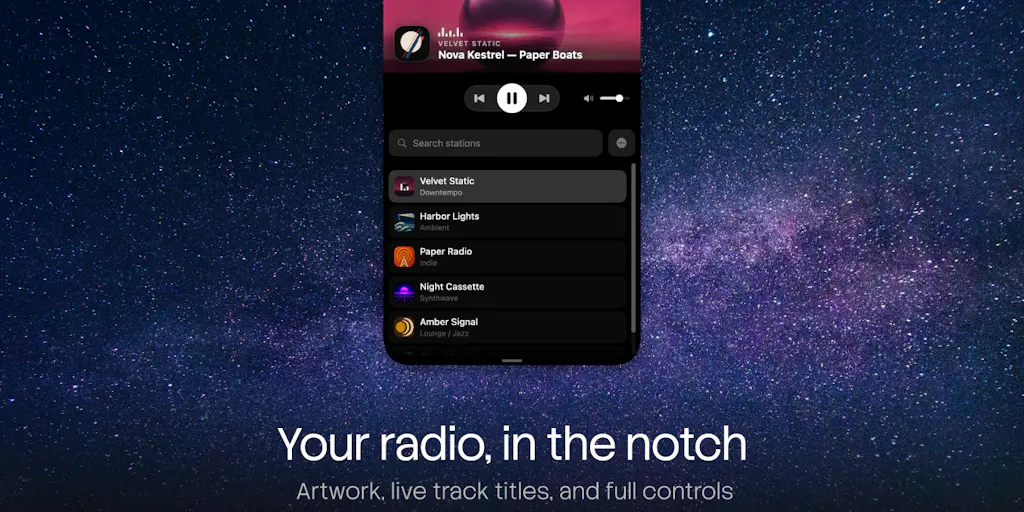
The maker, Fatih Turan, frames the origin story plainly: one of the Unicrow team keeps a radio stream running all day, and every radio app wanted a window for it. A window you minimize, lose, then hunt for in Mission Control when the track changes. Notch Radio’s answer is to put the player in the MacBook notch itself — collapsed as a thin pill, expanding on hover into a peek card, then a full player with artwork, live track titles, and controls. Move the pointer away and it folds back.
That’s the whole product. It plays radio. It reads track titles live from the broadcast and finds album art per song. It ships with thousands of stations from the Radio Browser community directory, searchable by name or genre, and saves none of its own. It supports Now Playing and media keys, full keyboard control, launch at login with your last station ready, and — for Macs without a notch — it draws one sized to your menu bar. Requires macOS 14 or later.
Pricing is stated plainly, which I appreciate: free forever for up to 5 saved stations, and $9.99 once for everything else — unlimited saved stations, live track titles, per-song album art, stations added by stream URL, country filtering, every page of search results, and placement options including the menu bar instead of the notch. The $9.99 is a launch price until 19 October; after that it’s $19.99. There’s a 14-day free trial of the paid half inside the app, though the maker notes a trial started this week ends after the launch price does. The app is available on the Mac App Store, and the maker also posted ten single-use promo codes for the Product Hunt community — first come, first served, redeemable through the App Store’s “Redeem Gift Card or Code” flow.
The “no account, no server” claim deserves scrutiny
This is the part I want to flag for anyone who runs social accounts for a living. The maker claims no analytics, no ads, no tracking, and that nothing about what you listen to is sent to Unicrow. I have no way to verify that from a Product Hunt post, and the maker doesn’t disclose an independent audit. What I can say is that the claim is structurally plausible in a way it wouldn’t be for a social scheduling tool: a radio player that pulls streams directly from public directory URLs doesn’t need a backend to function. Compare that to Later or Metricool, which by necessity hold your OAuth tokens, store your media, and proxy your posts through their servers. That’s not a knock on them — it’s just the architecture. But it does mean that “no server” is a design choice only available to certain categories of software, and social media tools are almost never in that category.
How it differs from the incumbents — and why that matters for your stack
The honest comparison set here isn’t social media SaaS. It’s other Mac menu-bar and notch utilities. The maker explicitly positions against “most notch apps” by saying Notch Radio does one thing: radio. That’s a pointed jab at the category of notch apps that have proliferated since Apple introduced the notch — apps that try to become a control center for Spotify, calendar, battery, clipboard, timers, and whatever else. I’ve tested a few of those, and the pattern is consistent: the more features they bolt on, the more they fight the OS for screen real estate and the more they break on external displays.
The other comparison is to radio apps proper. TuneIn and myTuner Radio are the obvious ones — both free, both ad-supported, both wanting an account for sync, both happy to serve you a subscription for premium tiers. Notch Radio’s differentiator isn’t the station catalog (it’s the same Radio Browser community directory many free apps use). It’s the interaction model and the pricing model. One hover, no window, one payment.
Why this matters more to solo creators than to agencies
If you’re a solo creator or indie founder, your tooling budget is your own money, and every subscription is a recurring tax on a business that may not have recurring revenue yet. A $9.99 one-time app that does one thing well is a fundamentally different value proposition than a $29/month scheduling tool that does twelve things adequately. I’d bet most solo creators reading this are paying for at least three subscriptions they use less than weekly. The Notch Radio pricing model is a reminder that “pay once” still exists as an option in some corners of software — mostly small Mac utilities, not SaaS.
If you’re at an agency, this calculation inverts. You need audit logs, team seats, approval workflows, and client reporting. A one-time-purchase app with no account model can’t give you any of that. Notch Radio is not for you, and the maker doesn’t pretend otherwise.
What social media operators can borrow from this launch
Three things stand out to me as transferable, and none of them require you to install anything.
1. The “one hover away” principle applied to your content workflow
The maker’s core insight is that the friction of losing a window in Mission Control was enough to make the app not worth using. That’s a UX observation, but it’s also a content operations observation. When I scheduled 30 posts across 5 platforms last month, the biggest time sink wasn’t writing captions or resizing assets — it was context-switching between the scheduler, the platform native apps, Canva for last-minute edits, CapCut for video trims, and a spreadsheet for tracking. Every switch costs attention. The lesson from Notch Radio isn’t “put your scheduler in the notch.” It’s “audit how many windows your content workflow requires, and cut the ones that don’t earn their place.” For me that meant killing a separate analytics dashboard and pulling the numbers I actually use into the same doc where I plan posts. Fewer surfaces, less hunting.
2. The “you pay once” framing as a positioning move
Even if you’re not selling software, the way Notch Radio states its pricing — “Free, for ever: up to 5 stations” and “$9.99 once: everything else” — is a masterclass in clarity. No asterisks, no “contact sales,” no “starting at.” If you sell anything as a creator — a course, a template pack, a membership — look at how you’re presenting the price. Most creators bury the number under three paragraphs of value-stacking. The maker here leads with the number and then explains what it unlocks. I’ve seen that pattern work better in creator landing pages too, though I’ll flag that as my opinion, not a tested result.
3. The promo code drop as a launch tactic
The ten single-use codes are a small thing, but they’re a smart launch mechanic: they create urgency, they reward the Product Hunt community specifically, and they cost the maker almost nothing in marginal revenue because the app has no server costs. If you’re launching anything as a creator — a paid newsletter tier, a digital product — consider whether you have a zero-marginal-cost perk you can hand out to early supporters. It’s the same logic behind “first 100 buyers get lifetime access.”
Where the math breaks
I want to be honest about the limits of the analogy. Notch Radio is a tiny Mac utility from a small studio. The maker doesn’t disclose revenue, user counts, or download figures, and I’m not going to invent them. The “no server” architecture that makes the one-time price viable is not replicable for a social scheduling tool, because scheduling inherently requires holding credentials and proxying requests. So the takeaway isn’t “social media tools should be one-time purchase.” It’s “social media tools should be honest about what their subscription actually pays for.” If a scheduler’s recurring fee is mostly funding server costs and API maintenance, say so. If it’s funding a sales team, also say so. Creators are smart enough to evaluate the tradeoff when it’s stated plainly.
Where I think Notch Radio falls short
A few things the launch post doesn’t answer, and that I’d want to know before recommending it.
No Windows or web version. The app is macOS 14+ only. If you’re a creator who works across a Mac and a PC, or who does most of your work in a browser, this is a non-starter. The maker doesn’t say whether other platforms are planned.
The notch dependency is a real constraint. The app handles Macs without a notch by drawing one sized to the menu bar, which is a clever workaround, but it means the core interaction model — a pill against the physical notch — is really designed for one hardware generation. External displays are another open question; the maker explicitly asks for feedback on that setup, which suggests it’s not fully solved.
The station catalog is community-maintained. Radio Browser is a volunteer directory. That means station quality, stream reliability, and metadata accuracy vary widely. Live track titles and album art are only as good as what each broadcaster sends. If you’re used to a curated experience, expect to do some weeding.
The free tier is genuinely limited. Five saved stations is enough to try it, not enough to live with it. The jump from free to paid is the whole product, which is fine, but the trial timing note — “a trial started this week ends after the launch price does” — is a bit awkward. If you start the trial on 18 October, you have one day at the launch price. That’s worth knowing before you click.
And the obvious one: this is a radio app. It does not schedule posts, track engagement, generate captions, or do anything else in the social media operator’s actual job description. I’m writing about it because the product philosophy is instructive, not because it belongs in your content stack.
What I’d watch / test next
If you’re an operator reading this, here’s what I’d actually do this week.
First, run the friction audit I mentioned. Open every app and browser tab you used to publish content in the last seven days. Write them down. Then ask which ones you could fold into another surface or eliminate entirely. I’d bet you find at least two.
Second, if you’re on a Mac and curious about the interaction model, grab one of the promo codes if any are left and test it against your external display setup — the maker is explicitly asking for that feedback, and it’s a good way to see how a persistent, always-available surface changes your relationship with a background tool. If the codes are gone, the 14-day trial is the low-risk path, just mind the launch-price timing.
Third, look at your own pricing or offer page and rewrite the top of it the way Notch Radio writes its pricing: state the number first, then what it unlocks, then what it doesn’t. No “starting at.” No “contact us.” Just the number.
Fourth, and most importantly, stop treating small utility launches as irrelevant to your work. The most useful product thinking for social media operators right now is happening in adjacent categories — Mac utilities, note apps, RSS readers — where makers are experimenting with pricing, privacy, and interaction models that the big social SaaS vendors won’t touch because their business models won’t allow it. Watch those launches. Borrow the ideas. Leave the subscriptions.


