The creator economy’s real bottleneck isn’t content — it’s the tools we trust with the boring parts
Every social media operator I know is quietly running an unglamorous second job: metadata janitor. We rename exports, re-tag assets, re-verify that the file we uploaded is actually the file we meant to upload, and re-check that a scheduled post didn’t silently mangle a caption. So when I see a Product Hunt launch like OmniDICOM — a desktop app for inspecting, editing, and exporting DICOM medical imaging studies — my first instinct isn’t “that’s not my vertical.” It’s “here’s another example of a builder who understood that the workflow around the file matters more than the file itself.” That lesson is the whole ballgame for creators juggling CapCut exports, Canva masters, and a dozen platform-specific aspect ratios. The tool is niche; the design philosophy is universal.
What OmniDICOM actually does — and why a creator should care
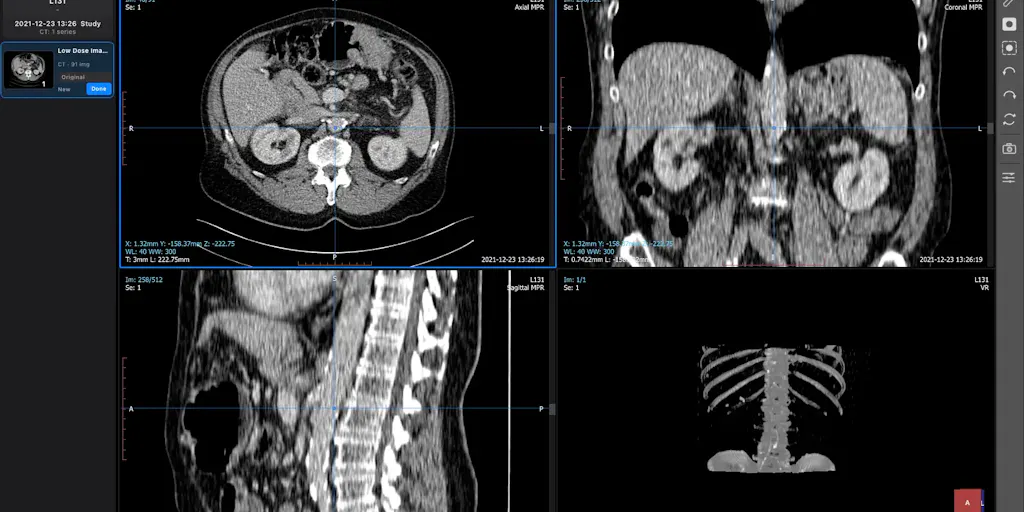
Let me get the facts straight before I editorialize. OmniDICOM is a desktop application built by Youngrak Choi, who describes it as a single app for opening studies, comparing series, editing tag values, exploring MPR and 3D views, and exporting results. He’s explicit that metadata editing is “a central part of the workflow” — you inspect a tag, change its value, save, then reopen the study to verify the change stuck. That verify-after-write loop is the detail that tells me this person has actually suffered through the alternative.
The platform support is narrow and stated plainly: the Mac build runs on Apple silicon with macOS 13 or later, and the Windows build targets 64-bit Windows 10⁄11. Pricing is per machine — Basic at US$10/month or US$99/year, Professional at US$45/month or US$449/year, with taxes possibly applying. A 14-day Professional trial starts at first launch but comes with export limitations. And the maker is upfront about scope: OmniDICOM is for research and education only, not diagnosis or clinical decision-making.
Now, the obvious objection: I run social accounts, not a radiology lab. Why am I writing about this? Because the operational pattern here — inspect, edit, save, reopen to verify, work on a copy — is exactly the discipline most creators skip when they’re pushing assets through five platforms at 11pm. In my own experience managing multi-platform publishing, the failures that cost the most time aren’t creative failures. They’re state failures: a wrong tag, a stale export, an overwritten master. OmniDICOM is a reminder that “work on a copy” should be a default, not a heroic act of willpower.
The “work on a copy” instinct is a creator survival skill
Choi’s own advice in the launch thread is to work on a copy if you need to preserve the original files. A commenter, Gal Dayan, pushes on exactly this point — noting that studies “can’t really be un-anonymized once you overwrite the wrong tag” — and asks whether there’s a built-in guardrail like a warning before saving over the original, or whether it’s entirely on the user’s backup discipline. That question is the most useful thing on the page, and it’s the same question I’d ask any content tool: does the software protect me from myself, or does it just trust me?
My take: most creator tools fall into the “just trust me” camp, and that’s a design debt. When I’ve batch-renamed exports for a week of Instagram Reels and TikTok posts, the only thing standing between me and a corrupted master is a naming convention I invented at 2am. A tool that forces a confirmation before destructive writes — or auto-versions on save — is worth more than a flashy AI feature. If OmniDICOM has that guardrail, it’s not stated clearly in the source; if it doesn’t, that’s the first thing I’d want added.
How it stacks up against the tools creators actually pay for
Here’s where I’ll be honest about the comparison being imperfect. OmniDICOM’s direct competitors aren’t Buffer, Hootsuite, or Later — those are scheduling and publishing layers. Its real peers are desktop file-workflow tools: the Adobe suite for asset editing, CapCut for video assembly, Canva for design masters. But the business model comparison is instructive, and it’s where I think creators should pay attention.
Look at the pricing shape. OmniDICOM charges per machine, not per seat, and offers a perpetual-ish annual option at roughly a 17% discount versus monthly. That’s a deliberate contrast with the per-seat, per-workspace pricing that dominates the social SaaS world — Buffer, Hootsuite, and Metricool all anchor on seats or connected channels. For a solo creator or a two-person team, per-machine pricing is friendlier; for an agency, it’s a budgeting headache. Neither model is “correct,” but it tells you who the builder thinks the customer is: an individual practitioner, not a procurement department.
The other telling choice is the export limitation on the trial. That’s a classic freemium lever — let people see the workflow, gate the output. In creator tooling, I’ve watched this pattern succeed (CapCut built a massive user base on a generous free tier before monetizing) and fail (tools that gate the one export format you actually need). Choi doesn’t say what the export limitation is, so I can’t judge whether the trial is genuinely useful or a teaser. That’s an open question, not a verdict.
Why the “single app for the whole workflow” pitch is harder than it sounds
Choi frames OmniDICOM as one desktop app covering open, compare, edit, explore, and export. That consolidation pitch is seductive — creators are drowning in tab-switching between Notion for planning, Canva for design, CapCut for edits, and a scheduler for distribution. But consolidation has a cost: every added capability is a new surface for bugs, and the tool becomes a single point of failure. When a monolithic tool breaks, you lose the whole pipeline; when a modular stack breaks, you swap one link.
In my experience, the tools that survive in a creator’s stack are the ones that do one thing so well you’d grieve its loss — not the ones that do five things adequately. OmniDICOM’s bet is that DICOM researchers want one app badly enough to accept the tradeoffs. Whether that bet generalizes to social media workflows is genuinely unclear. I’d bet it doesn’t generalize cleanly, because creator stacks are more heterogeneous than research workflows — but the underlying instinct, that fragmentation is the enemy, is right.
What creators and social teams can borrow from this launch
Strip away the medical context and there are three transferable practices here that I think any social media operator should steal this week.
First, build a verify-after-write step into your publishing flow. OmniDICOM’s maker explicitly describes reopening the study to confirm the edit. Most schedulers — Buffer, Later, Metricool — will show you a preview, but previews lie about platform rendering more often than you’d think. I’ve had scheduled posts go out with a cropped caption on LinkedIn while looking perfect in the tool’s preview pane. The fix isn’t a better preview; it’s a post-publish audit. Check the live URL, check the first comment, check that the UTM parameters survived.
Second, treat your masters as read-only. Choi’s “work on a copy” advice is the single most portable line in the launch. In creator terms: never edit the master export. Version your files with a date or a suffix, keep the original untouched, and only ever publish from a derived copy. This is boring. It will save you a career-ending mistake someday.
Third, be explicit about scope in your own work. The maker states clearly that OmniDICOM is for research and education, not diagnosis. That’s a trust signal — and it’s a discipline creators should mirror in their own content. If you’re a fitness creator, saying “this is not medical advice” isn’t legal boilerplate; it’s audience respect. If you’re a finance creator, “not investment advice” is the same. Scope statements build the kind of trust that survives a bad take.
Why TikTok creators should care more than LinkedIn ones
I’ll make a sharp claim: the lessons from this launch matter more for short-form video operators than for B2B content teams, and here’s the mechanical reason. Short-form platforms — TikTok, Instagram Reels, YouTube Shorts — reward iteration speed and punish asset-management sloppiness more severely, because the volume is higher. A LinkedIn team might publish five posts a week; a TikTok operator might publish five a day. At that cadence, a broken naming convention or an overwritten master isn’t a minor annoyance — it’s a lost week.
The algorithmic stakes are also asymmetric. On TikTok, watch time and completion rate dominate distribution; a mis-exported file with a bad aspect ratio tanks completion in the first second, and the algorithm buries it. On LinkedIn, engagement rate and dwell time matter more, and a slightly off asset is survivable. So the operational discipline OmniDICOM embodies — verify, version, don’t overwrite — pays off faster and harder on the short-form side. If you’re running high-volume short-form, borrow the workflow even if you never touch a DICOM file.
Where I think this falls short — and who shouldn’t buy it
Let me be balanced, because a launch page is a sales document and my job isn’t to sell it for them.
The biggest limitation is stated by the maker himself: OmniDICOM is not for diagnosis or clinical decision-making. That’s not a knock — it’s a scope boundary — but it means the addressable audience is researchers, educators, and students, not clinicians. If you’re a medical professional looking for a diagnostic tool, this isn’t it, and the maker says so.
Second, the pricing is per machine with no team tier mentioned. For a solo researcher, US$10/month Basic or US$99/year is reasonable. For a lab or a classroom, the math gets awkward fast — five machines on Professional is US$2,245/year, and the source doesn’t describe any volume discount or shared-license option. If you’re buying for a group, ask about that before committing.
Third, the trial’s export limitation is unspecified. “Export limitations” could mean a watermark, a format restriction, or a cap on exports. Not disclosed. That’s the kind of detail that determines whether a trial is a genuine evaluation or a demo reel, and I’d want it spelled out before I invested 14 days.
Fourth — and this is my judgment, not a sourced fact — the guardrail question Gal Dayan raised is unresolved in the thread. If there’s no warning before overwriting an original file, the tool is trusting the user’s backup discipline entirely. For a product whose central workflow is metadata editing, that feels like a gap. I’d want an auto-backup or a confirmation prompt on destructive saves. Whether it exists, the source doesn’t say.
Who is this not for? Anyone who needs diagnostic-grade tooling, anyone buying for a large team without a per-seat license, and anyone who wants a cloud-collaborative workflow rather than a desktop app. The source describes a desktop application, full stop — no mention of browser access, mobile, or real-time collaboration. If your workflow lives in the cloud, this isn’t your tool.
Where the math breaks
Let me do the uncomfortable arithmetic that launch pages skip. US$449/year for Professional on one machine is roughly US$37/month effective — cheaper than the US$45 monthly, but still a real commitment for an individual researcher. Compare that to what a creator pays for their stack: Metricool has a free tier and paid plans well under that; Buffer starts lower; Canva Pro is a fraction of it. OmniDICOM is priced like professional software, not creator software, and that’s a deliberate positioning choice. It’s fair for its audience — but it means the “borrow the workflow, skip the tool” advice I gave above is genuinely the right call for most social media operators. You don’t need to buy this to learn from it.
What I’d watch / test next
If you’re a social media operator, here’s what I’d actually do this week, in order.
First, run a destructive-save audit on your own stack. Open your scheduler — Buffer, Later, Metricool, whatever you use — and check whether it versions your posts or overwrites on edit. If it overwrites, start exporting a copy of every approved post to a dated folder before you schedule it. That’s your “work on a copy” discipline, applied to content instead of DICOM tags.
Second, add a post-publish verification step to your workflow. Pick three recent posts across three platforms, open the live URLs, and check the caption, the first comment, the link, and the UTM parameters. I’d bet you find at least one silent failure. Fix the process, not just the post.
Third, if you’re evaluating OmniDICOM specifically — or any niche desktop tool with a trial — ask the maker the two questions the source leaves open: what exactly does the export limitation restrict, and is there a guardrail before overwriting an original file? Those answers tell you more about the product’s maturity than any feature list.
Finally, watch how this launch’s comment thread develops. Gal Dayan’s guardrail question is the kind of specific, operational feedback that shapes early roadmaps. If the maker responds with a concrete answer, that’s a signal the product is being built with real users. If the thread goes quiet, that’s a signal too. Either way, the lesson for creators stands: the tools worth trusting are the ones that protect you from the mistakes you’ll inevitably make at 11pm.