The quiet case for tools that ask for nothing
Every social media operator I know runs their stack on borrowed trust. You install a scheduling extension, a thumbnail grabber, a hashtag helper, a “one-click repurpose” plugin — and each one asks for the same thing: permission to read and change data on every site you visit. That’s your ad accounts, your client dashboards, your logged-in Instagram and LinkedIn sessions, your Stripe tab from the other morning. Most of us click “Add to Chrome” without reading the dialog, because the alternative is doing everything manually.
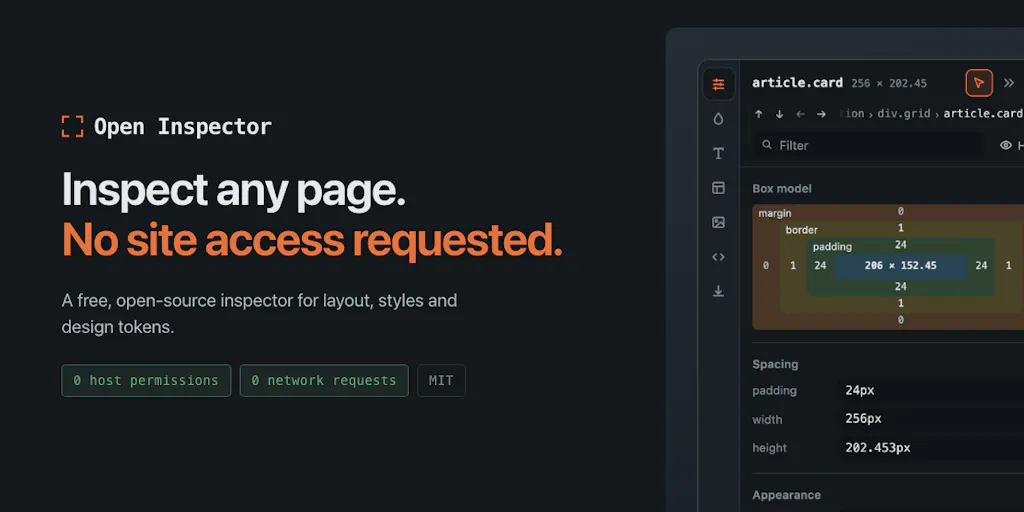
So when a tool shows up whose entire pitch is it asks for nothing, that’s not a feature footnote. For anyone who manages brand accounts across multiple clients, it’s the whole story. Open Inspector is a browser-based design inspection tool, not a social media scheduler — but the permission model its maker chose is the most interesting thing in the launch, and it’s the thing I’d want every SaaS founder in the creator-tools space to study.
What Open Inspector actually is, and what problem it solves
Patryk Lasek built Open Inspector for himself after getting tired of CSS inspector extensions demanding broad host permissions. In his own words on the launch page, every alternative he tried wanted to “read and change all your data on all websites” — which, for someone logged into staging environments and internal dashboards, meant handing a closed-source extension access to everything. So he built one that requests only activeTab: permission granted by your click for a single tab, revoked when you navigate away. Chrome’s install dialog, he notes, shows no site access at all.
The functional pitch is narrower than the security pitch, and it’s worth being precise about what it does:
- It surfaces things DevTools doesn’t readily tell you: the spacing scale a page actually follows, its type scale, grid/flex anatomy, the font that actually rendered, and a page-wide WCAG contrast audit.
- It exports a design system as CSS variables, Tailwind config, SCSS, JSON, W3C design tokens, or a Markdown handoff formatted for Cursor/Claude.
- Edits are live and reversible — tweak any value, and closing the inspector reverts everything exactly.
- It’s MIT-licensed and free forever, per the maker.
- Zero network requests: a build step scans source and shipped bundles for
fetch/XHR/WebSocket/beacon calls and fails the build if it finds one.
Trigger is Alt+Shift+I. That’s the whole product. No account, no pricing tier, no “Pro” upsell mentioned. Not disclosed whether there’s a paid tier planned.
Why this matters more to a social media operator than it first appears
Here’s the connection that isn’t obvious from the launch copy. If you run social for a brand, you spend a surprising amount of time reverse-engineering other people’s design systems. You screenshot a competitor’s carousel and try to match the type scale. You pull a landing page into Figma to steal the spacing rhythm for a Reels cover template. You audit a client’s site for contrast problems before you build accessible story graphics. That work is currently done with a mix of DevTools, screenshots, and guesswork — or with an extension that has full read/write access to every tab you have open, including the ones logged into client ad accounts.
A tool that does the reverse-engineering without asking for that access is, for agency people, a meaningfully different risk profile than the alternatives. My take: the security model is the product. The design-token export is a nice-to-have on top.
How it differs from what you’re probably already using
The honest comparison set here isn’t social media tools — it’s the browser-extension category that has quietly become part of many creators’ workflows.
Versus general-purpose inspector extensions. Most CSS/design inspection extensions in the Chrome Web Store request <all_urls> or broad host permissions, because that’s the path of least resistance for the developer. Open Inspector’s activeTab-only approach is the outlier, not the norm. The tradeoff is real: a tool with activeTab can’t passively monitor pages, can’t run in the background, can’t inject into tabs you didn’t explicitly activate it on. That’s the point.
Versus Figma and design-handoff tools. Figma’s own dev mode and tools like Anima or Locofy target teams that already have a design file. Open Inspector targets the opposite case: you have a live page and no source file. For a social team reverse-engineering a competitor’s visual system, that’s the more common situation.
Versus the “AI design audit” wave. A lot of 2024–2025 tooling bolts an LLM onto a screenshot and calls it a design review. Open Inspector reads computed styles from the DOM, which means it’s working from the actual rendered values, not a model’s guess at what a color “looks like.” That’s a meaningfully different accuracy profile, and it’s why the Markdown handoff for Cursor/Claude is interesting — you’re feeding real tokens to the model, not vibes.
Versus nothing. The most common alternative for a solo creator is: open DevTools, squint at the computed styles panel, screenshot, move on. That’s free and it works. Open Inspector’s value proposition over that baseline is the aggregation — spacing scale detection, contrast audit across the whole page, token export — not the raw inspection itself.
Where the math breaks
The maker is refreshingly honest about a real limitation, and it’s worth quoting because it’s rare to see a launch page admit this. On spacing, he says the tool “works out the base unit (like ‘8px, 92% of values fit’), but the export still lists every value it finds, including the odd ones. On a messy site that list gets long.” Cleaning that up is, per the maker, “next on my list.”
That’s a real gap for anyone hoping to export a clean token set from a site built without a system. The color side handles it better — near-identical colors get merged, so you don’t get twelve slightly-different greys — but they’re named by appearance (blue-600, gray-100), not by semantic role. As the maker puts it, “you won’t get ‘primary’ or ‘surface.’ That information just isn’t on the page.” Fair, and correct. Intent isn’t in the DOM.
What creators and social teams can actually borrow from this
Even if you never install Open Inspector, the launch is a useful prompt for how you run your own stack.
The permission audit you should run this week
Go to chrome://extensions, open the details panel for every extension you have installed, and read the site-access line. I’d bet most social media operators find at least two extensions with “on all sites” access that they installed for a single narrow purpose — a screenshot tool, a color picker, a caption helper. Every one of those is a tab you have logged into a client’s Meta Business Suite or LinkedIn page. The activeTab model exists precisely so tools don’t need that access. When you’re evaluating a new scheduler or analytics extension, make the permission scope a first-class criterion, not a footnote. This is the single most actionable thing in the launch.
Design-system reverse-engineering as a content workflow
If you run a brand account, you should be able to state your type scale, spacing scale, and color tokens without opening Figma. If you can’t, your content is probably drifting — the carousel cover from March doesn’t match the Reel cover from June. A tool that extracts those values from your own published landing pages gives you a ground-truth check on whether your social templates are still on-brand. The Markdown handoff format is genuinely useful here: you can paste your actual token set into an AI assistant and ask it to generate on-brand graphics specs, rather than describing your brand in adjectives.
The “no network requests” build check is a pattern worth stealing
The maker’s build-step approach — scan the shipped bundle, fail the build if any fetch/XHR/WebSocket/beacon call appears — is a technique any indie tool builder in the creator space should copy. If you’re shipping a scheduling extension or a browser helper to creators, being able to say “this literally cannot phone home, here’s the CI check that proves it” is a stronger trust signal than any privacy policy. It’s also cheap to implement. My take: this becomes table stakes for creator-facing browser tools within a year or two.
Why TikTok and Instagram creators should care more than LinkedIn ones
The practical relevance scales with how much visual reverse-engineering you do. A LinkedIn ghostwriter working in plain text has almost no use for a design inspector. A TikTok or Instagram creator building Reels covers, carousel templates, and story graphics in Canva or CapCut is constantly trying to match a visual system they don’t own. Same for anyone running Pinterest, where the visual language of a pin is doing most of the click-through work. Those are the operators for whom a lightweight, zero-permission design extractor is genuinely useful — not as a daily driver, but as a periodic “what is this brand actually doing” audit tool.
Where my judgment says it falls short
Let me be clear about the boundaries, because the launch copy is enthusiastic and I want to separate the claims from my read.
It’s not a social media tool. Open Inspector doesn’t touch scheduling, analytics, content repurposing, or platform APIs. If you came here looking for a Buffer or Later alternative, this isn’t it. It’s a browser extension for inspecting web pages. The relevance to social media operators is indirect — it’s about the permission model and the reverse-engineering workflow, not about managing posts.
The spacing export is acknowledged as incomplete. The maker says cleaning it up is next on his list. Until that ships, the token export is more useful for colors and typography than for spacing on any site that wasn’t built with a strict system.
Semantic naming isn’t possible, and that’s structural. You’ll get blue-600, not brand-primary. For a solo creator that’s fine. For an agency handing tokens to a dev team, it means a manual naming pass. Worth knowing before you promise a client a “design system export.”
Not disclosed: user counts, whether there’s a paid tier planned, how the tool handles shadow DOM or iframes, browser support beyond Chrome, or what happens on sites with heavy canvas/WebGL rendering. The launch page is silent on all of it. I’d want answers before recommending it for anything beyond casual use.
MIT and free forever is a double-edged commitment. Great for users. It also means no revenue model is visible, which raises the usual sustainability question for anything you build a workflow around. My take: use it, don’t depend on it.
Who it’s NOT for: teams that need a managed, supported design-handoff tool with SLAs; anyone who needs semantic token naming out of the box; anyone working primarily in native mobile apps rather than web; and anyone whose workflow is already fully inside Figma with a maintained design system. If you’re in that last group, you don’t have the problem this solves.
What I’d watch / test next
Concrete steps for this week, in order of effort:
- Run the permission audit. Open your extensions page, read the site-access line on each one, and uninstall or replace anything with broad host access that you don’t actively need. This takes ten minutes and it’s the highest-leverage thing in this piece.
- Install Open Inspector and point it at your own brand’s landing page. Press Alt+Shift+I, look at the spacing scale and contrast audit, and export the tokens as Markdown. Compare that output against the visual system your last ten social posts actually used. The gap, if there is one, is your content-drift report.
- Try the Markdown handoff. Paste the exported tokens into your AI assistant of choice and ask it to generate a brand-consistent graphic spec. See whether the output is closer to on-brand than what you get from describing your brand in words. That’s a cheap test of whether the token-export workflow earns a place in your stack.
- Watch the spacing cleanup. The maker said it’s next. If the export gets bucketed into “nearest multiple of base unit, off by Xpx” — which is the approach suggested in the launch thread — it becomes meaningfully more useful for messy real-world sites. That’s the update I’d check back for.
- Ask the hard questions before you standardize. Browser support, iframe handling, and long-term maintenance aren’t answered on the launch page. If you’re going to build a team workflow on top of this, email the maker first. Not disclosed is not the same as not a problem.
The broader lesson for anyone building or buying in the creator-tools space: permission scope is a feature, and most of the industry is still treating it as an afterthought. A tool that asks for nothing is worth more attention than its feature list suggests — even when, like this one, it isn’t really a social media tool at all.


