The demo video is the new landing page — and most creators are still editing theirs by hand
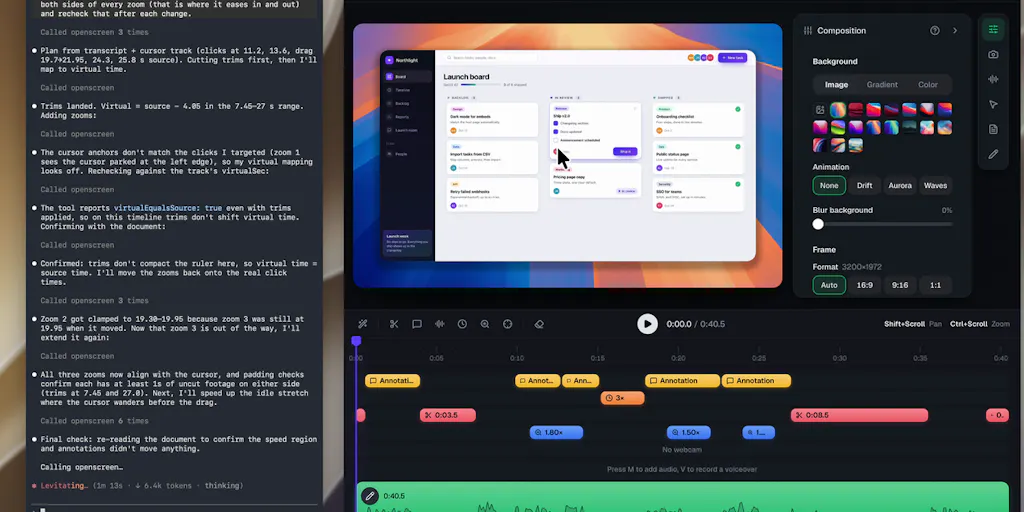
If you publish product content, you already know the pattern: the screen recording is the highest-intent asset you own, and it’s also the one you spend the most time on for the least reusable output. A single feature walkthrough can eat an afternoon of zoom keyframes, dead-air trims, and caption fixes — and then it dies inside one blog post. That’s the real reason a free, MIT-licensed screen recorder with an agent-friendly edit pipeline is worth your attention even if you never touch a terminal. OpenScreen 2 launched on Product Hunt with a local MCP server, click-derived zooms, transcript-based cutting, and a GPU renderer the maker says exports roughly 15x faster than the previous version on their reference laptop. Whether you adopt it or not, the design decisions inside it tell you where demo production is heading — and which parts of your current workflow are about to become free.
What OpenScreen 2 actually solves (and what it doesn’t pretend to)
The honest framing comes from the maker himself. Etienne Lescot took over the project after original author Siddharth Vaddem archived it in June, then spent four months on a 2.0 rewrite with 137 contributors. The pitch is a free alternative to Screen Studio, and the feature list is the interesting part:
- A local MCP server so an agent like Claude Code can perform the edit
- Zooms planned from your clicks, grouped as shots rather than one zoom per click
- Video cutting by deleting words in the transcript, with captions transcribed locally
- Webcam beside or above the recording, with background blur or removal
- A native GPU renderer
- A 3D camera that moves with your zooms, plus five cursor themes
- Windows, macOS, and Linux; free and MIT, no account, no watermark
If you’ve used Screen Studio or Recordly — which the maker notes started as a fork of OpenScreen — the surface area will feel familiar. What’s different is the architecture underneath. Most polished demo tools are closed, subscription-priced, and Mac-first. This one is cross-platform, account-free, and explicitly built so an external model can drive the timeline.
The MCP angle is the actual headline
Not the zooms. Not the renderer. The MCP server is what separates this from a nicer Screen Studio clone, because it changes who does the editing. In a conventional workflow, you record, then you scrub the timeline, then you export. With an agent in the loop, you record, then you describe the cut you want, and the model operates on the project file. Asked in the thread how Claude or ChatGPT compares to specialized AI video editors, Lescot answered that it depends mainly on the harness and model you choose, naming Opus 5.5 and GPT-6.1 Sol as strong at that kind of task.
My take: that answer is more revealing than a benchmark would be. Agentic video editing quality is currently a function of the orchestration layer, not the editor. The editor’s job is to expose a clean, deterministic API — and a local MCP server is exactly that. If you’re a social media operator, this is the same shift you watched happen to copywriting in 2023: the tool stops being the place you work and becomes the thing your agent calls.
The transcript-cutting question every short-form editor should be asking
The most useful exchange in the entire launch thread is buried under a comment from Gal Dayan, who asked the question anyone who has cut video from auto-transcripts eventually asks: local transcription is imperfect, so what happens when the agent deletes a misheard word and the cut lands mid-sentence instead of in the pause?
Lescot’s reply is technically specific and worth reading closely. The agent cuts by word ID, not by text — so a misheard word still cuts at its own timing in the audio. For English and French, word timings come from a forced aligner, so cuts land on word boundaries. Other languages fall back to Whisper’s own timings, which he describes as looser. There’s no review step yet: each edit lands as a single undo step, cuts appear on the timeline where you can drag the edges, and a review-before-apply mode is something the team has looked at.
Dayan’s follow-up is the sharpest observation in the thread, and I’d underline it: the tool is weakest exactly where it’s needed most. English and French get the forced aligner; the looser Whisper timings apply to the languages where a misheard word is more likely in the first place. If a review mode ships, his argument is that it should ship for the non-aligned languages first rather than everywhere at once. That’s good product reasoning regardless of whether you use OpenScreen.
Why this matters more to TikTok and Reels editors than to LinkedIn ones
If your primary output is a 90-second talking-head short with burned-in captions, transcript-based cutting is the single highest-leverage feature in this class of tool — and it’s also where a bad cut is most visible. A misaligned cut in a 12-minute LinkedIn product walkthrough is a minor blemish. The same misalignment in a vertical short with a hard cut every two seconds reads as amateur, and retention drops on the first three seconds anyway.
The practical implication for a short-form workflow: treat English and French transcript cuts as broadly safe, and treat other languages as “review the timeline before export.” That’s an operational rule, not a knock on the tool. It’s also the kind of rule that belongs in your SOP doc next to your caption style guide.
What social teams can borrow from this launch, regardless of the tool
Three transferable ideas, and none of them require installing anything.
1. Cut by transcript, not by waveform. If you’re still trimming silence by eye, you’re spending the most expensive minutes of your week on the cheapest possible task. Descript popularized text-based editing years ago, and CapCut has been pushing auto-captions and auto-cut features hard. The lesson from OpenScreen’s implementation is subtler: cut at word boundaries, not character offsets. If you’re building a repurposing pipeline that pushes long-form video into shorts, the alignment method is the quality ceiling. Forced alignment beats raw ASR timestamps every time, and that’s true whether you’re using a free tool or a paid one.
2. Plan zooms as shots, not as reactions. “One zoom per click” is what makes hand-recorded demos look twitchy. Grouping clicks into shots is a small naming decision with a large output difference — it forces the editor to think in scenes. When I’ve reviewed demo footage from teams, the tell for an unedited recording is almost always zoom density, not audio quality. If your current tool zooms on every interaction, you’re shipping a nervous video.
3. Let the agent handle the first pass; keep the human on the last ten percent. The launch thread itself is evidence for this. The maker’s own framing question was “what do you still fix by hand in your product demos?” — and the answers that emerged were about the parts automation still can’t judge: whether a cut reads as intentional, whether a pause should stay, whether a misheard word matters. Automate the assembly, protect the judgment calls.
Where the math breaks
Be skeptical of the “15x faster export” number in isolation. It’s the maker’s own claim, measured on their reference laptop, and export speed is rarely the bottleneck in a demo workflow — recording, scripting, and review usually are. A faster renderer is genuinely nice when you’re iterating on a 20-minute walkthrough, and it matters a lot if you’re batch-producing shorts from a single recording. But if your bottleneck is “I don’t know what to cut,” a 15x renderer saves you nothing. In my experience, the time savings from tools like this come from the transcript edit and the click-derived zooms, not the encode.
The free-and-MIT question
Free, MIT, no account, no watermark on a tool this polished is genuinely unusual, and Dayan called it out in the thread. It’s also the part I’d watch most carefully as an operator. A maintained open-source project with 137 contributors and an active maintainer is a real asset. A project that loses its maintainer is a folder of code. The original OpenScreen was archived once already before Lescot picked it up — that’s the actual risk profile you’re accepting, and it’s worth naming plainly. If your team depends on a tool for client deliverables, “MIT licensed” is not the same as “supported.”
Where my judgment says this falls short
Three things, stated as opinions rather than facts.
No review-before-apply is a real gap for team workflows. Undo as the safety net works when one person is editing their own recording and can see the timeline. It works less well when an editor is producing for a founder who records the raw footage, or when a contractor is delivering to a client. A single undo step per edit means the recovery path is manual. The team says a review mode has been looked at; until it exists, I’d keep agent-driven edits to non-final cuts and do the last pass by hand.
Local-only transcription has tradeoffs you should test on your own audio. Accents, crosstalk, jargon, and product names are exactly where ASR degrades — and product demos are full of all four. The forced-aligner distinction for English and French helps with timing, not with accuracy. If your recordings are heavy on invented terminology, budget review time accordingly.
Who this is not for. If you need a hosted, collaborative, browser-based editor with a support contract and SSO, this is not your tool — look at the paid incumbents instead. If you only record on a phone, the cross-platform desktop story doesn’t help you. And if your demos are mostly motion graphics or UI mockups rather than live screen capture, a screen recorder is the wrong category entirely.
What I’d watch / test next
This week, I’d do three concrete things.
First, download OpenScreen 2 and record one real demo — not a test clip. Use the transcript edit to remove filler words, and pay attention to whether the cuts land where you’d have put them manually. That’s the only honest test of the alignment claim.
Second, if you have any agent harness set up, wire the local MCP server to it and try one instruction like “remove the pauses and tighten the intro.” Watch what the agent does to the timeline and how many undo steps you burn. That will tell you whether agentic editing is ready for your production pipeline or still a parlor trick.
Third, audit your repurposing workflow. Take your last long-form demo and count how many shorts you actually extracted from it. If the answer is zero, the problem isn’t your recorder — it’s that your process treats the recording as a deliverable instead of raw material. Fix that before you fix your tooling.
I’d also keep an eye on whether a review-before-apply mode ships, and in which order. Dayan’s argument — non-aligned languages first — is the right one, and how the maintainer responds will tell you a lot about how this project prioritizes its users.


