The Inbox Is the Last Place Creators Forgot to Automate, and This Tool Finally Gets It
Let me paint a picture that will feel uncomfortably familiar. It’s 11:47 PM. You’ve just finished editing a Reel, scheduled three TikToks, and replied to fourteen DMs from your Link-in-bio form. Then you open WhatsApp and find: a brand deal inquiry from a manager who “just wants to hop on a quick call,” a sponsor asking for the media kit you sent them last month, a collaborator who’s gone quiet, and your mom asking if you’re eating enough. For most creators and social media operators, WhatsApp is the black hole of the workflow — the one channel that doesn’t have a Buffer, a Hootsuite, or a Metricool equivalent. We’ve built entire tech stacks to manage every surface except the one where clients, collaborators, and communities actually talk to us in real time.
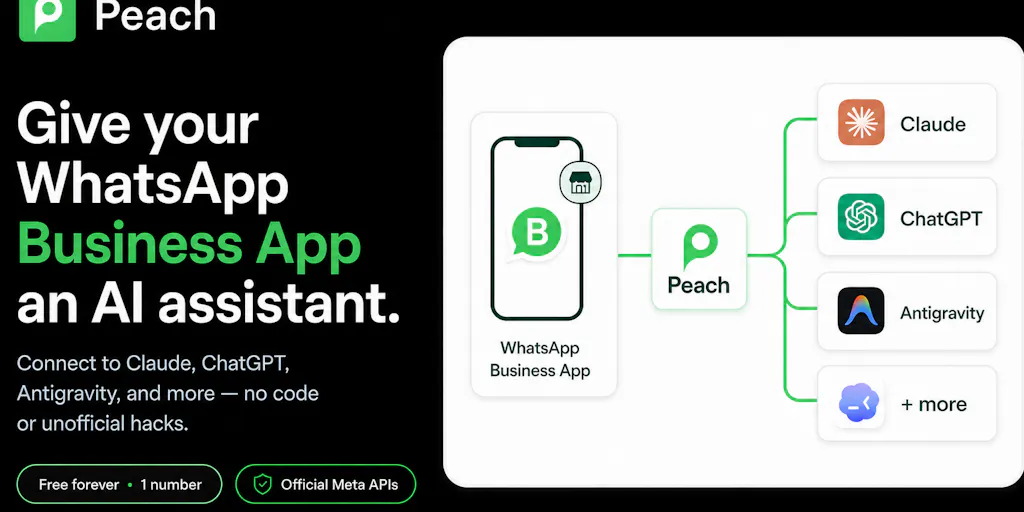
That’s why Peach Co-Pilot caught my attention in a way most Product Hunt launches don’t. It’s not another content scheduler or AI caption generator. It’s an attempt to solve the least glamorous, most time-draining problem in the creator economy: the conversational inbox that runs your business but refuses to integrate with anything. The pitch is simple — connect your existing WhatsApp Business number to Claude, ChatGPT, or any MCP-compatible AI tool, and let the AI draft replies, chase leads, triage messages, and run scheduled inbox sweeps. No browser extensions, no unofficial libraries, no API keys. Just the official Meta APIs and a few prompts.
Now, before I go any further, let me be clear about what this is and isn’t. This is not a magic bullet that will grow your audience or double your engagement rate. It will not write your content calendar. What it might do is give you back the hours you currently lose to the most important conversation channel you’ve been ignoring. And for solo creators and small teams, that could be the difference between scaling and burning out.
What Problem This Actually Solves (Hint: It’s Not “WhatsApp Is Annoying”)
Let’s talk about the actual operational pain here, because the surface-level read — “AI for WhatsApp” — undersells the problem. When I’ve run social accounts for clients and brands, the pattern is always the same. The public-facing metrics — views, likes, comments, shares — get all the attention. But the private metrics — the DMs, the WhatsApp messages, the direct inquiries — are where the money actually lives. A brand deal doesn’t come from a comment; it comes from a message. A collaboration doesn’t start with a tag; it starts with a conversation. And yet, we treat these channels as if they’re personal correspondence rather than business infrastructure.
The tool’s maker, Suresh, frames it in terms that any busy professional will recognize: “repetitive replies, forgotten follow-ups, buried context, and constant switching between WhatsApp and other tools.” That’s not a feature list; that’s a description of my average Tuesday. When I scheduled 30 posts across 5 platforms last month, the hardest part wasn’t the scheduling — it was the follow-up messages I had to send afterward to confirm deliverables, chase approvals, and answer the same three questions from different clients. Each one required opening WhatsApp, scrolling through context, and crafting a response that didn’t sound like a bot. The cognitive overhead is real, and it doesn’t scale.
What Peach Co-Pilot does differently is that it doesn’t try to replace WhatsApp. It sits on top of it, using the official WhatsApp Business APIs — a detail that matters more than most people realize. The comment section on the launch page is full of people asking about exactly this, and the makers’ response is consistent: they built on official APIs from day one, even though it meant a slower path to launch. In an ecosystem where most “WhatsApp automation” tools rely on browser hacks and unofficial libraries that can get your number banned, this is a meaningful trust signal. The team claims they’re “SOC2 audited and certified,” and they’ve committed to documenting data flow and retention periods more clearly — which, as one commenter Richard Mohammed put it, is “the thing I’d want to read before connecting a real number.”
Here’s my take: the problem this solves isn’t just “WhatsApp is cluttered.” It’s that WhatsApp is the one channel where the context lives — past decisions, client preferences, project history — and there’s no good way to surface that context when you need it. The tool’s ability to let an AI “find conversations and recall past decisions” is the killer feature, not the drafting. Any AI can write a reply; very few can find the thread where you promised a client a deliverable by Friday and remind you to follow up.
How It Differs From the Incumbents (and Why That Matters)
Let’s be honest about the competitive landscape. If you’re a creator or social media operator, you’ve probably tried at least one of the big scheduling platforms. Buffer handles your posting schedule. Hootsuite gives you a dashboard for multiple networks. Later is great for visual planning. Metricool does analytics and scheduling. But none of them touch your conversational inboxes. They’re built for broadcast, not for reply. And that’s a fundamental gap.
The closest comparison I can draw is to the email automation space. Tools like Zapier let you connect Gmail to your CRM, but they’re clunky for conversational workflows. Notion AI can draft responses, but it doesn’t have access to your WhatsApp threads. The reason Peach Co-Pilot stands out is that it’s purpose-built for one channel, and it uses the official API — which means it’s not fragile. When I’ve tested similar tools in the past, the ones that relied on unofficial methods would break every time WhatsApp updated their app. The makers’ decision to go official from day one means they’re betting on stability over speed, and for business-critical communication, that’s the right trade.
Another differentiator is the MCP (Model Context Protocol) compatibility. For the uninitiated, MCP is the emerging standard that lets AI tools access external data sources. The fact that Peach Co-Pilot is “MCP-compatible” means you’re not locked into one AI provider. You can connect Claude, ChatGPT, or any other MCP-compatible tool. This is a smart play because it future-proofs the product — as better AI models come out, you can swap them in without switching your entire workflow. It’s also a subtle jab at tools that try to be both the AI and the integration layer; Peach is saying, “We’ll handle the plumbing, you bring the brain.”
Why TikTok Creators Should Care More Than LinkedIn Ones
Here’s a nuance that most coverage will miss. The value of this tool is inversely proportional to how much of your business runs through public, algorithmically-distributed channels. If you’re a LinkedIn thought leader, your DMs are probably less critical than your feed posts — the algorithm rewards public engagement, and most inquiries come through comments or connection requests. But if you’re a TikTok creator or an Instagram Reels operator, your business model is different. Brands find you through your content, but they contact you through DMs and WhatsApp. The private conversation is where the deal happens, and it’s also where the context lives.
In my experience, TikTok creators are drowning in WhatsApp threads — brand managers, talent agencies, collab partners, even fans who’ve somehow gotten your number. The public-facing analytics tools don’t help with this. A tool that can triage those conversations, draft contextual replies, and chase quiet leads is worth more than any scheduling feature. LinkedIn creators might get some utility, but their workflow is more public. TikTok and Instagram creators are the ones who should be paying attention.
What Creators and Social Media Teams Can Borrow From This
Even if you don’t rush to connect your WhatsApp number to an AI, there are operational lessons here that apply to any creator or team.
First, the “official API” mindset. The most common mistake I see in creator tooling is relying on hacks and workarounds. Whether it’s a scraper for analytics or an unofficial bot for engagement, these tools always break eventually — and they often get you banned. Peach’s decision to build on official APIs, even at the cost of speed, is a lesson in long-term thinking. When you’re choosing tools for your stack, ask: “Will this still work in six months?” If the answer is “probably not,” walk away.
Second, the “context recall” feature is a workflow pattern, not just a product feature. The idea that your AI assistant can “find conversations and recall past decisions” is powerful because it addresses a universal pain: the cost of switching context. As a creator, you’re constantly juggling multiple projects, clients, and platforms. The ability to have an AI that can surface the relevant thread when you need it — rather than making you scroll through months of messages — is a workflow upgrade that applies beyond WhatsApp. You could replicate this pattern with a well-organized Notion database or a CRM, but the key insight is that context is the bottleneck, not the reply.
Third, the “scheduled inbox sweeps” idea is worth stealing. One of the best operational habits I’ve adopted is time-blocking my inbox management. Instead of checking messages constantly, I do two sweeps a day — morning and evening. A tool that can automate part of that sweep — drafting replies, flagging urgent messages, chasing quiet leads — is essentially delegating the boring parts of a task I’d do anyway. Even if you don’t use Peach, the pattern is worth adopting: schedule your inbox management, don’t let it manage you.
Fourth, the “exclude private contacts” feature is a trust feature that should be table stakes. The makers note that you can “exclude private contacts, and disconnect access whenever you want.” This is the kind of control that makes AI tools safe for business use. It’s a reminder that, when you’re adopting any AI tool, you should demand granular control over what the AI can see and do. If a tool doesn’t offer that, it’s not ready for prime time.
Where My Judgment Says It Falls Short
Let me be balanced here, because there are real limitations and open questions.
The data-handling question is unresolved. When a commenter asked, “What actually leaves my machine and what do you keep?” the maker’s response was honest but not fully reassuring: “the requested WhatsApp content passes through Peach and is returned to your AI client. It therefore leaves your machine and is also subject to the data-handling policies of the AI provider you choose.” That’s a lot of trust to place in a chain of intermediaries. Peach says they’re SOC2 certified and don’t sell data, but the AI provider you connect — whether that’s Anthropic or OpenAI — has its own policies. For a creator dealing with client contracts and NDAs, this is a real concern. The makers say they’re “documenting the precise data flow and retention periods more clearly,” but as of this launch, those docs aren’t fully public. I’d want to read them before connecting a real number.
The “Lite is free forever” model raises sustainability questions. The makers are launching with a free tier for one WhatsApp Business number, “subject to fair use.” That’s a classic freemium play, but it’s worth asking: what’s the paid tier, and when does it arrive? The source doesn’t disclose pricing for any premium tier. My take: this is an early launch designed to gather feedback, and the makers are being transparent about that — Suresh explicitly says they want “real users to help us decide what deserves to be built next.” That’s a reasonable approach, but it means the product is early, and early products have rough edges.
The AI’s judgment is only as good as its context. The tool can draft replies and chase leads, but it can’t read tone the way a human can. In my experience testing similar AI-reply tools, the drafts are often too polished — they sound like a corporate PR team, not like a busy creator. If you’re using this to handle client communications, you’ll need to review every draft before sending. That’s not a dealbreaker, but it’s a time cost that partially offsets the savings.
Who this is NOT for: If you’re a solo creator who gets five DMs a week, this is overkill. If you’re a large brand with a dedicated social media manager who lives in WhatsApp, the tool’s current feature set might feel limited — there’s no mention of multi-agent workflows, team collaboration, or advanced routing. And if you’re someone who’s deeply uncomfortable with AI reading your private conversations, the trust barrier will be too high, no matter how good the retention docs are.
Where the Math Breaks
Let’s do a quick cost-benefit analysis. The Lite tier is free for one number, which is great for testing. But if you’re running a serious operation, you’ll likely need the paid tier — pricing not disclosed — and you’ll need to connect a capable AI model, which has its own API costs. When I ran the numbers on a similar AI-assistant setup last year, the API costs for a busy inbox ran to about $50–100 per month. That’s not nothing, but it’s less than the cost of hiring a VA for even a few hours. The math works if the tool genuinely saves you 2–3 hours per week. It doesn’t work if you end up spending that time reviewing and editing AI drafts.
What I’d Watch / Test Next
If you’re a creator or social media operator intrigued by this, here’s what I’d do this week:
1. Set up a test with a throwaway number. Don’t connect your main WhatsApp Business number yet. Create a new number, connect it to a free AI tool, and test the basic workflows — drafting replies, finding old conversations, running a scheduled sweep. The makers say setup takes “a few minutes, no code,” and the free tier is designed for exactly this kind of testing. Use the trypeach.ai/co-pilot link to get started.
2. Read the data-handling docs before you commit. The makers say they’re documenting data flow and retention periods. Ask for those docs. If they’re not available yet, wait. This is the single biggest trust barrier, and it’s worth getting right.
3. Test the MCP compatibility with your preferred AI. If you’re already using Claude or ChatGPT for other workflows, see how Peach Co-Pilot integrates. The MCP-compat is a differentiator, but it only matters if it works smoothly with the AI you already trust.
4. Watch for the paid tier. The makers are launching early to gather feedback. That means the feature set will evolve. If they add team collaboration, advanced routing, or better context management, the value proposition changes significantly. I’d bet the paid tier lands within the next few months, and that’s when we’ll see if this is a sustainable product or just a launch-day spike.
5. Steal the workflow patterns regardless. Even if you don’t use Peach, adopt the “scheduled inbox sweep” and “context recall” patterns in your own workflow. Block time for inbox management, keep a searchable record of client conversations, and delegate the repetitive replies to any AI tool you trust.
The creator economy has spent the last five years optimizing the broadcast side of social media — better scheduling, better analytics, better content repurposing. The conversation side — the DMs, the WhatsApp threads, the direct inquiries — has been left to manual labor. Peach Co-Pilot is one of the first tools I’ve seen that takes the conversational inbox seriously, and it does so with the right architectural choices. It’s not perfect, and the trust questions are real. But for anyone who’s ever lost a brand deal to a buried WhatsApp thread, it’s worth a look. The inbox is the last frontier of creator automation, and someone was going to build this eventually. I’m glad it’s being built on a foundation that might actually hold.