The AI Writing Tool That Actually Respects Your Voice – And What Social Creators Can Steal From It
I’ve tested more AI writing tools than I care to count – from the early GPT‑3 wrappers that promised “10x your content output” to the flood of 2025 agents that can crank out a hundred LinkedIn posts before breakfast. What I keep seeing, over and over, is a trust problem. You paste three paragraphs of your own writing into a chat window, the AI spits back something that sounds professional but feels like a stranger ghostwriting your brand voice, and then you spend twenty minutes fighting the hallucinated facts, the overcooked adjectives, and the sudden shift to corporate jargon. The tool demanded the rewrite; you just wanted a tighter sentence.
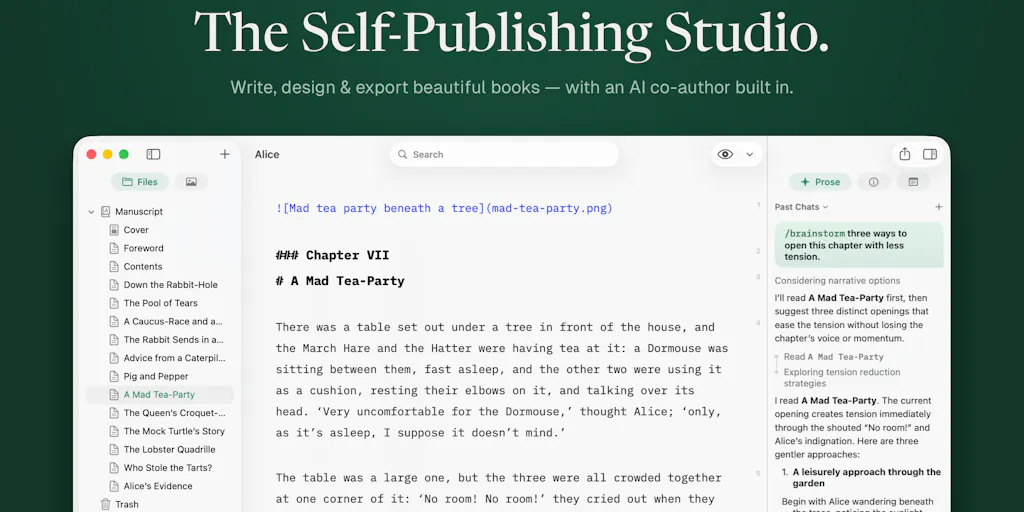
That’s why a recent Product Hunt launch caught my eye – not because I write books for a living, but because the design decisions behind Pinery 2.0 solve a set of problems that every social media operator faces when they touch AI for content. Pinery is a native macOS Markdown editor aimed at long‑form authors, and its new “Prose” AI co‑author does something almost no other content tool has bothered to do: it shows you exactly what changed, lets you accept or reject each edit as a labeled diff, and keeps your source files in plain Markdown on your own disk. That’s not a feature list for book writers – it’s a blueprint for how creators should demand AI tools behave when they edit a script, polish a caption, or repurpose a thread into a newsletter.
The Real Problem: AI Content Tools Break Your Workflow
Most AI writing tools operate as black boxes. You feed in a prompt or a few paragraphs, the model runs, and you get a block of text. If it’s good, you copy/paste into your CMS. If it’s bad, you tweak the prompt and try again. That back‑and‑forth destroys the one thing creators need most: a tight iteration loop between your own voice and the AI’s suggestions.
When I schedule 30 posts across five platforms in a single afternoon, every minute I spend context‑switching between a chat interface and my actual drafting tool – whether that’s Notion, Google Docs, or a markdown editor – costs me momentum. Worse, I have no way to audit what the AI actually changed. Did it rephrase my hook because of a grammatical error, or did it rewrite the entire angle? Did it swap out a brand term for a synonym that doesn’t match my style guide? I usually have to read through the whole output and guess.
Pinery’s Prose agent addresses this head‑on. It edits inside your manuscript and presents each change as a labeled diff – grammar, word choice, formatting – that you can accept or reject individually. The maker, Heberti Almeida, describes it as an AI that “works from the pages you’ve already written, so a new chapter or a continuation comes back in your pacing and your vocabulary.” That is the exact opposite of the “paste three paragraphs into ChatGPT and get a rewritten version that sounds like a press release” workflow that most creators tolerate.
For social media managers, this matters because voice consistency across platforms is the single biggest differentiator. A brand that sounds the same on TikTok, LinkedIn, and Threads builds trust faster than one that sounds like three different agencies wrote the posts. An AI that lets you see and approve every single change – rather than handing you a finished block of text – turns the machine from a black box into a pair of smart drafting hands.
How Pinery 2.0 Differs from the Incumbents
Let’s name the competition. For creators who write long‑form, the usual suspects are Notion AI, Google Docs with “Help me write”, Jasper, Copy.ai, and even Scrivener for the old‑school crowd. All of them either produce output in a separate pane (Notion AI, Jasper) or require heavy copy‑paste to keep a history of revisions (Google Docs’ version history is better, but it’s not labeled per edit type). None of them give you a live diff that separates “grammar fix” from “structural rewrite” and then asks you to approve each one.
Pinery also makes three architectural choices that matter:
Your files stay yours. Plain Markdown files on your Mac or iCloud. Cancel the subscription tomorrow and your book (or your content library) opens in any Markdown editor. No vendor lock‑in. The privacy page spells out how data flows. For creators who have been burned by platforms that change their terms overnight (remember when Buffer pivoted from publishing to analytics? I do.), this is a breath of fresh air.
Not locked to one model. You can choose per task among Anthropic, OpenAI, and Google models – “something fast and cheap for a line edit, the strongest one for a first draft,” as the launch post says. Social media operators should be thinking about this constantly. A line edit on a 200‑character Instagram caption doesn’t need GPT‑4‑Turbo; you can use a cheaper model for that, saving both cost and latency. For a long‑form newsletter essay, you want the most capable model. Pinery builds that choice into the UI rather than hiding it behind a settings panel.
Skills for the ways writers actually get stuck. The app ships with predefined skills –
/beta-reader,/line-edit,/developmental-edit,/drafting-partner, and/create-skillto teach it your own. This is analogous to the custom instructions or system prompts that power users of ChatGPT already cobble together, but here they are first‑class citizens in the editing UI. A creator could create a “/hook‑generator” skill that tightens your first sentence to hit a specific engagement pattern. The fact that you can build your own skills without leaving the editor is a huge productivity win.
A thoughtful commenter on the launch raised a crucial concern: “the labeled diff is the decision I would defend hardest, and it is also the one that decays.” They pointed out that as trust rises, people stop reading the diffs and start accepting blindly – the protection becomes a ritual. The maker acknowledged this and said Prose doesn’t yet learn from rejections across a manuscript, but it’s a likely addition. That honest exchange is exactly the kind of transparency I want from a tool I’m betting my content workflow on.
Why TikTok Creators Should Care More Than LinkedIn Ones
You might think a Markdown editor for books is irrelevant to a creator who posts 60‑second vertical videos. I’d argue the opposite – especially for TikTok creators who repurpose into longer content. A typical TikTok script is 150–300 words, but the pacing is everything. One misplaced comma or an extra adjective can kill the rhythm. If you’re using AI to draft or polish those scripts, you cannot afford the “AI voice” that sounds like a generic motivational quote generator.
Pinery’s line‑edit skill, applied to a short script, would let you see every single word‑choice change and reject the ones that flatten your natural cadence. For a creator who speaks in a specific vernacular – Gen Z slang, industry jargon, a regional accent – that level of control is non‑negotiable. LinkedIn posts, by contrast, are more forgiving of stylistic polish because the audience expects a more professional register. Both audiences benefit from consistency, but the TikTok creator’s voice needs finer granularity of control.
What Creators and Social Media Teams Can Borrow from Pinery
Even if you never touch a Mac and never open Pinery, the design philosophy is worth stealing. Here’s what I’d recommend any social operator do, inspired by this launch:
Build your own diff workflow. Next time you use ChatGPT or Claude to edit a post, do not just paste the output into your CMS. Instead, copy both the original and the edited version into a diff tool like Mergely or use the built‑in diff in your code editor. Manually review each change. Train your eye to distinguish “grammar fix” from “tone shift.” After a few weeks, you’ll be able to tell when the AI is adding value versus when it’s just adding noise.
Adopt a local‑first backup strategy for your content library. I keep all my published posts in a folder of Markdown files synced via iCloud. It’s not fancy, but it means I can open any post in any text editor, search across them with grep, and never worry about a platform going under. Pinery’s approach of “your files stay yours” is exactly right. Tools like Obsidian or iA Writer follow the same philosophy.
Use skill‑based prompting instead of a single prompt. Instead of asking an AI to “rewrite this post,” give it a specific job: “Fix the grammar errors in this post,” “Tighten the first sentence to under 30 characters,” “Rewrite this section to sound more empathetic.” Pinery’s skills are essentially pre‑defined system prompts with a UI wrapper. You can replicate that by saving a set of custom GPT instructions or using a tool like TypingMind to save prompt templates.
Version your drafts like code. Pinery supports version history via macOS’s built‑in file versioning. For social content, I’d recommend using Git with a simple fork – or at least a dated archive. When a post struggles to perform, being able to compare the original draft against the published version can reveal where the magic was lost (or found).
Where My Judgment Says It Falls Short
I have to be honest: Pinery 2.0 is not built for social media operators. It’s built for book authors, and the features that make it powerful for long‑form writing leave gaps for a social‑first workflow.
Mac‑only. No web app, no Windows version, no mobile companion. For a team of five social managers on Windows laptops, it’s a non‑starter. Even if the product is excellent, platform exclusivity limits its adoption in agencies and hybrid teams.
No multiuser collaboration. You cannot invite an editor or a client to review a diff inside Pinery. The tool is fundamentally a single‑author interface. For a content studio where three people touch every post, that’s a hard pass.
No direct publishing. You can export ePub and PDF, but you cannot connect Pinery to your social media scheduling tools (e.g., Later, Hootsuite, Metricool). That means the editing and approval workflow happens in isolation, and you still need to copy the text into your scheduler. For a creator who wants end‑to‑end pipeline, this is an extra step.
The AI learning feedback loop is missing. As noted by the commenter Clemente, the tool currently doesn’t adjust its suggestions based on which edits you accept or reject. The maker acknowledged it’s a good idea, but it’s not there yet. Without that loop, the diff becomes a manual chore rather than a continuously improving assistant.
No template or brand voice library. If you manage multiple brands or personas, you have no way to store a style guide, a glossary of banned words, or a tone profile inside the app. You’d have to externalize that into custom skills, which is possible but not trivial.
These are not deal‑breakers for a niche tool, but they are reasons why a social‑media operator should view Pinery as a reference design rather than a daily driver. It shows what an AI‑assisted editing environment could look like if it were built by someone who cares about the writer’s agency over the output.
What I’d Watch / Test Next
If you run social accounts or a content operation, here’s what I’d do this week:
Test Pinery as a drafting tool for your long‑form content – but not for anything that needs real‑time collaboration. Write your next newsletter or your next 10‑post LinkedIn series in Markdown inside Pinery. Use the /line-edit skill on each post, and force yourself to review every diff. See if the process makes you trust the AI more or less. For me, I suspect it will make me trust the process more, even if not every individual suggestion is perfect.
Watch the changelog. The Pinery changelog shows the team ships regularly. If they add cloud sync, collaborative editing, or a web version, the tool becomes much more relevant to a social team. If they add an API, you could theoretically pipe your drafts from a scheduling tool into Pinery for AI review and back.
Borrow the diff mechanic into your existing stack. If you use Notion, create a duplicate page for each post and run your AI edits there, then manually compare. If you use Google Docs, turn on “Suggestions” mode and treat your AI tool as an external editor that sends change requests. The principle is the same: never let the AI write a final draft without you seeing the delta.
Refine your own “skills” list. Sit down and write down the five most common editing tasks you perform on your content: grammar fix, hook tightening, word‑count reduction, tone adjustment, fact‑check placeholder. Then, in any AI tool that supports custom instructions (ChatGPT, Claude, even CapCut’s text features), save those as reusable prompts. That turns your AI into a set of on‑demand skills, just like Pinery’s, without needing a native app.
Pinery 2.0 is not the tool that will schedule your Instagram Reels or automate your cross‑platform repurposing. But it is a rare example of an AI product that treats the creator as the decision‑maker, not the output‑approver. The labeled diff, the local files, the modular model selection – those are design principles I hope the next generation of social media tools will copy. Until then, I’ll keep my Markdown folder and my custom GPTs close, and I’ll watch Pinery’s next update like a hawk.


