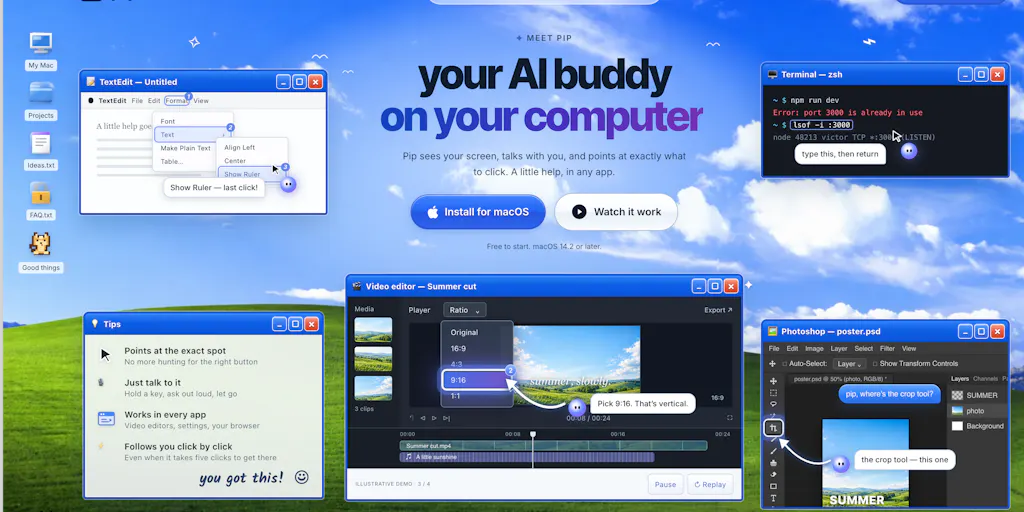
The screenshot-to-answer loop is eating your posting schedule
Every creator I know has a dirty secret: the same three minutes they spend fighting their own computer is three minutes not spent on the content that actually pays them. You’re mid-edit in CapCut, an export fails with a cryptic codec error, you screenshot it, tab over to ChatGPT, paste, explain what you were doing, get an answer that assumes you’re on a different OS, tab back, try it, fail again. Multiply that by four or five times a week and you’ve quietly donated an afternoon to tech support for yourself. That’s the loop Pip, a new desktop AI assistant from maker Victorr, is trying to collapse — and for anyone running social accounts solo, it’s worth understanding why this category keeps getting rebuilt.
What Pip actually does, and why the form factor matters
The pitch, in the maker’s own framing on the Product Hunt launch thread, is deliberately unglamorous: “get stuck on something, take a screenshot, open ChatGPT, explain the context, then go back and try to follow the answer.” Pip’s answer is to live on your desktop, watch what’s on screen when you hold a key, and respond in place — explaining, pointing at where to click, fixing an error, or walking you through a multi-step task. The stated ambition is to feel less like chatting with a bot and more like “having someone sitting next to you.”
That’s a meaningful shift in interaction model, not just a feature list. Chat assistants are pull-based and context-poor: you have to describe your situation in words, and the model has no idea what you’re looking at. Screen-aware assistants are push-adjacent and context-rich: the screenshot is the prompt. For creators, the difference shows up in the boring middle of a workflow — color grading panels, export settings, thumbnail templates, ad manager dashboards, analytics UIs that changed their layout last Tuesday.
It’s also worth noting the provenance, because it tells you something about maturity. The maker says Pip “started thanks to the open-source work behind HeyClicky,” and that his contribution was taking that foundation further on UX and daily-usability. In plain terms: this is a derivative build, not a from-scratch research project. That’s neither good nor bad on its own — plenty of great creator tools are forks — but it does mean the interesting question isn’t “does screen-aware AI work,” it’s “is this particular wrapper better than the alternatives.”
The multi-step question nobody asks until they’re paying
Buried in the comments is the detail I’d flag to any operator evaluating this: Alexandra Protsenko asked whether a walkthrough that takes five clicks counts as one question or five against the monthly limit, and the maker answered that it counts as one question. That’s a genuinely creator-friendly metering decision, and it’s the kind of thing that determines whether a tool survives contact with real work. If you’re on a capped plan and every guided walkthrough burned five credits, you’d ration it and eventually churn. If a whole task costs one, you’ll actually use it for the messy stuff.
How it stacks up against the incumbents you’re already paying for
Here’s where I’d push back on the framing of “new AI tool” as if it lands in a vacuum. If you’re a social media operator, you already have screen-adjacent AI in at least three places, and Pip is competing with all of them.
Chat assistants as a tab. ChatGPT and Claude are the default. They’re more capable models than most desktop wrappers, they have memory and file upload, and they’re already in your muscle memory. What they lack is ambient screen access — you’re still doing the screenshot-paste-explain dance. Pip’s entire bet is that removing that friction is worth more than raw model quality. My take: for short, visual, “what am I looking at” questions, it probably is. For long, reasoning-heavy briefs — “write me a 30-day content calendar for a DTC skincare brand” — you’ll still want the full chat window.
Native OS assistants. Microsoft Copilot is woven into Windows and Apple Intelligence into macOS, both with varying degrees of screen awareness. They’re free-ish, pre-installed, and improving every quarter. Any third-party desktop assistant is racing against the platform owner bundling the same capability. That’s the structural risk here, and it’s the same risk every utility app in this space carries.
Purpose-built creator tools. If your actual bottleneck is production rather than troubleshooting, the screen-aware assistant isn’t your category at all. Canva and CapCut have been folding AI directly into the editing surface — background removal, auto-captions, template generation — which is a different, arguably more valuable kind of “help where you’re working.” Likewise, if your pain is publishing and reporting rather than doing, you’re looking at Buffer, Later, Metricool, or Hootsuite, and Pip does nothing for you there.
So the honest positioning is narrow: Pip is a troubleshooting and onboarding layer, not a content layer. That’s a real job — but it’s a smaller job than the launch-page energy implies.
Why TikTok and Reels creators should care more than LinkedIn ones
I’d bet the value of a screen-aware assistant scales inversely with how text-heavy your workflow is.
If you’re a LinkedIn ghostwriter or a B2B newsletter operator, your work happens in a browser tab and a doc. You can copy-paste. A screen-watching assistant adds marginal value. If you’re a short-form video creator, your work happens in Premiere Pro, DaVinci Resolve, CapCut, Final Cut, and a phone — dense, visual, menu-driven UIs where describing the problem in words is genuinely harder than showing it. That’s exactly where “hold a key, it sees your screen” wins. Same logic applies to anyone living in Meta Ads Manager or TikTok Ads, where the interface reshuffles constantly and a wrong toggle can quietly burn budget.
Where the math breaks
Two operational realities to weigh before you commit.
First, screen access is a trust decision, not a feature decision. Anything that can see your desktop can see your client’s unpublished campaign assets, your ad account balances, your DMs, your unreleased product. The source doesn’t disclose the data handling model, retention policy, or whether screenshots leave your machine — “not disclosed” is the honest answer here, and it should be the first thing you ask before installing this on a work machine. If you handle client work under NDA, that question isn’t optional.
Second, the credit-metering question scales in ways the launch thread didn’t explore. One question per walkthrough is generous, but what counts as a “question”? A failed attempt you retry? A follow-up clarification? A session where you’re stuck for twenty minutes? The maker’s answer covers the multi-click case, which is the big one, but the edges are where subscription fatigue lives.
What creators and social teams can actually steal from this
Strip away the product and there’s a workflow lesson here that’s worth more than the tool itself.
Capture context at the moment of friction, not after. The reason Pip’s premise resonates is that the screenshot-to-chat loop loses information at every hop. When I’ve audited content workflows for small teams, the biggest time sink is almost never the creative work — it’s the re-explaining. Every handoff between “I hit a problem” and “someone who can solve it understands the problem” costs minutes. If you run a team, the takeaway is: build a shared, searchable log of recurring blockers with screenshots attached. Half of them will be the same five issues.
Audit your own toolchain for the same loop. Open your last week of browser history. How many times did you visit a help doc, a Reddit thread, or a chat window to solve something about the software you already pay for? That number is your realistic ceiling for a tool like this. If it’s two, don’t buy. If it’s thirty, you have a genuine problem and it’s worth paying to solve.
Don’t confuse troubleshooting AI with content AI. These get bundled in the same “AI for creators” conversation and they shouldn’t be. A screen-aware assistant makes you faster at using your tools. It does not make your hooks better, your retention higher, or your posting cadence more consistent. Those are separate problems with separate solutions — Opus Clip for repurposing long-form into shorts, Descript for text-based editing, Metricool or Buffer for scheduling and analytics, Canva for asset production. Buying a desktop copilot won’t move any of those needles.
The repurposing angle nobody’s talking about
Here’s a use case the launch thread doesn’t mention but I’d test immediately: using a screen-aware assistant to reverse-engineer competitor content. Pull up a high-performing Reel or TikTok in a browser, hold the key, and ask it to break down the structure — hook, cut rhythm, on-screen text, CTA placement. That’s not a native feature, and I have no idea how well it’d work on video, but it’s the kind of opportunistic workflow that turns a general utility into a creator-specific one. Same trick applies to ad libraries: screenshot a competitor’s creative in Meta Ad Library and ask for a teardown of the offer structure.
That’s my speculation, not a product claim. But it’s the kind of thing that separates tools that get used daily from tools that get uninstalled in a fortnight.
Where my judgment says this falls short
Let me be direct, because the launch thread is thin on the details I’d want before recommending this to anyone running client accounts.
The differentiation question is unanswered. Jim Hartung asked the maker directly how Pip differs from HeyClicky and requested a concrete example of the “more useful features.” As of the scrape, that question sits without a public answer. That’s not damning — makers get buried on launch day — but it means the single most important competitive question is, right now, open. If Pip is HeyClicky with better UX, that’s a legitimate product, but it’s a thin moat.
Team and commitment are undisclosed. Hartung also asked who’s behind it and whether it’s a side project or full-time. No answer in the thread. For a tool you’d install on your work machine and potentially build habits around, that matters — solo side projects have a habit of going quiet, and a desktop agent that stops getting updates as OS versions shift is worse than no tool at all.
Pricing, platform support, and privacy terms are all absent from the source. I’m not going to invent them. If you’re evaluating, those are your first three questions, in that order.
Who this is NOT for: teams with strict data governance, anyone whose bottleneck is strategy or output volume rather than software friction, and anyone already comfortable enough in their tools that they rarely get stuck. If you’ve been editing in the same NLE for eight years, you are not the customer.
The uncomfortable structural point
Every desktop assistant in 2025 is building on rented land. Microsoft and Apple ship the OS and are actively adding screen-aware AI to it. Google owns the browser most of your work happens in. The window for a third-party utility to establish a habit before the platform absorbs the feature is measured in quarters, not years. That doesn’t mean don’t use it — it means don’t build your workflow around it. Use it, enjoy the time savings, and keep your processes portable.
What I’d watch / test next
Three concrete things you can do this week, in order of effort.
Run the two-week friction audit. For fourteen days, every time you get stuck on something in software, log it in a note: what you were doing, what broke, how long it took to fix. At the end, count the entries. That number — not a launch page — tells you whether a screen-aware assistant has any ROI for you. If it’s under ten, close the tab and go make content.
Ask the three questions before you install anything. Data retention and whether screenshots leave your device; pricing and what counts against a limit (the maker has confirmed multi-step walkthroughs count as one question, which is a good sign); and roadmap commitment — is this full-time or a side project? The launch thread is the place to ask, and unanswered questions there are themselves a signal.
Test the competitor-teardown workflow specifically. If you do try it, don’t evaluate it on “did it help me fix an error.” Evaluate it on whether it makes you faster at the thing that actually grows your account — analyzing what’s working for other people and adapting it. That’s the creator-specific use case, and it’s the one that would justify keeping it installed past the novelty window.
The broader trend is real: the distance between “I’m stuck” and “I’m unstuck” is shrinking, and that’s good for anyone whose income depends on shipping consistently. But the tool is never the strategy. Your posting cadence, your hooks, your retention curves, and your repurposing pipeline are the levers. Everything else is just removing friction from pulling them.


