The real lesson from Quven’s launch isn’t media servers — it’s ownership of the distribution layer
Every creator I know is quietly running the same experiment right now: how much of my stack can I own before a platform decides my reach, my pricing, or my API access for me? That question usually gets asked about audience (email lists, Discord, RSS), but it applies just as hard to the boring infrastructure underneath — the scheduling queues, the asset libraries, the render farms, the archive of everything you’ve ever published. So when a small team launches a self-hosted media server and frames it around “your files stay on your own hardware,” I pay attention, because the argument is structurally identical to the one social operators are having about Buffer vs. self-hosted schedulers, CapCut vs. FFmpeg, and Notion vs. a folder of markdown.
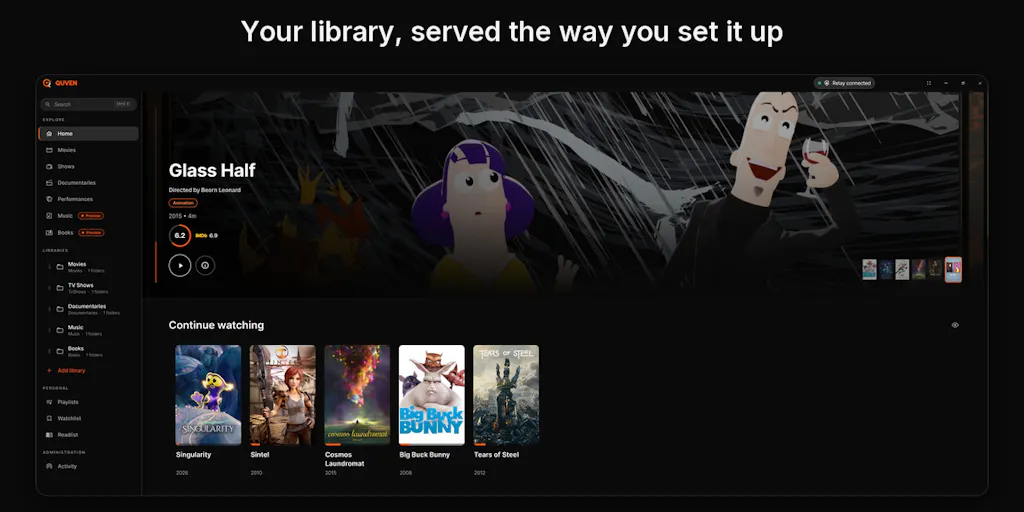
Quven, built by Quven Technologies S.R.L., is a media server for films, series, and documentaries that runs on your own hardware and plays back through native apps. On its face that’s a home-theater product, not a social tool. But the design decisions inside it — local-first storage, free hardware transcoding, a paid managed relay instead of a paid core — are the same decisions every creator tool will face over the next two years. Here’s what I think operators should actually take from it.
What Quven actually is, stripped of the launch-page gloss
The Product Hunt listing describes a server you install yourself, with a Linux server and a Docker image, and native client apps for Windows, macOS, iPhone, iPad, Android, Android TV, and Fire TV. The maker, Domenico Gabriele Aiello, states in the thread that personal use is free, includes hardware transcoding, and ships with no ads, while a Pro tier adds a managed relay and a hosted web client. Pricing for Pro is not disclosed in the source material I have.
That’s the whole product surface. No AI angle, no growth-hacking angle, no “10x your reach” claim. What it does have is an unusually clean split between the thing you run and the thing you rent.
The free tier is the interesting part
In the launch thread, a commenter asks whether there are hardware limitations on the free transcoding, and the maker responds that Quven imposes no limitation of its own — the number of simultaneous streams and the output quality depend entirely on what your server’s silicon can encode, via NVIDIA, Intel Quick Sync, AMD, or Apple encoders, with the CPU falling back when no dedicated encoder is present. That’s a meaningful stance. Most freemium tools cap the feature; this one caps nothing and lets physics do the gatekeeping. If you’ve ever hit a “3 exports per month” wall on a video tool mid-launch-week, you know why that distinction matters more than the price tag.
Where the relay fits
The paid tier is a managed relay plus a hosted web client. In plain terms: the free version assumes you can reach your own server from wherever you are, and the paid version removes that assumption by routing traffic for you. This is the classic self-hosted tension — the software is free, the networking is the product. I’d bet the same pattern shows up in creator tooling: free local rendering, paid cloud handoff. That’s already roughly how CapCut and Canva structure their upsells, just with the storage layer hidden from you.
Why a media server is a social-media story
If you publish across Instagram, TikTok, YouTube, X, LinkedIn, Facebook, Threads, and Pinterest, you are sitting on an archive problem you probably haven’t named yet. Every long-form YouTube video becomes 4–6 Shorts, 3–5 TikToks, a carousel, a text post, and a Pinterest pin. Every podcast episode becomes audiograms, quote cards, and a newsletter section. That’s a repurposing tree with dozens of leaves per trunk, and most teams store those leaves in whatever folder the editor happened to be in when they exported.
The tools that manage this today are cloud-first by default. Metricool, Later, Buffer, and Hootsuite all want your media in their storage, because that’s how they justify the subscription and how they keep you from leaving. That’s a fine trade for a lot of teams. But it has three costs that show up later: (1) you’re paying storage rent on assets you already own, (2) your archive dies if you churn, and (3) you can’t do anything with the archive that the vendor hasn’t built a button for.
Why TikTok creators should care more than LinkedIn ones
A LinkedIn-first operator publishes maybe three text posts a week and a carousel a month. Their media debt is trivial. A short-form operator on TikTok and Instagram Reels is generating 20–40 rendered video files a week, each with 2–3 variants, each with its own hook and caption. Multiply by a year and you have thousands of GB of assets that are simultaneously your portfolio, your ad-testing library, and your best source of “what worked six months ago, let’s repost it with a new hook.”
In my own experience running repurposing workflows, the bottleneck is never the idea — it’s finding the file. If the original export lives on a drive that got wiped, or in a cloud account tied to a contractor who left, the repurposing tree loses a branch permanently. Local-first storage doesn’t solve discovery on its own, but it removes an entire class of “we can’t find it, let’s just reshoot it” waste.
Where the math breaks
Here’s the honest counterargument, and I want to flag it as my take rather than a fact from the source. Self-hosting only wins if your time is cheaper than the subscription you’re avoiding. A Docker image and a Linux server are not hard for a technical founder; they are a weekend of yak-shaving for a social media manager whose actual job is content. If you’re billing your hours at agency rates, a $30/month cloud tool is cheaper than the four hours you’ll spend debugging port forwarding. The Quven model makes sense for the person who already runs a home server or a NAS. For everyone else, it’s a philosophy purchase, not a productivity purchase.
What creators and social teams can borrow from this launch
I don’t think most social operators should go install Quven this week. I do think they should steal three design principles from it.
1. Separate the free core from the rented convenience
Quven gives away the compute and charges for the network. That’s the inverse of how most SaaS prices, and it’s a healthier model for the user. When you evaluate your own stack — schedulers, AI caption tools, analytics — ask which part is the core and which part is convenience. If a tool charges you for the core and bundles convenience for free, you’re locked in. If it charges for convenience and gives the core away, you can leave whenever the convenience stops being worth it. Buffer has historically leaned toward the latter with its free plan; most AI writing tools lean hard toward the former.
2. Treat your archive as an asset, not a byproduct
The Quven pitch is essentially “your library is yours.” For a creator, the equivalent move is to keep a master copy of every asset outside the platform that published it. That means a local or self-controlled store of your original exports, plus a naming convention that a stranger could decode. I’ve watched teams lose a year of B-roll because it only existed inside a Frame.io project that got archived when the client relationship ended. The fix isn’t a media server — it’s a rule: nothing ships until the master is filed somewhere you control.
3. Native clients beat browser tabs
Quven ships apps for Windows, macOS, iPhone, iPad, Android, Android TV, and Fire TV, plus a Docker image for the server. That’s a lot of surface area for a small team, and it tells you they believe playback quality is a differentiator. For social teams, the parallel is capture and review: editing on a phone, reviewing on a desktop, approving on a tablet. Tools that force everything into one browser window — I’m looking at a lot of social inboxes here — lose the people who only touch the workflow from one device. If you’re choosing between two tools with similar features, pick the one with the better mobile review experience. Your approvers will thank you.
Where I think Quven falls short, and who it’s not for
The source material is thin on the things I’d want to know before recommending it to anyone. Pricing for the Pro tier is not disclosed. There’s no stated limit on relay bandwidth or concurrent remote streams. There’s no mention of how metadata matching handles obscure or foreign-language titles, which is the single most common complaint about self-hosted media servers. And there’s no discussion of mobile upload — can you push a file from your phone to the server, or does it have to be a desktop drag-and-drop? For a creator workflow, that’s a dealbreaker question, and the launch thread doesn’t answer it.
The maker does ask the community directly: “What would keep you from trying it, and what should I improve first?” That’s a good sign — it suggests the roadmap is still open. But it also means you’d be adopting early. If you need a media server that just works today, the incumbents in that space have years of metadata-handling polish that a new entrant won’t match on day one. My take: Quven is worth watching, not worth migrating to yet, unless you’re already comfortable running Docker and you specifically want to avoid cloud storage for your library.
Who should skip it entirely
If you’re a solo creator publishing from your phone and your entire archive fits in iCloud, this product is not for you. If your team’s workflow depends on cloud review links that clients can open without an account, this is not for you. And if you don’t know what a Docker image is, the setup cost will exceed the benefit. There’s no shame in that — the right tool is the one you’ll actually use.
What I’d watch / test next
If the local-first argument resonates with you, here’s what I’d actually do this week, in order. First, audit where your master assets live. Pick your three best-performing posts from the last quarter and trace each one back to its original export. If you can’t find it in under two minutes, you have an archive problem, and no tool will fix it until you name it.
Second, price your own time against your subscriptions. List every tool you pay for that stores media — schedulers, editors, review platforms — and estimate the hours per month you spend working around their storage limits. If that number is high, a self-hosted or local-first alternative is worth a trial. If it’s low, stay put and put the energy into content.
Third, if you’re technical enough to run Docker, spin up Quven on a spare machine and test one thing only: can you get a file in from your phone and play it back on your TV without touching a terminal? That single test will tell you whether the product fits a creator workflow or only a homelab one. Report back in the Product Hunt thread — the maker is clearly reading it, and the answers you get will be more useful than any launch-day upvote count.
The bigger takeaway isn’t Quven specifically. It’s that the ownership question — of storage, of distribution, of the archive — is moving from a niche homelab concern to a mainstream creator concern. The platforms will keep changing their algorithms and their API terms. The only durable asset you have is the library you control. Build for that, whichever tool you pick.


