The calendar is the last unoptimized surface in a creator’s stack
Every creator I know runs a content operation that looks, from the outside, like a publishing business. From the inside, it looks like a hostage negotiation with a calendar. You block two hours to batch three Reels, your editor pings you about a revision, a brand asks for a same-day story post, and by 6 p.m. the two hours have evaporated into a Slack thread and a CapCut export that won’t finish. The tooling industry has spent a decade solving the output side of this — Buffer, Later, Hootsuite, Metricool, Publer — and almost none of it solves the input side: the actual shape of your day, and whether the work you meant to protect survived contact with reality. That’s the gap Reassign is poking at, and it’s worth a creator’s attention even if you never install it.
What Reassign actually is, minus the launch-day fog
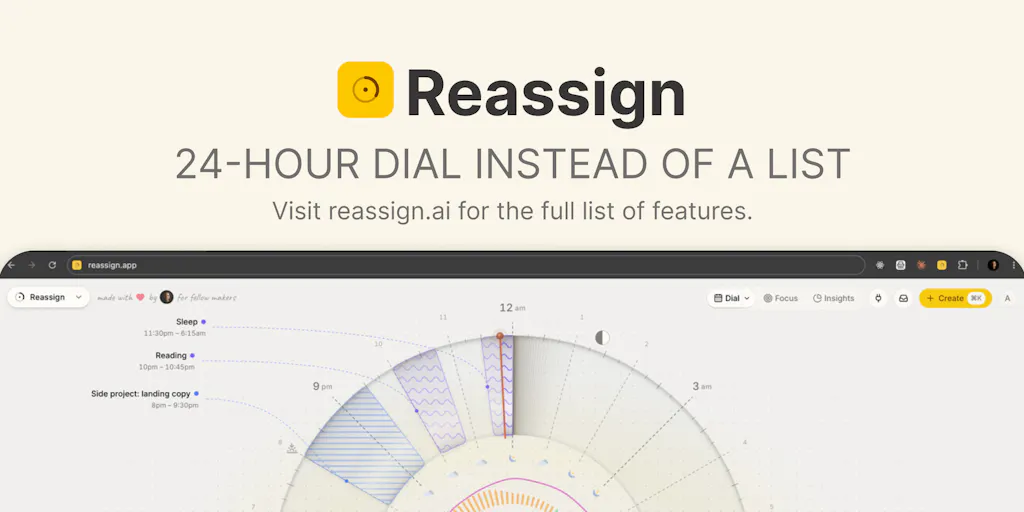
Reassign is a solo-built web app from maker Leo Spanovic that renders your day as a 24-hour dial — midnight at the top, noon at the bottom — where you drag blocks to reshape the day. The origin story, per the maker’s own launch post, is a decade of drawing tomorrow as a circle on paper every single night. His framing: to-do lists never showed him the real problem, which was that the hour he wanted for building was “the first thing my day ate.” A circle, in his telling, shows all 24 hours at once, and an empty hour has a shape you can protect.
The mechanics, as described in the launch thread:
- Color encodes area of life; fill pattern encodes how a block feels — flow, grind, recharge, or drain.
- Drag a block to move it, and the day reshapes when plans change.
- It’s an MCP server, so you can ask Claude or ChatGPT to “find 45 minutes for a run” and the block lands on your dial live. In Claude, it can draw the dial inside the chat.
- Every AI-initiated change ships with a 30-minute undo.
- Live at launch: the web app (installable as a PWA), a Chrome extension, two-way sync with Google Calendar, Outlook, Todoist, Linear, and more, plus a public REST API at reassign.dev.
- An iPhone companion and a Raycast extension are listed as next.
- Pricing: Pro free for 7 days, no card required. Ongoing tier pricing is not disclosed in the source.
I want to be precise about what this is not, because launch-day framing tends to blur categories. This is not a content calendar. It is not a scheduler. It is not a project manager. It’s a time-shape tool with an AI planning layer and a sync layer bolted on. That distinction matters enormously for whether it belongs in your stack.
The MCP angle is the actual story
If you’ve been ignoring the Model Context Protocol chatter because it sounds like developer plumbing, here’s the operator translation: MCP is how your AI assistant stops being a chatbot in a browser tab and starts being an actor inside the tools you already use. Reassign exposing itself as an MCP server means a planning prompt can mutate your actual schedule, not just produce a text suggestion you copy-paste. The maker explicitly says he got tired of copying his plan into a chat, so he taught the app to hand it over.
For creators, that’s the interesting seam. The reason most “AI content planning” tools feel like toys is that the output is a document. You still have to do the labor of moving it into the place where work actually happens. An MCP-connected dial closes that loop. I’d bet the 30-minute undo exists precisely because the maker knows how unnerving it is to let a model touch your calendar — he says as much: “honestly, I don’t trust AI blindly either.” That’s a healthy design instinct, and I’d rather see a conservative undo window than a confident auto-apply.
Where this collides with the tools you already pay for
Let’s place it against the incumbents honestly.
Notion Calendar (formerly Cron) is the closest thing to a competitor in feel — fast, keyboard-driven, beautiful, and deeply tied to Notion databases. It’s excellent at reading your commitments. It has no opinion about the shape of your day and no AI planning layer that moves blocks for you. Motion is the opposite: it aggressively auto-schedules your tasks into calendar slots based on priority and deadlines. Motion is powerful and, in my experience testing auto-schedulers, also occasionally infuriating, because the machine keeps rearranging your day in ways you didn’t sanction. Reclaim.ai sits in a similar lane, defending habits and focus blocks against meeting creep — genuinely useful for people whose calendars are dominated by other people’s invites.
Reassign’s differentiator, as I read it, is visual-spatial rather than algorithmic. It doesn’t try to be smarter than you about what deserves the time. It tries to make the cost of losing a block visible. That’s a real and underrated design choice. When your editing block is a wedge on a dial, losing it to a client call isn’t an abstraction — it’s a visible bite taken out of your day.
Where it does not compete: Buffer, Later, Hootsuite, Metricool, and Publer own the publish-and-schedule layer. Reassign doesn’t post anything anywhere. It won’t tell you your best-performing time slot on TikTok. It won’t store your caption variants or track UTMs. If you came here hoping for a content ops platform, this isn’t it — and I’d be suspicious of anyone who tries to sell it as one.
Why TikTok creators should care more than LinkedIn ones
Here’s the operational asymmetry. A LinkedIn-first operator publishes maybe three to five times a week, often in text, often scheduled days ahead. Their bottleneck is ideas and positioning, not time-shape. A TikTok or Reels operator is running a fundamentally different machine: higher volume, faster iteration, more raw filming, more editing, and a platform where watch time and completion rate dominate distribution. That work is time-hungry in a way that is easy to lose. If you’re batching short-form, you need contiguous blocks — you cannot shoot three videos in six fifteen-minute gaps. A tool that makes it obvious when your only contiguous three-hour block got eaten is more valuable to a short-form creator than to someone writing one thoughtful post a day.
Same logic applies to YouTube long-form. Editing a 12-minute video is a multi-hour, single-context task. If your dial shows that block getting fragmented, you now have a visual argument for declining the meeting — which is a surprisingly effective social tool.
What creators and social teams can genuinely borrow from this
Even if you never open the app, there are three transferable ideas here that I think are worth stealing this week.
1. Plan in shapes, not lists. The maker’s core insight — that a list never showed him where the hour went, but a circle did — is a real cognitive finding, not marketing. Lists are infinite and vertical; they have no ceiling. A day has a hard ceiling of 24 hours. Rendering your work against that ceiling forces honesty about capacity in a way that a 40-item to-do list never will. I’ve started sketching my week as a grid of fixed blocks before I write a single task, and the number of things I quietly stop promising has gone up. That’s a feature, not a bug.
2. Separate “area of life” from “energy cost.” The two-axis encoding — color for domain, pattern for flow/grind/recharge/drain — is a genuinely smart model. Most creator calendars only track the first axis. But a two-hour grind block and a two-hour flow block are not interchangeable, and if your calendar treats them as such, you’ll keep scheduling your hardest creative work into your lowest-energy window. Steal the two-axis idea even if you implement it in a spreadsheet.
3. Let AI propose into a system that can reject. The 30-minute undo is the most trust-building detail in the entire launch. When you wire an LLM into any operational workflow — content repurposing, caption drafting, scheduling suggestions — build the rollback before you build the capability. In my own experiments wiring models into publishing pipelines, the failure mode is never “the AI did something catastrophic.” It’s “the AI did something plausible and I didn’t notice for three days.” A short, visible undo window is a cheap insurance policy against exactly that.
The repurposing workflow this suggests
Here’s the concrete version I’d run. Block a single 90-minute “source asset” session on the dial — one long video, one podcast, one livestream. Then block three separate 30-minute “derivative” sessions on different days, each with a different output target: one for vertical clips, one for a carousel or text post, one for a newsletter or LinkedIn essay. Treat the source session as flow, the derivative sessions as grind. That’s a repurposing pipeline expressed as time-shape rather than as a tool stack. The tools — CapCut, Descript, Opus Clip, Canva — are downstream of the decision about when the work happens. Most creators get this backwards and buy another subscription instead of defending another hour.
Where my judgment says this falls short
I’ll be blunt, because launch-day threads rarely are.
It’s a solo project with no team, no budget, and no disclosed funding. The maker says so himself: “Solo founder. No team. No budget. Just an idea and a lot of late nights.” That’s admirable and also a risk factor. If you’re a social team of five building your ops around a tool, you need to weigh single-maintainer risk. Calendar sync is a surface where breakage is painful and invisible — you won’t notice a failed two-way sync until you’ve double-booked yourself.
The sync claims are broad and unverified. Two-way sync with Google Calendar, Outlook, Todoist, and Linear “and more” is a lot of surface area for one person to maintain. I have not tested the sync fidelity, and the source doesn’t describe conflict resolution behavior. If you live in Google Calendar, the question that matters is: what happens when Reassign and Google disagree? Not disclosed. Test it before you trust it with anything load-bearing.
No mobile app at launch. The web app is installable as a PWA, and an iPhone companion is listed as “next.” For creators who plan on the move — and that’s most of us — a PWA is a workable stopgap, not a substitute. Android isn’t mentioned at all.
Pricing after the trial is not disclosed. Seven days of Pro, no card needed, is a generous trial. But if you’re evaluating this for a team, you can’t budget against “not disclosed.” Ask before you build a habit.
It doesn’t touch your actual publishing workflow. No scheduling, no analytics, no UTM handling, no platform APIs, no rate-limit management, no engagement inbox. If your problem is “I don’t know what to post or when,” this tool will not help you. It solves a capacity and attention problem, not a distribution problem.
Who this is NOT for
If you’re a solo creator publishing twice a week with a day job and no team, this is plausibly useful. If you’re a growth marketer at a company with a shared content calendar, an approval chain, and a social media manager who already lives in Sprout Social or Sprinklr, Reassign is a personal productivity toy that will not integrate with your team’s workflow. Don’t try to make it your team’s source of truth. It isn’t built for that and the source gives no indication it wants to be.
What I’d watch / test next
Three concrete things to do this week, whether or not you sign up.
First, run the free trial and stress-test the sync, not the dial. Connect Google Calendar, then deliberately create a conflict in Google and see what Reassign does. Then create one in Reassign and check Google. That’s the failure mode that will hurt you, and it’s the one launch threads never test. The trial requires no card, so the cost of finding out is an hour.
Second, steal the two-axis model into whatever you already use. Take your existing content calendar and add a column for energy cost — flow, grind, recharge, or drain. Look at where your hardest creative work is scheduled. I’d bet a meaningful chunk of it is sitting in a grind slot, and moving it is free.
Third, if you use Claude or ChatGPT for planning, watch how MCP servers like this one evolve. The interesting question isn’t whether AI can suggest a schedule — it’s whether AI can act on one with a safety net. Reassign’s 30-minute undo is a small, specific answer to that. I’d like to see the same pattern show up in scheduling tools: an LLM that drafts your week of posts, with a visible, reversible window before anything goes live. That’s the feature I’m actually waiting for, and today’s launch is a useful signal that someone is thinking about the trust layer instead of just the capability layer.