The Most Interesting Question in AI Tools Right Now Isn’t About Content—It’s About Trust
Every week, I test another AI scheduling tool that promises to “10x your reach” or an auto-pilot that will “grow your channel while you sleep.” And every week, I delete it after realizing the same thing: the bottleneck was never content volume. It was trust. Can I trust this tool not to post something tone-deaf to my brand’s account? Can I trust it to tag the right collaborator, use the correct UTM parameters, or not reply to a comment with a hallucinated discount code? For social media operators, trust is the invisible line between automation that saves time and automation that creates a PR crisis.
So when I saw a Product Hunt launch for an open-source CRM called Relaticle, my first instinct was to scroll past. Another CRM? I don’t manage sales pipelines; I manage content calendars. But the founder, Manuk Minasyan, is asking a question that should resonate with anyone who has ever handed a task to an AI agent: where should the approval line sit?
It’s the same question I wrestle with when I let an AI draft a LinkedIn post or auto-generate alt text for 50 images. The answer isn’t binary. It’s a spectrum of trust, and Relaticle’s design—two distinct trust levels for AI agents—is a framework worth stealing, even if you never open a CRM in your life.
This isn’t a review of a sales tool. It’s a case study in how to design human-AI collaboration for the messy, high-stakes world of social media operations. Here’s what I learned, what I’d borrow, and where I think the model breaks down.
The Problem Relaticle Actually Solves: The “Silent Write” Problem
Let’s be honest about the state of AI in content operations. Most tools treat AI like a ghost in the machine. You type a prompt into a chat window, it generates a caption, and you copy-paste it into Buffer or Hootsuite. The AI never touches your actual data. It never schedules the post, tags the account, or updates the UTM link. That’s read-only AI, and it’s safe—but it’s also useless for anything beyond first drafts.
The other extreme is full autonomy. You connect an AI to your Notion content calendar or your Airtable campaign tracker and let it “organize” things. It moves deadlines, renames files, and updates statuses. This is where I’ve seen things go spectacularly wrong. Last quarter, I tested an AI project manager that was supposed to archive old campaign notes. It archived the current campaign notes. Silent writes into customer data—or your content calendar—feel wrong because they are wrong.
Relaticle’s founder hit this exact wall. In his launch post, Minasyan explains that read-only access was “too limited to be useful,” but “silent writes into customer data felt wrong.” So he built a middle path. The system has two trust levels:
- External MCP clients (like Claude Desktop or Cursor) authenticate over OAuth and write directly through 37 tools, similar to an API client. These are treated as power users.
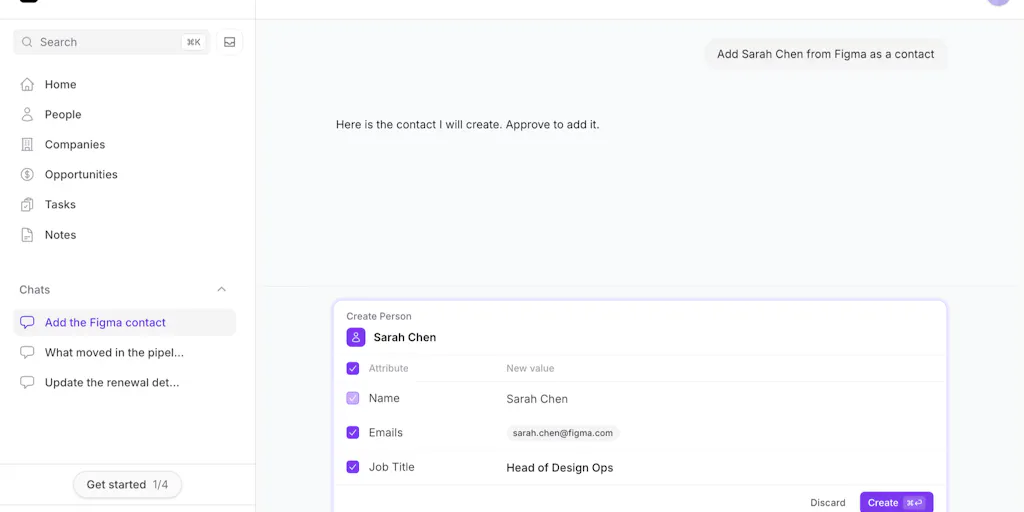
- The in-app assistant is stricter. Every write it wants to make becomes a “proposal card.” A human approves or skips each record before anything lands.
This is the “proposal engine” model. Your AI doesn’t just talk; it suggests. It shows you the exact change it wants to make, and you click approve or skip. For a social media operator, this is the difference between an AI that drafts a tweet and an AI that drafts a tweet and shows you a diff of the exact text it will publish.
Why TikTok Creators Should Care More Than LinkedIn Ones
You might think a CRM’s approval workflow has nothing to do with your TikTok strategy. But think about the stakes. On LinkedIn, a slightly-off post is a minor embarrassment. You delete it, maybe post an apology. On TikTok, a misstep can trigger a shadowban or get your account flagged for spam if the AI auto-posts too rapidly or uses banned hashtags. The platform’s algorithm is notoriously sensitive to inauthentic behavior.
If you’re a TikTok creator testing AI agents that can respond to comments or auto-post at peak times, you need a stricter approval gate than a LinkedIn thought-leader. You need to see the exact comment before it goes live. You need to approve the caption before it hits the “For You” feed. The per-record approval model isn’t just a nice-to-have; it’s a survival mechanism for platforms where one bad automated interaction can tank your distribution.
In my own tests of similar AI social tools, the ones that fail are the ones that don’t offer this granularity. They offer a “trust this tool forever” switch after the first successful post. That’s a trap. The algorithm changes, your brand voice shifts, and last month’s “safe” auto-reply is this month’s PR nightmare.
How It Differs from the Incumbents: The Open-Source, Self-Hostable Angle
Now, let’s talk about the elephant in the room. Why would a social media operator care about a CRM when we already have HubSpot or Salesforce for tracking leads? Because the architecture of trust is more important than the specific use case.
Here’s what sets Relaticle apart from the big players:
It’s AGPL and self-hostable. This is a massive differentiator. HubSpot and Salesforce are black boxes. You don’t know how their AI features work, what data they’re training on, or where your content drafts are being sent. Relaticle, as noted in the launch thread, is “AGPL and self-hostable, including the model via Ollama.” That means you can run the entire stack on your own server. For a brand that handles sensitive campaign data or unreleased product launches, this is huge. You’re not leaking your Q4 strategy to a third-party AI’s training set.
MCP compatibility. The launch mentions support for the Model Context Protocol—the open standard that lets AI assistants like Claude and Cursor interact with external tools. This is the frontier of AI tooling. Instead of being locked into a proprietary AI assistant, you can connect any MCP-compatible client. For my workflow, this means my favorite writing assistant could theoretically access my content calendar and propose changes, rather than me copy-pasting between windows.
The “proposal card” UI. This is the killer feature. Instead of a chat log where the AI claims it did something, you get a structured review queue. It’s like a pull request for your customer data. In the comments, one user, Cole Gawin, even asks for an “undo trail for approved writes.” That’s the right instinct—approval isn’t a one-time event; it’s a process that needs auditing.
Compare this to how Later or Metricool handle AI. They offer AI caption generation or “best time to post” predictions. But they don’t let the AI schedule the post without your final click. And they definitely don’t let an external agent like Claude Desktop write directly to your social accounts via an API. Relaticle is betting that the future isn’t about smarter AI—it’s about connected AI that can take actions across your stack, with a human in the loop.
Where the Math Breaks: Per-Record Approval Doesn’t Scale
Here’s where I push back. The founder asks in the discussion thread: “is per-record approval the right granularity, or does it become noise once you trust the assistant?”
My answer: it becomes noise. Fast.
If you’re a solo creator or a small team, approving 10 proposals a day is fine. But if you’re managing a content pipeline with hundreds of leads or draft posts, a per-record approval queue becomes a full-time job. You’re not saving time; you’re just moving the bottleneck from “writing” to “reviewing.”
Another commenter, Naim Azoutar, hits the nail on the head: “Can you set rules so certain fields can be automatically written while others always require approval?” That’s the logical next step. I don’t need to approve every time the AI updates a “last contacted” timestamp. But I do want to approve every time it drafts a public-facing response.
The current model is binary: either you trust the external agent (and it writes directly) or you don’t trust the internal assistant (and it must propose everything). The missing middle is policy-based autonomy. I want to say: “AI, you can auto-update the ‘content status’ field from ‘draft’ to ‘scheduled’ without asking, but you must propose any change to the ‘publish date’ or ‘platform’ field.” That’s the “trust this kind of change” switch the founder is asking about.
Minasyan’s response in the thread—”Id want people to choose what it can update on its own”—suggests he’s thinking about this. But it’s not in the launch version. And that’s a gap.
What Creators and Social Media Teams Can Borrow From This
Even if you never install a CRM, the Relaticle launch offers a blueprint for how to evaluate AI tools for your social stack. Here’s the checklist I’m now using:
1. Demand a “Proposal Mode.” If an AI tool offers to automate your posting, ask: “Can I see the exact post before it goes live, in a review queue, rather than a chat log?” If the answer is no, walk away. You want a tool that treats AI output as a suggestion with a clear diff, not a fait accompli.
2. Separate your “External Agents” from your “Internal Assistants.” This is the most creative takeaway. Relaticle treats API-connected tools (like Cursor) as power users with direct write access, but treats its in-app assistant as a junior employee that needs sign-off. You should do the same. For example, I use Zapier to auto-post my YouTube videos to Twitter (X). That’s an external, rules-based integration—I trust it because the logic is deterministic. But if I were to use an AI agent to write the tweet, that agent should be treated as an internal assistant with a strict approval gate.
3. Self-host your critical data. The AGPL and Ollama support is a trust signal. It means the founder isn’t trying to lock you into a data moat. For social media managers, this translates to: can you export your analytics? Can you delete your data? Does the tool train on your content? If the answer to any of these is “no” or “we don’t know,” that’s a red flag.
4. Rebuild the chat client for reliability, not just intelligence. Minasyan mentions in the launch that he had to rebuild the chat client after real failures: “A rate-limited retry could delete a conversation turn. A stale stream handler could write a draft into the wrong conversation.” This is the unglamorous work of AI tooling. It’s not about the model’s IQ; it’s about the plumbing. When I test AI social tools, I now look for evidence that they’ve handled edge cases—failed sends, reloads, rate limits—not just their prompt engineering. A tool that loses your draft on a refresh is worthless, no matter how clever the AI is.
Where My Judgment Says It Falls Short
Let me be clear about who this is not for.
It’s not for the solo creator who just wants to schedule Reels. The setup cost—self-hosting, managing Ollama, configuring MCP clients—is too high. You’re better off with a consumer tool like Canva or CapCut for creation and a scheduler for distribution.
It’s not for teams that need social listening or engagement analytics. This is a CRM. It tracks leads and deals. It doesn’t track comment sentiment or competitor mentions. If you’re looking for a social media management platform, this isn’t it.
The per-record approval model is a UX risk. As I noted, it doesn’t scale. And the lack of granular permissions (field-level auto-approval) means you’ll eventually get fatigued by the noise and start clicking “approve all” without reading—which defeats the entire purpose.
The open-source nature is a double-edged sword. While AGPL is great for transparency, it also means you’re responsible for security patches and updates. For a small team without a dedicated IT person, this is a liability. A managed SaaS like Attio or Pipedrive might be a better fit if you don’t want to babysit a server.
The “who approves the approver?” problem. One commenter, Dipanshu Kushwaha, asks the most cynical—and most valid—question: “who approves the approver?” If you’re the solo operator, you’re the approver. But if you’re a team lead, you’re approving the proposals that your junior staff already approved. The trust chain just gets longer. Relaticle doesn’t solve this yet; it just pushes the responsibility down a level.
What I’d Watch / Test Next
Relaticle isn’t going to replace your social media stack tomorrow. But it’s a proof-of-concept for a future where your AI tools aren’t just chat windows—they’re active agents that can read, write, and update your operational data, subject to your control.
Here’s what I’d do this week, regardless of whether you download Relaticle:
Audit your current AI tools for “silent write” risks. Go through your Buffer queue, your Notion automations, and your Zapier zaps. Ask: “Could an AI agent change this without my review?” If the answer is yes, add a manual approval step or a notification alert.
Test the “proposal card” concept manually. The next time you use an AI to draft a post, don’t just copy-paste it. Create a separate document where the AI’s output and your final edit are side-by-side. Track how many changes you make. This gives you a baseline for your own trust threshold. If you’re approving 90% of the AI’s drafts, you might be ready for more autonomy. If you’re rewriting everything, you’re not.
Spin up a self-hosted test. If you’re technical or have a developer on your team, Relaticle is worth a weekend test. The fact that it supports Ollama means you can run a local model—no API costs, no data leaving your machine. Connect it to your test CRM data and see if the proposal flow feels like a safety net or a straitjacket. That feeling will tell you more about your automation philosophy than any blog post.
Watch the MCP space. The Model Context Protocol is the plumbing that will let your favorite AI assistant (Claude, Cursor, etc.) talk to your tools. Relaticle’s support for it is early, but it’s the direction the industry is heading. If you’re a power user, learning MCP now is like learning API integrations in 2015—it pays off later.
The bottom line: Relaticle is asking the right question at the right time. As AI moves from generating text to taking actions, the approval line isn’t a technical detail—it’s the entire product. Whether you’re managing a CRM, a content calendar, or a TikTok account, the tools that win will be the ones that let you trust them just enough, but not too much. That’s a line worth drawing carefully.