The Boring Backend Is Where Creator Tools Are Actually Being Rebuilt
Most social media operators I know are not short on content ideas. They are short on the connective tissue between ideas: the workflow that turns a half-formed concept into a scheduled, cross-posted, measured asset without a human manually re-typing captions into five different dashboards. That is why I pay attention to small, unglamorous Product Hunt launches even when they have nothing to do with social. The interesting signal is rarely the product category — it is the shape of the problem being solved. When a maker ships something that collapses a messy multi-step planning process into “pick your inputs, get a single timeline,” that is the same architectural bet every serious social tool is quietly making right now. Robot Recipes is a cooking app. But the workflow logic underneath it is a direct mirror of what I want from a content calendar, and I think creators should read it that way.
What the product actually solves, and why it rhymes with content ops
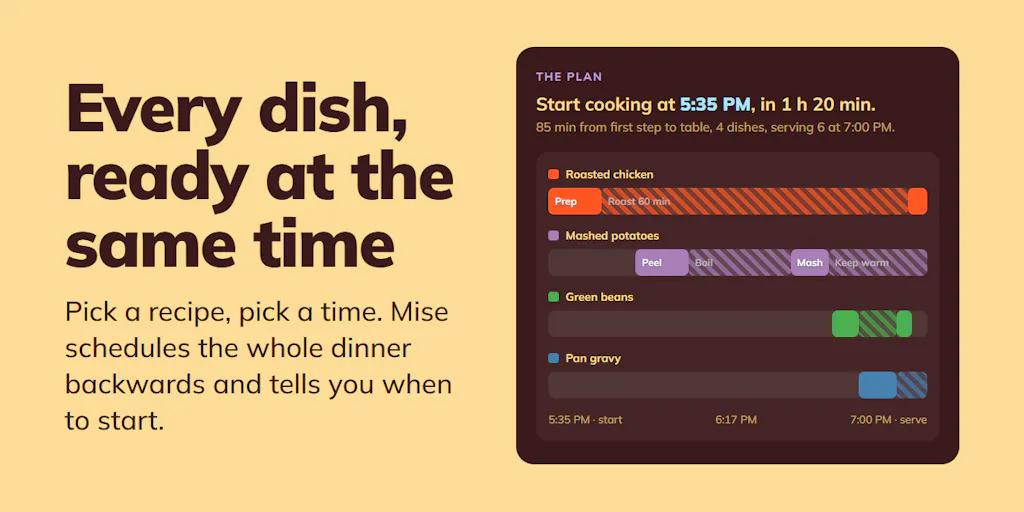
The core frustration the maker names is coordination, not creation. In his launch comment, Andrew Tye writes that getting multiple dishes ready at the same time is the hard part — one dish is manageable, but a full meal reliably drifts out of sync. His fix, a feature he calls “Mise,” asks you to pick dishes, set a meal time and serving count, and then returns a start time, a single consolidated shopping list, and step-by-step instructions with per-step start times. He also notes you can pull from “thousands of recipes” or generate new ones on demand, and — refreshingly — admits it is “not always 100% perfect.”
Read that again as a social media manager. Replace “dishes” with “platforms,” “meal time” with “campaign launch,” and “shopping list” with “asset checklist.” You have just described the exact job-to-be-done that Buffer, Later, and Metricool have been fighting over for a decade: given a set of outputs and a deadline, produce one coherent schedule where nothing collides and every dependency is visible. The reason this matters is that the hard part of social is almost never writing the caption. It is sequencing — knowing that the TikTok cut has to exist before the Reels cross-post, that the LinkedIn version needs a different hook than the X thread, that the Pinterest pin should go out two days after the blog goes live so the UTM data has something to attach to.
Why this is a “mise en place” problem, not a “recipe” problem
Professional kitchens solved this with mise en place — everything prepped and staged before service. The maker’s own framing leans on that idea, and I think it is the correct mental model for a content operation. When I scheduled a batch of posts across five platforms last month, the actual scheduling took minutes. The prep took hours: resizing, re-hooking, re-tagging, building the UTM strings, deciding which platform got the native upload versus the link-out. The tool that wins my subscription is not the one with the prettiest composer. It is the one that stages the prep so that “publish” becomes a single confident action.
How it differs from the incumbents — and where the comparison is unfair
I want to be careful here, because comparing a recipe app to a social suite is a category error if you push it too far. But the mechanism comparison is legitimate and instructive.
Incumbent schedulers are mostly calendar-first. You open a grid, you drag things around, and the intelligence is shallow — best-time-to-post suggestions, maybe an AI caption rewriter bolted on. The newer wave, including tools that lean on OpenAI-style generation and Canva’s Magic Studio, is asset-first: generate the thing, then figure out where it goes. Robot Recipes is neither. It is constraint-first: you declare the outcome (meal at 7pm, four servings) and the system works backward to produce a timeline. That backward-planning posture is the genuinely interesting part, and it is the posture I want more social tools to adopt.
A few concrete differences worth naming:
- Single consolidated output. The “one shopping list” idea maps to a unified asset and copy checklist per campaign — something Hootsuite and Sprout Social gesture at but rarely make the centerpiece.
- On-demand generation alongside a library. Having “thousands of recipes” plus the ability to generate new ones mirrors the hybrid workflow most mature content teams now run: a bank of evergreen posts plus net-new reactive content.
- Honest imperfection. The maker saying it is “not always 100% perfect” is a trust signal. Any operator who has watched an AI-generated schedule produce a caption with the wrong product name knows exactly why that caveat matters.
Why TikTok creators should care more than LinkedIn ones
If your primary channel is LinkedIn, timing is forgiving. A post that lands at 9:15 instead of 9:00 loses almost nothing. If your primary channel is TikTok or Instagram Reels, the distribution mechanics are far less tolerant. Early engagement velocity — the first 30 to 60 minutes of watch time and completion rate — heavily influences whether the algorithm widens your reach. That makes sequencing and timing a distribution variable, not a cosmetic one. A constraint-first planner that actually respects “this must go out at peak, and the cross-post must follow 90 minutes later” is worth more to a short-form creator than to a B2B writer. My take: the short-form crowd should be the loudest audience for backward-planning tools, and they are usually the last to get them.
What creators and social teams can borrow from this
You do not need to switch tools to steal the operating model. Here is what I would lift directly.
1. Declare the output, then work backward
Before you open any scheduler, write the finish line: “Three-platform launch, Tuesday 10am ET, one hero video, two static variants, one link-in-bio destination.” Then build the timeline backward from that fixed point. This is the single highest-leverage habit in content ops, and it is exactly what “choose your meal time” forces on the user.
2. Consolidate your inputs into one list
The “single shopping list” is the unsung hero of the whole product. In practice, that means one master asset checklist per campaign — every file, caption, hashtag set, thumbnail, and UTM parameter in one place. When those live in five different docs, something always ships broken. I have watched a launch go out with a dead tracking link because the UTM string lived in a Slack message nobody re-opened.
3. Treat generation and curation as complementary
The hybrid model — a curated library plus on-demand generation — is the right architecture. Pure generation burns you out and produces sameness. Pure curation goes stale. The teams I see winning on YouTube and Threads run a 70⁄30 split: mostly proven formats from a bank, plus a slice of reactive, generated-on-the-fly content.
4. Build in a manual QA gate
The maker’s own caveat is the lesson. Any generated timeline, caption, or asset list needs a human pass before it goes live. I would rather have a tool that flags “verify this” than one that pretends to be flawless.
Where my judgment says this falls short — and who it is not for
Let me be blunt about the limits, both of the product and of the analogy.
On the product itself: the source does not disclose pricing, a mobile app, or any social or scheduling integration — none of that is mentioned, so I will not assume it exists. The review history is thin: the page shows a 4.5 rating based on 2 reviews, which is far too small a sample to read as a quality signal. One reviewer, Andrew Brodsky, raises a genuinely important question the maker has not answered in the scraped text: are recipes AI-generated or scraped from the web, and if scraped, is there source attribution? That provenance question is not a nitpick — it is the same question every creator should be asking about any AI content tool, because attribution and licensing are where these products tend to get legally interesting. Another reviewer, Julien Zmiro, asks for ingredient-based filtering, which is unanswered in the source.
On the analogy: a recipe app has a bounded, well-understood domain. Social is adversarial and constantly shifting. Platform algorithms change distribution rules without warning, API rate limits throttle what any scheduler can actually do, and each platform’s native upload behavior differs in ways that break naive cross-posting. No constraint-first planner can fully model that. Where the math breaks is scale: backward-planning works beautifully for a five-asset campaign and falls apart for a 200-post monthly calendar, because the constraint graph gets too tangled for a simple timeline to represent.
Who it is not for: if you are a solo creator posting one thing a day on a single platform, you do not need this class of tool — a notes app and CapCut will do. If you are an enterprise team with compliance and approval workflows, a lightweight planner will not clear legal. The sweet spot is the operator running multi-platform, multi-asset campaigns who is currently holding the whole schedule in their head.
What I’d watch / test next
This week, I would run a small experiment rather than adopt anything. Pick your next campaign and, before touching a scheduler, write the finish line in one sentence: platform, date, time, asset count, destination link. Then build a single consolidated checklist and work backward to today. Time how long the prep takes versus your usual process. My bet is the constraint-first framing saves you more time than any new AI feature would, because it forces the coordination work into the open where you can see it.
Then, when you evaluate your next tool — whether that is a scheduler refresh or something adjacent like Robot Recipes — ask the provenance question first. Where does the content come from, who owns it, and can you trace it? A tool that cannot answer that is a liability no matter how slick the timeline looks. The creator economy’s next competitive edge is not more generation. It is better orchestration, and the operators who treat scheduling as a constraint-solving problem instead of a drag-and-drop chore are the ones who will quietly out-ship everyone else.