The real lesson from Starlie: your “social media tool stack” is a workflow problem, not a platform problem
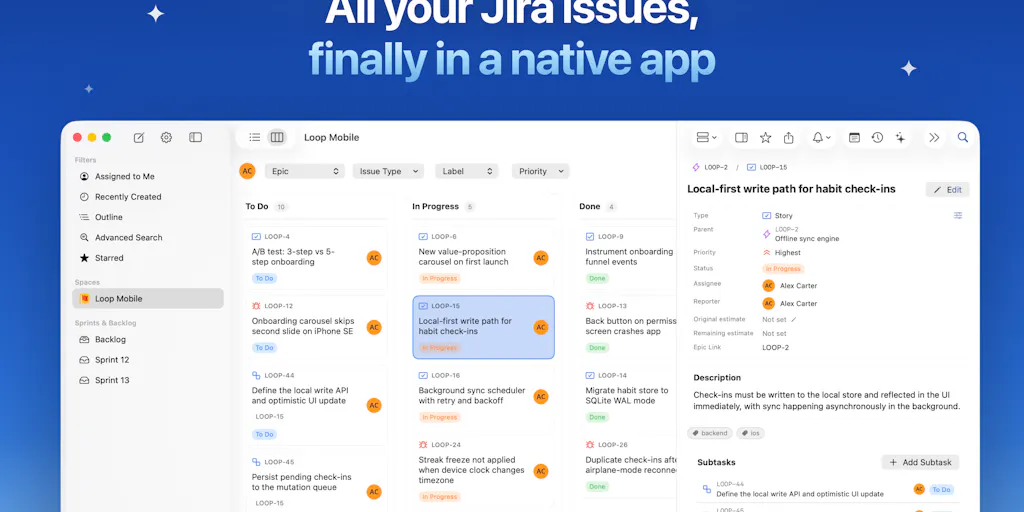
Every few months a launch like Starlie lands on Product Hunt and the comments section fills up with a very specific kind of frustration — the frustration of people who spend eight hours a day inside a web app that was never designed for the way they actually work. Starlie is a native macOS client for Jira, built by Artem Belkov and a small indie team, and on its face it has nothing to do with Instagram, TikTok, or your content calendar. But if you run social accounts for a living, you should read this launch closely, because the underlying thesis — that the browser tab is the wrong container for daily operational work — is the exact thesis that will define the next two years of social media tooling.
Here’s my framing before we get into the product itself. Social media managers and creators don’t have a “content problem” anymore. Most of us have a plumbing problem. We have six to twelve browser tabs permanently open: one for the scheduler, one for the analytics dashboard, one for each platform’s native composer, one for the asset library, one for the AI writing tool, one for the link shortener. The work is fragmented across SaaS products that each solve one slice of the pipeline and integrate with nothing. Starlie is interesting because it’s a bet that consolidation at the workflow layer — not the platform layer — is where the next wave of creator tooling wins. I think that bet is correct, and I’ll explain why, where the analogy breaks, and what you should actually test this week.
What Starlie actually solves, and why it’s a proxy for your own stack
Let me be precise about what this product is, because the framing matters. Starlie is a fast, native, keyboard-driven Jira client for Mac. Per the maker’s launch post, it offers a Kanban board for running sprints, ticket updates, a ⌘K command palette with full JQL search, and — this is the part I find genuinely interesting — the ability to open an issue directly in Claude or Codex with the issue context and local project attached. It works with Jira Cloud and self-hosted Jira, stores data only on your device and in your Atlassian account, and ships with no analytics or tracking. There’s a seven-day free trial; pricing beyond that is not disclosed in the launch thread.
Now, the reason a social media operator should care. Jira is to engineering teams what Buffer, Later, Metricool, and Hootsuite are to social teams: the operational system of record. It’s where the work lives, where status gets tracked, where the handoffs happen. And for the last decade, the dominant delivery model for that kind of software has been the browser tab. Starlie’s makers are betting that a meaningful slice of power users will pay for a native, keyboard-first, AI-adjacent client that treats the system of record as a workspace rather than a website.
The “context handoff” feature is the one to study
The Claude/Codex integration is the detail I’d underline for anyone building or buying social tools. Notice what it does: it doesn’t just open a chatbot. It packages the issue’s context and attaches the local project, then hands it to a model. That’s a workflow primitive, not a feature. Translate it to social: imagine your scheduler letting you highlight a draft post, hit a shortcut, and drop it into CapCut or an AI caption tool with the brand voice doc, the campaign brief, and the source asset already attached. Almost nobody does this well today. Most “AI integrations” in social tools are a text box bolted onto a sidebar that has no idea what campaign you’re working on. The context handoff is the hard part, and it’s the part that determines whether AI actually saves you time or just adds another tab.
Why the browser-tab fatigue is real for social teams
I’ve run social for long enough to know the specific pain. When I scheduled a batch of posts across five platforms last month, the actual scheduling was maybe 20% of the time. The other 80% was context-switching: resizing a video in one tab, pulling the caption from a doc in another, checking the last post’s engagement in a third, copying a UTM parameter from a spreadsheet in a fourth. Native apps don’t automatically fix that, but they remove one category of friction — the browser itself, with its tab limits, its memory hunger, and its constant temptation to check your own feed. Keyboard-driven tools like Starlie exist because the mouse is slow and the tab bar is finite. If you’ve ever lost a draft because a browser crashed, you already understand the emotional argument for native.
How Starlie differs from the incumbents — and where the comparison holds
Let’s do the honest competitive mapping, because “native client for a web app” is a well-trodden category and the winners and losers are instructive.
Starlie sits in the same family as tools like Linear (which made its name on speed and keyboard-first design before adding a desktop app), Superhuman (native-feeling email with a command palette), and the various third-party clients that have popped up around Slack, Notion, and GitHub over the years. The pattern is consistent: a web incumbent gets bloated, a small team builds a faster client for the top 10% of power users, and either the incumbent buys them, out-features them, or the niche client thrives on a subscription. Starlie is explicitly positioning against the browser version of Jira, and the maker’s own framing — “everyday Jira work on a Mac shouldn’t mean hunting through browser tabs” — is the entire pitch.
For social media, the closest analog is the gap between the native platform apps and the third-party schedulers. Instagram’s native composer is fast but useless for cross-posting. Buffer and Later are cross-platform but live in the browser and are, frankly, not fast. Metricool is powerful but dense. Nobody has really built the “Superhuman for social scheduling” — a native, keyboard-driven, context-aware client that treats your content calendar like a workspace. My take: that’s an open lane, and Starlie’s launch is a useful proof that indie teams can ship credible native clients in categories people assumed were locked up.
Why TikTok creators should care more than LinkedIn ones
Here’s a distinction that matters for how you read this launch. The value of a native, keyboard-driven client scales with the volume and velocity of your operational work. A LinkedIn ghostwriter posting three times a week does not need a command palette. A TikTok creator or a short-form team shipping 30–60 assets a month across TikTok, Instagram Reels, and YouTube Shorts absolutely does — because at that volume, every extra click compounds into hours, and every context switch is a chance to lose the thread of a campaign. The Starlie bet is a high-frequency-workflow bet. If your workflow isn’t high-frequency, the product (and its category) is overkill for you. That’s not a knock on Starlie; it’s a filter for whether you’re the customer.
Where the math breaks
I want to be balanced here, because the launch thread has open questions the makers themselves acknowledge. When asked about custom fields and custom workflows in self-hosted Jira setups, the question went unanswered in the thread — which is a real gap for enterprise-adjacent teams, and a signal that the product is optimized for standard Jira Cloud workflows. When asked about handling large numbers of issues, the maker replied that it “stays quick even in big projects” and that changes sync straight to Jira, which is the right claim but also the kind of claim you’d want to verify against your own backlog size before committing. Offline mode is “only partially” supported, with caching in place and expansion planned. Support beyond Jira is explicitly not on the near-term roadmap — the maker said they’re focused on making Starlie “the best Jira experience possible.” Multiple accounts are supported with toolbar switching.
None of that is disqualifying. But it tells you the product is early, opinionated, and narrow — which is exactly what you’d expect from a first indie-hacking project that, per maker Nikita Solovev, started in March 2026. Narrow and opinionated is often better than broad and mediocre. It’s also a reminder that “native client” is a promise about your workflow, not a universal upgrade. If your team’s Jira is heavily customized, test before you buy. If your social stack is heavily customized — which it almost certainly is — apply the same skepticism to any native client promising to replace it.
What creators and social teams can borrow from this launch
Strip away the Jira specifics and there are four transferable lessons for anyone running social operations.
1. Keyboard-first is a competitive advantage, not a nerdy preference. The ⌘K command palette and full JQL search in Starlie are the features power users will pay for. In your own workflow, the equivalent is building a shortcut layer: Raycast or Alfred commands for your most common tasks, saved searches in your scheduler, templates for recurring post formats. The creators who ship the most aren’t the most talented — they’re the ones with the fewest clicks between idea and publish.
2. Context handoff beats raw AI capability. Starlie’s Claude/Codex integration works because it packages context. When you evaluate AI writing tools — Jasper, Copy.ai, the built-in AI in Canva, whatever — the question isn’t “how good is the model.” It’s “does it know what campaign I’m working on, what voice I use, and what asset I’m referencing?” If the answer is no, you’re doing the context work manually and the AI is just a faster typist.
3. Privacy-by-design is becoming a purchase criterion. Starlie’s “no analytics, no tracking, data stays on your device and in your Atlassian account” stance is a differentiator in a category where browser-based tools are opaque about data handling. For social teams handling client accounts and unreleased campaigns, this matters. Audit your current stack: how many of your tools are training models on your content, and do you have a client-facing answer for that?
4. Native clients are a viable indie business again. For years the received wisdom was that the browser won and native was dead outside of creative tools. Starlie is one of a growing number of counterexamples. If you’re an indie founder reading this, the lesson is that “faster, more focused client for a bloated incumbent” is a repeatable playbook — and social scheduling is an incumbent category that is begging for it. If you’re a buyer, the lesson is to expect more of these and to evaluate them on workflow fit rather than feature checklists.
The repurposing angle nobody in that thread mentioned
One thing the launch thread didn’t discuss, and where I’d push the makers if I were advising them: repurposing. The single biggest time sink in social operations is taking one asset and reformatting it for five platforms — aspect ratios, captions, hashtags, thumbnails. A native client that understood “this is one piece of content with five platform variants” would be genuinely differentiated. Starlie’s model of “one issue, multiple contexts” is structurally similar. I’d bet the social-tool equivalent — a native client where one content item fans out to platform-specific variants with shared metadata — is buildable today and would find customers fast. That’s my take, not a claim about Starlie’s roadmap.
Where my judgment says Starlie falls short
Let me be direct, because balanced coverage is the only kind worth reading.
It’s a Mac-only, Jira-only, early-stage product. No Windows, no Linux, no Linear, no Asana, no GitHub Issues. That’s a deliberate focus, and focus is usually right at this stage, but it means the addressable audience is a slice of a slice. If your team runs on Asana or Monday.com, this launch is interesting as a signal, not as a tool you can adopt.
Pricing is not disclosed in the thread. The maker says they tried to make it “really affordable,” and there’s a seven-day free trial, but I can’t tell you what it costs after that, and neither can anyone reading the launch page. For a tool that wants to replace a browser tab you’re currently paying $0 for, the price-to-value math has to be obvious. I’d want to see the number before recommending it to a team.
The unanswered questions are the important ones. Custom fields and custom workflows in self-hosted Jira — no answer. Performance at very large issue counts — a claim, not a benchmark. Offline mode — partial. These aren’t fatal, but they’re exactly the questions a serious team asks before switching their daily driver. The makers are clearly responsive in the thread, which is a good sign, but responsiveness isn’t the same as shipped capability.
And the honest meta-point: the fact that this launch resonated — you can feel the pent-up frustration in the comments, including from users who were “so disappointed when Atlassian discontinued the native Jira app for Mac” — tells you the demand for native, focused clients is real. It also tells you that the incumbents have left a lot of workflow value on the table. That’s an opportunity for tool builders and a warning for tool buyers: the browser tab is not a neutral default. It’s a choice, and it’s often the wrong one.
What I’d watch / test next
If you’re a social media operator, here’s what I’d actually do this week — concrete steps, not vibes.
First, run a two-day time audit. Log every context switch in your content workflow: which app, which task, how long. You’ll almost certainly find that 40–60% of your “content time” is actually navigation time. That number is your budget for consolidation, and it tells you whether a native client (or a keyboard layer) is worth paying for.
Second, test the context-handoff principle with what you already own. Pick your most-used AI writing tool and your most-used scheduler. Try to make them share campaign context — a brief, a voice doc, a source asset — without you manually pasting it every time. If you can’t, you’ve found a real gap in your stack, and you now know what to look for in the next tool you evaluate.
Third, if you’re on Jira and on a Mac, try Starlie’s seven-day trial and specifically stress-test the two things the thread didn’t resolve: your custom fields and your largest project’s performance. Report back honestly. If it holds up, you’ve found a daily-driver upgrade. If it doesn’t, you’ve saved yourself a subscription and learned something about your own workflow.
Fourth, watch this category. Native clients for bloated web incumbents are having a moment, and social scheduling is one of the most bloated categories left. The team that ships “Superhuman for social” — native, keyboard-first, context-aware, multi-platform — will have a very good year. I’d bet on it. And when it launches, you’ll want to be the operator who already knows why it matters, because you’ve been living the browser-tab problem every single day.


