The Most Important Social Media Tool This Week Isn’t for Social Media at All
Here’s the uncomfortable truth about the creator economy in 2024: the bottleneck was never content production, scheduling, or even algorithm mastery. It’s attention — specifically, the fractured, restless, screen-bound attention of the people making the content. We spend our days staring at dashboards, scrubbing through raw footage, and sitting through yet another brand-sync call where the client says “make it more viral” without knowing what that means. We’ve built elaborate systems to manage our output while completely ignoring the input side: our own cognitive state. So when I saw a Product Hunt launch for a tiny physics toy that hangs off your Mac menu bar, my first thought wasn’t “that’s a gimmick.” My first thought was “that’s the missing piece of my workflow.” Because the most underrated tool in a creator’s arsenal isn’t a better analytics suite — it’s a way to keep your hands busy so your brain can actually listen.
The Real Problem: We’ve Optimized Everything Except Our Own Focus
Let me paint a picture that will feel familiar to anyone who runs multiple social accounts. It’s 2 PM on a Tuesday. You’ve got a TikTok edit queued for 4 PM, a LinkedIn carousel draft that’s been sitting at 80% complete for three days, and a client call in ten minutes. Your phone buzzes with a Threads notification. Your email pings with a sponsorship inquiry. Your Slack channel lights up because someone asked “does anyone know the UTM parameters for the Q3 campaign?” — again. You’re not doing any of it well. You’re context-switching at the speed of a failing hard drive, and the quality of your creative work is suffering because your working memory is a cluttered desk.
The standard advice from productivity gurus is to “monotask” or “batch your deep work.” That’s theoretically sound but practically useless for the parts of our jobs that require passive listening — client calls, team syncs, podcast recordings, even just reviewing raw interview footage for a cutdown. Your hands need something to do. The default fidgets are terrible: pen clicking (annoying on a mic), phone scrolling (a black hole for attention), or that nervous habit of refreshing your analytics dashboard every ninety seconds (a one-way ticket to anxiety). We’ve all been there. When I’m on a call with a brand manager explaining their “vibrant, dynamic, energetic” vision for a campaign, my cursor is involuntarily drifting toward the Instagram tab to check if the Reel I posted an hour ago has hit triple-digit views.
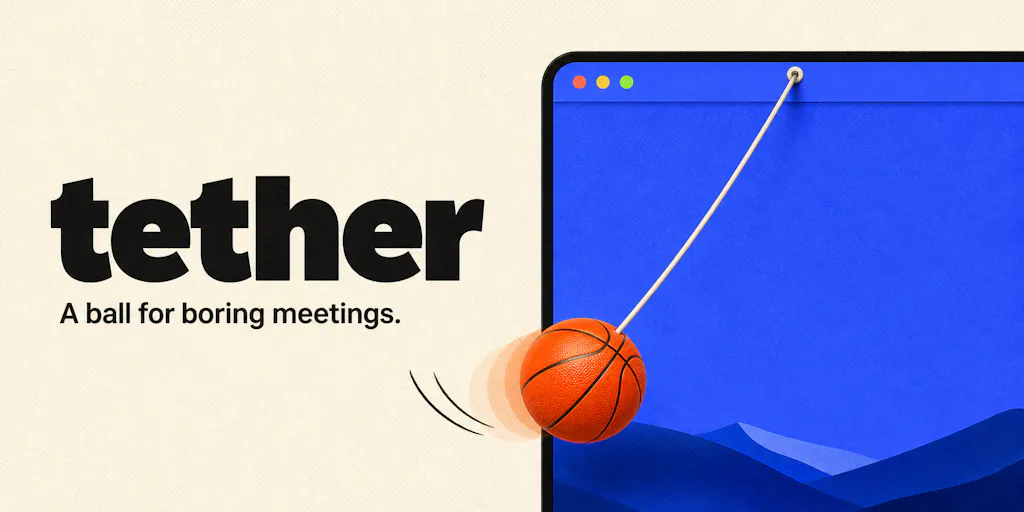
This is where Tether comes in — and I’m not being facetious. It’s a ball on an elastic string that lives in your Mac menu bar. You can drag it, fling it, slingshot it against your actual windows, and it reacts with real physics. The maker, Alex, built it for exactly this reason: he was looking for something to keep his hands busy during long work meetings. Pens, cables, notebook corners — the usual suspects — weren’t cutting it. So he made a digital one that can’t roll under the desk mid-call.
Now, a rational person might ask: why not just buy a physical fidget toy? A stress ball, a fidget cube, a worry stone? And that’s a fair question, until you realize that physical fidgets have a fundamental problem in the remote-work era: they’re not on your screen. You have to look away from the call to engage with them, which breaks your visual attention. Tether’s genius is that it lives in your workspace. It’s a fidget toy for the thing you’re already looking at. The product page describes it as a ball that hangs off the Mac menu bar on an elastic tether — you can fling it, slingshot it, and it lands on the top edges of your windows, rolls along them, and reacts when you move them. There’s even a “cut the rope” feature where it bounces around free across your desktop.
Why This Matters More for Creators Than for Corporate Employees
Let me make a distinction that might seem counterintuitive: this tool is more valuable for a solo creator or a small social media team than for a mid-level marketing manager at a large company. Here’s why. Corporate employees have meetings where they’re often passive participants — they’re on the call because they have to be, not because they need to absorb nuanced information. A creator, on the other hand, is almost always in active listening mode during calls. You’re mining client calls for tone, preferences, and hidden objections. You’re listening to podcast guests for quotable moments you can repurpose into clips. You’re on a brand call trying to decode what they actually mean by “authentic content.”
In those moments, your hands need to be occupied without your brain having to manage them. This is the same reason CapCut has become the default editing tool for short-form — it’s low-friction enough that it doesn’t interrupt your creative flow. Tether is the same principle applied to your attention span. When I tested a similar tool during a 90-minute podcast recording session, I found that having a physical distraction on screen actually improved my retention. I wasn’t checking my phone. I wasn’t drafting email replies in my head. I was just… listening, with my hands doing a low-level physics simulation in the corner of my screen.
The ADHD angle is real, too. One of the commenters on the launch page, Irene Chan, said she has ADHD and usually needs something to tinker with while listening — she could even imagine her students using it. That’s not a niche use case; that’s a huge swath of the creator population. The creator economy disproportionately attracts people with divergent attention styles because it rewards novelty-seeking and rapid context-switching. Those same traits make sustained listening exhausting. A tool that gives your hands a job without demanding your eyes is genuinely useful.
There’s also a specific operational benefit for social media managers: it keeps you from doom-scrolling your own metrics. When I’m waiting for a post to perform, the temptation to refresh the dashboard every thirty seconds is almost irresistible. That behavior is not just unproductive — it’s actively harmful to your mental state and your creative energy. A fidget toy on your desktop gives your restless energy a destination that isn’t your analytics. It’s a small thing, but small things compound.
How This Compares to the “Productivity” Software Incumbents
Let’s be clear about what Tether is not: it’s not a competitor to Buffer, Hootsuite, or Metricool. Those tools solve the scheduling and distribution problem. Tether solves a completely different problem — the human attention problem — and that’s precisely why it’s interesting. The creator economy has a tooling gap that no one is addressing. We have world-class software for every stage of the content lifecycle except the one where a human being has to sit still and absorb information.
Think about the tools we actually use daily. Canva for design. Later for visual planning. Notion for project management. These are all “output” tools — they help you produce and distribute. But the “input” side — the listening, the research, the client calls, the trend-watching — is still a wasteland of generic note-taking apps and browser tabs. We’re expected to be good at listening, synthesizing, and translating client feedback into creative direction, but there’s no tooling support for the cognitive state that makes that possible.
Tether isn’t trying to be that tool in a grand sense. It’s a tiny, single-purpose utility. But its existence points to a gap in the market. The most successful tools in the creator economy aren’t the ones with the most features — they’re the ones that reduce friction in a specific moment. Canva won because it made design accessible to non-designers. CapCut won because it made editing accessible to non-editors. Tether is trying to make focus accessible to people who are constitutionally incapable of sitting still. That’s a much harder problem, and it’s not one that a heavier, more complex piece of software could solve. You can’t “gamify” attention with a dashboard. Sometimes you just need a ball on a string.
The comparison that actually matters is against the default behaviors it replaces. When I’m on a call without Tether, my alternatives are: pen clicking (annoying), phone check (distracting), or that thing where you start rearranging your desktop icons (weirdly satisfying but not useful). Tether’s value proposition is that it’s silent — the maker confirmed in the comments that there’s no audio anywhere in the app, so it won’t interfere with your mic. That’s a thoughtful detail that shows the maker actually understands the use case. It’s not a toy for playing; it’s a tool for not playing in a way that disrupts others.
What Creators and Social Teams Can Actually Borrow From This
Here’s where I shift from reviewing a product to extracting lessons for your workflow, because that’s what this newsletter is really about. Tether is a niche utility, but the thinking behind it is transferable to how you run your social media operation.
Lesson One: Optimize for the “Between” Moments. Most of your content strategy is built around the moments of active creation — the writing, the recording, the editing. But a huge portion of your day is spent in the “between” moments: waiting for a render, sitting on a call, commuting, doing admin. Those moments are where creative ideas actually incubate, but only if your brain is in a receptive state. If you’re doom-scrolling during every interstitial moment, you’re not giving your subconscious the space to work. Find a way to keep your hands busy and your mind open. For me, that’s a fidget toy on screen. For you, it might be a sketchbook, a knitting project, or a walk around the block. The point is to be intentional about those moments.
Lesson Two: Build Your Own Micro-Tools. The maker of Tether built it because he had a specific pain point and couldn’t find a solution. That’s the same impulse that drives the best creator-led businesses. When I look at successful indie founders in the social media space, they didn’t start by trying to build a suite — they started by solving one infuriating problem. The creator who built Typefully was tired of the thread-writing experience on X. The team behind Pietra saw that creators needed a better way to handle merch. The lesson is: your frustration is a product opportunity. If you’re a social media manager who keeps hitting the same wall with a tool, that wall is a business.
Lesson Three: Small, Delightful Details Matter More Than Feature Lists. Look at the comment section on Tether’s launch page. People aren’t asking for more features — they’re sharing moments of delight. One commenter said they have a physical ball hanging next to their desk and never thought they’d need one on screen. Another asked if it’s quiet enough for a call with a mic on. The maker’s responses are charming and specific: “Completely silent, no audio anywhere in the app. Your bottle label never stood a chance.” That’s the kind of personality that builds a following. When you’re creating content, remember that people don’t share “comprehensive” — they share delightful. A single, weird, well-executed idea will outperform a generic “10 tips for better content” post every time.
Lesson Four: Respect the Platform Constraints. Tether is Mac-only, built for macOS 14 and later. The maker was asked about a PC version and said “Not at the moment. Just Mac for now!” That’s a deliberate constraint. It’s also a lesson for content distribution. You don’t need to be on every platform. A creator who focuses on YouTube long-form and repurposes to Shorts will build a more loyal audience than someone who tries to maintain a presence on all seven major platforms and does none of them well. The algorithm rewards consistency and depth, not breadth. Pick your platform, learn its mechanics, and dominate it before you expand.
Where the Math Breaks: Limitations and Open Questions
I’ve been positive so far, and I want to be clear about why: this is a genuinely clever little tool that solves a real problem. But I’d be doing you a disservice if I didn’t flag where the excitement should be tempered. Let’s talk about limitations.
Platform Lock-In. Tether is Mac-only. Not Mac and Windows, not Mac and web — just Mac. For a solo creator running a Windows machine, this is a non-starter. And for a social media manager on a team with mixed hardware, it’s a coordination headache. This is a classic indie dev constraint — you build for the platform you know — but it means the tool’s reach is inherently limited. The maker was transparent about this in the comments, which I respect, but it’s worth noting if you’re evaluating it for your workflow.
The Novelty Decay Problem. Here’s the honest question: does a fidget toy on your screen hold your attention after a week? A month? Six months? The physical ball on your desk has the advantage of being a tangible object that occupies a physical space. A digital ball can be minimized, forgotten, or — let’s be honest — annoy you when you’re trying to work and it’s bouncing around in your peripheral vision. The maker included a one-key hide shortcut for when your name gets called, which is smart, but the long-term stickiness of this kind of tool is unproven. I’d bet that for most users, the novelty wears off within a few weeks. For the subset who genuinely need the fidget, it becomes a permanent fixture. The maker’s challenge is building enough variety — seven balls with different weights, gravity, and bounce settings — to keep it interesting. But that’s a feature arms race that’s hard to win against the infinite variety of the actual internet.
The “Productivity” Trap. There’s a risk here that I want to flag, and it’s not about Tether specifically — it’s about the category of “productivity toys.” Tools that help you fidget can easily become tools that help you procrastinate. The line between “keeping my hands busy so I can listen” and “playing with this ball instead of doing my actual work” is razor-thin. If you’re someone who already struggles with screen time, adding a physics toy to your desktop might not be the best call. The maker’s design philosophy — no account, no subscription, no telemetry, nothing leaves your Mac — is reassuring from a privacy standpoint, but it also means the tool has no way to nudge you back to work. It’s a toy, not a taskmaster.
Who This Is NOT For. Let me be direct: if you’re a social media manager who works on a Windows machine, skip this. If you’re someone who doesn’t struggle with attention during calls, you’ll find this cute for an afternoon and then forget it exists. If you’re looking for a productivity system that will transform your workflow, this isn’t it. Tether is for a specific person: the creator who finds themselves reaching for their phone during every meeting, who needs their hands busy to keep their ears open, and who works on a recent Mac. That’s a real population, but it’s not everyone.
Why TikTok Creators Should Care More Than LinkedIn Ones
Let me get specific about who benefits most. A TikTok creator lives in a world of rapid-fire trends, constant sound-bite consumption, and a never-ending stream of short-form content. Their attention is trained to jump every three seconds. When they sit down for a client call or a brand briefing, that training works against them — their brain is screaming for novelty while the client is explaining their quarterly objectives. A fidget tool gives the novelty-seeking part of the brain a low-stakes outlet while the listening part of the brain does the actual work.
A LinkedIn creator, by contrast, is already operating in a slower, more deliberate mode. They’re used to reading long-form articles, writing thoughtful posts, and engaging in professional discourse. Their attention span is already suited to meetings. They might find Tether mildly amusing, but it’s not solving a critical pain point.
This distinction matters because it reveals something about tooling in the creator economy: the best tools are the ones that fit the cognitive style of the user, not just the functional need. A tool that’s a lifesaver for a TikTok creator might be a distraction for a LinkedIn one. When you’re evaluating any new software, don’t just ask “does this solve my problem?” — ask “does this fit how my brain works?” The answer to that second question is often more important.
What I’d Watch / Test Next
I’m going to give you concrete next steps, because that’s how I operate. Here’s what I’d do this week if I were a social media manager or a solo creator evaluating this space.
Step One: Try Tether (if you’re on a Mac). It’s a one-time purchase on the Mac App Store, no subscription, no account. The maker says it’s built for macOS 14 and later. If you’re on a recent Mac and you have a single client call this week, install it and use it during that call. Don’t use it during deep work — that’s not what it’s for. Use it during the calls where you’re listening, not talking. See if it changes how you feel at the end of the call. That’s the test.
Step Two: Audit Your “Between” Moments. For one day, track what you do during the interstitial parts of your day — the two minutes before a meeting starts, the time waiting for a render, the walk to the kitchen. Are you reaching for your phone? Refreshing analytics? If you’re constantly seeking stimulation, that’s a sign your attention system is overloaded. The fix isn’t necessarily a fidget toy — it might be a more deliberate approach to those moments. But you can’t fix what you don’t measure.
Step Three: Watch the Indie Creator Tooling Space. Tether is a small launch, but it’s part of a broader trend: indie developers building hyper-specific tools for the creator economy. The ones that win will be the ones that understand the cognitive dimension of the work, not just the functional one. Keep an eye on Product Hunt launches in the “productivity” and “macOS” categories. The next big creator tool might not look like a tool at all — it might look like a ball on a string.
Step Four: Steal the “Delight” Principle for Your Content. The most valuable thing you can take from Tether isn’t the tool itself — it’s the lesson that small, well-executed, personality-driven products build communities. The maker’s responses in the comments are a masterclass in brand voice. When you’re creating content this week, ask yourself: what’s the delight moment? What’s the thing that makes someone smile, share, or comment? That’s worth more than any algorithm hack.
The creator economy is saturated with tools that promise to 10x your reach, automate your posting, or optimize your engagement. What we’re missing is tools that make the human part of the work sustainable. Tether is a small step in that direction. It won’t change your life, but it might change your Tuesday afternoon — and sometimes, that’s exactly what you need.