The creator-tooling bottleneck isn’t generation anymore — it’s orchestration
If you run social for a living, you’ve already hit the wall. It’s not that you can’t make content — it’s that you can’t reliably run the same process twice. Every week: pull the week’s assets, write 5–7 variants per platform, resize for Reels and Shorts and TikTok, schedule, tag UTMs, log performance, then repeat. The generative tools solved step one. Nobody solved step ten. That’s the gap Toone is aiming at — a macOS app from maker Matheus Paranhos that lets you build recurring AI workflows in natural language instead of prompt-by-prompt. Whether you adopt it or not, the problem it names is the one every social team I know is quietly drowning in. So let’s talk about what it actually does, where it sits against the incumbents, and what I’d steal from it regardless.
What Toone actually is (and isn’t)
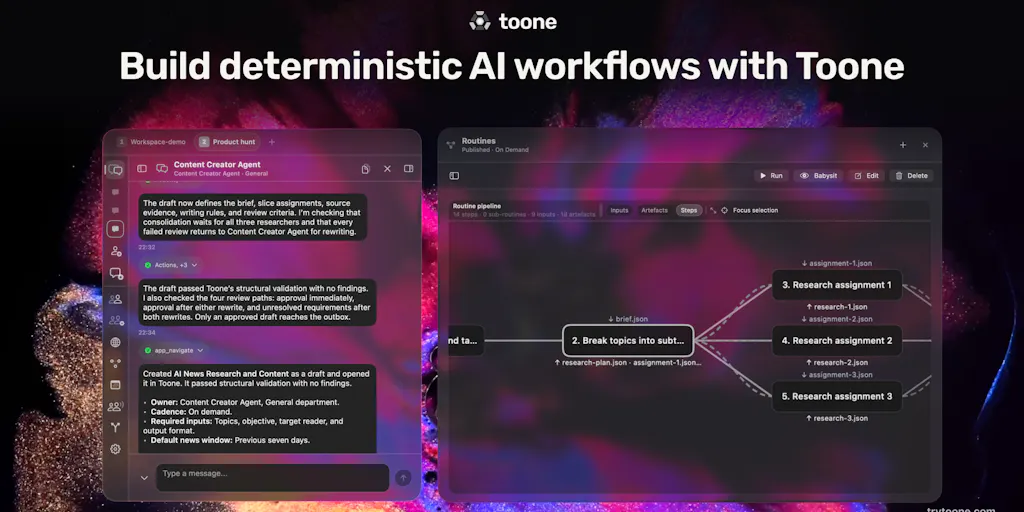
Strip away the launch-page framing and Toone is a desktop app for composing repeatable AI routines — the maker’s word, not mine — where you describe a workflow in plain language, the app breaks it into steps with defined boundaries, and you can stop, fix, and resume mid-run if something goes sideways. That last part is the interesting bit. In the launch thread, Paranhos told a commenter that “the boundaries are well defined so the agents know exactly the steps to take and what to output,” and that his recommended approach is to “start simple and be composing your workflows, instead of creating a big one” — though you can build big ones and recover from a failure without restarting from zero.
That’s a meaningfully different posture from the “one mega-prompt, pray” school of AI tooling. If you’ve ever tried to get a single prompt to handle “write the caption, pick the hashtags, generate the alt text, and format for LinkedIn” and watched it silently drop step three, you understand why step-level boundaries matter. Toone’s pitch is that those boundaries are visible and editable, not buried in a black box.
What it is not, based on the source: it’s not a scheduler, not an analytics dashboard, not a publishing API wrapper. There’s no mention of native integrations with Instagram, TikTok, YouTube, or any of the social platforms. It’s a workflow layer that sits above your tools, not a replacement for them. That distinction matters enormously for whether it fits your stack.
The macOS-only problem
Let me flag this early because it kills the product for a chunk of my readers: Toone is a macOS app. If your social team runs on Windows, or you’re a Chromebook-and-Google-Docs operation, you’re out. Paranhos hasn’t said anything about a web version or Windows port in the thread. For solo creators on a MacBook, fine. For a five-person social team where three people are on Windows laptops issued by IT, this is a non-starter until it ships cross-platform. I’d bet a web version is on the roadmap — every desktop-first productivity tool eventually ships one — but “I’d bet” is doing a lot of work in that sentence, and the source says nothing.
How it differs from the tools you’re already paying for
Here’s where I want to be precise, because “AI workflow automation” is a category that’s been colonized by a dozen different product shapes, and Toone doesn’t slot neatly into any of them.
Versus schedulers like Buffer, Later, or Metricool: these are publishing pipes. They take finished content and push it to platforms on a calendar. They don’t generate, they don’t orchestrate multi-step reasoning, and their AI features (where they exist) are shallow — caption suggestions, hashtag helpers, best-time-to-post predictions. Toone doesn’t compete here at all. In my own stack, a scheduler is the last mile; Toone would be the first mile.
Versus Zapier and Make: these are trigger-action automators built on deterministic logic. “When a new row appears in this sheet, post to Slack.” They’re brilliant at plumbing and terrible at judgment. Toone’s bet is that LLM agents can now handle the judgment steps — “decide which of these five hook angles fits the clip’s tone” — that Zapier can’t. The tradeoff is obvious: deterministic tools are predictable and cheap; agentic tools are neither, unless you build the boundaries well.
Versus n8n or LangChain-style orchestration: these are developer tools. You write nodes, you wire APIs, you debug JSON. Toone’s whole pitch is that you don’t — you chat with the agent and it composes the workflow. That’s a real accessibility gain for social managers who can describe a process but can’t write a function.
Versus ChatGPT desktop or Claude: this is the closest comparison, and the one Paranhos himself leans into. He describes Toone as “creating consistent workflows alongside the ChatGPT desktop.” The difference is persistence and repeatability. A ChatGPT conversation is a one-off; a Toone routine is a reusable asset you can run again next Tuesday with different inputs. If you’ve ever copy-pasted the same 400-word prompt into a fresh chat window for the fifteenth time, you’ve felt the gap Toone is selling into.
Why TikTok creators should care more than LinkedIn ones
This is my take, not the source’s, but it follows from the mechanics. TikTok and Reels reward volume and iteration speed — you’re testing hooks, watching 3-second retention, and reposting winners with new openings. That’s a workflow that cries out for automation, because the steps are identical every time and only the inputs change. LinkedIn rewards a slower, more considered cadence where a single well-argued post can carry your week. If you’re a LinkedIn-first operator, the ROI on workflow automation is lower. If you’re posting 20+ short-form videos a month across three platforms, the ROI is enormous — and it compounds every week you don’t have to rebuild the process.
What social teams can borrow from Toone, even without buying it
The most useful thing about a launch like this isn’t the product — it’s the mental model. Three things I’d steal immediately, regardless of whether you install Toone:
1. Name your recurring workflows and write them down. Most social teams run the same five or six processes every week but never formalize them. “Monday: pull weekend UGC, write three caption variants, schedule for Tue/Thu/Sat.” If you can’t write it as a numbered list, you can’t automate it — and you probably can’t delegate it either. The act of naming the workflow is 80% of the value. Toone’s natural-language composition is just a forcing function for that clarity.
2. Build boundaries into every AI step. Paranhos’s point about defined boundaries is the operational lesson. When I hand a task to an LLM — “write 5 hooks for this clip” — I get better output when I specify the inputs (clip transcript, target platform, audience), the constraints (under 12 words, no questions, no “you won’t believe”), and the output format. Vague prompts produce vague results, and vague results are un-automatable because you can’t tell when they’ve failed.
3. Design for mid-run recovery, not perfection. The “stop, fix, return from where it was” model is how you should think about any AI-assisted pipeline. If your process only works when every step succeeds, it’s fragile. If you can pause at step four, correct the output, and resume, you can ship with a tool that’s 85% reliable instead of waiting for 100%. That’s a genuinely useful reframe for anyone who’s been burned by a half-finished automation.
Where the math breaks
Here’s the honest counterweight. Toone’s business model, per the maker, is to keep the app free and monetize a routines/automations marketplace. That’s a bold call, and I have questions. Marketplaces are brutally hard to bootstrap — they need liquidity on both sides, and a marketplace for AI workflows only works if the workflows are (a) non-obvious, (b) reliably reusable across different users’ stacks, and © hard enough to build that people would rather buy than compose their own. In a world where the composition is natural language, © is a shaky assumption. If I can describe my workflow in three sentences and Toone builds it, why would I buy someone else’s? The answer has to be that the bought workflow encodes domain expertise I don’t have — a specific SEO routine, a specific outreach sequence — not just a generic “write captions” template. I’d want to see the first 50 marketplace listings before I believed the model.
The other open question: cost. Paranhos mentions that people on “$100–$200 plans” for AI tools would find Toone “certainly worth it,” which implies the target user is already spending serious money on AI subscriptions. But he doesn’t disclose what Toone itself will cost beyond “free,” or what model(s) it runs on, or whether there are usage caps. A commenter named Brent Vardy asked exactly this — one-off, subscription, or pay-as-you-go — and got the marketplace answer instead of a pricing answer. That’s not a dodge, it’s just early. But for a social team budgeting tools, “free with an undisclosed marketplace” is not a number you can plan against.
Where my judgment says it falls short
Three things I’d want resolved before recommending this to a social team:
No platform integrations, no social-specific value prop. Toone is horizontal — it’ll run any workflow. That’s a strength for a founder juggling SEO, coding, and outreach (which is exactly the use case Paranhos describes). It’s a weakness for a social manager, because the highest-value social workflows involve talking to platform APIs — pulling comments, checking post performance, scheduling to Threads or Pinterest. Without native connectors, you’re manually ferrying data in and out, which is where automation ROI usually dies.
The accuracy question is unresolved. A commenter asked directly whether accuracy holds up on long, complicated workflows with many steps. Paranhos said yes, and added the caveat about starting simple. I believe the caveat more than the yes. Every agentic tool I’ve tested degrades on long chains — error compounds, context drifts, and step twelve forgets what step three decided. “Start simple” is good advice, but it’s also an admission that the long-workflow case is the hard one.
Zero reviews, zero disclosed metrics. The Product Hunt page shows “No reviews yet.” No user counts, no retention data, no case studies. That’s normal for a fresh launch, but it means everything here is maker-claim, not verified outcome. The “10x” energy in the launch copy — “huge time saver,” “critically important” — is promotional. Treat it as such.
Who this is not for
If you’re a solo creator who posts twice a week and your process is “open CapCut, make a video, write a caption,” you don’t have a workflow problem yet — you have a volume problem, and Toone won’t fix that. If your team is on Windows, wait. If you need platform-native scheduling and analytics, buy a scheduler instead. Toone is for the operator who’s already spending real time on process — the person who has a documented weekly routine and is tired of rebuilding it.
What I’d watch / test next
Concrete moves for this week, whether or not you touch Toone:
Write down your three most-repeated social workflows as numbered steps. No tool, just a doc. If you can’t, that’s your actual bottleneck — not generation, not scheduling, but the absence of a defined process. Automating a fuzzy process just makes the fuzziness faster.
Audit what you’re already paying for. If you’re on a $100–$200/mo AI plan (the segment Paranhos names), list every recurring task you do manually that a workflow tool could handle. That list is your buy/no-buy decision, not the launch page.
Join the Toone waitlist and test one small routine. The maker explicitly asked for people to share “the task you repeat, the inputs you’d start with, and what a useful result would look like” — and said he’d arrange access individually where he can. That’s a genuine invitation to pressure-test it with a real task. Pick something you can verify yourself, per his own suggestion. If you’re on macOS, this costs you an email.
Watch for the marketplace and the pricing page. Those two artifacts will tell you more about Toone’s viability than any launch comment. If the marketplace fills with genuinely non-obvious, social-specific routines — not generic caption templates — the model works. If it fills with repackaged prompts, it doesn’t.
And keep your scheduler. Toone, if it works, sits upstream of Buffer or Later, not in place of them. The orchestration layer and the publishing layer are different jobs, and conflating them is how you end up with a beautiful workflow that never actually posts.