The Feedback Loop Is the Product: Why Toplify Matters to Anyone Who Publishes Anything
Every creator I know is chasing the same phantom: the moment when a piece of content lands. You post a video, a thread, a Reel, and for a few hours you refresh the analytics tab like a slot machine addict, waiting to see if the algorithm gods smiled on you. The problem isn’t the waiting — it’s the blindness. You’re publishing into a void and hoping the numbers tell you something useful a day later, when the moment has already passed.
That’s why I keep coming back to tools that close the feedback loop. When I saw Toplify launch on Product Hunt, I initially dismissed it as another ASO tool for indie developers — a niche I don’t inhabit. But the more I read through the maker’s comments and the thread’s back-and-forth, the more I realized this is a case study in something every social media operator should study: the difference between monitoring and alerting, between dashboards and decisions.
The creator economy runs on feedback loops. You post, you measure, you adjust. But most of us are doing this with tools built for a different era — tools that give us weekly email digests when we need real-time push notifications, tools that drown us in data when we need one clear signal. Toplify, built by indie developer Dmytro Chuta, is ostensibly an App Store ranking tracker. But the thinking behind it — the emphasis on immediate, curated alerts over exhaustive reporting — is exactly the kind of philosophy that separates the creators who grow from the ones who just post.
Here’s what I mean.
The Problem It Actually Solves: You Can’t Optimize What You Can’t See
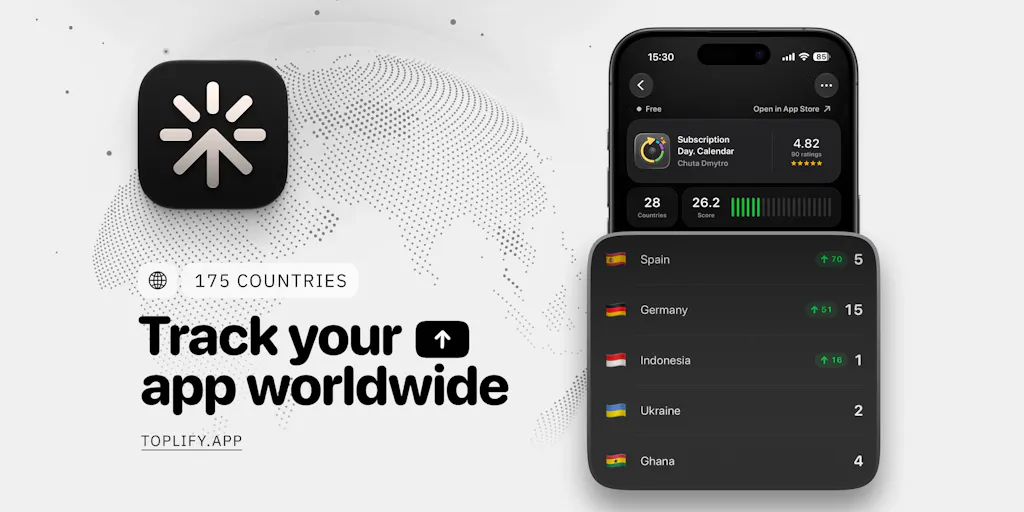
Let me be clear about what Toplify does, because the product details matter. It’s a mobile app that monitors App Store rankings across 175 countries, 24⁄7, tracking both iPhone and Mac apps across 54 categories including Games. You add an app by searching its name or pasting an App Store link — no API keys, no App Store Connect access required. It tracks rankings, ratings, and reviews (with automatic translation), and it sends push notifications when something significant happens.
The maker’s origin story is telling. Chuta says he was surprised to discover that App Store Connect doesn’t show where your app ranks across countries. Most ASO tools can do this, but they’re expensive and overloaded with features. And crucially, they send daily or weekly stats by email — not real-time updates.
This is the same pain I see in social media management. When I scheduled 30 posts across 5 platforms last month, I wasn’t using one tool — I was using five, plus native analytics, plus a spreadsheet to track cross-platform performance. The data was all there, but it was fragmented and delayed. I’d find out a week later that a particular post format was crushing it on LinkedIn but dying on Instagram, and by then the moment had passed.
Toplify’s answer to this is the push notification. Not a dashboard you have to remember to check — a notification that arrives when something actually matters. The maker’s example is telling: you post about your app on Threads, it takes off, and you immediately get a notification that your app has entered the Top Charts. You generate a share image, post it, and potentially get even more downloads.
That’s the feedback loop I’m talking about. The tool isn’t the product — the loop is the product. The notification isn’t just information; it’s a trigger for action.
Why This Matters More for Creators Than It Seems
You might be thinking: “I don’t have an app. Why should I care about App Store rankings?” Fair question. But the underlying mechanics are identical to what you deal with every day.
When you post a YouTube video, you’re competing for visibility in a ranking system — the algorithm’s recommendation engine. When you post on Instagram, you’re competing for placement in the Explore feed and the Reels tab. These are rankings, just not ones you can see in a neat chart. The platforms don’t tell you exactly where your content ranks in real-time; they give you delayed, aggregated metrics that arrive long after the distribution window has closed.
The tools that succeed in this space — whether for app stores or social media — are the ones that solve the timing problem. A notification that arrives when your content is gaining traction lets you double down. A notification that arrives when it’s dying lets you pivot. A weekly report tells you nothing actionable because the moment has passed.
This is why I’d bet on the push notification as the killer feature here, not the tracking itself. The tracking is table stakes. The alerting is what changes behavior.
How It Differs From the Incumbents: The Signal-to-Noise Problem
The App Store optimization space has established players — think App Annie (now data.ai), Sensor Tower, and Appfigures. These are powerful tools, but they’re built for enterprise teams with dedicated ASO specialists. They’re expensive, they’re complex, and they’re oriented toward deep analysis rather than quick action.
Toplify positions itself as the opposite. It’s indie-friendly, with a free tier for new apps not yet in the charts or ranking in fewer than 4 countries. It’s mobile-first, designed for checking your rankings on the go rather than sitting at a desktop dashboard. And it’s focused on alerts over reports.
But the most interesting differentiator is the AI-curated notification system. When I asked about the risk of notification fatigue — an app ranking in 175 countries could generate dozens of events per day — the maker’s response was revealing. All ranking changes are processed as “Events,” and AI selects only the single most important one to notify you about, or may decide not to send anything at all. You only hear about meaningful events: a jump of 50+ positions, or entering a new country’s charts for the first time.
This is the signal-to-noise problem that every social media operator faces. I’ve tried Buffer, Hootsuite, Later, and Metricool — and they all have the same issue: they notify you about everything, so you learn to ignore everything. The tools that win are the ones that curate aggressively.
Where the Math Breaks
The Product Hunt comment section surfaced a genuinely smart concern from a user named Lisa: small app stores are so thin that an app can jump 40 places on like 6 downloads. If every wobble pings you, you’ll have the app muted by Tuesday.
This is the same problem I see with engagement rate tracking on social media. A creator with 1,000 followers can see their engagement rate swing wildly based on a single post — 10 likes is a 1% engagement rate, 50 likes is 5%. That’s not signal; that’s noise. The platforms know this, which is why they don’t surface these metrics prominently. They know that small-sample-size variance will drive creators crazy.
Toplify’s AI-curated alerts are an attempt to solve this — the system decides what’s meaningful rather than making you set thresholds yourself. But this creates a trust issue. As Lisa pointed out in the thread, if the AI decides not to notify you about something, can you see what it skipped? During a launch week, “the AI didn’t think it mattered” is a scary answer when your team is asking why you missed a dip.
The maker’s response was reassuring: all the data is still there, and you can see the full history for every country and category. The AI just curates the notifications. But this is where I’d flag a concern. Any system that filters information between you and the data creates a dependency on the filter’s judgment. For a creator tracking their own content performance, that’s a tradeoff worth understanding.
What Creators and Social Media Teams Can Borrow From Toplify
Even if you never track an App Store ranking in your life, Toplify’s design philosophy offers three lessons worth stealing.
1. Build Your Own Alert System
The most valuable thing Toplify does is turn monitoring into action. Instead of checking dashboards, you receive notifications when something matters. You can do the same thing with your social media analytics using Google Alerts for brand mentions, IFTTT or Zapier for cross-platform triggers, and platform-native notification settings for engagement spikes.
The key is to define what “meaningful” means for your content. For me, it’s not every new follower — it’s a post that’s getting engagement at 2-3x your baseline within the first hour. That’s the signal that the algorithm is testing your content for wider distribution. If you’re not getting notified when that happens, you’re missing the window to respond, engage in comments, and signal to the algorithm that your content deserves more reach.
2. The Share Card Is a Marketing Asset
Toplify generates beautiful achievement cards to share your milestones. This sounds trivial, but it’s actually a brilliant growth loop. When you hit a milestone, you share it publicly. The share card includes your app’s name and ranking. Your audience sees your success, and new potential users discover your app.
Creators do this instinctively — I’ve seen countless “we hit 10K subscribers!” posts. But most of these are ugly, text-only screenshots. Toplify’s approach of generating polished, animated share cards natively on device is the kind of thing that makes a milestone post actually shareable rather than just announceable. If you’re a creator, invest in a template for your milestone posts. Make them beautiful. Make them something your audience would want to share even if it weren’t about you.
3. The Two-Week Retroactive History Is a UX Lesson
When you add an app to Toplify, you immediately see its history for the past two weeks. You don’t start at zero and wait. This is a small detail, but it’s a huge onboarding win. Most analytics tools start you at zero and make you wait for data to accumulate. Toplify gives you context immediately.
The maker explained that the two-week window was initially a storage cost decision — a single game can have up to four separate rankings in each country, and storing every change for every app adds up terrifyingly fast. But it’s also a smart product decision. When you’re evaluating a tool, you want to see it work with your actual data, not a blank dashboard.
For creators, this translates to a simple principle: when you’re testing a new analytics tool or social media platform, don’t judge it on an empty dashboard. Find a way to populate it with historical data or run it in parallel with your existing tools for a week before you make a judgment.
Why TikTok Creators Should Care More Than LinkedIn Ones
Here’s a nuance that matters. The value of real-time ranking alerts varies dramatically by platform. If you’re a LinkedIn creator, your content has a long tail — posts can generate engagement for days or even weeks. A weekly digest is probably fine. But if you’re a TikTok creator, your content lives and dies in the first few hours. The algorithm decides within minutes whether to push your video to a broader audience or bury it.
TikTok creators should care more about the Toplify philosophy because their platform is the most ranking-driven of all. The “For You” feed is essentially a real-time chart, and your video’s performance in the first hour determines whether it climbs or stalls. If you’re not getting real-time alerts when a video starts gaining traction, you’re missing the window to engage with comments, post a follow-up, or even just watch the analytics in real-time to understand what’s working.
This is why I’d argue that the concept behind Toplify is more valuable for TikTok creators than for LinkedIn ones, even though the product itself is App Store-specific. The feedback loop is tighter, the stakes are higher, and the window for action is shorter.
Where My Judgment Says It Falls Short
I’ve been writing about creator tools for years, and I’ve learned to be skeptical of launch-day hype. Toplify has some real strengths, but there are also genuine limitations worth flagging.
The platform limitation is obvious. This is iOS and Mac only, tracking only the App Store. The maker has said he plans to expand to Google Play and Steam charts in the future, but that’s a roadmap promise, not a current feature. If you’re an Android developer or you’re tracking apps across both platforms, this isn’t a complete solution.
The two-week history limit is a real constraint. The maker has said they plan to extend to one month “once we grow a bit more,” but for now, you can’t see longer-term trends. For social media operators, two weeks is nothing. You need to see month-over-month and quarter-over-quarter trends to understand what’s actually working. This is a data depth issue that matters.
The AI-curated alerts create a black box. I appreciate the maker’s explanation that all Events are processed on the server, and AI selects only the single most important one to notify you about. But as a user, I’d want to know why the AI made that decision. Was it a 50-position jump? A new country entry? A category change? If the AI decides not to notify me about something, I want to see what it skipped. The maker says you can see the full history in the app, but that requires you to proactively check — which defeats the purpose of push notifications.
The pricing model beyond the free tier is not disclosed. The launch post mentions the free tier for new apps, but doesn’t specify what the paid tiers cost. For a creator evaluating this as a potential tool, pricing transparency matters. I’d want to know what I’m signing up for before I invest time in setting it up.
Who this is NOT for: If you’re a social media manager running accounts for multiple clients across platforms, this isn’t your tool. If you’re a creator who doesn’t have an app, this isn’t directly useful to you. If you need deep ASO analysis — keyword research, competitor benchmarking, download estimates — you should look at Sensor Tower or data.ai instead. Toplify is for indie developers who want a simple, immediate view of their App Store performance.
What I’d Watch / Test Next
If you’re intrigued by the philosophy behind Toplify — even if you never track an app — here’s what I’d suggest testing this week:
Map your own feedback loop. Write down the three metrics that actually matter for your content: the ones that predict success or failure. For most creators, that’s first-hour engagement rate, save rate, and share rate. Set up alerts for these — not daily digests, but real-time notifications. Use Zapier or IFTTT to connect your analytics to push notifications.
Audit your notification settings. Open your social media apps and look at what you’re currently being notified about. I’d bet you’re either getting too many notifications (so you ignore them all) or too few (so you’re missing meaningful events). Find the middle ground. The goal is to get notified only when something happens that requires action.
Create a share-card template. Before you hit your next milestone, design the image you’ll post. Make it beautiful, include your key metric, and make it something your audience would want to share. When the milestone hits, you’ll be ready to post within minutes — not hours.
If you have an app, try Toplify. The free tier for new apps is genuinely generous, and the two-week retroactive history means you’ll see value immediately. Track your own app, set up the alerts, and see if the AI-curated notifications feel right or if you’re constantly second-guessing what it decides to tell you.
The bigger lesson here isn’t about App Store rankings. It’s about closing the loop between action and feedback. The creators who win are the ones who can see what’s working while it’s still working — not a week later, when the algorithm has already moved on. Toplify’s approach — real-time alerts, curated signal, beautiful share assets — is a model for what every social media tool should be doing. The question is whether the rest of the industry will catch up.