The Uncanny Valley Is Now a Toll Booth: Why Expressive AI Avatars Are About to Change Your Content Workflow
Every social media operator I know has a graveyard of half-finished video projects. Not because the ideas were bad, but because the production was brutal. You block out an afternoon to film, fight with lighting, reshoot the same sentence fourteen times because you blinked on take six, and then spend an hour in post just to get a sixty-second clip that still looks slightly off. Then the algorithm changes, the hook needs to be shorter, and you have to do it all over again.
The creator economy runs on a brutal math equation: content volume multiplied by distribution breadth, divided by the hours in a day. Most of us lose that equation. We either post less often than the algorithm wants, or we burn out trying to keep up. That’s why I’ve spent the last six months testing every AI video tool that promises to break the loop — and why the launch of WizStar caught my attention in a way most avatar tools haven’t.
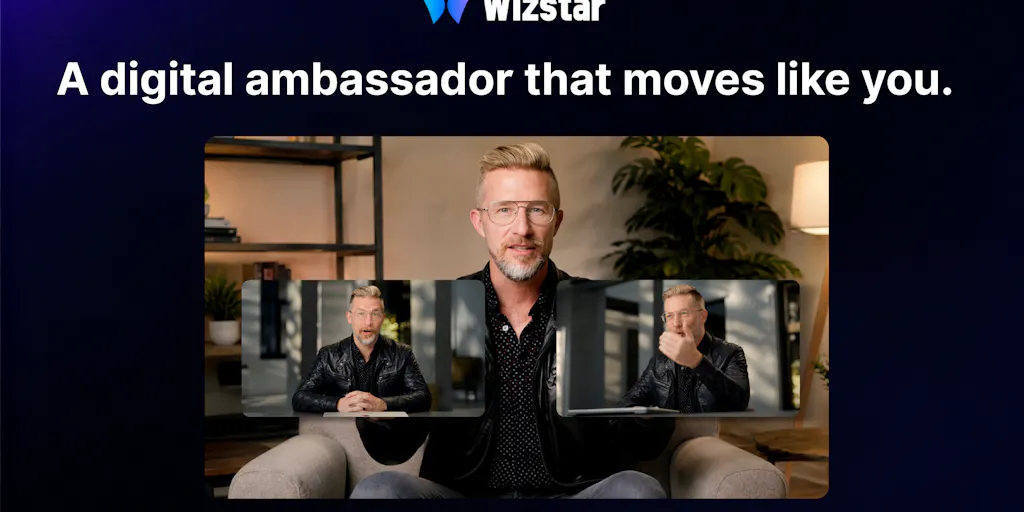
The pitch is simple: upload a photo or video of yourself, add a voice sample, write a script, and generate a digital ambassador that doesn’t just talk — it turns its head, gestures, interacts with objects, and coordinates facial expressions with body movement. The team claims precise lip sync even when an object covers the mouth, full-angle adaptability for side and upward shots, and support for source videos up to five minutes or 200MB. For anyone who has watched AI avatars stare blankly into the camera like a hostage reading a ransom note, that’s a meaningful difference.
But here’s the thing I actually care about as someone who runs social accounts for a living: this isn’t just another novelty toy. It’s a workflow shift. The question isn’t whether AI avatars can look human enough to fool someone for three seconds. The question is whether they can carry actual communication load — explain a product, deliver a launch pitch, handle a multilingual localization pass — without making your audience feel like they’re watching a deepfake audition reel. That’s where most tools fail, and that’s where WizStar is making a specific bet worth examining.
The Problem That Actually Matters: It Was Never About Looking Human
Let me be direct about what the real bottleneck has been. For the past two years, I’ve tested the major avatar platforms — Synthesia, HeyGen, D-ID — and the core issue was never whether the face looked realistic in a static frame. It was whether the motion held up under scrutiny. Humans are extraordinarily sensitive to micro-movements. We read faces, necks, and shoulders as a coordinated system. When the lips move but the head stays unnaturally still, or when the head turns but the shoulders don’t follow, our brains flag it as wrong within milliseconds. It’s a survival mechanism — we’re wired to detect when a face isn’t behaving like a real person.
That’s the uncanny valley, and it’s not a cosmetic problem. It’s a trust problem. If your audience detects even a flicker of wrongness, they stop hearing your message and start examining your avatar. The content becomes a spectacle instead of communication. Engagement drops, watch time plummets, and you’ve wasted your production budget on something that actively harms your brand.
WizStar’s approach to this is worth understanding because it’s technically different from what I’ve seen before. The maker, starry li, describes a two-stage lip-driving solution that first decouples speech audio, mouth movement, and head pose into three independent data streams, then reconstructs fine-grained facial details during rendering. The claimed benefit is eliminating the cross-interference that happens when a head turn causes lip-sync glitches — which is exactly the artifact that ruins most AI avatar videos.
In my experience testing similar tools, that decoupling is the right instinct. The failure mode of most avatar generators is that they try to solve the whole problem at once — generate the face, the voice, the movement, and the expression in a single pass. That creates compounding errors. By separating the audio-driven mouth and head motion from the visual reconstruction, WizStar is attacking the problem the way a human animator would: break it into layers, solve each layer independently, then composite.
The result, based on the demo comments and the hunter’s review from Chris Messina, is an avatar that “turns my head, gestures, and delivers a launch pitch without the usual stiff, staring-you-down-without-blinking Zuckbergian vibe.” That’s high praise from someone who has clearly seen enough hackathon videos to know how bad this category usually is.
But here’s my caveat: I haven’t tested it hands-on yet, and I’m skeptical of any demo that looks too good. The real test is whether the expressiveness holds up across a full range of scripts, emotions, and delivery styles — not just the curated examples in a launch video. That’s where I’ll be watching.
How WizStar Actually Differs From the Incumbents
If you’re a social media manager, you’ve probably already got an AI video tool in your stack. The question is whether WizStar replaces it or just adds another option to the menu. Let me give you my honest comparison based on what’s disclosed in the launch.
Synthesia is the enterprise workhorse. It’s reliable, has a huge avatar library, and integrates with most corporate workflows. But the avatars have historically been stiff — they’re built for training videos and corporate announcements where “professional but slightly robotic” is acceptable. WizStar is explicitly targeting the expressiveness gap, claiming full-body coordination and natural gestures that Synthesia’s avatars typically lack. If you’re producing internal compliance training, Synthesia is probably still the safer bet. If you’re producing social-first content where authenticity drives engagement, WizStar’s approach is more aligned with what the platform algorithms reward.
HeyGen is the closest competitor in terms of positioning. It’s popular with creators and marketers for its ease of use and decent lip sync. But HeyGen’s avatars still have a “talking head” quality — they’re great for explainer videos and talking-head content, but they don’t move much beyond the shoulders. WizStar’s claim of full-body motion, object interaction, and multi-angle adaptability suggests it’s targeting a different use case: not just talking heads, but performance. That’s a meaningful distinction if you’re creating product demos, tutorial videos, or any content where the body language matters as much as the words.
D-ID pioneered the “talking photo” concept and is great for quick, low-cost video generation from a single image. But its avatars are fundamentally limited — they’re a face on a static background, not a full-body presence. WizStar’s support for long video input (up to five minutes or 200MB) and its claimed coordination of facial, neck, and full-body movements suggests it’s operating at a different level of complexity.
The other differentiator is the founder ambassador use case that Chris Messina highlights. The idea of creating a digital version of yourself that can deliver a launch pitch, handle script changes on the fly, and publish without a reshoot is genuinely useful for indie founders and solo creators who don’t have a video production team. That’s a workflow I can see myself adopting: record a reference video once, then generate variations as needed without blocking out another filming session.
But here’s what’s not disclosed: pricing, the quality ceiling for the free tier (if one exists), and the actual output resolution. The launch page mentions support for custom avatar clothing and a library of globally localized avatars, but doesn’t specify costs. For a tool like this, pricing is the make-or-break factor. If it’s priced like HeyGen’s premium tier, it’s competing on a crowded field. If it’s priced more aggressively, it could disrupt the market.
Why TikTok Creators Should Care More Than LinkedIn Ones
Let me get specific about where this tool matters most. The algorithm on TikTok and Instagram Reels rewards content that holds attention through authentic human presence. Watch time, completion rate, and engagement signals all favor videos where the speaker feels real. A stiff AI avatar gets swiped past in under two seconds. An expressive one that gestures naturally and maintains eye contact during head turns can hold a viewer long enough for the hook to land.
LinkedIn, by contrast, is more forgiving. Professional talking-head content is an established format, and audiences there are more tolerant of lower production quality. The bar for “good enough” is lower because the content is often informational rather than entertainment-driven.
What this means operationally: if you’re a creator building on TikTok or Reels, the expressiveness gap is the difference between an avatar video that flops and one that performs. WizStar’s focus on natural motion and lip-sync accuracy during head turns is directly targeting the #1 reason AI avatar content fails on short-form video platforms. If the tool delivers on its claims, it could unlock a workflow where you create a digital version of yourself once, then generate platform-specific variations without reshooting.
For LinkedIn creators, the calculus is different. You’re probably better off using a more established tool with a proven track record, because the expressiveness premium is lower and the reliability bar is higher. Don’t switch your workflow just because a new tool looks impressive in a demo — wait until the community has stress-tested it.
What Social Media Teams Can Borrow From This (Even Without Using the Tool)
Here’s where I want to shift from product review to operational strategy. Whether or not you ever generate a WizStar avatar, the thinking behind this tool offers lessons for how you structure your content production.
The “create once, reuse everywhere” principle. The maker’s design philosophy, as stated in the comments, is that the tool should “create content once, not record everything again.” That’s not just a product feature — it’s a content strategy. The most efficient social media teams I know operate on this principle: record a master asset, then repurpose it across platforms, languages, and formats. The tool just makes it easier to execute.
The multilingual localization angle. One commenter, Desire Waterman, nailed this: “I like the idea of creating content once and adapting it for different markets instead of recording everything again.” If WizStar’s avatar can deliver the same script in multiple languages with the same expressiveness, that’s a massive workflow win for any brand operating internationally. You record once, localize infinitely.
The “last-minute change” workflow. Chris Messina’s point about script changes is the most practical insight in the entire launch thread. Anyone who has ever prepared a launch video knows the pain of a last-minute product change that invalidates your recording. With an avatar-based workflow, you regenerate, not reshoot. That’s a genuine time-saver for time-critical content.
The “digital asset” mindset. WizStar frames the avatar as a “digital asset” you create once and reuse. That’s the right framing. Your face, your voice, your delivery style — these are assets, just like your logo or your brand colors. The tools to capture and reuse them are getting better, and the teams that treat their personal brand as a reusable asset library will have a competitive advantage.
Where My Judgment Says It Falls Short
I’ve been around long enough to know that every AI tool launch has a honeymoon period, and the comments section of a Product Hunt page is not a reliable indicator of long-term quality. Here’s where I’m cautiously skeptical.
The demo is curated, and the real-world variance is unknown. The launch video and the hunter’s testimonial show the tool at its best. What happens when you feed it a script with emotional nuance — anger, excitement, sarcasm? What happens with longer videos, where fatigue or drift can set in? The five-minute input limit is disclosed, but the quality ceiling at that length isn’t tested. I’d want to see stress tests before committing a production workflow to it.
The “professional actor” claim is a high bar. The maker says WizStar creates digital ambassadors that “move and act like professional actors.” That’s an extraordinary claim, and I’ve yet to see any AI avatar tool fully deliver on it. Even the best tools I’ve tested have a “slightly too smooth” quality — the movements are correct but lack the micro-hesitations and imperfections that make human performance feel alive. If WizStar gets 80% of the way there, that’s still a win. But “professional actor” is a stretch target, not a baseline.
Pricing and business model are not disclosed. This is a significant gap. The launch page doesn’t mention pricing tiers, free trial limits, or usage caps. For a social media team evaluating tools, that’s a critical missing piece. I’ve seen too many promising AI tools launch with aggressive pricing that makes them unsustainable for solo creators. Until the pricing is public, I’d hold off on restructuring your workflow around it.
The uncanny valley is a moving target. What looks impressive in 2025 will look dated in 2026. The audience’s tolerance for AI-generated content is also shifting — as more brands flood feeds with avatar videos, viewers will get more discerning. The tools that win won’t just be the most realistic; they’ll be the ones that understand when to use avatars and when to use real human footage. That’s a strategic question, not a technical one.
Who this is NOT for: If you’re a brand that relies heavily on authentic human connection — influencer partnerships, founder-led storytelling, personal brand building — an AI avatar should be a supplement, not a replacement. Your audience follows you for you, not for a digital approximation. If you’re producing high-stakes content where trust is paramount (testimonials, expert commentary, crisis communication), I’d stay away from avatars entirely. And if you’re on a tight budget, wait for pricing to be disclosed before getting attached.
Where the Math Breaks
Let me get into the operational nitty-gritty. The “create once, reuse everywhere” promise sounds great in theory, but the math only works if the quality holds across all the variations. Here’s the breakdown I’d run before adopting this workflow:
- Source video cost: You need to record a high-quality reference video (up to five minutes or 200MB) of yourself. That’s a real time investment, even if it’s a one-time cost.
- Voice sampling: You need a clean voice sample. If you have a home studio setup, that’s manageable. If you’re recording on your phone, the quality might not be sufficient for good lip sync.
- Script generation: You’re writing scripts anyway, so that cost is constant.
- Rendering and iteration: Every script change or variation requires a new generation. If each generation takes minutes (not seconds), the time savings vs. reshooting shrink.
- Platform-specific optimization: A TikTok hook needs to be faster than a YouTube intro. An Instagram Reel needs different pacing than a LinkedIn video. If WizStar can’t handle these variations natively, you’ll still need editing software to adapt the output.
The point is: the tool saves you filming time, but it doesn’t save you thinking time. You still need to write good scripts, structure good hooks, and edit for platform-specific pacing. If you’re expecting to upload a script and get a publish-ready video, you’ll be disappointed. If you’re expecting to skip the reshoot cycle, that’s where the value is.
What I’d Watch / Test Next
If you’re intrigued by the possibilities but not ready to commit, here’s what I’d do this week:
1. Wait for pricing, then run a controlled test. The launch page doesn’t disclose costs, so don’t build a workflow around it until that’s public. When pricing drops, generate the same script with WizStar, HeyGen, and Synthesia, and put the outputs side by side. Show them to a test audience and measure which one holds attention longer. Don’t trust your own eyes — you’re too close to the material.
2. Stress-test the expressiveness claims. Generate a script that requires emotional range — not just a product pitch, but something with humor, urgency, or empathy. See if the avatar’s facial expressions and body language shift appropriately. If it delivers the same “neutral professional” performance regardless of the script’s emotional content, that’s a limitation you need to know about.
3. Check the localization output. If you operate in multiple markets, test the multilingual generation on a script you know well. Pay attention to whether the lip sync holds up in languages with different phonetic structures (e.g., tonal languages vs. Romance languages). If the tool’s two-stage lip-driving solution holds up across languages, that’s a significant competitive advantage.
4. Build a “digital asset” library regardless. Even if you don’t use WizStar, start treating your own content as reusable assets. Record a master reference video of yourself delivering key messages. Keep a library of voice samples and scripts. When the right AI tool emerges — whether it’s WizStar or a competitor — you’ll be ready to plug in without starting from scratch.
5. Watch the comments section. Product Hunt commenters are often the first to discover limitations. Check back in a few weeks to see if users report issues with longer videos, complex scripts, or specific use cases. The community’s experience will tell you more than the launch demo ever will.
The bottom line: AI avatars are no longer a novelty. They’re becoming a legitimate production tool for social media teams that need volume, speed, and localization without sacrificing quality. WizStar’s bet on expressiveness is the right bet — the tools that can cross the uncanny valley will win the creator economy workflow wars. Whether WizStar is the one that crosses it, or just the one that pushes the category forward, remains to be seen. But the direction is clear, and the teams that start building their digital asset libraries now will be the ones who benefit when the technology catches up to the promise.