The quiet case for owning your distribution stack before the next API rug-pull
Every few months I get the same Slack message from a creator friend: “my scheduler broke, half my queue didn’t post, and I found out from a comment.” It’s almost always the same root cause — a platform changed an endpoint, a token expired, or a tool that promised “post everywhere” quietly lost access to one of the networks. If you run social for a living, you already know the uncomfortable truth: your publishing stack is a dependency chain you don’t control, and the tools that look most convenient are often the ones most exposed to platform policy shifts. That’s the lens I want to use whenever a new product crosses my desk, including the one that prompted this essay — Art4, a small paid-once desktop app from maker unvalley that turns museum-grade paintings into your wallpaper with an interactive layer for exploring the painter’s timeline and relationships. On paper it has nothing to do with social media. In practice, it’s a useful case study in the kind of product thinking creators and social operators should be stealing: opinionated scope, one-time pricing, and a workflow that respects the user’s attention instead of farming it.
What Art4 actually is, and why a social media operator should care
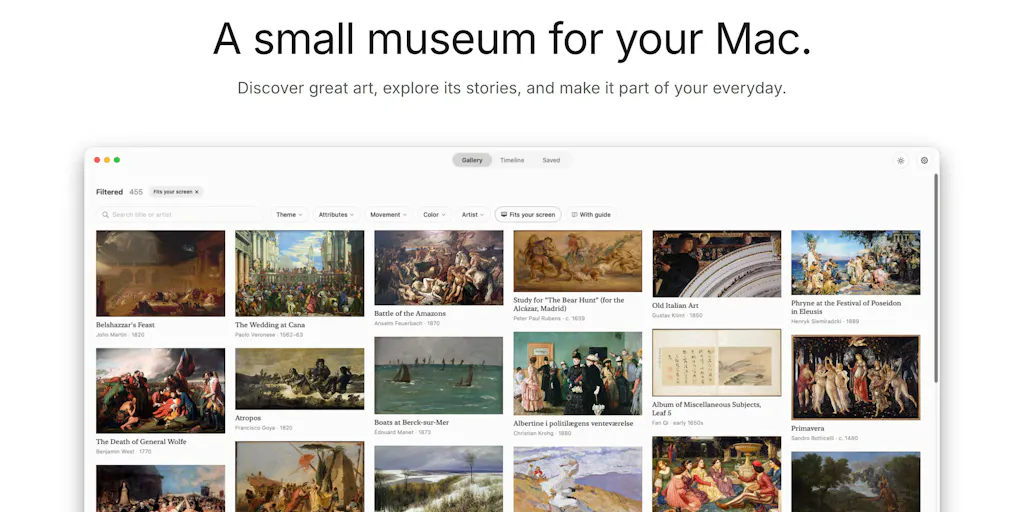
Let me get the facts straight before I editorialize. Art4 is a desktop wallpaper app built around fine-art imagery. The maker’s origin story, posted on the Product Hunt launch page, is refreshingly human: a Renoir at the Musée d’Orsay made him want great paintings in front of him every day, and manually saving images from museum sites got old. So he built a tool that lets you “enjoy art as your wallpaper while interactively exploring its background, the painters timeline, and relationships.” Pricing is stated as $14 once, no subscription, 7-day free trial. That’s it. No team size, no funding, no user count — not disclosed on the page.
Now, why would I — someone who spends most of his week thinking about Instagram Reels hooks, TikTok watch time, and LinkedIn carousel completion rates — care about a wallpaper app? Three reasons.
First, the one-time pricing model is a direct rebuke of the subscription-everything default that has infected the creator tooling market. Second, the interactive exploration layer is a content strategy in disguise: the same way Art4 lets a user tap into a painter’s timeline and relationships, a creator can think of their own back catalog as a graph rather than a linear feed. Third, the narrow scope — wallpaper, not “creative suite” — is the exact discipline most creator tools lack, and it’s the discipline that keeps a tool from breaking every time a platform changes its API.
The incumbents Art4 is quietly competing with
If you’re going to evaluate any tool, name the alternatives. On the wallpaper side, the obvious comparisons are Wallpaper Engine on Steam, Unsplash and Pexels for free imagery, and the built-in wallpaper pickers on macOS and Windows. On the “learn about art” side, you’re looking at Google Arts & Culture and the WikiArt archive. What Art4 appears to be doing differently is fusing the two: the wallpaper is the surface, but the timeline-and-relationships view is the differentiator. My take: that’s a smart wedge, because pure wallpaper apps are a race to the bottom on price and pure art-history apps are a race to the bottom on engagement. The hybrid has a reason to exist.
The problem Art4 actually solves (and the one it doesn’t)
Strip away the museum romance and Art4 solves a small, real, unglamorous problem: curating and rotating high-quality art without manual labor. The maker explicitly says saving images from museum sites by hand “got old.” That’s the entire pitch. It’s a workflow fix, not a paradigm shift, and I respect that.
Here’s where I want to push back on the framing, though. The launch copy leans on the emotional hook — “a Renoir at the Musée d’Orsay made me want great paintings in front of me every day.” That’s lovely, but it’s not the reason someone pays $14. The reason someone pays $14 is that they tried to build a rotating art wallpaper setup themselves, hit licensing friction, got tired of right-click-saving JPEGs, and gave up. The emotional hook gets the click; the workflow relief gets the purchase. If I were advising this maker — and I’m not, this is pure opinion — I’d lead with the friction, not the Renoir.
Why this matters more than it sounds for content teams
Here’s the leap I want you to make with me. Every creator I know has a version of this problem. Not wallpaper — but the “I keep doing this by hand and it’s eating my week” problem. For a solo Instagram operator, it’s pulling the same brand assets out of a Canva folder and re-exporting them at three aspect ratios. For a YouTube team, it’s re-cutting long-form into CapCut shorts. For a LinkedIn ghostwriter, it’s reformatting the same essay into a carousel, a text post, and a newsletter intro. The Art4 lesson isn’t “build a wallpaper app.” It’s identify the manual ritual you repeat weekly, and either automate it or pay once to make it disappear. That’s the whole game.
What creators and social teams can borrow from Art4’s playbook
I’ve been running social accounts — mine and clients’ — for long enough to have opinions about tool design, and Art4 does three things that most creator SaaS gets wrong.
1. One-time pricing is a positioning weapon, not a business model flaw
$14 once, no subscription. On the Product Hunt thread, that’s the entire commercial pitch. Compare that to the subscription gravity of the creator stack: Buffer, Hootsuite, Later, Metricool, Sprout Social — all recurring, all justified by ongoing API maintenance and cloud costs. For a wallpaper app, one-time pricing works because there’s no server dependency per user. For a scheduler, it’s much harder, because every platform integration is a live liability. But here’s the strategic insight: creators are exhausted by subscription fatigue, and a one-time-priced tool in a recurring-priced category is a marketing event. If you’re building anything for creators, ask whether you can carve out a one-time tier — even if it’s a lite version — because the goodwill and word-of-mouth it generates is worth more than the ARR you give up. My take, not a fact.
2. The interactive layer is repurposing, dressed as delight
“Interactively exploring its background, the painters timeline, and relationships” — read that again with a content strategist’s hat on. That’s a knowledge graph for art. And a knowledge graph is exactly what most creators need for their own back catalog. If you’ve published 400 posts across Instagram, TikTok, YouTube, X, LinkedIn, Facebook, Threads, and Pinterest, you don’t have a content library — you have a pile. The creators who win the next 18 months are the ones who can query their own archive: “show me every post that mentioned pricing,” “show me every hook that beat my median watch time,” “show me every clip featuring this guest.” Art4’s timeline-and-relationships UI is a tiny, beautiful demonstration of what that feels like when it’s done well.
3. Narrow scope is a feature, not a limitation
Art4 does wallpaper. It doesn’t do calendars, reminders, mood tracking, or a “pro” tier with AI summaries. That restraint is why it can ship at $14 and why it probably won’t break next Tuesday when some platform changes an endpoint. If you’re a creator evaluating tools, this is the heuristic I’d apply: the broader the tool’s promise, the more fragile its integrations. A tool that does one thing across one surface is a tool you can trust. A tool that promises to “manage your entire social presence” is a tool with twelve failure points you’ll discover one at a time.
Where the math breaks
Let me be honest about the limits of the analogy. Art4’s licensing situation is genuinely tricky — in the Product Hunt comments, the maker tells a user asking for Siqueiros that the artist’s work “don’t have license to add.” That’s a candid admission, and it exposes the same rights-management problem that plagues every creator who repurposes third-party footage, music, or imagery. If you’re pulling assets into your content workflow, you need a rights trail. Most creators don’t have one, and most tools don’t help them build one. That’s an open opportunity, not a solved problem.
Where I think Art4 falls short (and who it’s not for)
Balanced assessment time. The launch page is thin on details, and I’m not going to invent them. Platform support is not disclosed — I don’t know if this is macOS, Windows, or both. Image sourcing is not disclosed — is it pulling from museum APIs, a curated library, or user uploads? The “relationships” feature is not specified — is it artist-to-artist influence, movement-to-movement, or something else? Those aren’t nitpicks; they’re the questions a $14 buyer should be able to answer in thirty seconds, and the page doesn’t answer them.
Who is Art4 not for? Anyone who wants a dynamic, video-based wallpaper setup — that’s Wallpaper Engine territory. Anyone who wants free — that’s Unsplash and Pexels. Anyone who wants art history as a structured course — that’s Google Arts & Culture. Art4 is for the person who wants a small, calm, paid-once utility that rotates beautiful paintings and gives them a little context. That’s a narrow audience, and that’s fine. Narrow audiences are how indie products survive.
Why TikTok creators should care more than LinkedIn ones
Here’s a sidebar I can’t resist. If you’re a TikTok or Reels creator, the Art4 story should hit harder than it does for a LinkedIn operator, and here’s why: visual creators live and die by asset pipelines. Your B-roll, your overlays, your thumbnails, your cover frames — if any of those require manual sourcing every week, you’re bleeding hours. A wallpaper app is trivial; the pattern of paying once to eliminate a recurring manual task is not trivial. LinkedIn creators, by contrast, mostly work in text and can get away with far less asset infrastructure. So if you’re a short-form visual creator, use Art4 as a prompt: list every manual asset step in your weekly workflow and price out what it would cost to kill it. I’d bet you find at least one $14-sized problem worth solving.
What I’d watch / test next
Concrete next steps for the week, whether or not you care about wallpaper:
- Audit your manual rituals. Open a doc and list every task you did by hand in the last seven days that touched published content — resizing, re-captioning, re-uploading, re-linking. Circle the one you did more than three times. That’s your Art4.
- Pressure-test your scheduler’s failure modes. If Buffer, Later, or Metricool went down for 48 hours, what would break? Write the answer down. If it’s “everything,” you have a single point of failure worth diversifying.
- Try Art4 if you want a $14 experiment in paid-once software. The Product Hunt page has the 7-day free trial and the maker is responsive in comments. My take: it’s a small, honest product, and supporting that pricing model is a vote for a healthier creator tooling ecosystem.
- Watch the licensing conversation. The Siqueiros exchange in the comments is a preview of the rights problem every repurposing workflow will hit in 2025. If you don’t have a rights log for your assets, start one this week.
- Ask the questions the page doesn’t answer. Platform support, image sourcing, relationship model. If the maker answers, great. If not, that’s your signal about how mature the product is.
The bigger point: the tools that survive the next platform shake-up won’t be the ones that promised the most. They’ll be the ones that did one thing, charged once, and never made you think about them again. Art4 is a tiny example. The lesson is not.