The Meeting Bot Is Dead — What That Means for Creators Who Live in Calls
Every creator I know has a love-hate relationship with meetings. The love part is obvious: brand deals, sponsor calls, collab brainstorms, podcast interviews — these are where the money gets made. The hate part is the administrative tax that comes after: the notes, the action items, the “wait, what did they say about the deliverable timeline again?” moments that send you scrambling through a recording or a chat log.
For the last few years, the standard answer to this problem has been the meeting bot — that awkward avatar that joins your Zoom call, sits in the participant list like a quiet stalker, and transcribes everything. It works, sort of. But anyone who’s run a client call with a bot present knows the dynamic shifts. Clients get cagey. They ask “who’s the third person?” You explain it’s just an AI note-taker. They don’t fully believe you. The trust erodes slightly, and for creators whose entire business runs on trust, that’s not a small cost.
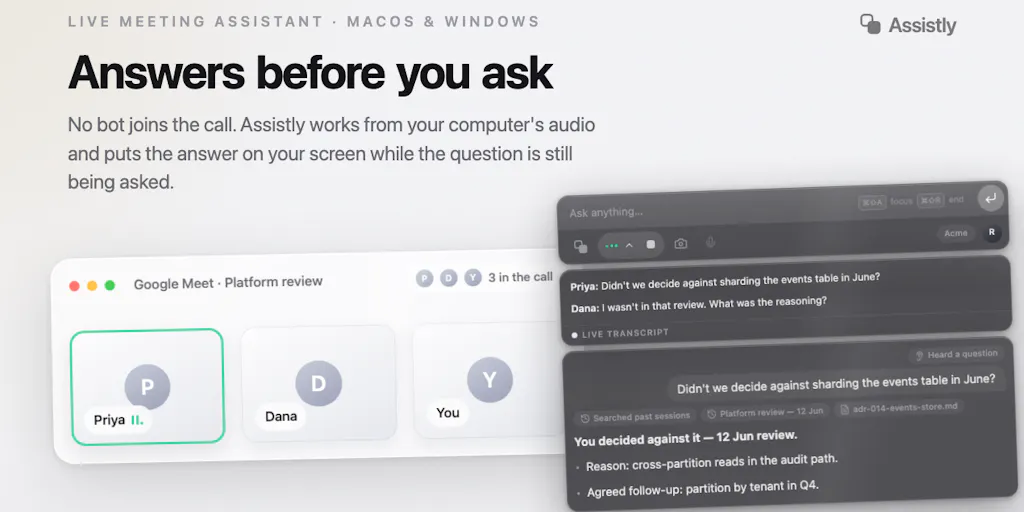
So when I saw Assistly launch on Product Hunt, the pitch stopped me mid-scroll. The hook is simple: no meeting bot. The tool captures system audio locally on your machine, transcribes in real time, and surfaces relevant context on your screen — all without ever appearing as a participant in the call. No waiting room approval. No extra grid square. No “who’s that?” moment.
That’s not a feature tweak. That’s a category shift. And for creators and social media operators who live in calls — brand negotiations, agency check-ins, cross-platform strategy sessions — it changes the calculus on how you capture and use conversation data without poisoning the room.
What Problem This Actually Solves
Let me be precise about the pain point here, because it’s not just “meeting bots are annoying.” The deeper problem is that meeting bots break the social contract of a conversation, and they create a second, subtler problem: context fragmentation.
Here’s the scenario I’ve lived a hundred times. I’m on a call with a brand manager about a sponsored content package. They mention a specific audience metric they want to hit, a competitor they’re worried about, and a deadline for the first draft. In the moment, I nod along. After the call, I’m left with my own scribbled notes — which are always incomplete — and a recording I’ll never rewatch because who has time for that?
The traditional bot solves the recording problem but creates a new one: it’s a visible third party. And on platforms like Zoom and Google Meet, hosts can block or flag bots. Some enterprise accounts automatically reject unknown participants. The bot becomes another thing to manage.
Assistly’s approach — capturing system audio locally — sidesteps the entire visibility problem. There’s no participant to approve, nothing to set up on the host’s side, no awkward “I’ve invited a bot to take notes” preamble. It just runs on your side of the call, listening to what your machine hears.
The second problem it tackles is context switching. The launch post describes it well: when something important comes up in a meeting, you often have to stop the conversation, dig through notes or documents, and switch between different AI tools to get the context you need. That’s a real workflow killer. I’ve lost count of how many times I’ve been mid-call with a client and needed to pull up a previous email thread, a competitor’s recent post, or a platform’s updated content policies — and had to either ask them to hold on or bluff my way through.
Assistly’s real-time assistance layer — detecting questions and important moments as they happen and surfacing relevant context on screen — is the feature that actually changes the game. The model here is less “recording tool” and more “co-pilot that’s already read your stuff and whispers in your ear at the right moment.”
How It Differs From the Incumbents
To understand why this matters, you have to look at the current landscape of meeting AI tools. The big players — Otter.ai, Fireflies.ai, tl;dv — all follow the same architecture: a bot joins your call, records, transcribes, and produces summaries. They’ve gotten good at the transcription and summarization part. But they’re all vulnerable to the same structural weakness: they’re visible, they can be blocked, and they require the host or meeting platform to allow them in.
There’s also the newer wave of “ambient” tools like Granola that try to work locally without a bot. But most of them still rely on capturing the audio stream in a way that can be janky or platform-specific. Assistly’s bet is that local audio capture is the right architecture — it works across Zoom, Google Meet, and Teams without needing API integrations or bot invitations.
The MCP angle is where things get interesting. MCP — Model Context Protocol — is the open standard that lets AI tools talk to each other. Assistly supports MCP in both directions: it can pull context from other MCP-connected tools during a meeting, and after the meeting, your existing AI tools can query Assistly’s transcripts. That’s a genuinely different approach from the closed silos of Otter or Fireflies, where your data lives inside their ecosystem and doesn’t easily flow into your other workflows.
My take: this is the right bet. The creator economy runs on Zapier workflows, Notion databases, and increasingly on custom AI pipelines. A meeting tool that can’t plug into that stack is a dead end. Assistly positioning itself as a node in a larger MCP graph — rather than a standalone app — is smart architecture for the moment we’re in.
Why TikTok Creators Should Care More Than LinkedIn Ones
Here’s a nuance that might not be obvious: the value of a no-bot meeting tool varies wildly depending on what kind of creator you are.
If you’re a LinkedIn-focused B2B creator, your calls are mostly with corporate clients and agency folks. These people are used to bots. They’ve seen Otter and Fireflies a hundred times. Nobody blinks when a bot joins. The friction is low, and the benefit of “no bot” is marginal.
But if you’re a TikTok or YouTube creator doing brand deals, the dynamic is different. You’re often talking to marketing managers who are younger, more platform-native, and more privacy-conscious. They’ve read the horror stories about AI tools leaking call data. They’re skeptical. A visible bot triggers their “is this being recorded?” instinct in a way that can derail the whole conversation.
I’ve been on calls where a brand rep literally asked me to remove the bot before they’d talk numbers. That’s not a hypothetical edge case — it’s a recurring friction point. For creators in that world, Assistly’s no-bot design isn’t a nice-to-have; it’s the difference between a conversation that flows naturally and one that’s stilted and guarded.
The overlay feature — where your Assistly workspace stays visible on your screen but doesn’t appear in screen shares or recordings — is also more valuable for video creators. When you’re screen-sharing a draft or a content calendar during a call, you don’t want your AI assistant’s suggestions showing up in the client’s recording. That’s a subtle but real trust issue.
What Creators and Social Media Teams Can Borrow
Even if you never install Assistly, there are operational lessons here that apply to how any creator or social team runs their calls.
First: kill the visible bot. If you’re using Otter or Fireflies, consider whether the visible presence is costing you conversational candor. In my experience, clients say different things when they know a bot is listening. They hedge more. They use more corporate language. They’re less likely to speak off-the-cuff — which is exactly where the interesting nuggets live. If you can capture the conversation without the visible bot, you get better source material.
Second: build your context layer before you need it. The real-time assistance model only works if you’ve actually connected your sources. Assistly can pull in context from other MCP tools — which means you need to have your documents, notes, and previous transcripts organized and accessible. That’s a workflow discipline thing, not a tool thing. I’ve started keeping a “current clients” folder with every relevant email, brief, and previous call summary in one place, so that any AI assistant I use can actually find what I need mid-call.
Third: treat transcripts as data, not just records. The MCP angle — making meeting knowledge available to other AI tools — is the part most creators ignore. Your call transcripts contain gold: client preferences, objection patterns, content ideas, competitive intelligence. If you’re just using a transcript for a summary and then never touching it again, you’re leaving value on the table. Connect your meeting data to your content planning tools, your CRM, your idea bank. That’s where the compounding returns are.
Fourth: the privacy overlay matters for your own content. If you record client calls and then repurpose snippets into content — which many creators do for testimonials or behind-the-scenes content — you need to be careful about what’s visible on screen. The overlay feature that keeps your assistant workspace out of screen shares is a reminder that your recording is a content asset, and you should control what appears in it.
Where the Math Breaks
I want to be balanced here, because there are real limitations and open questions with Assistly — and anyone who’s been burned by half-baked AI tools should hear them.
Consent is a genuine gray area. The Product Hunt comments raise this directly, and the makers’ responses are honest but not fully satisfying. Gal Dayan’s question about all-party consent laws is spot-on. In many jurisdictions — California and several other states — you need consent from all parties to record a conversation, even if no visible bot is present. The fact that Assistly doesn’t appear as a participant doesn’t change the legal requirement. It might actually make it worse: the “no bot” design could lead people to assume nothing is being captured when something is.
The makers’ response — “treat it like any note-taking tool: if your jurisdiction or company policy requires disclosure, disclose it” — is reasonable, but it puts the burden entirely on the user. There’s no built-in consent mechanism, no notification to other participants, no way to verify compliance. That’s a liability for creators who operate across state lines or work with international clients. My take: if you use this tool, you need a boilerplate disclosure line you add to every call — something like “I use a local AI assistant to take notes for my own reference; happy to share the transcript if you’d like.” It’s awkward, but it’s better than a legal headache later.
System audio capture is fragile. The tool relies on capturing system audio locally, which means it depends on your operating system’s audio routing. On macOS and Windows, this can be finicky. Bluetooth headphones, virtual audio devices, or apps that take exclusive control of the audio stream can break the capture. I’ve tested similar local-capture tools, and the failure rate is non-trivial. If you’re on a call using a Bluetooth headset and the audio routes through a different device, you might end up with a transcript that’s missing half the conversation.
The “real-time assistance” quality is unproven. This is the feature that would make or break the tool for me, and the launch post doesn’t give specifics on how well it works. Detecting “questions and important moments” in real time is a hard NLP problem. Getting it right requires the tool to understand context, intent, and conversational flow — not just keyword matching. The makers claim it works, but there’s no demo video or case study in the launch post. In my experience, this is where most AI meeting tools fall short. The transcription is fine, but the real-time suggestions are often generic or irrelevant.
Platform risk is real. Zoom, Google Meet, and Teams all have terms of service that govern how their audio can be captured. While local system audio capture is technically a gray area — the tool isn’t joining the call as a participant, so it’s not violating participant-count rules — it’s not clear whether the platforms could change their terms or technical measures to block this approach. Microsoft and Google have both been tightening their AI governance. A tool that captures system audio could find itself on the wrong side of a platform update.
Who this is NOT for: If you’re a solo creator who does a handful of calls a month and just needs a simple summary, this is overkill. A basic Otter or even Apple’s built-in voice memos with transcription will do the job. If you’re in a regulated industry — law, finance, healthcare — the consent issues are a non-starter. If you’re on a team where someone else handles all the client calls, you don’t need this. And if you’re someone who already has a reliable bot-based workflow and your clients don’t care, the switching cost might not be worth it.
What I’d Watch / Test Next
If you’re a creator or social media operator who wants to test this idea without committing to a full workflow overhaul, here’s what I’d do this week:
Run a no-stakes test with a trusted collaborator. Pick a call where you’re comfortable with the other person knowing you’re capturing audio. Tell them you’re testing a new tool. Use Assistly for the call, and pay attention to two things: whether the real-time assistance actually surfaces useful context, and whether the transcript quality holds up. Don’t judge it on a call with a brand — that’s high-stakes. Test it with a peer first.
Map your MCP connections. Even if you don’t use Assistly, start thinking about which of your existing tools speak MCP. Notion’s MCP server, Zapier’s MCP integration, and the growing list of MCP-compatible tools are the plumbing for the next phase of your workflow. If Assistly’s claim holds — that your meeting knowledge becomes queryable by other AI tools — then your future self will thank you for setting up the connections now.
Draft your consent boilerplate. Whether you use Assistly or any other meeting capture tool, you need a standard line you can drop into calls without sounding robotic. Something like: “Quick heads up — I use a local AI assistant to take notes for my own reference. It doesn’t share anything externally, and I’m happy to share the transcript if you want. Let me know if you’re not comfortable.” Practice it until it sounds natural.
Watch the platform responses. This is the thing I’d bet on: if local audio capture becomes a meaningful threat to the meeting platforms’ own AI features — Zoom has its own AI companion, Google has Gemini in Meet — they may move to block or restrict it. The fact that Assistly works across platforms without their cooperation is both its strength and its vulnerability. If Zoom or Google closes the audio capture loophole, tools like this will need to pivot fast.
The broader lesson here is bigger than any single tool. The meeting bot era normalized the idea that AI assistance in calls means a visible third party. Assistly’s bet is that the invisible assistant — the one that listens on your side, respects your privacy, and feeds context to your other tools — is the future. I’m not ready to declare them the winner, but I’m ready to pay attention. The creator economy runs on conversations, and the tools that make those conversations better without making them weirder are the ones worth watching.