The real social-media bottleneck isn’t content anymore — it’s the clicking between the tools
Here’s the thesis I keep circling back to in 2025: the hardest part of publishing across seven platforms isn’t having ideas, and it isn’t even editing. It’s the operational tax — the dozens of small, repetitive actions that live between your tools, none of which any single platform’s API will let you automate cleanly. So when a product shows up that tries to automate the clicking itself rather than the integrations, I pay attention. That’s what Audimate, a Product Hunt launch from co-founders Gordon Wan and Kenny Lam, is attempting with a desktop assistant they call Arro. It’s not a social media tool. But the workflow pattern it’s selling — watch me do it once, turn it into a reusable playbook, run it on a schedule — is exactly the pattern most social teams are still doing by hand. Let me explain why that matters, where I think it lands, and where I’d stay skeptical.
What Audimate’s Arro actually is, in plain terms
Per the launch page, the founders bring “over 22 years of experience building workflow automation at Amazon” between them. Their framing of the problem is precise: “most of our workday is small, repetitive stuff spread across a dozen apps. Chatbots can tell you how to do it, but you still do the clicking. Automation tools can do it, but first you have to build the workflow and wire up integrations.” That second sentence is the one I want you to sit with, because it’s the same complaint I hear from every social media manager who’s tried to stitch together Zapier or Make for content ops.
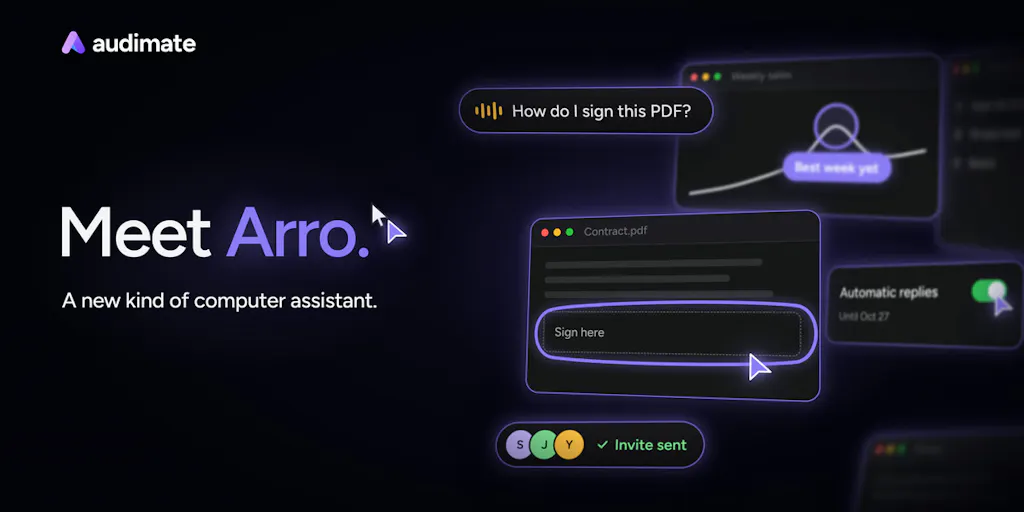
Arro’s pitch is that it works inside the apps you already use, with no integrations to build. The interface is described as hold a key, point at something, say what you want. The launch lists four capabilities:
- Skip the tutorial — Arro marks each step on your screen and waits while you do it.
- Hand it off — e.g. “Find a time with Sarah and James.” Arro checks calendars, books the slot, sends the invite.
- Do it once, Arro repeats it — your steps become a playbook you can read, edit, share with your team, then run on demand or on a schedule.
- You stay in control — you can see what it’s doing, make it ask before it acts, and stop it any time.
The pricing line from the source: “Audimate is free to start on Windows and Mac. Paid plans add more usage and automated workflow runs.” No specific dollar figures are disclosed on the page, so I’m not going to invent any.
Why this pattern matters more to social teams than it looks
If you manage social for a brand, your week is probably a pile of tasks that no scheduling tool owns end-to-end. Pull the week’s top-performing post from Metricool or Sprout Social, resize the asset in Canva, export a vertical cut from CapCut, drop it into a Buffer queue, write the LinkedIn variant with a different hook, log the UTM in a spreadsheet, screenshot the result for the client deck. Each step is trivial. The chain is not. And every chain has a brittle seam where an API rate limit, a changed dashboard, or a login prompt breaks your automation.
That’s the specific gap Arro is aiming at. In the Product Hunt thread, a commenter named Neeraj Nathany asked the sharpest question on the page: if the app you recorded a playbook in changes its layout, does Arro notice and stop, or does it find the new button on its own? Kenny Lam’s answer: “Arro definitely adapts. If a button moves or the layout changes, it finds the new way to do that step on its own and keeps going. Arro also updates the playbook to match.” He added that the founders built it precisely because “most how-to docs go stale the first time an app changes.” Gordon Wan then clarified the control layer: after a run with changed steps, “Arro will let you know how the steps are different (e.g. the export button is now under the more menu). The user can choose to update at the end of the run.”
My take: that self-healing playbook is the single most interesting claim in the launch, and it’s also the one I’d want to stress-test hardest. Anyone who has maintained a Playwright script or a Selenium test suite knows that “it finds the new button on its own” is a promise that ranges from miraculous to maddening depending on the app. But the diff-and-confirm pattern — show me what changed, let me approve it — is the right design instinct. It treats the automation as a draft, not a black box.
What creators and social teams can borrow from it, even without buying it
You don’t need Arro to steal its mental model. The transferable idea is the playbook as a first-class asset. Most social teams keep their workflows in their heads or in a Notion doc that’s three quarters dead. The Arro framing — record the steps once, make the playbook readable and editable, share it with the team, then run it on demand or on a schedule — is a better organizing principle than any SOP template I’ve seen.
The repurposing chain is the obvious first candidate
Take the single most repetitive workflow in creator land: one long-form video becomes a YouTube upload, three TikTok cuts, two Instagram Reels, an X thread, a Threads post, and a Pinterest pin. The creative decisions in that chain are yours. The mechanical ones — download, transcribe, cut, resize, caption, upload, tag, schedule — are not. If a tool can watch you do that chain once and then replay it against a new source file, you’ve bought back hours per week without touching an API.
Where the math breaks
Here’s the honest caveat. Screen-level automation is only as good as the screen. If your workflow depends on a platform’s native scheduler, you’re at the mercy of whatever UI the platform ships that month — and platforms change UIs constantly, often without warning, often to close off exactly the kind of automation you’re trying to run. A browser-based agent that clicks through Meta Business Suite is fundamentally more fragile than a tool using Meta’s official Graph API, because the API is a contract and the UI is a moving target. So the mental model to hold is: use screen automation for the tasks no API covers, and use API-based tools for the tasks that have one. Arro is not a replacement for Hootsuite, Later, or Sprout Social. It’s a complement for the long tail those tools don’t reach.
Where I think Audimate falls short, and who it’s not for
I want to be balanced here, because the launch page is doing what launch pages do — selling the dream, not the edge cases.
The platform risk is real and the source is silent on it. Nothing on the page says how Arro handles two-factor authentication prompts, CAPTCHAs, or platforms that actively detect and block automated UI interaction. In my experience testing screen-automation tools, those three things are where the dream meets the wall. The founders didn’t address it in the comments, and I’m not going to pretend they did.
“No integrations and nothing to build” is both the selling point and the limitation. It means Arro can technically touch anything you can see — which is powerful — but it also means you’re relying on visual and semantic understanding of an interface rather than a stable data contract. For a solo creator with five repetitive tasks, that trade is fine. For an enterprise social team with compliance requirements, audit trails, and a security review process, “an AI that clicks around my logged-in browser” is going to be a hard sell to whoever owns risk.
Concurrency is answered, but only lightly. Commenter Sohan Patil asked whether Arro can run multiple tasks at once. Kenny Lam’s reply: “Yes! Arro can perform several tasks in the background so you can continue to use your computer while Arro works. We also provide a task board… move the task from the inbox to the work queue and Arro will pick it up.” Good answer. But “several tasks in the background” on a single machine raises obvious questions about what happens when two tasks want the same window, or when one task’s failure cascades. Not addressed on the page.
Who it’s not for: anyone whose workflow is already fully covered by a native API integration, anyone who needs guaranteed determinism for compliance reasons, and anyone who can’t tolerate a tool occasionally asking for confirmation mid-run. If your job is “post the same thing at the same time every day,” you don’t need this. If your job is “orchestrate twelve apps that don’t talk to each other,” you might.
What I’d watch and test next
Concrete steps for this week, whether or not you ever install Audimate:
- Audit your own clicking. For three days, note every task you do more than twice that involves moving between two apps. That list is your automation backlog, and it’s probably longer than you think.
- Separate API-shaped tasks from UI-shaped tasks. Anything with a native integration (scheduling, basic analytics pull) belongs in Buffer, Metricool, or your platform’s own scheduler. Anything that requires eyeballs and clicks across three tools is a candidate for a screen-level agent.
- Write one playbook by hand. Even if you never automate it, document your repurposing chain as numbered steps with the exact UI locations. This is the artifact any automation tool — Arro or otherwise — will need, and it exposes the brittle steps before you trust a machine with them.
- If you do trial Arro, start with a low-stakes, read-only task (pull metrics into a sheet) before you let it touch anything that publishes. Watch the diff-and-confirm behavior closely — that’s the feature that determines whether this is a tool or a liability.
The bigger story here isn’t Audimate specifically. It’s that the creator economy’s next productivity unlock probably isn’t another AI that writes captions. It’s AI that finally does the boring clicking between the tools we already pay for. Arro is one bet on that thesis. Whether it wins or not, the thesis is right.