The creator economy’s dirty secret: your best work happens while you sleep, and your laptop is sabotaging it
Every social media operator I know has a version of this story: you queue up an overnight batch — a week of Reels, a month of LinkedIn carousels, a stack of Pinterest pins — hand it to an AI agent or a render farm, and go to bed. You wake up to find the machine went to sleep at 1:47 a.m., the run stalled, and the whole queue is empty. For anyone who has ever babysat a CapCut export at 3 a.m. or refreshed a Claude Code window like a newborn parent, Awakado is a small, oddly specific answer to a problem that has quietly become central to how solo creators and small social teams actually ship content. It is not a scheduling tool, not an analytics dashboard, and not a content generator. It’s a Mac sleep manager that watches your AI agents and keeps the machine alive only while real work is happening. That sounds niche. In practice, it’s the missing piece of the overnight content pipeline that most creators are running by accident.
What Awakado actually does — and why it isn’t just a caffeine clone
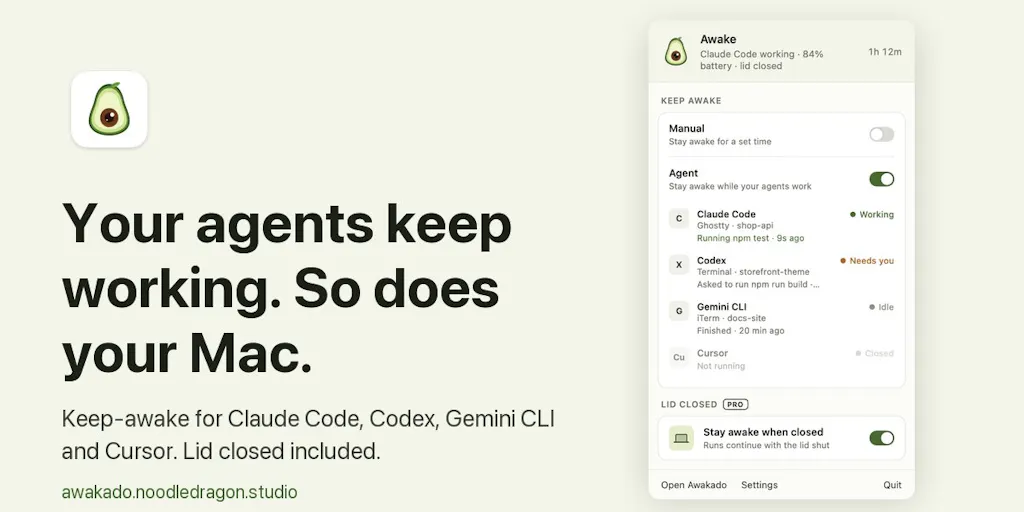
The maker’s own framing is refreshingly unglamorous: “my Mac kept falling asleep in the middle of long Claude Code runs,” he writes on the launch page. The fix is that Awakado listens to each agent’s own hooks, so it knows whether an agent is actively working, waiting on you, stuck at a usage limit, or finished. It keeps the Mac awake only while something is working, then allows sleep a few minutes after the last agent finishes.
If you’ve used Caffeine or macOS’s built-in caffeinate command, you know the failure mode: they’re dumb switches. They hold the machine awake whether or not anything is happening, which means your laptop cooks overnight, your battery cycles degrade, and your electricity bill quietly ticks up while an idle terminal sits there. Awakado’s pitch is that it’s state-aware — it reads agent signals rather than just toggling a sleep assertion. That’s the entire product thesis, and it’s a good one.
The Pro tier adds the genuinely interesting bit: if Claude Code hits its usage limit at 2 a.m., Awakado lets the Mac sleep and wakes it two minutes before the limit resets, so the run picks up while you’re still asleep. The maker claims this “works quite well” with Claude, and says he hopes more agents support auto-restart going forward — a claim I’d treat as directional rather than universal, since agent support is explicitly framed as an open question.
Pricing is simple and refreshingly un-SaaS: free to download, Pro is $9.99 once for three Macs. Made by a small studio in New Zealand. No subscription, no seat-based pricing, no “contact sales.” For a creator-economy audience that is drowning in $29/month tools, a one-time tenner is a real differentiator.
Why this is a creator tool, not just a developer tool
Here’s where I’d push back on the framing. The launch page is written for developers running Claude Code. But the overnight batch problem is more acute for social media operators, not less. A developer running one agent has one failure point. A creator running a repurposing pipeline — transcribe a YouTube long-form with Whisper, clip it with Opus Clip, caption it with CapCut, resize for Instagram Reels, TikTok, YouTube Shorts, and Pinterest — has five or six chained steps, each of which can stall. If step three dies because the Mac slept, steps four through six never fire, and your Monday morning publishing calendar is a ghost town.
In my own tests of similar “keep-awake” workflows, the pain isn’t the sleep itself — it’s the silent failure. macOS doesn’t tell you the render died. You find out when you open Buffer or Metricool at 8 a.m. and see an empty queue. Awakado’s value proposition, translated for creators, is: your overnight repurposing pipeline stops silently dying. That’s the sentence the landing page should be leading with.
How it stacks up against the tools you’re already paying for
Let me be honest about the competitive set, because “Mac sleep manager” sounds like a category with a dozen free alternatives, and it mostly is.
Against Caffeine and caffeinate: Awakado wins on intelligence, loses on simplicity. If you just need your Mac awake for a two-hour export, the free built-in tools are fine and you don’t need this. If you’re running multi-hour agent chains with unpredictable completion times, the state-awareness is the whole point.
Against scheduling suites like Buffer, Hootsuite, Later, and Metricool: these are downstream of Awakado, not competitors. They publish what your overnight pipeline produced. The integration story is entirely manual — Awakado doesn’t talk to your scheduler, and the launch page makes no claim that it does. That’s a gap, and I’ll come back to it.
Against Zapier and Make automation: these orchestrate cloud workflows, not local ones. If your content pipeline runs entirely in the cloud, Awakado is irrelevant to you. If it runs locally — and a surprising amount of AI content tooling still does, because local models and local rendering are cheaper and more private — Awakado fills a hole Zapier can’t reach.
Against Raycast extensions and menu-bar utilities: there’s a whole ecosystem of Mac menu-bar tools that do one thing well. Awakado is competing for that same tray real estate. The $9.99 one-time price is competitive with paid Raycast extensions and cheaper than most.
My take: the closest true competitor isn’t a sleep tool at all — it’s the “cron job on a VPS” workflow that more sophisticated creators graduate to. Once you’re running content automation at scale, you stop doing it on your laptop and move it to a $5/month cloud box that never sleeps. Awakado’s real market is the middle — creators who aren’t ready to run a server but have outgrown “just leave the laptop open.”
Where the math breaks
The Pro feature — wake two minutes before the usage limit resets — is clever, but it only works if the agent’s usage limit is predictable and the reset window is knowable. Claude Code’s limits are, in my experience, reasonably predictable. But if you’re running a multi-agent pipeline across Claude, ChatGPT, and Gemini, each with different rate-limit mechanics, Awakado’s auto-restart only helps where the agent exposes the right hook. The maker explicitly says he hopes more agents support auto-restart “moving forward” — which is a polite way of saying support is currently thin.
That’s not a knock on the product. It’s a reality check for anyone buying Pro expecting it to orchestrate a heterogeneous agent stack. The math breaks when your pipeline is more diverse than the tool’s hook coverage. For a single-agent Claude Code workflow, it’s a clean win. For a five-tool repurposing chain, you’re still going to lose runs to the tools that don’t expose state.
What creators and social teams should steal from this launch
Even if you never install Awakado, there are three operational lessons here that apply directly to how you run social.
1. Treat your overnight batch as production infrastructure, not a hack
Most creators run overnight AI work the way people ran backups in 2005: informally, unreliably, and with no monitoring. Awakado’s existence is a signal that this workflow has matured enough to deserve real tooling. If you’re batching content generation overnight, you should be asking: what happens when a step fails at 2 a.m.? If the answer is “I find out at breakfast,” you have a reliability problem, not a tooling problem. The fix might be Awakado. It might be moving the pipeline to a cloud runner. It might just be adding a completion notification via Slack or Discord webhook. But the question needs asking.
2. State-aware beats always-on — in tools and in your posting cadence
The deeper principle behind Awakado is that always-on is wasteful. A Mac held awake 24⁄7 burns power and hardware for nothing. A social account posting 24⁄7 burns audience attention for nothing. The creators winning right now are the ones who post when their audience is actually there — which is why Metricool and Later have built their entire value prop around best-time-to-post analytics. The Awakado philosophy — wake only when there’s work, sleep when there isn’t — is a decent mental model for your content calendar too. Stop filling slots because the calendar has slots.
3. One-time pricing is a positioning weapon
In a market where Hootsuite charges per seat per month and Buffer charges per channel, a $9.99 one-time purchase for three Macs stands out. I’d bet this is partly a function of the product’s simplicity — there’s no cloud infrastructure to pay for, so there’s no recurring cost to cover. But it’s also a deliberate choice, and it’s a reminder that not every tool needs to be a subscription. If you’re a creator building your own stack, the one-time-purchase tools (like Affinity in the design world, or ScreenFlow in video) often deliver better long-run economics than the SaaS treadmill.
Why TikTok creators should care more than LinkedIn ones
This is a nuance worth spelling out. The overnight-batch problem scales with volume and rendering cost. A LinkedIn operator posting three text-plus-image posts a week barely needs an overnight pipeline. A TikTok or Reels creator producing 20–30 short videos a week absolutely does — because video rendering is the expensive, slow, failure-prone step. If your content mix is heavy on CapCut exports, Descript renders, or Runway generations, you’re the natural Awakado user. If your content mix is mostly text and static images, you can probably skip it.
Where I think Awakado falls short
I want to be balanced here, because the launch page is thin on details and I’d rather flag the gaps than pretend they don’t exist.
No scheduler integration. Awakado doesn’t know about your Buffer queue, your Later calendar, or your Metricool schedule. It keeps your Mac awake; it doesn’t tell you whether the output actually made it into your publishing pipeline. That’s a missed opportunity — a webhook or a simple “pipeline completed” notification would turn this from a utility into a workflow tool.
Agent support is explicitly incomplete. The maker says he’d “love to hear which agents you’d like it to support next,” which tells you the supported list is short and growing. If your stack is built around ChatGPT or Gemini rather than Claude, verify support before buying Pro.
Mac-only. The launch page is unambiguous about this — it’s a Mac tool. Windows creators running the same overnight pipelines have no equivalent here, though Windows has its own power-management APIs and the category is wide open.
Not disclosed: user counts, revenue, team size beyond “small studio in New Zealand,” and any independent benchmarks on how much the auto-restart actually saves in practice. The maker’s “works quite well” is a maker’s claim, not a measured result. Treat it accordingly.
Who it’s NOT for: creators whose pipelines run entirely in the cloud (you don’t need it), creators who post low-volume text content (you don’t need it), and anyone on Windows (you can’t use it). It’s also not for people who want a full content automation suite — this is one small, sharp tool, not a platform.
What I’d watch / test next
If you run overnight content pipelines on a Mac, here’s what I’d actually do this week. First, audit your last month of overnight runs and count how many failed silently. If the number is zero, you don’t need this — save your tenner. If it’s more than two, you have a real problem worth solving. Second, if you do install Awakado, test the Pro auto-restart specifically with your actual agent stack before trusting it — run a deliberate limit-hit and see whether the wake-and-resume actually fires. Third, regardless of whether you buy, add a completion notification to your pipeline via Slack or Discord webhooks, because the real fix for silent failure is visibility, not just uptime. Fourth, if your pipeline has grown past two or three chained tools, start pricing out a cloud runner — the $5/month VPS that never sleeps will eventually beat any laptop-based workflow, Awakado or not.
The bigger story here isn’t the tool. It’s that the creator economy’s production layer is quietly professionalizing, and the winners over the next two years will be the operators who treat their content pipeline like infrastructure — monitored, reliable, and boring — instead of a heroic all-nighter. Awakado is a small brick in that wall. Worth watching, worth testing, and worth stealing the philosophy from even if you never install it.