The creator economy’s real bottleneck isn’t ideas — it’s the two minutes you look away from the keyboard
Every social media operator I know has a version of the same story: you’re mid-edit on a Reel, you turn to answer a Slack ping, and a small human has opened a new browser tab, typed gibberish into a scheduled post, and somehow triggered a system shortcut you didn’t know existed. For creators who work from home — which, in 2025, is most of us — the gap between “productive afternoon” and “recovered a deleted draft from the trash folder” is often measured in seconds, not hours. That’s the specific, unglamorous problem Baby Desk is trying to solve, and while it’s not a social media tool in the traditional sense, it’s the kind of utility that quietly determines whether a solo creator can actually ship content on a predictable schedule. If your publishing cadence depends on you being at a Mac during daylight hours, this launch is worth understanding — not because it changes your strategy, but because it protects the workflow your strategy depends on.
What Baby Desk actually does — and why it’s a creator-workflow story, not a parenting story
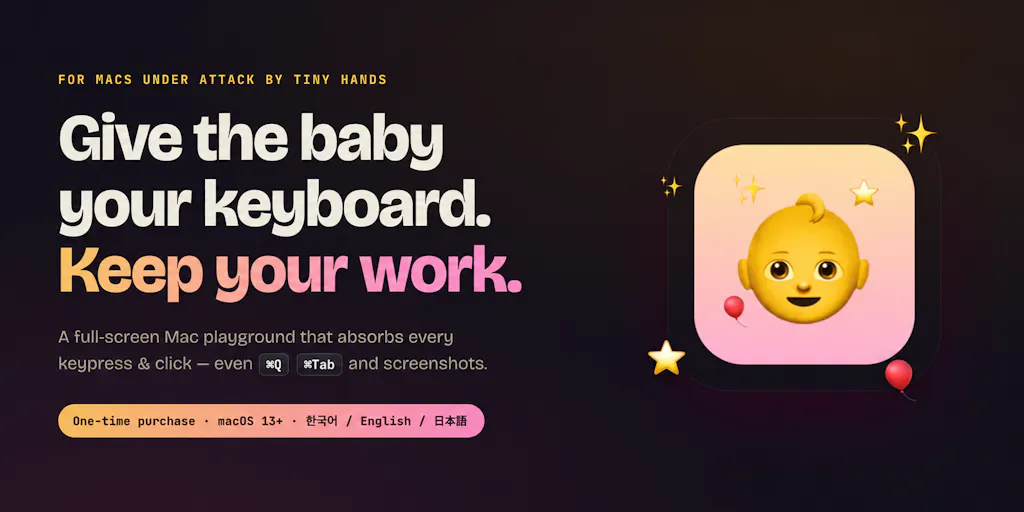
The maker, GUNWOO KO, frames the origin plainly: he built it after handing his laptop to his baby “one too many times,” and losing a terminal session, a set of slides, and a call in the process. That’s a familiar failure mode for anyone who runs a one-person content operation. The product turns a Mac into a locked-down playground: on-screen the child gets stars, letters, a rainbow drawing trail, and poppable balloons with gentle sounds; underneath, your code, docs, and meetings stay untouched. Critically, it swallows every keypress and click — including system-level shortcuts like ⌘Q, ⌘Tab, and screenshots — which is the part most “kid mode” workarounds get wrong.
Exit is gated behind a hidden combo plus Touch ID or PIN. There’s a play timer, a dim mode, and a volume cap. For launch it’s $1.99 instead of $4.99 — a one-time purchase, not a subscription. It’s signed and notarized by Apple, and the interface follows your system language across English, 한국어, and 日本語.
Why this belongs in a social media operator’s toolkit conversation
Here’s my take, and I want to flag it as opinion rather than fact: the biggest hidden tax on solo creators isn’t scheduling tools or analytics dashboards — it’s context-switching. When I’ve mapped my own week, the hours I lose aren’t from posting; they’re from the interruptions that force me to rebuild my mental state after a draft gets corrupted or a tab gets closed. A $2 utility that eliminates one entire category of interruption is, functionally, a productivity tool for content operations. It doesn’t help you write better hooks or read your retention curves — but it protects the block of time in which you do those things.
How it stacks up against the tools creators already pay for
Most creators I know already run some combination of Buffer, Later, Metricool, or Hootsuite for scheduling, plus Canva or CapCut for asset production. Those tools solve the “what gets published when” problem. Baby Desk solves a different problem entirely — the “can I actually sit down and use those tools without a toddler nuking my session” problem. Comparing them head-to-head would be a category error, and I’d push back on anyone who tries.
What’s more useful is comparing Baby Desk to the ad-hoc workarounds creators already use. The most common one is a guest user account on macOS, which is clunky, slow to switch, and still doesn’t reliably swallow system shortcuts. Another is a dedicated old iPad or tablet — which works, but means you’re not using the machine you actually need for editing. A third is third-party “kiosk mode” apps, most of which are designed for retail displays, not for a living room with a two-year-old. Baby Desk’s specific claim — that it intercepts ⌘Q, ⌘Tab, and screenshot shortcuts at the system level — is the differentiator that makes it actually viable for a working parent, because those are the exact keystrokes that cause the most damage.
Where the math breaks
At $1.99 one-time, the ROI calculation is trivially positive if it saves you even one corrupted draft per year. But I’d caution against treating it as a universal solution. It’s Mac-only. It assumes you’re willing to hand your primary machine to a child, which some creators reasonably won’t do regardless of safeguards. And it doesn’t address the deeper workflow question: if you’re regularly working in the same physical space as a toddler, no software fully replaces the need for a designated “deep work” window — early mornings, nap time, or a co-working day. Baby Desk buys you flexibility; it doesn’t buy you focus.
What creators and social teams can borrow from this launch
The most instructive thing about Baby Desk isn’t the product — it’s the positioning. The maker didn’t pitch it as a parenting app. He pitched it as a developer’s survival tool, and the comments reflect that: Uddipta Mahanta notes that “every parent working from home needs this,” and Maria Anosova — who works on Scade.pro — describes the exact scenario of a kid typing nonsense and sending it to someone. Art Stavenka immediately asks for “cat protection next.”
That comment thread is a masterclass in niche positioning for indie founders. The maker didn’t try to appeal to “parents” broadly; he appealed to a specific, self-identifying tribe — people who work on Macs and have small children — and let the specificity do the marketing. If you’re a creator launching a digital product, that’s the playbook: name the exact moment of pain, name the exact person experiencing it, and let the adjacent use cases (cats, elderly relatives, demo kiosks) surface organically in the comments.
Why TikTok creators should care more than LinkedIn ones
This is a generalization, but I’d bet it holds: TikTok and Instagram Reels creators tend to work in shorter, more interruptible bursts, often from a home setup, often with kids or pets nearby. LinkedIn creators — especially those operating in a B2B context — are more likely to work from an office or a dedicated space where the “baby on keyboard” scenario doesn’t apply. So the practical value of a tool like Baby Desk skews toward the short-form video crowd, the solo podcaster, and the indie hacker shipping content between childcare blocks. If you’re a LinkedIn ghostwriter working from a co-working desk, this probably isn’t for you — and that’s fine.
Where my judgment says it falls short
I want to be balanced here, because the Product Hunt page is enthusiastic and the maker is clearly responsive, but there are real open questions. First: the source doesn’t disclose how the app handles multi-monitor setups, external keyboards, or Bluetooth peripherals — all of which are common in creator setups. If a toddler can still reach a second keyboard, the protection is partial. Second: “swallows every keypress” is a strong claim, and while I don’t doubt the maker’s testing, I’d want to see it hold up against edge cases like VoiceOver, accessibility shortcuts, or third-party hotkey managers that creators often run (Raycast, Alfred, Keyboard Maestro).
Third, and this is the bigger strategic point: the pricing is a one-time $1.99, which is great for buyers but raises a sustainability question. Ongoing macOS updates — especially major releases that change system-level input handling — will require maintenance. A one-time purchase model with no subscription means the maker either needs volume, a paid major-version upgrade, or another revenue stream. That’s not a criticism of the launch; it’s a question any operator should ask before building a workflow dependency on a $2 app. If Baby Desk disappears in two years, you’re back to square one.
Who this is NOT for
- Creators who work primarily from mobile or tablet — this is Mac-only.
- Teams with shared editing machines in an office — the threat model is different.
- Anyone who needs cross-platform parity with Windows or Linux.
- Creators whose primary interruption risk is a pet rather than a child — the maker acknowledged the cat suggestion but it’s not a shipped feature.
What I’d watch / test next
If you’re a creator or social media operator reading this, here’s what I’d actually do this week. First, if you have a Mac and a small child in the house, the $1.99 launch price is low enough to test without much deliberation — but test it deliberately. Set up a dummy document with unsaved changes, hand the machine over for five minutes, and verify that ⌘Q, ⌘Tab, and screenshot shortcuts are genuinely blocked. Don’t take the claim on faith.
Second, watch the maker’s response to the cat-protection suggestion and any follow-up comments about multi-monitor support — those threads will tell you more about the roadmap than the launch page does. Third, if you’re a founder or indie creator, study the positioning: the specificity of “Mac + baby” is what made this launch resonate, and the same principle applies to whatever you’re shipping. Finally, treat this as a reminder that your content calendar is only as reliable as the environment you produce it in. The tools that protect your production time — even the $2 ones — are worth more than the ones that promise to 10x your reach.