The memory problem nobody warned you about when you became a one-person content team
Every social media operator I know is running the same broken play. We duct-tape our content calendar together across Notion, a Google Sheet, three Slack channels, and a Figma file full of half-finished carousels — then we spend Monday morning trying to remember why we decided to kill that Reel concept, who approved the revised hook, and when the client asked us to swap the CTA. The work doesn’t get lost because we’re disorganized. It gets lost because the context behind every decision lives in a different app than the decision itself. That’s the exact gap Bracket, a freshly relaunched product from maker Saksham Shukla and co-founder Tanay, is trying to close — and even though it isn’t a social media tool on paper, the problem it’s solving is one every creator-led team is quietly bleeding hours to.
What Bracket actually does — and why the pitch is sharper than it sounds
The maker’s own framing is refreshingly blunt: the first version of Bracket tried to be a structured workspace where you explain your project once and it organizes everything. The team realized that model was doomed because, as Shukla puts it in the launch thread, “the moment you finish organizing your work, it starts becoming outdated.” That’s a real insight, not a marketing line. Static project management tools assume the project is a snapshot. Real projects — especially content projects — are a moving target where the meaningful information is the delta, not the state.
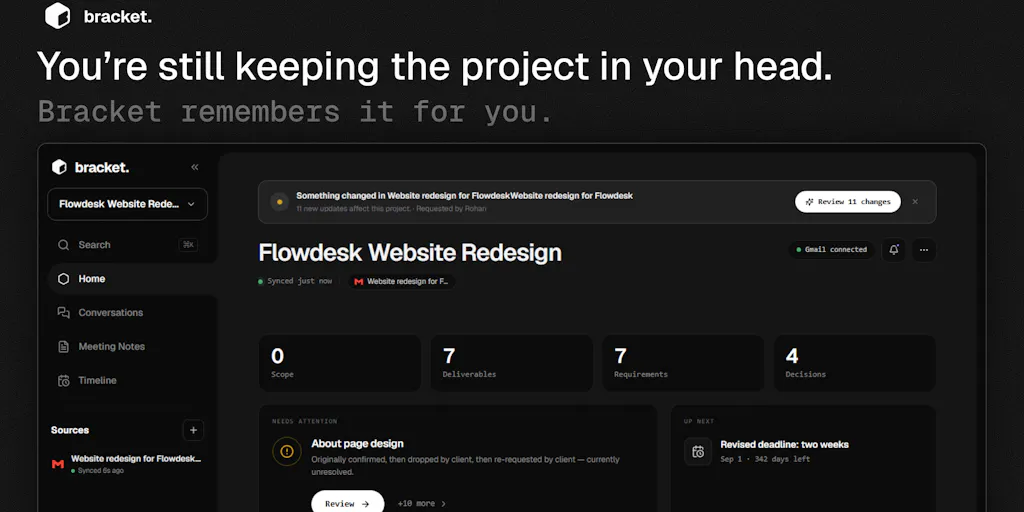
The rebuilt Bracket connects to Gmail, Slack, Figma, and GitHub, and also ingests meeting notes and transcripts. As work happens across those tools, Bracket watches for the things that actually matter to a project: requirements, decisions, scope changes, deliverables, deadlines, and change history. Then it lets you query that memory in natural language — the maker’s own example is asking “Why did the launch date change?” and getting an answer with the original source attached.
If you’ve ever spent twenty minutes scrolling a Slack thread to find the message where a client said “actually, let’s push the drop to Thursday,” you already understand why that query matters. The interesting part isn’t the AI. It’s the sourcing. Bracket isn’t just summarizing — it’s supposed to give you the receipt.
Why this is a content operations problem in disguise
Here’s where I diverge from the standard Product Hunt framing. Bracket is being pitched as a project management tool, but the workflow it describes — scattered context, decisions made in chat, revisions buried in design files, deadlines that shift without a paper trail — is exactly the operating reality of a modern content team. A social media manager running paid and organic across Instagram, TikTok, YouTube, and LinkedIn is juggling more moving parts than most software teams. Brand guidelines live in one doc. Creative feedback lives in Figma comments. Scheduling decisions live in Slack. The approved final cut lives in a Google Drive folder nobody can find. When a stakeholder asks “why did we change the hook on that video,” the honest answer is usually “someone said something in a meeting three weeks ago and I can’t find it.”
That’s the gap Bracket is aiming at. Whether it nails it is a separate question — but the diagnosis is correct, and that alone makes it worth watching.
How it stacks up against the tools you’re probably already paying for
If you’re a social media operator, your instinct is going to be: “Isn’t this just Notion with AI bolted on?” Or “Asana already has a Slack integration.” Fair. Let me be specific about where Bracket’s positioning differs from the incumbents you’d actually compare it to.
Against Notion and Coda: These are pull tools. You go to them and type. Bracket is trying to be a push tool — it watches where work is already happening and surfaces the changes. The difference matters because the failure mode of every Notion workspace I’ve ever built is that it becomes a graveyard of outdated docs. Nobody updates the page after the decision changes.
Against Asana, Monday, and ClickUp: These tools want you to move your work into them. Every task, every update, every comment lives inside their system. Bracket’s bet is the opposite — it plugs into the tools you’re already using and tries to remember without asking you to migrate. In the maker’s words from a pre-launch thread, the goal is to flip the “project management tools become another thing to manage” problem on its head.
Against Fathom and Otter for meeting notes: Those tools capture the meeting. Bracket is trying to capture what happens after the meeting, when the decision gets re-litigated in Slack and contradicted in a Figma comment. Meeting notes are an input, not the product.
Against the general wave of “AI workspace memory” startups: This is a crowded category in 2026, and Bracket’s differentiator — at least on paper — is the conflict-resolution behavior. More on that below, because it’s the most interesting and least verified part of the pitch.
My take: Bracket’s real competitor isn’t Notion or Asana. It’s the status quo of not having a memory layer at all — the Google Doc called “Project Notes FINAL v3” that everyone silently agrees to ignore.
Where the conflict-resolution answer gets interesting
The sharpest question in the entire launch thread came from Kareem Ben, who asked how Bracket handles conflicting information when two threads say different things about the same deliverable. Shukla’s answer: Bracket “doesn’t silently overwrite one piece of context with another” — it keeps the source and timeline behind both versions, and if recency alone can’t resolve the conflict, it surfaces the contradiction rather than “confidently remember the wrong thing.”
That’s the right stated design principle. It’s also the hardest thing to actually ship well. Every AI memory product I’ve tested either (a) silently picks the most recent input and pretends there was never a conflict, or (b) drowns you in “possible discrepancy detected” alerts until you stop reading them. The narrow path between those two failure modes is where Bracket will either earn its place in your stack or get uninstalled in week two. The team hasn’t published benchmarks, accuracy numbers, or a public roadmap on this — not disclosed — so I’d treat the conflict-handling claim as a hypothesis to test, not a feature to rely on.
What creators and social teams can steal from this, regardless of whether you adopt Bracket
Here’s the part I actually want you to take away, because it applies whether or not you ever sign up for Bracket.
The “decision log” habit is worth stealing today
The single highest-leverage thing a social media team can do this quarter isn’t a new scheduling tool. It’s starting a lightweight decision log — a running document where every meaningful content decision gets one line: what changed, who asked, and why. Not a full project brief. One line. “Killed the Tuesday Reel because the hook tested flat in the client’s audience panel — Sarah, 4⁄12.” That’s it.
I’ve watched teams cut their revision cycles dramatically just by being able to answer “why did we do it this way” without a Slack archaeology session. Bracket essentially productizes that habit. You can adopt the habit for free while you evaluate whether the product earns its keep.
Stop treating context as a byproduct — treat it as a deliverable
The mental model shift Bracket is selling is that project context is itself a thing worth maintaining, not a side effect of doing the work. For content teams, this means: when you hand off a campaign to a freelancer, when a new social manager inherits an account, when a client asks for a post-mortem — the context should already exist somewhere queryable. Most teams treat this as overhead. The good ones treat it as infrastructure.
Watch the integrations list like a hawk
Bracket connects to Gmail, Slack, Figma, and GitHub. Notice what’s missing for a social team: Buffer, Hootsuite, Later, Metricool, Canva, CapCut, Airtable, Frame.io. If you’re running content ops, your most important context lives in those tools — the comment thread on a Canva draft, the scheduling note in Buffer, the client feedback in Frame.io. Until Bracket (or a competitor) plugs into the content stack specifically, its value for social teams is going to be partial. That’s not a knock on the product — it’s a reminder that “connects to where work happens” is only as good as the definition of “where.”
Why TikTok-first creators should care less than agency teams
If you’re a solo creator posting to Threads, TikTok, and Pinterest, your “project context” is mostly in your own head. You don’t need a memory layer for a team of one. Bracket’s value scales with team size and stakeholder count. The moment you have a client, an editor, a VA, and a brand manager all touching the same campaign, the context problem becomes real. So: solo creators, skip it. Small agencies, freelance collectives, in-house brand teams — this is where the pain is sharpest and Bracket’s pitch lands hardest.
Where I think Bracket falls short — and the questions the launch thread didn’t answer
Let me be balanced here, because the launch thread is genuinely light on the details that would let me recommend this with confidence.
Pricing is not disclosed. The maker says Bracket is “completely free right now,” which is standard early-access language. There’s no published pricing page, no indication of what happens when free ends, and no info on seat limits or API usage caps. If you’re considering building a workflow on top of this, that’s a real risk. Free-now tools have a habit of becoming expensive-later tools, and you won’t know the number until you’re already dependent.
No reviews yet on the Product Hunt page. The launch hit #8 on launch day — impressive given it apparently went live by accident while both founders were out of town, per Shukla’s own post — but upvotes aren’t the same as validated workflows. I’d want to see a month of real usage from teams with messy, multi-stakeholder projects before trusting the conflict-resolution claims.
The “understand meeting notes and transcripts” claim is vague. Which transcription formats? Which meeting tools? Does it ingest Zoom recordings directly, or do you paste transcripts? Not disclosed. For a content team that lives in client calls, this is the difference between a useful feature and a manual chore.
The accuracy question is unanswered. What happens when Bracket misremembers? What’s the correction workflow? Can you audit its memory? Every AI memory product eventually gets something wrong, and the ones that survive are the ones with a graceful correction path. Bracket hasn’t shown us theirs.
The scope is broad, which is usually a warning sign. Gmail, Slack, Figma, GitHub, meetings — that’s four very different data models and one very hard natural-language layer on top. Products that try to remember everything often end up remembering nothing well. I’d bet the team would be better served by going deep on two integrations (Slack + Figma, or Slack + Gmail) than shallow on four. But that’s my opinion, not a fact about the product.
Who this is NOT for
- Solo creators with no team and no clients. You don’t have a context problem yet.
- Teams already running a tight, disciplined Notion or Asana workflow with strong documentation habits. You’ve solved this problem manually; Bracket may not beat your system.
- Anyone who needs a social-media-native tool today. Bracket isn’t that, and it doesn’t pretend to be.
- Anyone uncomfortable with an AI layer reading their Slack and email. That’s a real consideration for agencies with client confidentiality obligations, and the launch page doesn’t address data handling, retention, or compliance. Not disclosed.
What I’d watch / test next
If you’re curious, here’s the concrete play I’d run this week — and it’s the same play whether you’re evaluating Bracket or just trying to fix your own ops.
Step one: Pick one live project — ideally a campaign with at least three stakeholders and a deadline that has already moved once. Don’t test on a clean project. Test on the messy one.
Step two: Before you connect anything, write down your top five “why did we do it this way” questions about that project. The ones you’d currently have to dig through Slack to answer. That’s your benchmark.
Step three: Connect Bracket to Gmail and Slack only. Skip Figma and GitHub for now — you want to isolate whether the core memory layer works before adding complexity.
Step four: Ask it your five benchmark questions. Score each answer on two axes: correct and sourced. An answer that’s right but unsourced is a guess. An answer that’s sourced but wrong is worse than nothing. You’re looking for both.
Step five: Deliberately introduce a conflict. Have one person say X in Slack and another say not-X in email. See whether Bracket surfaces the contradiction or silently picks a winner. That single test will tell you more about the product than any launch thread.
If it passes, you’ve got a real workflow upgrade. If it fails, you’ve learned something about AI memory tools in general — and you can go build the manual decision log instead. Either way, you win.