The creator stack’s real bottleneck isn’t making content — it’s keeping the brief, the calendar, and the AI in the same room
If you run social for a brand, a founder, or your own face, you already know the dirty secret of the creator economy: the publishing part is the easy part. The hard part is the context. The campaign brief lives in a Google Doc. The approval thread lives in Slack. The caption variants live in a Notes app. The AI-generated hook lives in a ChatGPT thread you’ll never find again. And the “final” version of the plan lives in whatever tab you last edited before a client call. Every social operator I know is running a distributed cognition problem disguised as a content problem — and the tools keep selling us faster creation instead of better continuity.
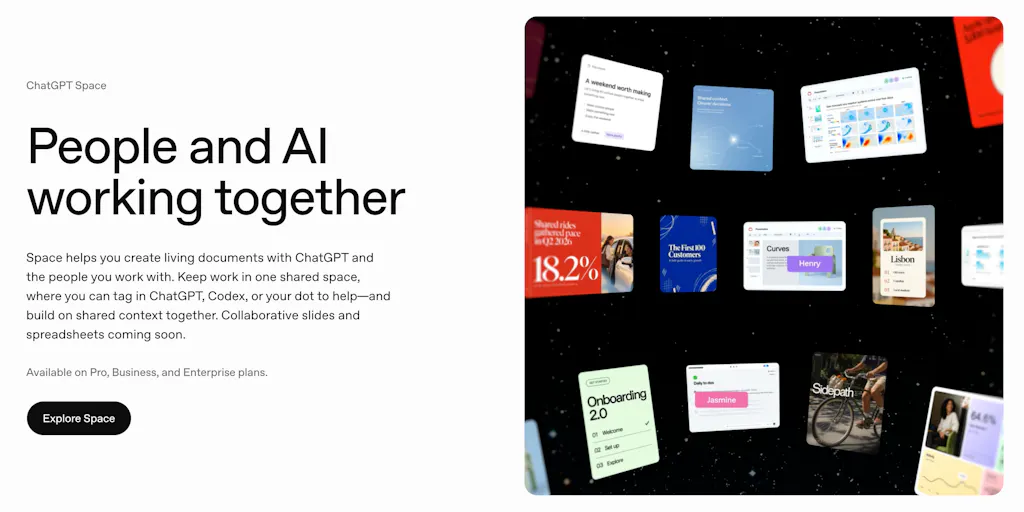
That’s the lens I brought to ChatGPT Space, a shared workspace from OpenAI that the launch page describes as a place where people and AI “create and maintain living documents together.” The pitch, per the Product Hunt listing, is that Space keeps context, collaboration, and AI assistance in one place instead of scattering work across chats, docs, files, and updates — and lets you tag ChatGPT, Codex, or “your dot” directly inside a shared page to edit, research, code, or take next steps. If you’ve ever rebuilt a month’s content calendar from scratch because the source of truth got fragmented across six tools, you already understand why this matters more than another caption generator.
What Space actually solves — and why social teams feel it first
Let me be specific about the problem, because “shared workspace with AI” is the kind of phrase that means nothing until you map it to a Tuesday afternoon.
When I scheduled 30 posts across 5 platforms last month, the actual work wasn’t writing 30 captions. It was reconciling: the TikTok hook the founder rewrote in a DM, the LinkedIn angle the legal team softened, the Instagram carousel copy that changed after a product update, and the YouTube description that needed the same UTM parameters as the X thread. Every one of those edits happened in a different place. The “content calendar” was a fiction — a decorative artifact that looked organized while the real decisions lived in threads and side chats.
Space’s stated features map directly onto that pain. Per the launch page, it offers self-updating pages for writing, visualizing, research, and coding; real-time team editing, comments, and AI tagging in the same document; a shared knowledge hub for files, pages, slides, spreadsheets, and team context; Dots integration to keep pages updated across ChatGPT, Slack, and Microsoft Teams; and templates for to-do lists, project dashboards, and onboarding-style workflows. The team positions it for “teams and professionals on Pro, Business, and Enterprise plans who collaborate on plans, research, projects, and documentation,” with use cases including project dashboards, onboarding prototypes, campaign plans, visual research pages, and self-updating to-do lists.
Read that list again as a social media manager. “Campaign plans” and “visual research pages” aren’t adjacent to your job — they are your job. The pitch isn’t that Space writes your captions faster. It’s that the document where you plan the campaign can also be the place where the AI that helps you execute it lives, and where your teammates’ edits and your AI’s edits land in the same version history. That’s a meaningfully different bet than what most creator tools are making.
Why this is a repurposing play in disguise
The creator-economy conversation around AI has been dominated by generation: write me a hook, make me a thumbnail, turn this blog into a carousel. But the operational bottleneck in repurposing isn’t generation — it’s state. When you turn one YouTube video into a TikTok, an Instagram Reel, an X thread, a LinkedIn post, and a Pinterest pin, the hard part is tracking which platform got which cut, which hook performed, which CTA changed, and what the source video’s key claims were so you don’t accidentally contradict yourself three platforms later.
A workspace where the source document, the platform-by-platform variants, and the AI assistant all share context is a genuinely better fit for that workflow than a chat window. In my experience testing similar “AI inside the doc” tools, the value isn’t the AI’s raw output quality — it’s that you stop copy-pasting context into a chat box every time you switch tasks. Whether Space delivers on that depends on mechanics the launch page doesn’t detail, which I’ll get to.
How it differs from the incumbents you’re already paying for
Here’s where I’d place Space in the stack, because “shared doc with AI” competes with very different tools depending on what you’re actually trying to do.
If your problem is scheduling and publishing, Space is not a replacement for Buffer, Later, Hootsuite, or Metricool. None of those are mentioned in the source, and Space’s launch page makes no publishing or scheduling claims. It doesn’t connect to platform APIs, doesn’t queue posts, doesn’t give you a calendar view of scheduled content. If that’s what you need, close this tab and go audit your queue.
If your problem is visual asset creation, Space isn’t Canva or CapCut. It’s not a design tool. The “visualizing” and “slides” language in the feature list suggests lightweight visual pages, not template-driven asset production.
If your problem is documentation and team knowledge, Space competes with Notion, Coda, Google Docs, and Confluence. This is the real comparison. Notion has been adding AI features aggressively; Coda has long positioned itself as a doc-plus-app hybrid; Google has been folding Gemini into Workspace. Space’s differentiator, per the launch page, is the ability to tag ChatGPT, Codex, or your dot directly inside a shared page — meaning the AI isn’t a sidebar or a separate chat, it’s a participant in the document.
If your problem is AI-assisted content generation specifically, Space competes with the ChatGPT interface itself, plus tools like Jasper, Copy.ai, and the growing long tail of “AI social media manager” products. Most of those are generation-first; Space is context-first. That’s the distinction I’d bet on being meaningful for teams, and meaningless for solo creators who just want a faster caption.
Why TikTok creators should care more than LinkedIn ones
This is where I’ll get opinionated, because the platform mix matters enormously for whether a tool like Space is worth your time.
LinkedIn and X are text-native, document-friendly platforms. A campaign plan, a thought-leadership pipeline, a repurposing map — these live naturally in docs, and a shared workspace with AI assistance is a clean fit. If your primary output is written posts, Space’s value proposition is legible.
TikTok, Instagram Reels, and YouTube Shorts are different. The artifact that matters isn’t the caption — it’s the video file, the hook timing, the on-screen text, the sound choice, the edit rhythm. A shared document can hold the brief for those things, but it can’t hold the thing itself. So for short-form video creators, Space is a planning and continuity tool, not a production tool. That’s still useful — arguably more useful than another AI caption writer — but it’s a narrower claim than the launch page’s “campaign plans” language might suggest. If you’re a TikTok-first creator, I’d test Space as the place where your hook bank, your posting cadence, and your performance notes live, not as the place where the video gets made.
Pinterest sits in between. It’s visual, but it’s also heavily text-and-keyword-driven, and the repurposing workflow (blog → pin → idea pin → board) is genuinely document-friendly. Space could plausibly serve as the planning layer there.
What creators and social teams can borrow from Space — even if they never use it
Here’s the part I actually care about, because the most useful thing about a launch like this isn’t the product — it’s the workflow pattern it validates.
The pattern is: stop treating AI as a separate tool and start treating it as a collaborator inside the artifact. Most social teams I know run a split-brain workflow. They plan in a doc, then open a chat window, then paste the output back into the doc, then lose track of which version is which. Every context switch is a place where context leaks. Space’s bet — tagging AI directly inside the shared page — is an attempt to collapse that loop.
You can borrow that pattern this week without paying for anything. Pick one recurring workflow — say, your weekly content calendar — and make the document itself the single source of truth. Put the brief, the platform-by-platform variants, the UTM parameters, and the performance notes in the same page. Then, when you use AI, use it on that page rather than in a separate chat. The tool matters less than the discipline. In my experience, the teams that get the most out of AI content tooling aren’t the ones with the best models — they’re the ones with the cleanest context.
A second borrowable idea: self-updating pages as a concept. The launch page describes pages that update themselves, and Dots integration that keeps pages updated across ChatGPT, Slack, and Microsoft Teams. The operational fantasy here is a campaign plan that reflects reality without someone manually reconciling it. I’d be skeptical of full automation — more on that below — but the underlying instinct is right. If your content calendar requires a human to manually sync it with the platform analytics and the team chat every week, you’re burning hours on work that should be structural.
A third: templates as workflow encoding. The launch page mentions templates for to-do lists, project dashboards, and onboarding-style workflows. For social teams, the equivalent is a repurposing template: source asset, platform variants, hook options, CTA, UTM, publish date, performance check-in. If you build that once and reuse it, you’ve encoded your workflow into a structure — which is exactly what makes AI assistance useful rather than generic.
Where my judgment says it falls short — and the questions the launch page doesn’t answer
Now the honest part, because a launch page is marketing and you should read it like one.
The most substantive critique in the Product Hunt comments comes from Gal Dayan, who raises a question I’d want answered before trusting this for anything real: if you’re mid-edit on a section and a teammate’s dot tag triggers the AI to rewrite that same section based on a Slack update, whose version wins? Does it merge, flag a conflict, or does one edit quietly overwrite the other? Dayan’s point is sharp: “living documents are exactly where silent overwrites do the most damage, since nobody’s diffing a doc the way they’d diff code.” That’s not a nitpick — it’s the central trust question for any AI-in-the-document product, and the launch page doesn’t address it.
Marina Gomel raises a related concern: version history that distinguishes human edits from AI edits, so you can undo something without hunting for it. Also not addressed in the source. For social teams, this matters more than it does for most knowledge workers, because you’re often working under brand and legal constraints. If an AI edit quietly changes a claim in a campaign brief and nobody catches it, you can end up publishing something you can’t defend.
Beyond those commenter concerns, here’s what I’d flag from my own reading:
Pricing is not disclosed. The launch page says Space is for teams on Pro, Business, and Enterprise plans, which implies it’s gated behind existing ChatGPT paid tiers — but the source doesn’t state standalone pricing, seat limits, or whether it’s included in existing plans. If you’re a small team budgeting tools, that’s a real gap.
Platform integrations are named but not detailed. The source mentions Dots integration with ChatGPT, Slack, and Microsoft Teams. It does not mention Instagram, TikTok, YouTube, X, LinkedIn, Facebook, Threads, or Pinterest — which is to say, none of the platforms you actually publish to. That’s not a flaw in Space; it’s a scope clarification. Space is a workspace, not a social media management tool. But if you were hoping for a unified hub that connects your planning doc to your publishing queue, this isn’t that.
The “self-updating” claim is doing a lot of work. The launch page says pages are self-updating, but doesn’t explain the mechanism, the triggers, or the failure modes. In my experience, “self-updating” usually means “updates when someone remembers to trigger it” or “updates on a schedule and sometimes gets it wrong.” I’d want to test this specifically before relying on it.
No mention of analytics or performance data. Social teams live and die by engagement rate, watch time, reach, and conversion. Space’s feature list doesn’t include any analytics integration. That’s fine — it’s not trying to be Sprout Social or Sprinklr — but it means the performance feedback loop still lives elsewhere.
Where the math breaks
Let me put the limitation in operational terms. Suppose you’re a team of three running social for a DTC brand across Instagram, TikTok, and Pinterest. You adopt Space as your campaign planning hub. You get: a shared brief, AI-assisted ideation inside the doc, and a template-driven repurposing workflow. Good. You don’t get: scheduled posts, platform-native previews, comment management, analytics, or a content calendar that reflects what’s actually queued. So you still need your scheduling tool, your analytics tool, and probably your asset management tool. Space is an addition to the stack, not a consolidation of it — unless your stack was already just docs and chats, in which case it’s a genuine upgrade.
That’s the honest math. For a solo creator, the addition may not be worth it. For a team already paying for ChatGPT Business or Enterprise and already drowning in context sprawl, it might be.
Who this is not for
If you’re a solo creator who publishes to one or two platforms and your workflow is “write caption, post, repeat,” Space is overkill. If you’re a social media manager whose primary pain is scheduling and analytics, Space doesn’t address it. If you’re a video-first creator whose bottleneck is editing and production, Space is upstream of your problem. And if you’re on ChatGPT’s free tier, the source suggests Space is for Pro, Business, and Enterprise users — so check your plan before getting excited.
What I’d watch / test next
If you’re a social operator evaluating Space — or just trying to decide whether the “AI inside the document” pattern is worth adopting — here’s what I’d do this week.
First, run a conflict test. Open a shared page with a teammate, have one person edit a section while the other triggers an AI rewrite on the same section, and see what happens. If the tool merges cleanly or flags a conflict, that’s a green flag. If one edit silently overwrites the other, that’s your answer about whether to trust it with anything that matters. This is the single most important thing to verify, and it’s the question the launch page doesn’t answer.
Second, build one repurposing template in whatever doc tool you already use — Space, Notion, Google Docs, doesn’t matter — with fields for source asset, platform variants, hook options, CTA, UTM, publish date, and performance notes. Use it for one week. If the structure alone saves you time, you’ve validated the pattern without paying for a new tool.
Third, audit your context sprawl. List every place a content decision currently lives: DMs, Slack threads, email, docs, notes apps, chat windows. If the list is longer than three, you have a continuity problem that no AI model will fix on its own — and a shared workspace, with or without AI, is probably worth testing.
Fourth, if you’re already on a ChatGPT paid plan, try Space on a low-stakes project first — a content calendar for a single platform, or a research page for a campaign that hasn’t started yet. Don’t migrate your entire workflow on day one. The launch page’s claims about self-updating pages and Dots integration are worth testing in a sandbox before you trust them with a client’s brand voice.
My overall take: Space is a bet that the future of AI-assisted work isn’t a better chat window, it’s AI as a participant in the artifacts where work already happens. That bet is probably right. Whether Space is the tool that wins it depends on mechanics — conflict resolution, version history, integration depth — that the launch page doesn’t yet prove. Watch the version history. That’s where the trust lives.


