The permission-prompt tax is the real bottleneck in your AI content pipeline
If you run social for a living, your job has quietly become less about posting and more about babysitting machines. The same week you’re batch-filming Reels, you’re also prompting an AI assistant to draft captions, summarize comments, generate alt text, or refactor a scheduling script — and every one of those tasks stalls on the same tiny friction: the tool stops and asks permission. You tab away to answer a DM, come back twenty minutes later, and the model has been sitting there the entire time waiting on a single “allow” click. That dead time is invisible on any analytics dashboard, but it’s the difference between shipping a week of content and shipping a day of it. Clair, a new Android and Wear OS app from maker Jeffrey Walter Mixon, is a small, specific bet that this friction is worth solving from your wrist. My take: it’s a niche tool, but the underlying problem it names is one every creator running AI-assisted workflows should be thinking about.
What Clair actually does — and the workflow it’s really targeting
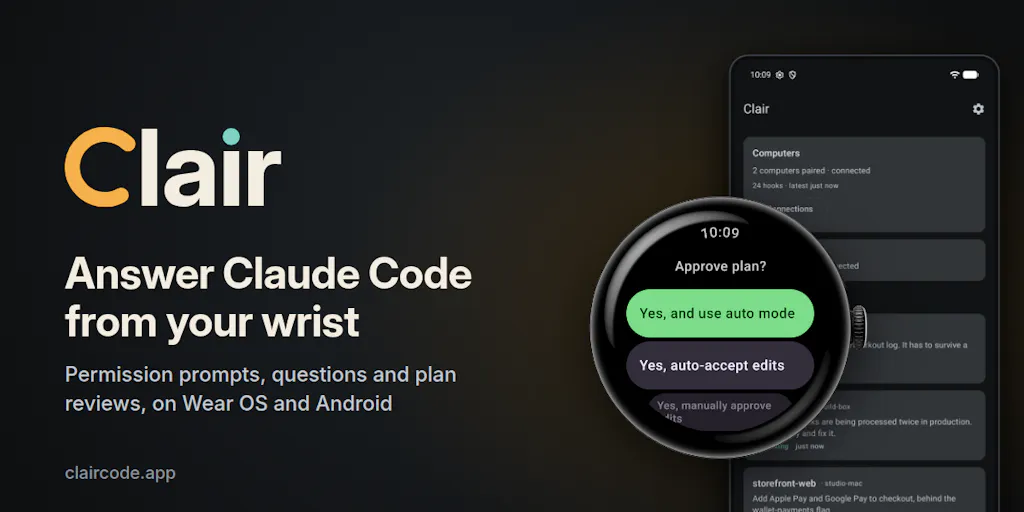
Let me strip the launch-page language down to mechanics. Clair is an Android phone and Wear OS watch app that forwards the permission prompts, clarifying questions, and plan reviews that Claude Code throws up during a task, so you can answer them remotely instead of sitting at the terminal. The maker’s own framing is refreshingly honest about the origin story: he kept starting a Claude Code task, walking away, and returning to find it had spent the whole time waiting on one permission prompt.
From the wrist, you can handle three categories of interruption. First, permission prompts — with the exact command or edit shown in front of you — which you can allow once, for the session, or by the rule Claude Code itself suggests (the maker’s example: every go test run), so it stops asking. Denials let you type or dictate a reason, and Claude reads it. Second, questions: the options arrive with their descriptions, or you can dictate your own answer. Third, plan reviews: approve the way the terminal would, or send the plan back with notes.
The important architectural detail is that the terminal still works. Whichever answer arrives first settles the prompt, so you can approve one command from the couch and the next from your desk. And you don’t strictly need a watch — every prompt also reaches your phone, with Allow and Deny right in the notification.
Under the hood, a small agent on your computer (macOS, Linux, or Windows) connects through Claude Code’s hooks. The maker says each prompt is sealed before it leaves your machine, and only your phone holds the key, so the relay in between can’t read a command or forge an answer. The relay does see metadata needed to deliver messages — timing, size, IP addresses — and the listing spells out exactly what. Clair never asks for your Claude login, and it’s an independent app, not affiliated with Anthropic.
The pricing, plainly
It’s US$24.99 a year after a 14-day free trial, and the trial doesn’t start until your first computer is paired — a genuinely creator-friendly detail, since trial clocks that start at signup are one of the small scams of the SaaS world. Without a subscription you can still follow along: sessions, the tile, the complication, and notifications keep working. On Wear OS 6 or later there’s also a watch face whose dials track your five-hour and weekly Claude usage.
There’s a demo built in: open Clair on your phone or watch and tap “Try the demo.” Three sessions on two machines will ask you things, and you answer them like the real thing. No install on your computer required to see it work.
Why this matters more to some creators than others
Here’s where I want to be careful, because the reflexive take is “cool, but who cares about a watch app.” The honest answer is: it depends entirely on whether your AI work is interactive or batch.
If you’re a solo creator using AI as a drafting assistant, you probably don’t feel this pain acutely. You prompt, you get a caption, you edit it, you move on. The model isn’t running long autonomous tasks that require a chain of approvals.
If you’re running agentic workflows — scripts that touch your CMS, your analytics exports, your scheduling APIs — you feel it constantly. This is the creator-operator profile that’s grown fast in the last year: people who use tools like Claude Code not to write captions but to build and maintain the plumbing behind their content operation. That’s where the permission-prompt tax compounds.
Why TikTok creators should care more than LinkedIn ones
This is a deliberately provocative split, but I think it holds. TikTok-native creators tend to operate in high-volume, fast-iteration loops — more posts, more variants, more testing — which means more automation, more scripts, more agentic tooling. LinkedIn-first creators tend to publish lower volume with higher production value per post, which means less need for automation throughput.
I’d bet the correlation isn’t perfect, but the direction is right: the more your content strategy depends on volume and repurposing pipelines, the more a stalled AI task costs you. If you’re the kind of operator who batch-produces 30 posts across five platforms in a session, you’re the target user. If you post twice a week and write everything yourself, Clair is probably a solution to a problem you don’t have yet.
How it differs from the scheduling and automation incumbents
It’s tempting to file Clair next to Buffer, Hootsuite, Later, or Metricool — but that would be a category error, and it’s worth being precise about why.
Those platforms solve distribution: they hold your queue, publish to platform APIs, and report back on performance. Clair solves interruption handling for a local AI agent. They don’t overlap at all. You would not replace Buffer with Clair; you’d run both, if you ran Clair at all.
The closer comparison is to the general class of “remote control” and notification-relay tools that have grown up around AI coding agents — the various mobile bridges, webhook notifiers, and terminal-in-your-pocket apps that let you monitor long-running jobs. I haven’t tested Clair specifically, but in my own experiments with similar remote-approval setups, the make-or-break variable is always latency and reliability of the relay. A notification that arrives ninety seconds late is worse than useless when the prompt has already timed out or the session has moved on.
The security question I’d actually ask
The maker’s claim is specific and testable: prompts are sealed before leaving your machine, only your phone holds the key, and the relay can’t read a command or forge an answer. The relay does see timing, size, and IP addresses. That’s a reasonable threat model for a tool like this, and the transparency about metadata is a good sign.
But — and this is my judgment, not a sourced fact — the trust boundary here is the pairing and key management, not the encryption claim. Anyone evaluating Clair should be asking: what happens if I lose my phone? How is the key stored on the device? What’s the recovery path? The listing doesn’t detail this, and those are the questions I’d want answered before routing production credentials through it. If your Claude Code sessions touch live API keys for your scheduling stack, that matters.
What creators and social teams can borrow from this
Even if you never install Clair, the launch is a useful mirror for how you’ve structured your own AI workflows. Three things stand out.
First: the “allow by rule” pattern is underused. The maker highlights the ability to approve “every go test run” so it stops asking. That’s the right mental model for automation generally — not blanket trust, but scoped, revocable, pattern-based trust. If you’re using AI to generate captions or alt text at volume, you should be defining the equivalent of allow-rules: what can the model do without asking, what requires a human check, and what’s forbidden outright. Most creators I talk to have this as a vague vibe rather than an explicit policy. Write it down.
Second: the terminal-still-works design. The fact that whichever answer arrives first settles the prompt — wrist or desk — is a small but important UX principle. Good automation doesn’t replace your primary interface; it adds a second one and lets you use whichever is closer. If you’re building any internal tooling for your content operation, steal this.
Third: the trial-starts-on-pairing detail. This is a trust signal. It says the maker understands that evaluation friction is real and isn’t trying to game the clock. I’d like to see more SaaS in the creator space adopt this posture, especially the scheduling tools where onboarding takes a week before you can meaningfully judge the product.
Where the math breaks
Let me do the honest arithmetic on whether US$24.99 a year is worth it. If Clair saves you one stalled task per week — say twenty minutes of dead time — that’s roughly seventeen hours a year. At any reasonable valuation of your time, that clears the bar easily.
But that math only works if the stalls are actually happening and actually costly. If you check your terminal every few minutes anyway, or if your AI tasks are short enough that a stall resolves itself before you notice, the savings evaporate. The tool’s value is entirely a function of how long and how interrupt-driven your agentic sessions are. That’s not a criticism; it’s just the honest framing. The maker’s own story — walking off, coming back to find it waiting — is the exact scenario that has to be true for you.
Where I think it falls short
The biggest limitation is stated plainly on the listing: Clair is Android and Wear OS only. If you’re on an iPhone or Apple Watch, you’re out of luck. The maker explicitly asks for feedback on this — “If you’d use it on an iPhone or Apple Watch, tell me below. That’s the question I’d most like answered today” — which tells you iOS is at best a future consideration, not a current option. Given how much of the creator economy runs on iPhones, that’s a real addressable-market constraint, though it’s also a reasonable place for a solo maker to start.
Second: it’s Claude Code-specific. The agent connects through Claude Code’s hooks, which means it’s not a general-purpose AI interruption handler. If your stack is built around other agent frameworks, this doesn’t help you today. That’s a narrow bet, and narrow bets are fine — but it means the tool’s ceiling is tied to Claude Code’s adoption among people who also want wrist-based approvals. Not disclosed: how large that intersection is.
Third, and this is the one I’d flag hardest for social media operators specifically: Clair solves a developer-workflow problem, not a social-media-workflow problem. If you’re a content creator who uses AI to draft posts, this is probably not for you. If you’re a creator-operator who writes code to run your content pipeline, it might be. The launch page doesn’t overclaim here — the maker is clearly targeting developers — but it’s worth saying out loud so nobody buys it expecting it to manage their posting queue.
The demo is the smartest part of the launch
One thing I genuinely respect: “You don’t need to install anything on your computer to see it work. Open Clair on your phone or watch and tap Try the demo.” For a tool whose value is entirely experiential — you can’t understand why remote approval matters until you’ve felt a task stall — a no-install demo is the right call. Most creator-tool launches bury this. If you’re launching anything in this space, study that decision.
What I’d watch / test next
If you’re curious, here’s what I’d actually do this week — no purchase required.
Run the demo first. Open Clair on your phone or watch and tap “Try the demo.” Three sessions on two machines will ask you things, and you answer them just like the real thing. That’s a zero-cost way to feel whether the interaction model fits how you work.
Audit your own stalls. Before spending anything, spend a day noting every time you walk away from an AI task and come back to find it waiting. If you log more than a handful, the problem is real for you. If you log zero, you’ve saved yourself US$24.99 and a setup afternoon.
Check your platform. Android and Wear OS only. If you’re an iPhone or Apple Watch user, the maker is explicitly collecting that feedback — so tell him, because that’s the signal that determines whether an iOS version ever exists.
Ask the security questions the listing doesn’t answer. Key storage, phone-loss recovery, and what the relay can and can’t see in practice. The encryption claim is specific and good; the operational details around it are where I’d want more before routing anything sensitive through it.
And zoom out. The real lesson here isn’t Clair. It’s that the permission-prompt tax is a measurable drag on anyone running AI-assisted content operations at volume, and the tools that shave it down — whether this one or the next — are worth watching. The creators who win the next two years won’t be the ones with the best prompts. They’ll be the ones whose pipelines never stop moving.