The Creator Economy’s Next Hiring Problem Isn’t Talent — It’s Follow-Through
Every social media operator I know has the same dirty secret: the content calendar is the easy part. The strategy deck writes itself. The hard part is the thousand small, unglamorous tasks that happen after the ideas are approved — the lead research for a potential brand partnership, the CRM update after a sponsored post closes, the weekly report that pulls engagement metrics from five different dashboards, the chasing of invoices from a client who keeps “forgetting” to pay. These tasks don’t require creativity. They require a reliable pair of hands that won’t get bored, won’t get distracted, and won’t quit after three weeks.
When I scheduled 30 posts across 5 platforms last month, the actual scheduling took maybe two hours. The prep work — resizing images for each platform’s aspect ratio, rewriting captions to fit character limits, tagging the right collaborators, pulling UTM parameters for each campaign — took the better part of two days. That’s the gap AI tools have been circling for years without actually closing. They can generate a caption. They can’t run a full campaign workflow end-to-end without me babysitting every step.
That’s why the launch of Construct caught my attention — not because it’s another chatbot wrapper, but because it’s trying to solve the follow-through problem. The pitch, in short: give AI agents a real computer instead of a chat window, let them work in the cloud while you sleep, and lock in the workflows that work so they don’t re-reason through solved problems and burn tokens. As someone who has tested more AI content tools than I care to admit, the “lock it in” part is the feature I’ve been waiting for someone to build — because it’s the one that actually changes the economics of delegating work to software.
What Problem This Actually Solves (and Why It’s Not What You Think)
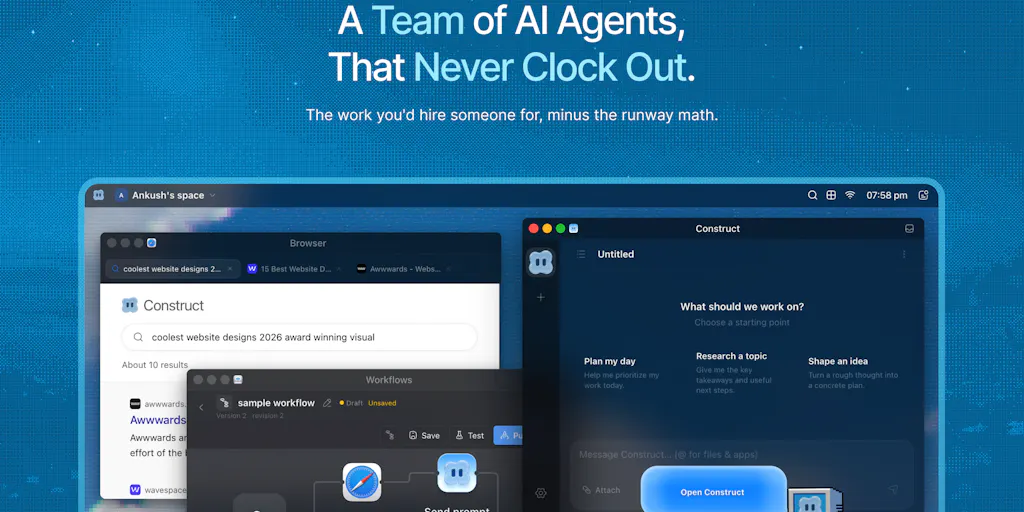
Let me be precise about what Construct is claiming, because the marketing language obscures something genuinely interesting. The megathread description says: “Construct gives your AI coworkers a real computer instead of a chat window. Every agent gets its own browser-based cloud desktop — browser, terminal, files, email, calendar, and memory that persists across sessions.”
On the surface, this sounds like every other “AI agent” product that launched in the last eighteen months. But the operational detail that matters — and the one that separates this from the pack — is the persistence and the workflow locking. When I’ve tested tools like Grok or OpenClaw, the pattern is always the same: the agent reasons through a task, executes it, and then forgets everything the next time you ask. It’s like hiring a contractor who needs a full briefing every single morning, even for the same job they did yesterday. The token burn is absurd, and the time cost of re-explaining is worse.
Construct’s answer, per co-founder Ankush Singh, is that “once a job runs right he locks it in. Next time it’s one command, no re-thinking, no token burning, and your team can trigger it too.” That’s not a feature — that’s a fundamentally different operating model. It’s the difference between asking an assistant to “research potential podcast guests” from scratch every week versus having a saved search, a qualification rubric, and a templated outreach email that you’ve refined over months.
The co-founder’s comment about their own CRM workflow is revealing: “The agent isn’t figuring anything out or reasoning through a thinking loop every time, it just runs. It sources and qualifies new leads and investors, builds out the pipeline directly inside the CRM, and every morning it emails us a summary of what got done yesterday and what’s on deck today.” For a social media operator, translate that to your own recurring nightmare: the weekly content performance report that requires pulling data from Buffer, Metricool, and Google Analytics, cross-referencing engagement rates, and formatting it for a stakeholder who only reads the first three bullet points. That’s not a creative task. That’s a workflow that should run itself.
The cloud desktop aspect matters more than it sounds like it should. The claim is that you can “open the screen from any device to watch it work, take the controls back, or nudge it in a different direction.” In practice, this is the difference between trusting an AI and actually trusting it. When I’ve delegated tasks to other agent tools, the experience is a black box — you prompt, you wait, you hope. Construct’s approach of giving you a visible screen to watch the agent work is, in my experience, the single biggest trust-building feature an AI tool can offer. It’s the difference between hiring someone who works behind a closed door and someone who works in a glass office.
How It Differs From the Incumbents (and Where the Comparison Gets Interesting)
The obvious comparison points are the other agentic workspace tools that have launched into this space — Grok Bot, YC’s QM, and the broader category of OpenClaw-style open-source agent infrastructure. The founder’s response to a commenter asking about competition is worth reading carefully, because it reveals the strategic positioning: “Solutions like grokbot and QM definitely look like competitors on a first glance, but actually we have very different product boundaries. Grok bot would be closest to us with their agents and QM is more like open-source agent infrastructure teams can deploy and customize on their own if they have the technical knowhow.”
This is the right distinction to draw. Grok is a capable agent, but it’s aimed at technical teams who can handle a cursor-based setup and don’t mind a steeper learning curve. QM, if you’re familiar with it, is infrastructure — powerful, but you need engineers to make it sing. Construct is positioning itself as the managed, opinionated option: “everything can be used by even non-tech native people” because “every MCP, every tool, etc. is an App, installable like how one would install something from Appstore or Playstore.”
For a social media team, this distinction is everything. Most creator businesses and small agencies don’t have a technical co-founder who can configure MCP servers and deploy agent infrastructure. They have a content lead, a community manager, and maybe a part-time VA. The “app store” model is the only one that has any chance of being adopted by that team. I’ve seen tools with ten times the raw capability die on the vine because the setup required a developer to wrangle API keys and environment variables.
But here’s where my take diverges from the founders’ framing. They’re positioning against other agent tools, which is the right competitive set for the product — but for the buyer in the creator economy, the real competition is simpler. It’s a VA on Upwork. It’s a junior freelancer on Fiverr. It’s the intern who costs $15 an hour and needs constant supervision. When I think about whether Construct replaces that person, the answer is: it depends on whether the workflow can be locked in. A VA can handle ambiguity and judgment calls. An agent — even a good one — needs a defined process. The teams that will get value from this are the ones that already have documented standard operating procedures, not the ones hoping AI will magically create process from chaos.
The other difference worth noting: the multiplayer angle. Nischal Naik’s comment describes a workspace where “teams can collaborate in the same workspace, invite teammates to existing agents, or let each person create their own private agents. Agents can also coordinate with other agents, so it becomes more of a multiplayer environment for both humans and bots.” That’s genuinely different from most agent tools, which are single-user by design. For a social media team of three to five people, the ability to share a locked-in workflow — say, the weekly content repurposing pipeline — across the whole team is the difference between one person getting leverage and the whole team getting leverage.
Why the “Locked Workflow” Is the Killer Feature for Social Teams
Social media operations are uniquely suited to this model because so much of the work is genuinely repetitive. Think about the lifecycle of a single YouTube video: you upload to YouTube, then you clip the best 60-second moment for TikTok, then you make a quote card for Instagram, then you write a LinkedIn post that references the video, then you schedule a Threads update. Each of those steps involves different tools, different aspect ratios, different caption styles, different hashtag strategies. Most creators do this manually, every single time, because the repurposing tools that exist (Canva, CapCut, etc.) handle the creation but not the distribution — and the distribution is where the time actually goes.
A tool like Construct could, in theory, learn your repurposing workflow once and then execute it every time you drop a new video into a folder. It could pull the transcript, identify the most engaging moments based on your historical analytics, generate the clips, write the captions in your voice, and schedule everything across platforms. That’s not a hypothetical — that’s a workflow with a defined process, and it’s exactly the kind of thing Construct claims to lock in.
The caveat, and it’s a big one, is whether the agent can handle the judgment parts — like deciding which moment is actually the most engaging, or adjusting the caption tone for a sensitive topic. That’s where I’d bet the locked workflow breaks, and where a human still needs to be in the loop. The tool is honest about this — the failure notification system means a human gets alerted when a workflow breaks — but it’s worth going in with realistic expectations.
What Creators and Social Media Teams Can Borrow From This (Even If You Never Buy It)
Here’s the thing about watching a Product Hunt launch like this — you can extract strategic lessons even if you never sign up. The way Ankush Singh and Nischal Naik are positioning Construct tells you something about where the creator economy is heading, and about how you should be thinking about your own operations.
Lesson one: Document your workflows before you try to automate them. The entire value proposition of Construct rests on the ability to “lock in” a workflow. But you can’t lock in something that doesn’t exist. Most social media teams run on tribal knowledge — the content lead knows how the repurposing pipeline works, but it’s never been written down. Before you even look at agent tools, spend a week documenting your top five recurring workflows. Write down every step, every tool, every decision point. That documentation is the asset that makes automation possible, regardless of which tool you end up using.
Lesson two: The cost of “re-thinking” is the hidden tax on AI tools. The comment from Asad M. on the launch page nails this: “Re-planning a solved task on every run is where credits actually disappear, and most agent products quietly bill you twice for the same thinking.” This is a lesson that applies to any AI tool you use. When you’re evaluating a tool, ask not just “can it do this task?” but “does it remember how to do this task next time?” The tools that persist knowledge across sessions are worth ten times the ones that treat every request as a fresh conversation. I’ve seen teams burn through their OpenAI API credits on tasks that should have been cached and templated months ago.
Lesson three: The “remote hire” mental model is the right one. The philosophy articulated by Nischal — “the experience should feel more like having a remote hire with their own laptop, where you can actually see what they’re doing and step in when needed” — is the correct way to think about AI delegation. Most people treat AI tools like search engines: type a query, get an answer. The teams that get real leverage treat them like employees: brief them properly, give them access to the tools they need, review their work, and iteratively improve their performance. That shift in mental model is worth more than any feature.
Lesson four: The “app store” approach to AI tooling is the future. The fact that Construct makes MCPs and tools installable like apps is a genuinely important design decision. It lowers the barrier to entry for non-technical teams, and it creates a distribution mechanism for the ecosystem. If you’re building tools for the creator economy, this is the model to study — not the “give us your API key and we’ll figure it out” model.
Where the Math Breaks (and What It Means for Your Budget)
Let me do some rough math on the economics, because this is where the rubber meets the road for independent creators and small teams. Construct is offering “7 days free on Pro plan, then 40% off for the first year, or 20% off monthly” — the actual pricing isn’t disclosed in the source, so I can’t give you exact numbers. But the model is worth thinking about.
If the pricing is comparable to other agent platforms — and I’d bet it’s in the $50–$200/month range for a serious plan — then the question becomes: what’s your time worth? If a workflow that takes you three hours a week can be automated, and you bill your time at $50/hour, that’s $150/week, or roughly $600/month, of value. Even at $200/month for the tool, that’s a 3x return. But the math only works if the workflow is actually locked in. If you’re spending an hour a week re-briefing the agent, or fixing its mistakes, the ROI evaporates.
Here’s where I’d flag a concern. The founder’s response to a question about API changes — “When a workflow fails, the respective agent gets a failure notification, and it lets the workspace owner or the responsible user about it, they may then appropriately tell the agent to fix it” — reveals the current limitation. The agent doesn’t self-heal; it alerts a human. That means the “fully autonomous” pitch is really a “semi-autonomous with human supervision” pitch. Which is fine — I’d argue it’s actually more honest — but it means you can’t fully check out. You’re still the manager, just with a better assistant.
Where My Judgment Says It Falls Short (and Who Should Skip This)
I want to be balanced here, because the launch is impressive but the product category is still immature. Here’s where I’d push back.
The “just works” claim deserves skepticism. The founder’s origin story — “I tried all of them. Every one reasoned for a minute to do a ten second task, burned tokens like they were free, and I spent more time fixing its work than doing my own” — is relatable, but it’s also a classic founder’s journey narrative. The reality is that agentic tools are only as good as the workflows you build around them. If you don’t have clean processes, well-documented SOPs, and realistic expectations, Construct will disappoint you just like every other tool did. The tool doesn’t fix broken operations; it amplifies whatever operations you already have.
The long-running task question is unanswered. KP’s comment asking about “long-running, multi-step browser tasks over time” got a technical response about Cloudflare workers and alarms, but the honest answer is: nobody knows yet how these systems hold up over months of continuous use. The demo scenarios are impressive, but the real test is whether the agent can handle a task that takes six hours and involves 47 steps, with an API rate limit thrown in halfway through. In my experience testing similar tools, the failure rate on long-horizon tasks is still too high for full trust.
The “non-technical” claim is aspirational. The founders say Construct is usable by “non-tech native people,” and the app-store model helps. But the comparison to Grok’s “confusing cursor signup process” suggests the bar for “easy” is “easier than the hardest option,” not “actually easy.” If you’re a solo creator who struggles with API keys and webhooks, you’ll still need a learning curve. The question is whether it’s a weekend or a month.
Who should skip this: If you’re a solo creator who posts to Instagram and TikTok from your phone and doesn’t have recurring workflows that eat hours of your week, you don’t need this yet. If you’re a large agency with dedicated ops staff, you probably have tools that already do this, and migrating will be disruptive. The sweet spot is the team of 2–10 people — a small agency, a growing creator business, a marketing department at a startup — where the founder or lead is drowning in operational tasks and has enough process that automation is feasible.
Why TikTok Creators Should Care More Than LinkedIn Ones
The platform split matters here. If you’re primarily a LinkedIn creator, your workflow is probably: write a post, publish it, maybe repurpose it to X and Threads. That’s a lightweight pipeline that doesn’t need much automation. But if you’re a TikTok or YouTube creator, your workflow is heavy: long-form video production, clipping, captioning, trend adaptation, cross-posting, analytics review. The volume of operational tasks is an order of magnitude higher, and the margin for error is thinner because the algorithm rewards consistency and volume.
For TikTok creators specifically, the algorithm’s preference for watch time and completion rate means you need to publish frequently and test variations — and that’s a perfect use case for an agent that can handle the mechanical parts of repurposing while you focus on the creative parts. The creators who win this year will be the ones who figure out how to delegate the distribution machinery to software and keep their creative energy for the content itself.
What I’d Watch / Test Next
If you’re an operator reading this and thinking about whether to explore Construct, here’s what I’d do this week — concrete steps, not vague intentions.
First, audit your own workflows. Before you even visit the Construct website, spend 30 minutes listing your top five recurring operational tasks. For each one, write down every step, every tool involved, every decision point. This is the raw material you’ll need to evaluate any automation tool. If you can’t articulate the workflow, you can’t automate it.
Second, try the free trial with one specific workflow in mind. The 7-day free Pro trial is enough time to test one workflow end-to-end. Pick the task that eats the most time — the weekly report, the lead research, the content repurposing pipeline — and see if you can get it locked in. Don’t try to automate everything at once. One workflow, one week, one clear success metric.
Third, watch the Discord community to see what real users are doing. The best signal for whether a tool works is what people say when the founders aren’t in the room. If you see users sharing locked-in workflows that sound like yours, that’s a good sign. If it’s all crickets, wait a few more months.
Fourth, book the 15-minute demo if you’re serious. The founders are clearly responsive — their launch day reflection shows they’re paying attention to user questions. A 15-minute call where you describe your workflow and they show you how they’d automate it is worth more than a week of reading documentation.
Finally, keep your expectations calibrated. The tool is promising, but it’s not magic. It’s a very well-designed harness for AI agents, with a smart workflow-locking mechanism and a thoughtful collaboration layer. It will not fix broken operations, and it will not eliminate the need for human judgment. What it can do — if you have the process discipline — is eliminate the hours you spend on tasks you’ve already figured out how to do. In a creator economy where the difference between growth and stagnation is often just volume and consistency, that’s not a small thing. It might be the thing that lets you ship the content you keep putting off because you’re too busy doing the work around the work.