The Quiet Shift That Changes Everything About Your AI Workflow
Every social media operator I know has hit the same wall. You’re editing a video in CapCut, drafting a caption in ChatGPT, generating thumbnails in Midjourney, and transcribing a podcast in Descript. That’s four different AI tools, four different subscriptions, four different privacy policies, and four different places where your creative data lives. The monthly bill creeps toward triple digits, and somewhere in the back of your mind, you know every prompt you type is training someone else’s model or being reviewed by a contractor on another continent.
The tools we’ve built our creator workflows around are powerful, but they’re also a slow-motion surrender of control. Every time I upload a raw interview to a cloud transcription service, I’m handing over my unreleased content. Every time I ask a cloud model to rewrite a caption, I’m feeding my brand voice into a black box. Most creators have made peace with this trade-off because the alternative — running models locally — has historically meant wrestling with Python environments and command-line interfaces that would make your average TikTok strategist run screaming.
That’s why the arrival of tools like NobodyWho matters more than the usual Product Hunt noise. This isn’t another pretty wrapper around someone else’s API. It’s an open-source inference engine that runs open-weight models entirely on your own hardware, across six platforms, with support for text, image, audio, speech transcription, and text-to-speech. The implications for how creators and social media teams handle their AI workflows are genuinely significant — if you know what to look for and where the rough edges still are.
What NobodyWho Actually Solves
Let me be specific about the problem, because “run AI locally” gets thrown around so loosely that it’s lost all meaning. The real issue isn’t that cloud AI is expensive or even that it’s slow. The issue is that the creator economy runs on raw material — unedited footage, unfiltered voice notes, half-baked drafts, private analytics — and every time you push that material through a cloud service, you create a copy of it somewhere you don’t control.
I’ve been through this cycle myself. Last year, I built a workflow where I’d record a podcast episode, upload the audio to a cloud transcription service, get back a transcript, then feed that transcript to another cloud model to generate show notes, social snippets, and a newsletter. It worked beautifully. It also meant my unreleased episode was sitting on three different third-party servers before I’d even published it. When a platform’s terms of service changed or a contractor data breach made headlines, I couldn’t do anything about it — my content was already out there.
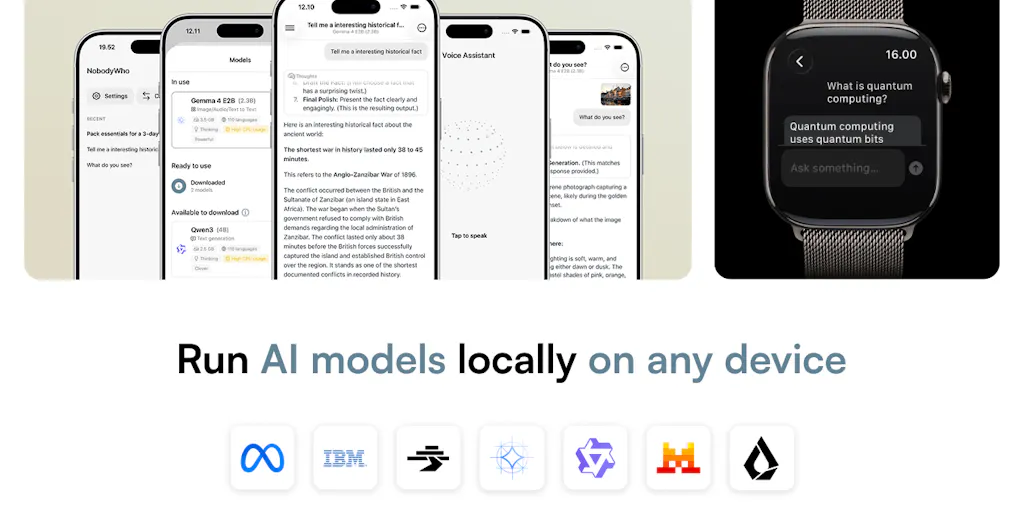
NobodyWho’s pitch is that you don’t need to make that trade-off anymore. The team behind it — led by Pierre, who’s been fielding questions in the launch comments with an impressive level of technical candor — has built an inference engine that runs entirely on-device. The open-source codebase supports models from the Gemma, Qwen, and LFM families, handles multimodal inputs for image and audio analysis, transcribes speech with Whisper models, and generates speech with models like Supertonic, Pocket TTS, and Kokoro. They’ve even built demo apps for iOS, Android, Apple Watch, and Vision Pro.
The “six platforms” claim is the part that caught my attention. Most on-device inference projects — and I’ve tested more than I’d like to admit — stop at one platform. You get a Mac app or an iOS demo, and that’s it. NobodyWho claims support across six platforms and frameworks, including Godot, which is a deeply unusual choice. When a commenter asked about the Godot integration, Pierre confirmed it’s for NPC dialogue in games. That’s a signal that this team isn’t just building for developers — they’re thinking about the full spectrum of use cases, from productivity tools to interactive entertainment.
How This Differs From the Incumbent Stack
The comparison that matters isn’t NobodyWho versus other local inference engines — it’s NobodyWho versus the cloud tools that dominate creator workflows right now. Let me walk through what changes when you move your AI operations on-device.
Privacy and data ownership. This is the headline benefit, and it’s not abstract. When I use Buffer to schedule posts, my content goes through their servers. When I use Canva to generate designs, my assets are processed in the cloud. When I use CapCut for video editing, my footage is uploaded for certain features. None of this is necessarily malicious — it’s just how SaaS works. But for creators who handle sensitive client work, unreleased product footage, or proprietary brand assets, the risk calculus is real. Running models locally means the raw material never leaves your device.
Cost structure. The creator economy runs on subscriptions that quietly compound. A transcription tool here, an image generator there, a writing assistant on top — it adds up fast. The team claims the inference engine is open-source and free, which means the only cost is the hardware you already own. I’ve been testing similar setups on my own machines, and the economics are genuinely compelling once you get past the setup friction.
Latency and reliability. Cloud AI calls have a hidden tax: network requests, queue times, API rate limits. When you’re trying to iterate on a caption or generate variations of a thumbnail, every round-trip to a server interrupts your flow. Local inference is instant — no network dependency, no rate limits, no “service is experiencing high demand” errors. Pierre shared in the comments that he’s getting 27 tokens per second on an iPhone 15 Pro with Granite 4 (1B), which is faster than most people can read. That’s the kind of responsiveness that makes AI feel like a native tool rather than a remote service.
Guaranteed schema-valid output. This is a technical detail that most creators won’t care about directly, but it matters enormously for anyone building automated workflows. The tool-calling feature builds grammar from your function signature, so the model can’t return malformed JSON. In plain English: if you’re building an automation pipeline where AI output feeds into another system — say, generating social posts that get pushed to a scheduling tool — you don’t have to write error-handling code for broken outputs. The model physically can’t produce invalid data. For social media teams running automated content pipelines, this is a genuinely useful feature.
Why TikTok Creators Should Care More Than LinkedIn Ones
The platform you create for should determine how much you invest in local AI. TikTok and Instagram Reels creators are constantly processing raw footage, extracting clips, generating captions, and transcribing audio — all of which involves sending sensitive, unreleased content through third-party services. A leaked draft or a prematurely released clip can kill a carefully planned launch. LinkedIn creators, by contrast, mostly work with text and already-published content, so the privacy calculus is less urgent.
There’s also a creative angle. Local models give you the freedom to experiment without burning API credits. You can generate fifty variations of a hook, test different tones, and iterate until something clicks — all without watching your usage meter climb. For high-volume platforms like TikTok, where the algorithm rewards experimentation and volume, this is a meaningful advantage. The cost of failure drops to zero, which changes how willing you are to take creative risks.
What Creators Can Actually Borrow From This
You don’t need to become a local-inference evangelist to benefit from the thinking behind NobodyWho. Even if you stick with cloud tools, there are principles worth stealing.
Separate your raw material from your finished product. The most important workflow lesson from local AI is that your unreleased content should never touch third-party servers until it’s ready to publish. This isn’t just about privacy — it’s about creative freedom. When you know your drafts are private, you’re more willing to generate messy, experimental work. The best creative work happens when you’re not self-censoring because you’re worried about who might see the intermediate steps.
Build redundancy into your AI stack. The team’s decision to support multiple model families — Gemma, Qwen, LFM — is a lesson in itself. If you’re relying on a single AI provider and their API goes down or their pricing changes, your entire workflow breaks. Smart operators maintain relationships with multiple tools and know how to switch between them. The same logic applies to your scheduling and analytics stack — don’t put all your operational eggs in one basket.
Quantization is your friend. The discussion in the comments about Q4 quantization — where model weights are compressed to 4 bits — is directly relevant to anyone who’s ever run into storage limits. The team’s analysis suggests Q4 is the sweet spot for balancing quality and efficiency. For creators, this translates to a simple rule: you don’t need the biggest, most powerful model for every task. A smaller, faster model that runs locally can handle 90% of your everyday needs — drafting captions, transcribing audio, generating ideas — while you reserve cloud calls for the heavy lifting.
Test the edge cases before you commit. One commenter asked about the latency impact of grammar constraints on smaller models, and Pierre’s answer was refreshingly honest: it has a big impact on small language models. The time-to-first-token on Qwen3 0.6B jumps from 20ms to 240ms with grammar constraints enabled. That’s the kind of transparency you rarely get from product launches, and it’s a reminder that every optimization has a cost. When you’re evaluating any new tool, ask about the edge cases — not just the happy path.
Where My Judgment Says It Falls Short
I’ve been testing local inference tools for months, and I’ve learned to be skeptical of the hype. NobodyWho is genuinely impressive, but it’s not a magic bullet for every creator workflow.
The setup barrier is real. The team has built starter examples and a model selection page to lower the barrier, but “get started in 5 minutes” is a developer’s definition of quick. For a solo creator who’s never touched a terminal, the learning curve is still significant. You need to understand concepts like quantization, model families, and inference speed to make informed choices. That’s a skill gap that most creators aren’t going to cross willingly.
Hardware requirements are non-trivial. Running a 27B model on an iPhone 17 Pro Max is technically possible, but the comment thread reveals the catch: it requires aggressive quantization that degrades quality. One commenter noted that the 1-bit build runs at roughly 90% of full precision, which sounds fine until you’re generating long-form content where errors compound. The honest assessment is that local inference works best for small, focused tasks on devices you already own — and that’s a narrower use case than the marketing suggests.
The context window problem hasn’t been fully solved. The team mentions “preemptive context shifting” to handle long conversations, but the fundamental constraint remains: local models have limited context windows compared to cloud services. For creators who want AI to maintain months of brand history and content performance data, local inference isn’t ready. The comment thread includes a sharp observation from a developer building a consumer app: “the AI features need months of user history in the context window, and on a phone that’s either impossible or unbearably slow.” That’s the honest truth about the current state of the art.
Who is this actually for? The launch comments reveal a pattern: the people most excited about NobodyWho are developers and technical founders, not creators. That’s not a criticism — it’s a positioning observation. The ideal user is someone who’s comfortable with GitHub, understands what an inference engine does, and is building a product that needs on-device AI. For a social media manager who just wants to generate captions faster, the cloud tools are still the better choice. The value proposition of local inference only becomes compelling once you hit a certain scale of content production or privacy sensitivity.
Where the Math Breaks
The token-per-second numbers that get thrown around in these discussions sound impressive, but they’re often misleading. A model that generates 27 tokens per second is genuinely fast — until you’re asking it to generate a 500-word caption, which would take roughly 40 seconds. That’s not terrible, but it’s not instant either. The math gets worse with larger models. The comment thread includes a home server running Qwen3.6 35B, and the developer notes that “everything below Q4 came apart in ways that weren’t worth the memory it saved.” The trade-off between quality and speed is real, and it’s not always in your favor.
The other broken math is the comparison between local and cloud costs. Cloud APIs charge per token, which scales with usage. Local inference has a fixed hardware cost, which amortizes over time. But if you’re only generating a few hundred AI calls per month, the cloud is almost certainly cheaper — you’re not paying for the hardware, the electricity, or the setup time. The economics only flip when you’re generating thousands of calls per month, which is a scale most individual creators never reach.
What I’d Watch and Test Next
If you’re intrigued by the idea of local AI but not ready to dive in, here’s what I’d suggest testing this week.
Try the demo apps first. The team has built actual apps you can download — iOS, Android, Apple Watch, and Vision Pro. Start with the mobile app and see how it feels to run a model entirely on your phone. The experience of having AI work without a network connection is genuinely different from cloud tools — it feels more like a native feature than a remote service.
Run a side-by-side comparison. Pick one task you do regularly — transcribing a podcast episode, generating caption variations, or summarizing a research document — and run it through both your current cloud tool and a local setup. Compare not just the output quality but the entire experience: speed, privacy, cost, and friction. You might find that the cloud tool is still better for your use case, but you’ll learn something about where the trade-offs actually are.
Read the model selection documentation. The team’s model selection page and their quantization analysis are genuinely useful resources, even if you never install the tool. Understanding why Q4 is the sweet spot, how different model families compare, and what quantization does to output quality will make you a smarter consumer of AI tools regardless of where they run.
Watch the GitHub activity. The team is planning a Rust release soon, which suggests active development and a commitment to expanding platform support. If they follow through on their roadmap, the tool will become more accessible to non-developers over time. I’d bet we see more creator-friendly wrappers around local inference engines in the next year — tools that hide the technical complexity and just deliver the privacy and cost benefits.
The bigger trend to watch is the convergence of local AI with existing creator workflows. The team’s support for Godot is a hint at where this is heading: AI that’s embedded in the tools you already use, rather than a separate service you have to call. When your video editor, transcription tool, and caption generator all run locally as native features, the entire economics of content production shift. That’s the future NobodyWho is pointing toward, and even if this specific tool isn’t the one that gets there, the direction is clear.