The Creator’s Second Brain Is a Physical Object Now — And That Changes the Game
Every social media operator I know is running the same silent experiment: how many AI agents can I trust to work in the background before I lose the thread entirely? We’ve got Claude drafting captions while Cursor refactors our landing page and Codex handles the repetitive scripting work. The bottleneck was never the AI’s capability — it was the interface. We were babysitting chat windows like toddlers, refreshing screens, waiting for the moment an agent stalled or hallucinated or needed a human yes/no. The whole workflow demanded your eyes on a screen, which defeats the entire point of delegating work to software in the first place. That’s why the arrival of CTRL Micro, a physical control deck that turns your spare iPhone into a tactile command center for Mac-based AI agents, matters more than its modest Product Hunt launch page suggests. This isn’t a gadget review. This is a signal about where the creator economy’s operational layer is heading — toward haptic feedback, ambient awareness, and the return of physical controls in a software-obsessed industry.
I’ve spent the last year testing every AI scheduling tool, content repurposing pipeline, and automation stack I could get my hands on. The pattern is consistent: the tools are getting smarter, but the human-in-the-loop experience is getting worse. We’re all staring at dashboards waiting for something to happen, refreshing APIs, checking if the agent actually posted the scheduled thread. CTRL Micro attacks that specific pain point, and the implications for anyone running multiple social accounts, managing content calendars, or supervising AI-assisted production workflows are immediate and practical.
The Real Problem: AI Agents Are Terrible Roommates
Let me paint a picture that will feel uncomfortably familiar. Last month, I was running a content operation across five platforms — Instagram, TikTok, YouTube, X, and LinkedIn — with a mix of scheduled posts, AI-drafted captions, and manual interventions. The workflow involved three different AI tools, two scheduling platforms, and a spreadsheet that had become sentient in its complexity. The worst part wasn’t the volume. It was the constant context-switching. I’d be editing a video in CapCut, and my phone would buzz with a notification that Claude needed approval on a caption. I’d switch to the Claude interface, approve, go back to editing, and then Cursor would need input on a script change. Each interruption cost me minutes of creative flow. By the end of the day, I’d spent more time managing the AI tools than actually creating content.
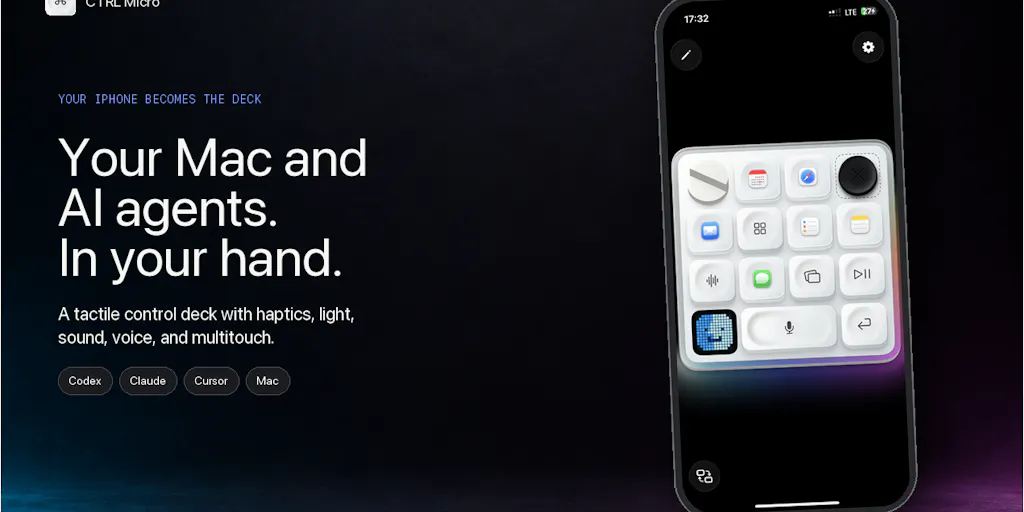
This is the problem CTRL Micro addresses, and it does so with a deceptively simple premise: give the AI agent a physical presence you can feel without looking at a screen. The maker, Andrew Flores, built it because he wanted tactile shortcuts for AI work but found options like Codex Micro out of stock — so he repurposed the iPhone already in his pocket. The result is a companion app that lets you monitor Codex, Claude, and Cursor, feel when a task needs attention, open tasks, read responses, answer prompts, and act on approvals — all through haptic feedback and a Game Boy-style desktop view.
The genius here isn’t the technology. It’s the recognition that the creator economy’s bottleneck has shifted. We’ve solved content generation. We’ve solved scheduling. We’ve even mostly solved repurposing. What we haven’t solved is the human attention problem — how to stay in creative flow while supervising a network of autonomous agents that occasionally need a human touch. CTRL Micro turns your spare phone into a peripheral that extends your nervous system into the AI workflow. That’s not a nice-to-have. That’s the missing piece.
Why Haptics Beat Notifications
The Taptic Engine angle is where this gets interesting. Lisa from Softorino nailed it in the comments — asking whether the haptic pattern differs when an agent finishes versus fails. Flores confirmed yes, and that’s the kind of detail that makes or breaks this category of tool. A notification is something you check. A haptic pattern is something you feel. When I’m editing a video or writing a script, I don’t want to look at my phone every time an agent completes a task. But I do want to know, at a visceral level, when something needs my attention versus when something completed successfully.
Think about what this means for a creator’s daily workflow. You’re filming a TikTok, and your phone buzzes with a distinct pattern meaning “Claude finished drafting the LinkedIn captions.” You keep filming. Later, a different buzz means “Cursor needs approval on a code change.” You decide whether to interrupt your flow. The agent management becomes ambient rather than interruptive. That’s a fundamental shift in how we relate to AI tools — from active supervision to passive awareness with selective intervention.
How CTRL Micro Differs From the Incumbents
The obvious comparison is to the physical control deck category — devices like the Loupedeck, the Stream Deck, or the TourBox that creators use for editing shortcuts. But those are single-purpose devices designed for specific software. CTRL Micro is different because it’s not trying to be a dedicated piece of hardware. It’s using hardware you already own — your iPhone or iPad — to create a control surface for AI agent workflows. That’s a fundamentally different approach.
The closer comparison might be to remote desktop tools like TeamViewer or Splashtop, but those are designed for accessing a computer from afar, not for supervising AI agents. CTRL Micro’s Remote Anywhere feature uses end-to-end encrypted relay for remote connections, which means you can monitor and control your Mac’s AI agents from anywhere. For a creator who travels — or who wants to check on a batch of scheduled posts while waiting in line for coffee — that’s a meaningful capability.
The security architecture is worth noting too. No CTRL Micro account is required. Screen, input, command, and dictation content are processed locally and encrypted. For someone like me who’s paranoid about giving AI tools access to everything, the local processing angle is a trust signal. The nearby connections use Apple Bonjour protocol, which is the same discovery mechanism Apple uses for AirDrop and other local services. That’s a sensible choice for a device that’s meant to live in your pocket and connect to your Mac.
Where the Math Breaks
Let me be honest about the limitations. CTRL Micro is currently an iPhone and iPad app on the App Store, with a Mac Host available from ctrlmicro.com. That means it’s Apple-only. If you’re a creator running a Windows PC or an Android phone, this tool is not for you — at least not yet. The source doesn’t disclose any plans for cross-platform support, so I’m not going to speculate beyond what’s stated.
The pricing model is also worth parsing carefully. Flores says you can “start for free with full Mac controls” and “test the agent management and upgrade only if you need to.” That’s a classic freemium structure, but the source doesn’t disclose what the paid tier costs or what features it unlocks. In my experience with tools like this, the free tier usually covers the basics, and the paid tier adds advanced features like multiple Mac connections, extended remote access, or more sophisticated agent management. But I’m flagging that as my read — the source is silent on specifics.
The other limitation is the agent ecosystem. CTRL Micro currently supports Codex, Claude, and Cursor. Those are three of the most popular AI coding and writing tools, but they’re not the only ones. If you’re using other AI tools — whether it’s Midjourney for image generation or Descript for video editing — you’re out of luck until the maker expands the integration list. The source doesn’t disclose a roadmap for additional integrations, so this is an open question.
What Creators and Social Media Teams Can Borrow From This
Even if you never download CTRL Micro, there are operational lessons here that apply to any creator running a content operation with AI assistance.
First, the concept of ambient monitoring. The best way to manage AI tools isn’t to watch them constantly — it’s to set up systems that only interrupt you when something actually needs your attention. Whether that’s haptic feedback from a phone app, a dedicated notification channel, or a rule that agents only ping you for approvals above a certain threshold, the principle is the same: reduce the cognitive load of supervision.
Second, the value of repurposing existing hardware. You don’t need to buy a dedicated device to improve your workflow. The iPhone in your pocket is already a powerful computer with a screen, a processor, and a haptic engine. The question is whether you’re using it to its full potential. For creators, this might mean setting up your phone as a second screen for monitoring analytics, using it as a remote control for your camera, or — if you’re adventurous — turning it into a control surface for your AI workflow.
Third, the importance of local processing and privacy. When you’re using AI tools for content creation, you’re feeding them your ideas, your drafts, your unfinished thoughts. The more you can keep that processing local, the more control you have over your intellectual property. CTRL Micro’s architecture — processing screen, input, command, and dictation content locally — is a model worth emulating in your own workflow. Be suspicious of tools that require everything to be processed in the cloud.
Why TikTok Creators Should Care More Than LinkedIn Ones
The value proposition of a tool like CTRL Micro varies dramatically by platform. If you’re a LinkedIn creator running a newsletter and posting text-based content, your AI workflow is probably simple: draft, edit, schedule. You don’t need real-time agent supervision because the agents aren’t doing complex, multi-step tasks.
But if you’re a TikTok or Instagram creator, your workflow is completely different. You’re juggling video editing, caption writing, trend monitoring, and posting schedules — often simultaneously. You might have Claude drafting captions while CapCut renders a video while Cursor builds a landing page for your latest product. That’s exactly the kind of multi-agent chaos where a physical control deck shines. The haptic feedback lets you know when each piece is done without breaking your creative flow. For creators who produce daily video content, the ability to supervise multiple AI agents without losing focus is not a luxury — it’s a competitive advantage.
My Judgment: Where CTRL Micro Falls Short
I’ve been testing similar tools for years, and I have a clear picture of where this category struggles. Let me be direct about what concerns me.
First, the reliability question. Any tool that connects your phone to your Mac and allows remote control is only as good as its connection stability. If the Bonjour connection drops mid-task, or the encrypted relay has latency issues, the entire value proposition collapses. The source doesn’t disclose any specifics about connection reliability, uptime, or performance benchmarks. In my experience with remote desktop tools, this is where the rubber meets the road — and where most products in this category fail.
Second, the agent integration depth. Supporting Codex, Claude, and Cursor is a good start, but the real test is how deeply the integrations go. Can you actually approve a Claude task with a single tap, or do you still have to switch to the Claude interface? Can you see the full context of a Cursor task, or just a notification that something needs attention? The source mentions the ability to “open tasks, read responses, answer prompts, and act on approvals,” which sounds promising, but the depth of those interactions is unclear.
Third, the long-term viability. CTRL Micro is a solo developer project — Flores built it because he wanted the functionality himself. That’s admirable, but it’s also a risk. Solo developer tools in the creator economy have a tendency to stall or disappear when the developer moves on to other projects. The source doesn’t disclose anything about the company’s funding, team size, or long-term roadmap. If I’m building my workflow around a tool, I want to know it’ll be around in two years.
There’s also the question of who this is NOT for. If you’re a solo creator who posts once a week and manages your AI tools manually, CTRL Micro is overkill. If you’re on Windows or Android, it’s irrelevant. If you’re not using Codex, Claude, or Cursor, it’s useless. The target audience is specifically creators and operators who have embraced AI agents as part of their workflow and need a better way to supervise them.
The Bigger Picture: Physical Controls in a Software World
There’s something almost retro about the concept of a physical control deck for AI work. We spent years moving everything into software, and now we’re circling back to physical controls — but with a modern twist. The Game Boy-style Desktop View is a deliberate nod to the nostalgia of physical controls, but it’s also a practical choice. A small screen with a D-pad and buttons is perfect for quick interactions: scroll through a task list, select an item, approve or reject. It’s the same reason the Stream Deck became popular — sometimes physical buttons are faster and more reliable than navigating through menus.
For creators, this trend has implications beyond AI supervision. We’re seeing a broader movement toward physical interfaces for creative work — from MIDI controllers for music production to control surfaces for video editing. The lesson is that the best tools meet you where you are, and sometimes that means putting a physical object in your hand rather than another tab in your browser.
The privacy angle is also worth emphasizing. In an era where every tool wants your data, CTRL Micro’s local processing is a differentiator. The fact that no account is required — you can pair your iPhone with your Mac directly — is a refreshing change from the account-required model that dominates the SaaS world. It’s a reminder that not every tool needs to be a platform with a login page and a data harvesting operation.
What I’d Watch / Test Next
If you’re intrigued by the concept but not ready to commit, here’s what I’d suggest testing this week:
Download the free tier and test the haptic feedback. The source says you can start for free with full Mac controls. Set up CTRL Micro on your iPhone and Mac, run a simple Claude task, and pay attention to how the haptics feel. Do you notice the difference between task completion and task failure without looking at the screen? That’s the core value proposition.
Try the remote access with a real workflow. Connect to your Mac from somewhere other than your desk — a coffee shop, a different room, on your commute. Run a batch of AI tasks and see how the remote experience holds up. Is the connection stable? Is the latency acceptable? This is where the tool will either prove its worth or reveal its limitations.
Test the dictation feature for your content workflow. The source mentions you can dictate into desktop apps with transcription processed locally. For creators, this could be a game-changer for capturing ideas on the go. Try dictating a draft caption or a video script into your Mac from your iPhone and see how accurate the transcription is.
Compare it against your current notification setup. For one day, use CTRL Micro as your primary way of monitoring AI agent status instead of checking chat windows. Track how many times you instinctively reached for your phone to check a status versus how many times the haptic feedback gave you the information you needed. The difference will tell you whether this tool solves a real problem or creates a new one.
The creator economy is entering a phase where AI agents are becoming trusted colleagues rather than experimental toys. Tools like CTRL Micro are the first wave of interfaces designed for that new reality. They’re not perfect, and they’re not for everyone — but they’re pointing in a direction that matters. The question isn’t whether physical control surfaces for AI work will become standard. It’s which tools will survive the transition from novelty to necessity. I’d bet on the ones that understand the fundamental truth of creative work: the best tool is the one that gets out of your way and lets you create.