The note-taking tool your content calendar has been missing
Every social media operator I know has the same dirty secret: the strategy doesn’t live in the scheduler. It lives in a graveyard of half-finished notes — a hook you saved from a TikTok at 1am, a comment thread you swore you’d turn into a carousel, a client’s offhand remark that would make a perfect LinkedIn opener. The scheduling tools handle the when. Almost nothing handles the what, and the what is where creators actually lose the game. So when a note-taking app shows up on Product Hunt that claims to fix how ideas connect to each other, I pay attention — not because I need another notes app, but because the connective tissue between “saved” and “published” is the single most broken part of most content operations I’ve audited. That’s the lens I’m reading Understory through.
What Understory actually does — and why “another notes app” is the wrong frame
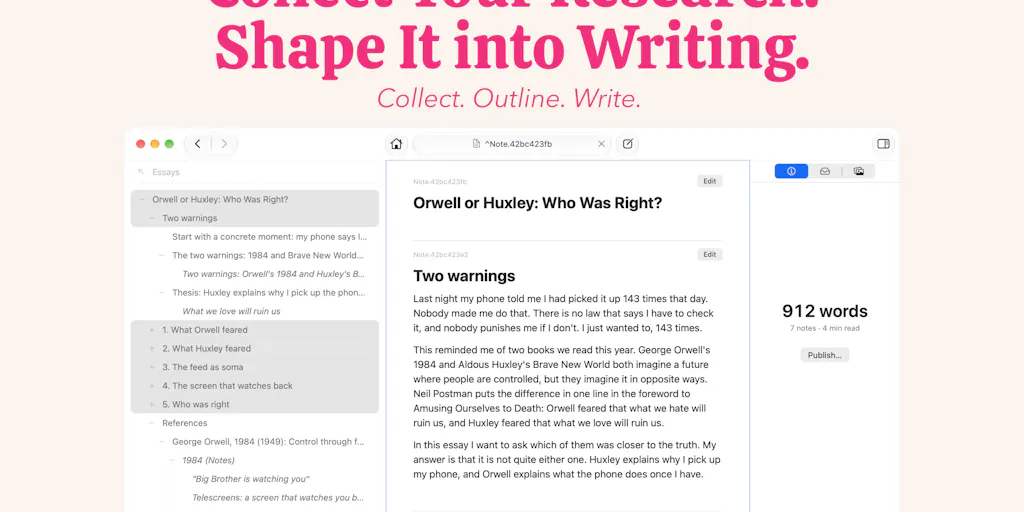
The maker, Allen Ussher, frames the problem precisely in his launch post: networked note apps force you to connect ideas with wiki-style links, and “that gets tedious fast.” His fix is spatial rather than syntactic. You link two notes by placing one beneath the other — the top note becomes a parent, the bottom becomes a subnote, and the whole thing renders as an outline. The twist is that the same note can sit beneath as many parents as you want, which turns the outline into a network that still looks like a tree.
He describes the payoff as “neighborhoods of ideas,” and notes that because a single note can live in several neighborhoods, it behaves “like a portal” — follow it and you cross from one cluster into another. That’s the part that made me stop scrolling. In content terms, it’s the difference between a folder called “Q3 hooks” and a hook that lives simultaneously inside “Q3 hooks,” “client A voice tests,” and “things that flopped.” Same asset, three contexts, no duplication. Ussher says he spent two years and “at least half a dozen UIs” hunting for this, which tracks — most tools solve linking by making you type [[double brackets]] and hope you remember the exact phrasing later.
A few concrete specs from the launch, since they matter for anyone evaluating a tool they’ll live in daily: it’s Mac-only for now, free to try with a one-time purchase (no subscription), requires no account, and stores notes as plain Markdown files. That last point is the one I’d underline in red for any operator who’s ever been burned by a SaaS shutdown.
Why a social media operator should care more than a novelist
If you write long-form fiction, a networked notes app is a nice-to-have. If you run content across Instagram, TikTok, YouTube, X, LinkedIn, Facebook, Threads, and Pinterest — as most of the people reading this do — the same idea needs to exist in five formats and twelve hooks. A single talking point should be able to sit under “Reels script,” “carousel slide 3,” “newsletter section,” and “X thread opener” without you copy-pasting it four times and then forgetting which version is canonical. That multi-parent model is, in my read, the closest thing I’ve seen to how repurposing actually works in practice.
How it stacks up against the incumbents you’re probably already paying for
Let me be blunt about the comparison set, because “notes app” is a crowded shelf and you deserve a straight answer.
Obsidian is the obvious reference point — Ussher’s own framing (“wiki-style links”) is a direct shot at it, and one commenter, Michias Hailu Alemu, said flatly that “wiki links are exactly why I quit Obsidian.” Obsidian’s strength is a massive plugin ecosystem and local Markdown files; its weakness for creators is that linking is manual and the graph view is pretty but rarely actionable. Notion wins on databases and collaboration but locks you into blocks and a cloud account. Roam Research and Logseq pioneered the outliner-plus-backlinks model, but both still lean on typed links and daily-note sprawl. Apple Notes and Bear are fast but flat. None of them make placement itself the linking gesture.
Where Understory diverges is that the structure is the link. You don’t annotate a relationship; you perform it by dragging. That’s a smaller cognitive tax per connection, and over hundreds of notes the tax is the whole game.
The plain-Markdown question, answered
The most useful exchange in the thread came from Alemu, who asked the question every operator should ask: if you open the folder in another editor, does the structure survive? Ussher’s answer: each note has a unique identifier, and the front matter of each Markdown file lists the IDs of its subnotes alongside other metadata. Translation — the hierarchy lives in YAML, not in folder nesting. That’s portable in the sense that your content is never hostage, but the relationships only render as a tree inside Understory. Open the same file in VS Code and you’ll see a list of IDs, not an outline. Whether that’s a dealbreaker depends on how much you value the graph versus the raw text.
My take: for a solo creator, this is fine. For a team where a junior editor needs to open the vault cold, it’s a real friction point.
What creators and social teams can steal from this, even if they never install it
Here’s the part that matters more than the product itself. Two commenters — Stanly Thomas and Christian Mardan — independently raised the same operational gap: source provenance. Thomas described his actual workflow as “collecting notes as you read, then drafting each section with the research next to it,” and asked whether Understory keeps the source attached so a published piece can carry a footnote back to origin. Mardan asked whether a note stays linked to its source when moved into the outline, so you can “jump back to the original while drafting.”
Ussher’s launch post doesn’t explicitly answer either question, and the thread doesn’t show a reply — so on the record, source-provenance behavior is not disclosed. But the questions are the lesson. If you run content at any volume, you need a citation layer. When a stat goes into a carousel, you need to know which study it came from before legal or a client asks. When a hook is lifted from a comment, you need the permalink. Most creators I know keep this in their head until it fails, usually on the one post that goes viral and gets fact-checked in the replies.
The second stealable idea is Ussher’s own framing: “you stop filing and linking and just put ideas where they belong.” That’s a workflow philosophy, not a feature. The reason most content calendars rot is that filing is a separate chore from creating. Any system — even a spreadsheet — that collapses filing into the act of creation will get used more. I’d bet that’s the real reason this launch resonated.
Where the math breaks
Let me flag the limits honestly, because the launch post is promotional and you should read it as such.
It’s Mac-only “for now.” If your team is on Windows or you edit on an iPad in the field, this is a non-starter today. There’s no account system, which is great for privacy and terrible for collaboration — no shared vaults, no comments, no permissions. It’s a one-time purchase, which is refreshing, but it also means no revenue to fund a mobile app or a sync service unless Ussher builds one. And the multi-parent model, as commenter Jaewon Seo noted, “didn’t click til I actually tried it” — he kept expecting a drag to move a note rather than link it. That’s a UX learning curve, and learning curves cost adoption on teams.
None of that is disqualifying. It just means Understory, as launched, is a solo-operator tool, not a content-team platform.
The verdict I’d give a client
If you’re a solo creator or a two-person content shop working primarily on Mac and you’ve outgrown Apple Notes but find Obsidian’s linking ceremony exhausting, this is worth an afternoon. The free trial costs you nothing but time, and the plain-Markdown storage means you can walk away with your content intact if it doesn’t click. If you’re a growth marketer running a five-person team across Windows and Mac with a shared content calendar in Notion or Airtable, this isn’t your tool yet — and Ussher’s own thread doesn’t pretend otherwise.
What I’d watch / test next
Three concrete things to do this week. First, if you’re curious, download the free trial and run one real project through it — not a test vault, an actual client deliverable — so the multi-parent model gets stress-tested against your genuine repurposing load. Second, audit your own system for the provenance gap Thomas and Mardan flagged: pick five published posts and ask whether you could trace any claim back to its source in under a minute. If not, that’s your bottleneck, regardless of what tool you use. Third, watch whether Ussher ships a Windows build, a mobile companion, or any collaboration layer — those three moves determine whether Understory stays a solo tool or becomes something a team can adopt. I’d bet the one-time-purchase model makes the team features slow to arrive, but that’s speculation, not fact. The launch post itself is the only source I’m working from here, and it’s silent on roadmap.