The wallpaper app that says the quiet part out loud about AI content tools
Every social media operator I know is drowning in the same problem, and it has nothing to do with algorithms: the visual layer of their output is the first thing to degrade when volume goes up. You can write a decent caption in ninety seconds. Producing a background, a thumbnail, a story frame, a pinned post asset that doesn’t look like a stock-photo shrug takes an hour you don’t have. So when a small Mac utility shows up on Product Hunt promising generated, gently animated wallpapers for a one-time fee, my instinct as someone who has built and broken content pipelines for a decade is not “cute.” It’s “what does the workflow underneath this teach me about the tools I actually pay for every month?”
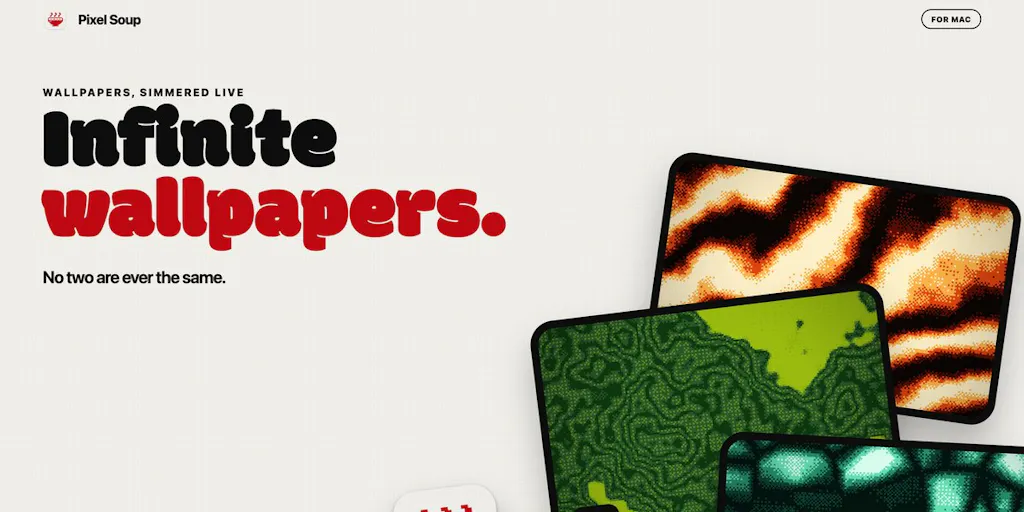
That’s the lens for this piece. Pixel Soup, built by Madhav, is a $4.99 Mac app that generates wallpapers locally and animates them behind your desktop icons. On its face it’s a consumer desktop toy. But the interesting part for creators is the shape of the thing: local generation, one-time pricing, a narrow single-purpose output, and a maker who is openly asking what to build next. That combination is a preview of where a lot of creator tooling is heading, and it’s worth unpacking before you spend another quarter on subscription seats.
What Pixel Soup actually is, and what problem it solves
The maker’s own framing is refreshingly unglamorous: he got bored of his Mac wallpaper, nothing he found felt like his, so he built the thing himself. Pixel Soup makes wallpapers directly on the Mac and keeps them “gently moving behind your icons,” or converts your own photos into dithered versions. Launch-week pricing is $4.99, one payment, no subscription, and the maker explicitly invites feature requests.
That’s the entire pitch. No “AI-powered creative suite,” no “10x your workflow.” Just a small, opinionated tool.
Why a wallpaper app is a creator-economy story
Here’s my take, and I’ll flag it as opinion: the reason this matters to social media operators is that wallpaper generation is a pure stress test of the local-generation model. Wallpapers are large files (a 5K display is roughly 14.7 million pixels), they need to look good at full-bleed scale, and they need to loop or animate without burning battery. If a solo developer can ship that as a one-time $4.99 Mac app, then the economics of “generate a visual asset on your own machine” have quietly crossed a threshold. The same threshold applies to the assets you actually publish: story backgrounds, Reels covers, thumbnail plates, Pinterest pin bases, LinkedIn carousel end-cards.
Most creators I know currently solve this with a stack that looks like Canva for templated layouts, CapCut for motion, and occasionally a generative image tool bolted on. Each of those is a subscription, each has its own export quirks, and none of them were designed to produce a single 16:9 plate that just sits there and looks expensive. That gap — the “I need one beautiful background and I need it now” gap — is real, and it’s the gap Pixel Soup is poking at, even if the maker didn’t frame it that way.
How it differs from the incumbents you’re already paying for
Let me be concrete about the comparison set, because “AI image tool” is a useless category label in 2025.
Against Canva. Canva is a layout engine with a massive asset library and a Magic Studio layer on top. It’s built for teams, brand kits, and collaborative editing. Pixel Soup is the opposite: single output, single device, no collaboration surface, no brand kit. If you need a template your VA can duplicate, Canva wins and it isn’t close. If you need one weird, personal, high-resolution background, Canva’s generative tools will give you something competent and slightly generic, and you’ll spend more time prompting than you wanted.
Against Adobe Firefly and Photoshop’s generative fill. Adobe Firefly is the enterprise-grade option, with commercial indemnification that actually matters if you’re publishing for a brand client. Pixel Soup makes no such claims in the source material — indemnification is not disclosed, and you should treat that as a real gap if you’re producing paid client work. For a personal Mac wallpaper, nobody cares. For a sponsored post background, you should care a lot.
Against Midjourney and the Discord-based generation crowd. Midjourney produces the most aesthetically distinctive output of the bunch, but it’s a subscription, it lives in Discord, and it’s overkill for “I want a dithered gradient behind my dock.”
Against the dithered-art niche specifically. Dithering is a deliberate aesthetic — think early Macintosh, 1-bit punk zine, lo-fi album cover. Pixel Soup’s photo-to-dither feature is a stylistic commitment, not a general-purpose filter. If your brand is clean and corporate, this is not your tool. If your brand is “internet-native and slightly feral,” it might be exactly your tool.
Where the math breaks
Here’s the operational reality check I’d run before getting excited. Suppose you’re paying for Canva Pro, a Midjourney subscription, and a stock asset library. That’s a meaningful monthly line item, and it’s justified by breadth. Pixel Soup is $4.99 once. The math only “breaks” in Pixel Soup’s favor if you actually use it repeatedly — which is the classic problem with cheap single-purpose tools. I’ve bought a dozen $5 Mac utilities that I opened twice. The honest test isn’t the price, it’s whether the tool inserts itself into a workflow you already run. For me, that workflow is “make a thumbnail plate every Tuesday.” If Pixel Soup becomes part of that, it pays for itself in one week. If it becomes a novelty, it’s just another icon in my Applications folder.
What creators and social media teams can borrow from this
Strip away the wallpaper framing and there are three transferable lessons here for anyone running accounts across multiple platforms.
Lesson 1: local generation is a real cost lever, not a gimmick
When you generate on-device, you’re not paying per image, you’re not rate-limited by an API, and you’re not sending client assets to a third party. That last point matters more than people admit. If you’re a social media manager handling unreleased product shots for a brand, “the image never left my laptop” is a sentence your legal team will like. Cloud tools like Buffer and Later are excellent at scheduling and publishing, but they’re not where you’d want confidential creative assets sitting before launch. My take: the smartest creator stacks over the next two years will be hybrid — local generation for anything sensitive or high-volume, cloud for anything collaborative.
Lesson 2: one-time pricing is a positioning weapon
Every scheduling and analytics tool in this space has moved toward subscriptions, and for good reason — servers cost money and features keep shipping. Hootsuite, Metricool, and Sprout Social all run on recurring revenue because they’re running infrastructure. But a local tool has no marginal cost per generation. That means a solo maker can credibly say “one payment, no subscription” in a way a cloud SaaS simply cannot. If you’re an indie founder building a creator tool, this is a strategic fork in the road: cloud features buy you recurring revenue and lock-in; local features buy you a pricing story nobody can copy without rebuilding their architecture.
Lesson 3: the maker is using Product Hunt as a roadmap survey, not a launch
The closing line of the pitch — “What should I add next?” — is the most useful sentence in the whole post. It’s a public, low-cost way to gather demand signal from exactly the people who’d pay. If you’re launching anything into the creator economy, copy this. Don’t guess what to build next; ask in public, on launch day, when attention is highest. The answers you get will be more honest than any survey you’d send to your email list.
Why TikTok creators should care more than LinkedIn ones
This is a platform-fit point, not a product point. TikTok and Instagram Reels are visual-first, trend-velocity-driven surfaces where a distinctive aesthetic is a competitive moat — a dithered, animated, slightly retro look is a recognizable look, and recognizability is how you build a returning audience. LinkedIn rewards text, credentials, and a certain professional polish; a dithered 1-bit gradient behind your headshot would read as a mistake, not a brand. Pinterest is the sleeper here: pin bases are essentially wallpapers, and the platform’s visual search rewards texture and color distinctiveness. If you’re a Pinterest-first creator, a tool that generates unique high-resolution backgrounds is closer to a core workflow than it is for anyone else.
Where my judgment says it falls short
I want to be genuinely balanced here, because the maker is a solo developer and the product is $4.99, and it’s easy to hold small tools to standards that only make sense for venture-backed platforms.
Platform lock-in is total. This is a Mac app. Not disclosed in the source is any Windows, web, or iOS version. If your team is on Windows, or if you edit on an iPad, this is a non-starter. For a solo creator on a MacBook, fine. For a five-person social team with mixed hardware, it’s a toy for one person.
No collaboration, no brand controls. There’s no mention of shared libraries, brand colors, team seats, or approval flows. That’s not a criticism of the product — it’s a clear signal of who it’s not for. If you’re a social media manager at an agency, you need assets that a client can approve and a junior can reproduce. Pixel Soup, as described, gives you neither.
Licensing and commercial-use terms are not disclosed. This is the one I’d actually chase down before using output in client work. When you generate an image with Adobe Firefly, Adobe’s indemnification is a documented selling point. When you generate one with Pixel Soup, the source says nothing about who owns the output or whether commercial use is permitted. The maker may well have generous terms — but “may well” isn’t good enough for a sponsored post. Read the license before you publish.
Animated wallpapers and battery life. “Gently moving behind your icons” sounds lovely until you’re on a MacBook Air at 20% battery in a coffee shop. I haven’t tested this build, so I won’t claim a battery hit — but any continuously animating desktop layer is doing work your GPU wasn’t doing before. If you’re a laptop-based creator who lives on battery, test this before you commit to it as a daily driver.
The “what should I add next” question cuts both ways. It signals a maker who listens, which is great. It also signals a product that isn’t finished. If you’re looking for a mature, feature-complete tool with a roadmap, this isn’t that yet. If you’re looking for something small and cheap that might grow, it is.
Who this is NOT for
Agency social teams. Windows and iPad users. Anyone producing client work who needs documented commercial licensing. Anyone whose brand aesthetic is minimal, corporate, or luxury. And honestly, anyone who already has a background-generation step they’re happy with — the switching cost of adding a new app to your dock is higher than $4.99 suggests.
What I’d watch / test next
Here’s what I’d actually do this week if I were evaluating this the way I evaluate any tool that touches my content pipeline.
First, run the license question down before you use any output commercially. Read the app’s terms, and if commercial use isn’t clearly permitted, keep Pixel Soup for personal desktop use and leave it out of client deliverables. This is the single highest-stakes unknown in the whole pitch.
Second, test it against your real workflow, not a demo. Generate a background, export it, and try to actually use it as a thumbnail plate or a Reels cover. The question isn’t “does it look nice on my desktop” — it’s “does this asset survive being cropped to 9:16 and compressed by Instagram.” Dithered textures can turn to mush under aggressive compression, and that’s a test only you can run for your own platform mix.
Third, watch the maker’s response to the feature-request thread. If animation controls, export presets for common social aspect ratios, or batch generation show up in the next few releases, that’s a signal the tool is growing toward creator workflows rather than staying a personal project. If it stalls, treat it as a $4.99 desktop novelty and move on.
Fourth, audit your own stack for the same pattern. Where are you paying a subscription for something a local tool could do once? Backgrounds, simple crops, file conversion, and basic text overlays are all candidates. The Pixel Soup lesson isn’t “buy this app” — it’s “the single-purpose local tool is back, and it’s cheap.” That’s a good thing for creators, and a real strategic threat to anyone selling a bloated subscription suite.
I’ll be watching whether this stays a wallpaper app or quietly becomes an asset engine. My bet is the maker’s next feature request tells us everything.