The Creator Workflow Is a File Management Problem, and Nobody Wants to Admit It
Here’s the thesis that most social media tooling misses: the bottleneck for a serious creator isn’t the idea, the shooting, or even the algorithm. It’s the sheer, soul-crushing logistics of moving assets between folders, apps, and cloud servers. When I’m scheduling a month of content across five platforms, I spend more time dragging video files from a download folder into a Dropbox folder, then into a Canva brand kit, then into a scheduling tool’s upload queue, than I do actually writing the caption. The creator economy runs on a foundation of glorified file management, and for the most part, we’re doing it with tools that were designed in 2001.
This is why I find the launch of VeloFiler so interesting, even though it’s a macOS file manager and not a social media SaaS. It’s a native, keyboard-first, dual-pane file manager built in Rust on the GPUI framework, and it landed on the Mac App Store today. On the surface, it’s a niche utility for keyboard addicts. But underneath, it’s a case study in how the tools we use to organize our digital lives are becoming the next battleground for creator efficiency. If you’re a solo founder or a social media manager juggling raw footage, b-roll, client assets, and export files, the speed of your file system is the speed of your content pipeline. Let’s dig into why this matters, where it fits in the ecosystem, and what we can actually steal from it.
The Real Problem: Context Switching Is Eating Your Content Calendar
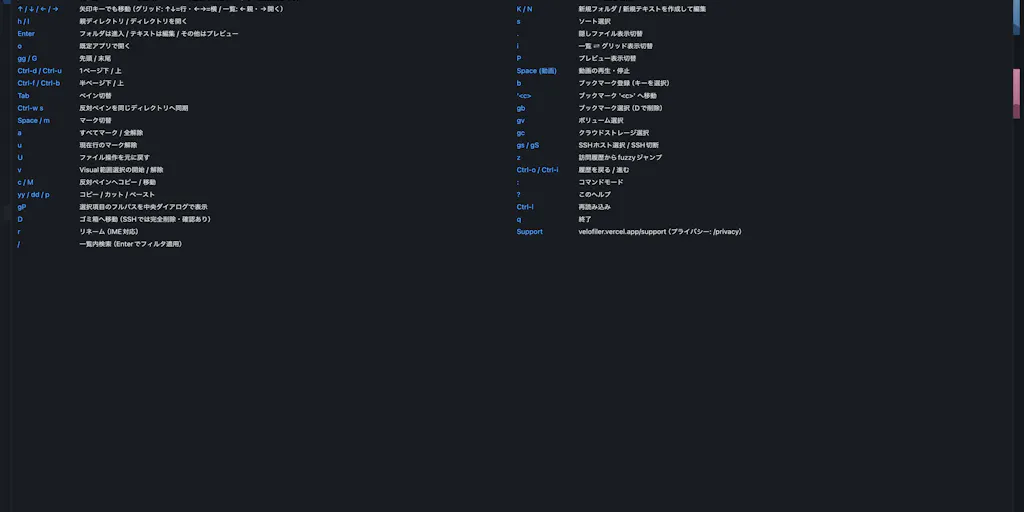
The product pitch from maker Kazuhiro Kotsutsumi is straightforward: he loves the speed of classic two-pane file managers but wanted one that feels native to modern macOS. He built it to launch instantly and stay smooth regardless of folder size, with Vim-style keys, instant previews for images, code, Markdown, PDF, video, and Office documents, and built-in SSH/SFTP so remote servers show up as regular panes.
That’s the feature list. But the problem it solves for a creator isn’t just “I want to move files faster.” It’s the death by a thousand cuts that happens when you’re in a creative flow. Last month, I was editing a YouTube video while simultaneously pulling stills for an Instagram carousel and clipping audio for a LinkedIn podcast teaser. My workflow was a mess of alt-tabbing between Finder, a browser tab for Google Drive, and a desktop app for Dropbox. Every time I had to locate a file, I lost the thread of what I was doing. The cognitive cost of switching from “creative mode” to “file retrieval mode” is huge. It’s that friction that makes you feel like you worked for eight hours but only produced two pieces of content.
VeloFiler’s approach—keyboard-first, instant preview, and remote servers as local folders—directly attacks that friction. If I can preview a video file without opening QuickTime, or check a PDF without launching Acrobat, I’m saving 10-15 seconds per file. That doesn’t sound like much, but when you’re sorting through 200 raw clips for a vlog, that’s 50 minutes of my life back. The SSH/SFTP integration is the sleeper hit here. For creators who work with editors or virtual assistants, mounting a remote server as a local pane means you’re not downloading and re-uploading files through a clunky web interface. You’re just dragging and dropping, which is how a file system should work. This is the kind of operational efficiency that good tooling should provide, and it’s rare to see it done with this level of native polish.
How It Differs from the Incumbents (and Why That Matters)
When I talk about file management, the usual suspects are Finder, Windows Explorer, or cloud sync apps like Dropbox and Google Drive. For power users, there’s also the legacy of Forklift and Transmit, which have been the go-to for dual-pane and SFTP on Mac for years. The maker even acknowledges this in the comments, where a user mentions jumping between Finder and Transmit for the same task is the exact friction he’s describing.
So how is VeloFiler different? The core differentiator is the tech stack. It’s built in Rust on GPUI, the same UI framework behind the Zed editor. This is a bold choice. Most Mac apps are built with Swift/SwiftUI or Electron (a web view). Electron apps are notorious for being memory hogs and feeling sluggish. VeloFiler’s pitch is “no Electron, no web view—pure Rust,” which should translate to a snappier, more responsive experience. In my experience testing similar tools, the “native vs. Electron” debate is real. When I’m trying to scrub through a large video file, a laggy interface makes me want to throw my MacBook out the window. A tool that launches instantly and handles large folders without stuttering is a massive quality-of-life upgrade.
Compared to Forklift, which has been around for ages and has a more established feature set, VeloFiler is betting on speed and modern architecture. Forklift is powerful but can feel a bit dated. VeloFiler is trying to be the modern, minimalist take on the genre. It’s also worth noting the Mac App Store angle. As Lisa points out in the comments, getting a file manager through Apple’s sandbox requirements is a pain. The maker confirmed they use security-scoped bookmarks to avoid prompting for every folder, which is a smart workaround. This is a meaningful difference from direct-download tools like Transmit, which have free rein over the file system but lack the trusted install and auto-update benefits of the App Store. For a creator who isn’t technical, a trusted native install from the App Store is a huge plus.
What Creators and Social Media Teams Can Borrow from This
This isn’t just a review of a niche Mac app; it’s a lesson in workflow design. Here’s what I think social media teams and indie founders should steal from VeloFiler’s philosophy, regardless of the OS you’re on.
The “Keyboard-First” Mindset
The most underrated feature for a content creator is the ability to keep your hands on the keyboard. Vim-style keys for moving, marking, and copying files might sound intimidating, but the underlying principle is speed. When I’m editing a video in CapCut or Premiere, I use keyboard shortcuts for everything. The second I have to touch the mouse to find a file, I’ve broken my flow. This is why I’m a huge proponent of learning keyboard shortcuts in your scheduling tools too. For example, in Buffer or Hootsuite, setting up custom keyboard shortcuts for “add to queue” or “switch account” saves me hours a month. The principle is the same: reduce the distance between your intention and the action. VeloFiler applies that to the file system, which is the one place most of us still use a mouse out of habit.
The “Instant Preview” Sidebar
The ability to preview files without opening another app is a game-changer for content repurposing. Think about the workflow of turning a long YouTube video into short-form clips. You have to scrub through the video to find the good moments. If your file manager can show you a video preview and let you scrub through it right in the pane, you can quickly identify the timestamps you need without the overhead of a full video editor. This is the same logic behind why Canva has become so popular—it removes the friction of opening a professional design tool just to crop an image. VeloFiler’s instant preview for images, code, Markdown, PDF, and video is a direct answer to that need. For a social media operator, this means you can quickly verify that a client’s logo looks right on a transparent background or check that a PDF of a press release is the correct version before you upload it to a scheduler.
The “Remote as Local” Philosophy
This is the one I’m most excited about. If you’re a solo creator or a small team, you likely have a cloud storage setup (Dropbox, Google Drive, or a NAS) or you work with a remote editor. The traditional workflow is to download a file, edit it, and upload it back. That’s a lot of manual syncing. VeloFiler’s SSH/SFTP support treats remote servers as regular panes, so you can drag and drop files directly to a server as if it were a local folder. For me, this would be a huge win when I’m working with a video editor who needs access to raw footage. Instead of uploading through a web browser, which is slow and clunky, I could just drag the file into the remote pane. The maker’s approach to security here is also worth noting. In the comments, he states that VeloFiler doesn’t store SSH passwords or private keys; it uses your OpenSSH configuration with SSH-agent or key-based authentication. This is a trust signal. As a creator, I don’t want my credentials sitting in a third-party database. This “your keys stay on your Mac” approach is the right way to handle security.
Where the Math Breaks: Limitations and Open Questions
Now, let’s be real. This is a Product Hunt launch, and the enthusiasm is high. But as an operator, I have to look at the limitations before I switch my entire workflow.
The macOS and App Store Constraint
The most obvious limitation is that this is a Mac-only app. If you’re a creator on Windows or Chrome OS, this is a non-starter. The broader creator economy is heavily Mac-based, but not entirely. Also, the Mac App Store sandbox is a real constraint. While the maker found a workaround with security-scoped bookmarks, it’s worth asking: what happens with files that are outside the user-selected folders? Does it prompt every time? The user Gal Dayan asked a similar question about SSH credentials and the sandbox, and the maker’s answer about using OpenSSH config is good, but it implies a certain level of technical proficiency. If you’re not comfortable with SSH keys, the built-in SFTP feature might be a hurdle. The app might be “native,” but it assumes a user who understands the underlying system. That’s a smaller market than the general “creator” demographic.
The “Power User” Trap
I’ve been burned by tools that promise Vim-style efficiency only to find they require a steep learning curve. The maker’s target audience is “keyboard addicts,” which is a niche within a niche. For a social media manager who is more comfortable with a mouse, the learning curve might be too steep. The dual-pane layout is also a specific paradigm. It’s great for moving files, but if you just want to quickly look at a file, it can feel overwhelming. This is a tool for people who organize files for a living, not for someone who just wants to post a photo. In my experience, tools like Notion or Airtable have become the default for content calendars because they are visual and forgiving. VeloFiler is the opposite—it’s precise and demanding. That’s not a bug, but it’s a filter.
The “Does It Replace My Stack?” Question
I don’t think VeloFiler is a replacement for Dropbox or Google Drive. Those are sync services, not just file managers. VeloFiler is a front-end for your local and remote file systems. It doesn’t solve the problem of collaboration or version history. If you need to share a folder with a client or a remote team member, you still need a cloud sync service. What VeloFiler does is make the local experience of managing those synced folders faster. It’s a complement, not a replacement. The maker doesn’t claim otherwise, but it’s a distinction worth making. The hype on Product Hunt can often blur the lines between a utility and a platform. This is a utility. A great one, potentially, but a utility nonetheless.
Why TikTok Creators Should Care More Than LinkedIn Ones
Let’s talk about the use case. If you’re a LinkedIn text-based creator, your “assets” are mostly text and a few images. You can probably get away with a messy file system. But if you’re a TikTok or Instagram Reels creator, you are drowning in video files. High-resolution video files are huge, and managing them is a nightmare. You have raw footage, audio files, export files, and final versions. The ability to quickly preview and move these files without opening a video editor is a massive time-saver. This is where VeloFiler’s instant preview and speed become a killer feature. The faster you can sort through raw footage, the faster you can edit and post. For a text-based creator, the value proposition is much weaker. This is a tool for the video-heavy, asset-heavy side of the creator economy.
What I’d Watch / Test Next
So, is this worth your time? If you’re a Mac user who feels the pain of a sluggish Finder, I’d say yes. But don’t just take my word for it. Here are the concrete steps I’d take if I were evaluating this for my own workflow this week:
Test the preview speed on your heaviest files. Download VeloFiler and point it at your largest video folder. See how fast it scrolls and how quickly it renders the video preview. If it feels instant, that’s a huge win. If it stutters, then the “native performance” claim is just marketing. This is the single most important test for a video creator.
Set up an SFTP connection to your editor’s server. If you work with a remote editor or have a NAS, try mounting it as a remote pane. The goal is to see if you can drag and drop a large file to the server without a browser upload. If it works seamlessly, it will change your collaboration workflow. If the setup is too technical, it might not be worth the hassle.
Map your current file organization to the dual-pane layout. For a week, try using it as your primary file manager. The dual-pane layout is designed for moving files between two locations. If you’re constantly moving files from a “raw” folder to an “edited” folder, this is perfect. If your workflow is more about just browsing, the layout might feel restrictive.
Check for the “App Store” trust factor. I appreciate the decision to go through the Mac App Store. It’s a signal of trust and a commitment to a native install. But it also means updates might be slower to roll out. Watch how the developer handles feedback in the Product Hunt comments. The maker’s responses are detailed and technical, which is a good sign for long-term support.
My bet is that this doesn’t replace your cloud sync or your scheduling tool, but it could become the missing layer of speed that makes the rest of your stack feel less clunky. The creator economy is obsessed with the front-end—the content, the algorithm, the engagement—but the back-end is where the real efficiency gains are hiding. Tools like VeloFiler are a reminder that sometimes the biggest upgrade to your content pipeline isn’t a new AI editor, but a better way to manage the raw material. I’m going to give it a spin, and I’d recommend you do the same.