The multi-agent creator stack is coming for your content workflow — and nobody’s ready for the tab chaos
If you run social for a living, you already live inside a dozen browser tabs. Instagram Reels drafts in one, TikTok caption variations in another, a CapCut export rendering in a third, a Metricool queue open in a fourth, and — increasingly — an AI writing assistant in a fifth. The next twelve months will add something messier: multiple terminal agents running in parallel, each one drafting, repurposing, and scheduling content on your behalf. The launch of Clippo by Thiago Grião is a small but revealing signal about that future. It’s a Windows-native orchestrator for running several CLI coding agents side by side on a single visual canvas, and while it isn’t built for social media managers, the problem it’s solving — how do you keep three or four autonomous agents from stepping on each other — is exactly the problem creators are about to inherit.
What Clippo actually is, and why a creator should care
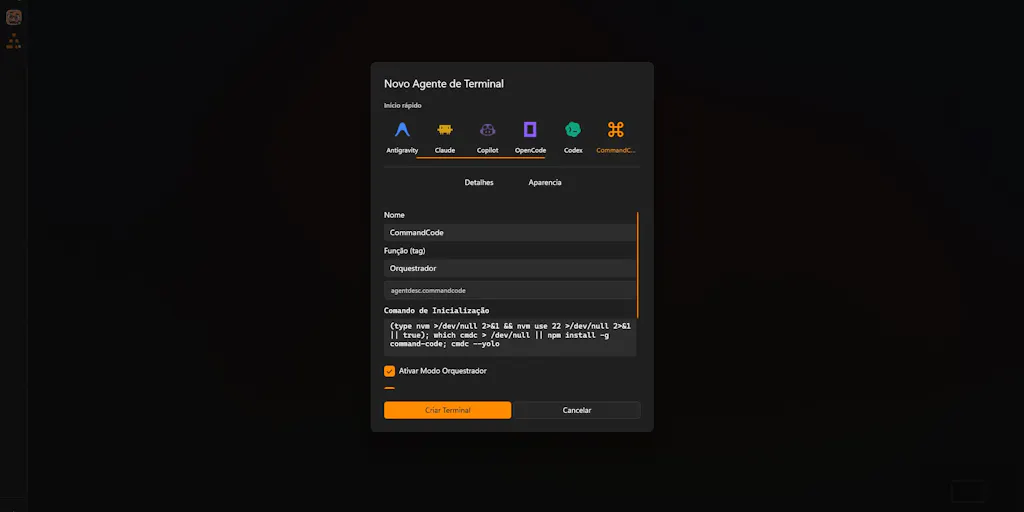
Clippo is a desktop app, distributed through the Microsoft Store, that gives you a wide visual canvas where you can spread out multiple terminal sessions, pin project notes next to them, and draw a line from a note directly into a terminal to hand off an instruction. The maker’s framing is honest about the pain: running one terminal agent is fine, but running three or four — Claude Code, OpenCode, Codex, and CommandCode are the ones named — “turns into chaos within minutes.” You end up spending more energy switching tabs and re-explaining context than solving problems, because the agents don’t talk to each other and keep forgetting the guidelines.
The two features that matter most aren’t the canvas. They’re the handoff mechanic — drag a line from a note to a terminal — and an on-device local memory layer that preserves context between tasks to save tokens, with no logins and no cloud dependency. The free tier ships with a full workspace, so you can evaluate it without a card. Pricing beyond free is not disclosed in the launch post.
Why this is a creator-economy story, not a dev-tools story
I know how this reads: a terminal orchestrator is a developer tool, and social media managers don’t run Claude Code. Fair. But the workflow pattern Clippo is addressing — multiple AI agents, each with a narrow job, sharing context across a project — is already migrating into content operations. If you’ve used ChatGPT to draft a carousel, Claude to rewrite it for LinkedIn, and a third tool to generate the hook variations, you’ve been a manual orchestrator. The next wave of creator tooling collapses that into parallel agents. When that happens, the failure mode is identical to what Clippo describes: context loss, duplicated work, and a tax on your attention every time you switch windows.
So the interesting question isn’t “should a social media manager install Clippo.” It’s “what does Clippo’s design tell us about the orchestration layer creators will need.”
How it differs from the scheduling incumbents you already pay for
The obvious comparison set for a social media operator is Buffer, Hootsuite, Later, and Metricool. Those tools solve a distribution problem: queue a post, hit multiple platforms, pull analytics back into one dashboard. Clippo solves an execution problem: keep several autonomous workers from colliding while they do the work that produces the post in the first place.
That distinction matters because the two layers are converging. Buffer and Hootsuite have been bolting AI into the caption-writing step for two years. Canva owns the design step. CapCut owns the edit. What none of them own cleanly is the orchestration step — the place where a research agent, a copy agent, a repurposing agent, and a scheduling agent hand work to each other without you copy-pasting context between them. Clippo is a primitive version of that layer, aimed at code. My take: within eighteen months, someone ships the creator-facing version, and it will look a lot like a visual canvas with drag-to-handoff.
Where the math breaks
The token-savings claim deserves scrutiny. The maker says local memory “handles keeping context between tasks to save tokens.” That’s plausible — re-sending the same project brief to four agents on every turn is genuinely wasteful — but it’s also the kind of claim that only holds if the memory layer is good enough that you don’t re-explain anyway. In my experience testing similar local-context tools, the savings are real on long sessions and negligible on short ones. If your typical agent task is “rewrite this caption five ways,” you won’t notice. If it’s “audit three months of posts, extract the top-performing hooks, and generate a repurposing plan,” you will.
What creators and social teams can borrow from Clippo’s design
Even if you never open a terminal, three design decisions in Clippo are worth stealing for your own content workflow.
1. Spatial context beats tab context. The canvas metaphor works because it makes the relationship between a note and a worker visible. Most social teams do the opposite: they keep strategy in Notion, drafts in Google Docs, assets in Drive, and the actual post in a scheduler. The context is scattered across four apps, and every handoff is a manual re-explanation. A shared canvas — even a physical whiteboard, even a Figma board — where the brief sits next to the draft next to the asset next to the schedule is a cheap upgrade.
2. Explicit handoffs reduce drift. Dragging a line from a note to a terminal is a deliberate act. You’re saying “this instruction goes to this worker.” Compare that to the typical AI-content workflow, where you paste a prompt, get output, and have no record of which instruction produced which draft. If you’re running any AI-assisted content at volume, log your handoffs. A simple spreadsheet column — “brief ID → agent → output → published?” — will save you hours when something underperforms and you need to trace why.
3. Local-first is a feature, not a limitation. Clippo runs on-device with no logins and no cloud dependency. For a creator handling client work under NDA, or just someone who doesn’t want their brand strategy sitting in a third-party vector database, that’s a meaningful posture. It’s also a constraint: no cloud means no cross-device sync, no team collaboration, no mobile. Which brings us to the honest part.
Why TikTok creators should care more than LinkedIn ones
Volume and iteration speed. A LinkedIn thought-leader posts three times a week; a TikTok operator might ship three times a day and needs to test hooks, sounds, and formats constantly. The higher your iteration rate, the more you benefit from parallel agents that can draft, variant, and schedule without you as the bottleneck. If your content cadence is low, orchestration tooling is overkill — you’ll spend more time managing the agents than doing the work. If your cadence is high, the tab-switching tax compounds fast, and something like Clippo’s canvas starts to look less like a dev toy and more like a preview of your future operating system.
Where my judgment says it falls short
Three honest limitations, none of which are fatal but all of which matter if you’re evaluating this as a creator.
It’s Windows-only. The Microsoft Store distribution means Mac and Linux creators — which is a large share of the design and video-editing crowd — are out. The maker is explicit that this was built “to fix this headache on Windows,” so it’s a deliberate scope choice, not an oversight. But it caps the addressable audience hard.
It’s not built for you. Clippo orchestrates coding agents. There’s no Instagram integration, no TikTok API, no scheduling, no analytics. If you install it expecting a content tool, you’ll be disappointed. The value is conceptual — it shows you what agent orchestration looks like — not operational.
The memory layer is unproven at scale. Local context that works across two or three short tasks is a different beast from context that holds across a month-long campaign with dozens of assets. The maker doesn’t disclose benchmarks, token-savings figures, or memory limits, so treat the “save tokens” claim as directional until you’ve stress-tested it yourself. I’d bet it’s genuinely useful for developers running long coding sessions and mostly irrelevant for anyone whose tasks are short and independent.
No team features, no sync, no mobile. For a solo creator, fine. For a social team of five, this is a non-starter as a shared workspace — which is exactly where the orchestration problem gets worst.
What I’d watch / test next
Three concrete things to do this week, whether or not you touch Clippo.
First, audit your own handoff tax. For one day, count every time you copy context from one tool to another — brief to draft, draft to scheduler, scheduler to analytics. That number is your baseline. If it’s high, you have an orchestration problem regardless of what tooling you adopt.
Second, install Clippo on a Windows machine and run two agents on a real task, even a trivial one. Watch how the canvas changes your mental model of parallel work. The point isn’t to use it for social — it’s to feel what orchestration-first tooling is like before the creator-facing version arrives. The free tier makes this a zero-cost experiment.
Third, pressure-test your AI content stack for context loss. Pick your most-repeated prompt — the one you paste into ChatGPT or Claude every week — and ask whether a shared memory layer would actually save you time, or whether you’d just be re-explaining anyway. That answer tells you whether you’re a candidate for the orchestration wave or whether your current Buffer-plus-Canva stack is genuinely enough.
The creator tools that win the next two years won’t be the ones with the best single feature. They’ll be the ones that let you run five things at once without losing the thread. Clippo is a rough, Windows-only, developer-shaped sketch of that future. But it’s a sketch worth studying, because the polished version is coming for your workflow whether you’re ready or not.